Prestashop: Gmail SMTP not working
Describe the bug
While i am trying to use google's SMTP server for mails in my ps i cant get it to work. Note that i have tried and succeed in using pure PHPMailer gmail.phps function.
To Reproduce
Steps to reproduce the behavior:
- Go to 'Advanced Parameters -> Email'
- Click on 'Set my own SMTP parameters (for advanced users ONLY)'
- Scroll down to 'Adjust Email'
- Configure smtp using gmail's server.
- Scroll down to 'Test your email configuration'
- Error as folows:
Error: Please check your configuration
Connection could not be established with host smtp.gmail.com [Connection timed out #110]
NOTE: password is set but not shown in the screenshots
Screenshots


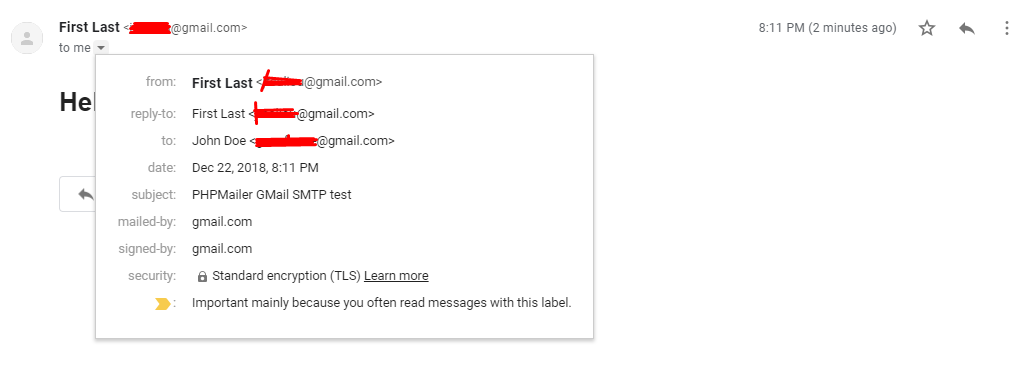
PHPMailer code used to sent test email to evaluate if its the server or the firewall blocking the connection. The email was successfully sent.
<?php

//Display errors if any

/**
 * This example shows making an SMTP connection with authentication.
 */
//Import the PHPMailer class into the global namespace
use PHPMailer\PHPMailer\PHPMailer;
//SMTP needs accurate times, and the PHP time zone MUST be set
//This should be done in your php.ini, but this is how to do it if you don't have access to that
date_default_timezone_set('Etc/UTC');

require 'PHPMailer-6.0.6/src/PHPMailer.php';
require 'PHPMailer-6.0.6/src/SMTP.php';
require 'PHPMailer-6.0.6/src/Exception.php';

//Create a new PHPMailer instance
$mail = new PHPMailer;
//Tell PHPMailer to use SMTP
$mail->isSMTP();
//Enable SMTP debugging
// 0 = off (for production use)
// 1 = client messages
// 2 = client and server messages
$mail->SMTPDebug = 2;
//Set the hostname of the mail server
$mail->Host = 'smtp.gmail.com';
// use
// $mail->Host = gethostbyname('smtp.gmail.com');
// if your network does not support SMTP over IPv6
//Set the SMTP port number - 587 for authenticated TLS, a.k.a. RFC4409 SMTP submission
$mail->Port = 587;
//Set the encryption system to use - ssl (deprecated) or tls
$mail->SMTPSecure = 'tls';
//Whether to use SMTP authentication
$mail->SMTPAuth = true;
//Username to use for SMTP authentication - use full email address for gmail
$mail->Username = "[email protected]"; // censored
//Password to use for SMTP authentication
$mail->Password = "xxxxxxx"; // censored
//Set who the message is to be sent from
$mail->setFrom('[email protected]', 'First Last'); // censored
//Set an alternative reply-to address
$mail->addReplyTo([email protected]', 'First Last'); // censored
//Set who the message is to be sent to
$mail->addAddress([email protected]', 'John Doe'); // censored
//Set the subject line
$mail->Subject = 'PHPMailer GMail SMTP test';
//Read an HTML message body from an external file, convert referenced images to embedded,
//convert HTML into a basic plain-text alternative body
$mail->msgHTML(file_get_contents('contents.html'), __DIR__);
//Replace the plain text body with one created manually
$mail->AltBody = 'This is a plain-text message body';
//send the message, check for errors
if (!$mail->send()) {
    echo "Mailer Error: " . $mail->ErrorInfo;
} else {
    echo "Message sent!";
    //Section 2: IMAP
    //Uncomment these to save your message in the 'Sent Mail' folder.
    #if (save_mail($mail)) {
    #    echo "Message saved!";
    #}
}
//Section 2: IMAP
//IMAP commands requires the PHP IMAP Extension, found at: https://php.net/manual/en/imap.setup.php
//Function to call which uses the PHP imap_*() functions to save messages: https://php.net/manual/en/book.imap.php
//You can use imap_getmailboxes($imapStream, '/imap/ssl') to get a list of available folders or labels, this can
//be useful if you are trying to get this working on a non-Gmail IMAP server.
function save_mail($mail)
{
    //You can change 'Sent Mail' to any other folder or tag
    $path = "{imap.gmail.com:993/imap/ssl}[Gmail]/Sent Mail";
    //Tell your server to open an IMAP connection using the same username and password as you used for SMTP
    $imapStream = imap_open($path, $mail->Username, $mail->Password);
    $result = imap_append($imapStream, $path, $mail->getSentMIMEMessage());
    imap_close($imapStream);
    return $result;
}
?>
The response form the above php code
Available2018-12-22 16:25:34 SERVER -> CLIENT: 220 smtp.gmail.com ESMTP k135sm23300075wmd.42 - gsmtp
2018-12-22 16:25:34 CLIENT -> SERVER: EHLO xxxxxxxx (CENSORED)
2018-12-22 16:25:34 SERVER -> CLIENT: 250-smtp.gmail.com at your service, [188.166.153.38]250-SIZE 35882577250-8BITMIME250-STARTTLS250-ENHANCEDSTATUSCODES250-PIPELINING250-CHUNKING250 SMTPUTF8
2018-12-22 16:25:34 CLIENT -> SERVER: STARTTLS
2018-12-22 16:25:34 SERVER -> CLIENT: 220 2.0.0 Ready to start TLS
2018-12-22 16:25:34 CLIENT -> SERVER: EHLO xxxxxxxx (CENSORED)
2018-12-22 16:25:34 SERVER -> CLIENT: 250-smtp.gmail.com at your service, [188.166.153.38]250-SIZE 35882577250-8BITMIME250-AUTH LOGIN PLAIN XOAUTH2 PLAIN-CLIENTTOKEN OAUTHBEARER XOAUTH250-ENHANCEDSTATUSCODES250-PIPELINING250-CHUNKING250 SMTPUTF8
2018-12-22 16:25:34 CLIENT -> SERVER: AUTH LOGIN
2018-12-22 16:25:34 SERVER -> CLIENT: 334 VXNlcm5hbWU6
2018-12-22 16:25:34 CLIENT -> SERVER: <credentials hidden>
2018-12-22 16:25:34 SERVER -> CLIENT: 334 UGFzc3dvcmQ6
2018-12-22 16:25:34 CLIENT -> SERVER: <credentials hidden>
2018-12-22 16:25:34 SERVER -> CLIENT: 235 2.7.0 Accepted
2018-12-22 16:25:34 CLIENT -> SERVER: MAIL FROM:<[email protected]> (CENSORED)
2018-12-22 16:25:34 SERVER -> CLIENT: 250 2.1.0 OK k135sm23300075wmd.42 - gsmtp
2018-12-22 16:25:34 CLIENT -> SERVER: RCPT TO:<[email protected]> (CENSORED)
2018-12-22 16:25:34 SERVER -> CLIENT: 250 2.1.5 OK k135sm23300075wmd.42 - gsmtp
2018-12-22 16:25:34 CLIENT -> SERVER: DATA
2018-12-22 16:25:34 SERVER -> CLIENT: 354 Go ahead k135sm23300075wmd.42 - gsmtp
2018-12-22 16:25:34 CLIENT -> SERVER: Date: Sat, 22 Dec 2018 16:23:26 +0000
2018-12-22 16:25:34 CLIENT -> SERVER: To: John Doe <[email protected]> (CENSORED)
2018-12-22 16:25:34 CLIENT -> SERVER: From: First Last <[email protected]> (CENSORED)
2018-12-22 16:25:34 CLIENT -> SERVER: Reply-To: First Last <[email protected]> (CENSORED)
2018-12-22 16:25:34 CLIENT -> SERVER: Subject: PHPMailer GMail SMTP test
2018-12-22 16:25:34 CLIENT -> SERVER: Message-ID: <0jK1K2znnSqDrxGMhR1i6V7OmsrGPV2x7k1uHEDeY@xxxxxx> (CENSORED)
2018-12-22 16:25:34 CLIENT -> SERVER: X-Mailer: PHPMailer 6.0.6 (https://github.com/PHPMailer/PHPMailer)
2018-12-22 16:25:34 CLIENT -> SERVER: MIME-Version: 1.0
2018-12-22 16:25:34 CLIENT -> SERVER: Content-Type: multipart/alternative;
2018-12-22 16:25:34 CLIENT -> SERVER: boundary="b1_0jK1K2znnSqDrxGMhR1i6V7OmsrGPV2x7k1uHEDeY"
2018-12-22 16:25:34 CLIENT -> SERVER: Content-Transfer-Encoding: 8bit
2018-12-22 16:25:34 CLIENT -> SERVER:
2018-12-22 16:25:34 CLIENT -> SERVER: This is a multi-part message in MIME format.
2018-12-22 16:25:34 CLIENT -> SERVER: --b1_0jK1K2znnSqDrxGMhR1i6V7OmsrGPV2x7k1uHEDeY
2018-12-22 16:25:34 CLIENT -> SERVER: Content-Type: text/plain; charset=us-ascii
2018-12-22 16:25:34 CLIENT -> SERVER:
2018-12-22 16:25:34 CLIENT -> SERVER: This is a plain-text message body
2018-12-22 16:25:34 CLIENT -> SERVER:
2018-12-22 16:25:34 CLIENT -> SERVER: --b1_0jK1K2znnSqDrxGMhR1i6V7OmsrGPV2x7k1uHEDeY
2018-12-22 16:25:34 CLIENT -> SERVER: Content-Type: text/html; charset=us-ascii
2018-12-22 16:25:34 CLIENT -> SERVER:
2018-12-22 16:25:34 CLIENT -> SERVER: <!doctype html>
2018-12-22 16:25:34 CLIENT -> SERVER: <html lang="en">
2018-12-22 16:25:34 CLIENT -> SERVER: <head>
2018-12-22 16:25:34 CLIENT -> SERVER: <!-- Required meta tags -->
2018-12-22 16:25:34 CLIENT -> SERVER: <meta charset="utf-8">
2018-12-22 16:25:34 CLIENT -> SERVER: <meta name="viewport" content="width=device-width, initial-scale=1, shrink-to-fit=no">
2018-12-22 16:25:34 CLIENT -> SERVER:
2018-12-22 16:25:34 CLIENT -> SERVER: <!-- Bootstrap CSS -->
2018-12-22 16:25:34 CLIENT -> SERVER: <link rel="stylesheet" href="https://stackpath.bootstrapcdn.com/bootstrap/4.2.1/css/bootstrap.min.css" integrity="sha384-GJzZqFGwb1QTTN6wy59ffF1BuGJpLSa9DkKMp0DgiMDm4iYMj70gZWKYbI706tWS" crossorigin="anonymous">
2018-12-22 16:25:34 CLIENT -> SERVER:
2018-12-22 16:25:34 CLIENT -> SERVER: <title>Hello, world!</title>
2018-12-22 16:25:34 CLIENT -> SERVER: </head>
2018-12-22 16:25:34 CLIENT -> SERVER: <body>
2018-12-22 16:25:34 CLIENT -> SERVER: <h1>Hello, world!</h1>
2018-12-22 16:25:34 CLIENT -> SERVER:
2018-12-22 16:25:34 CLIENT -> SERVER: <!-- Optional JavaScript -->
2018-12-22 16:25:34 CLIENT -> SERVER: <!-- jQuery first, then Popper.js, then Bootstrap JS -->
2018-12-22 16:25:34 CLIENT -> SERVER: <script src="https://code.jquery.com/jquery-3.3.1.slim.min.js" integrity="sha384-q8i/X+965DzO0rT7abK41JStQIAqVgRVzpbzo5smXKp4YfRvH+8abtTE1Pi6jizo" crossorigin="anonymous"></script>
2018-12-22 16:25:34 CLIENT -> SERVER: <script src="https://cdnjs.cloudflare.com/ajax/libs/popper.js/1.14.6/umd/popper.min.js" integrity="sha384-wHAiFfRlMFy6i5SRaxvfOCifBUQy1xHdJ/yoi7FRNXMRBu5WHdZYu1hA6ZOblgut" crossorigin="anonymous"></script>
2018-12-22 16:25:34 CLIENT -> SERVER: <script src="https://stackpath.bootstrapcdn.com/bootstrap/4.2.1/js/bootstrap.min.js" integrity="sha384-B0UglyR+jN6CkvvICOB2joaf5I4l3gm9GU6Hc1og6Ls7i6U/mkkaduKaBhlAXv9k" crossorigin="anonymous"></script>
2018-12-22 16:25:34 CLIENT -> SERVER: </body>
2018-12-22 16:25:34 CLIENT -> SERVER: </html>
2018-12-22 16:25:34 CLIENT -> SERVER:
2018-12-22 16:25:34 CLIENT -> SERVER:
2018-12-22 16:25:34 CLIENT -> SERVER: --b1_0jK1K2znnSqDrxGMhR1i6V7OmsrGPV2x7k1uHEDeY--
2018-12-22 16:25:34 CLIENT -> SERVER:
2018-12-22 16:25:34 CLIENT -> SERVER: .
2018-12-22 16:25:34 SERVER -> CLIENT: 250 2.0.0 OK 1545495934 k135sm23300075wmd.42 - gsmtp
2018-12-22 16:25:34 CLIENT -> SERVER: QUIT
2018-12-22 16:25:34 SERVER -> CLIENT: 221 2.0.0 closing connection k135sm23300075wmd.42 - gsmtp
Message sent!
Additionnal information
PrestaShop version: 1.7.5.0
PHP version: 7.2.13
 geocfu
All 9 comments
I forgot to mention that insecure apps is enabled in the corresponding sender's account
geocfu
on 22 Dec 2018
Proof of concept
geocfu
on 22 Dec 2018
Hi @geocfu,
Thanks for your report.
About the technical configuration: to configure PrestaShop to send emails to your customers. We strongly advise you that you consult your web host to determine which settings to use for this feature.
Thanks to check with your host & feedback.
Thanks!
 khouloudbelguith
on 24 Dec 2018
khouloudbelguith
on 24 Dec 2018
Hello @khouloudbelguith, I use my own VPS configured by me. So is there any port i should allow for prestashop to access google's SMTP? As i already mentioned, the server is capable of sending an email using IMAP and TLS by using the PHPMailer framework. I will try to configure ps to use PHPMailer and i will come back with any helpfull instructions i may have.
geocfu
on 24 Dec 2018
@geocfu,
Thanks!
Waiting for your feedback.
khouloudbelguith
on 24 Dec 2018
I have some news but not the answer.
My vps provider, DigitalOcean, blocks by default the connection to smtp via ipv6. So a solution i found is to use the corresponding ipv4 address of smtp.gmail.com which is 108.177.15.109. Now the new error message is displaying that i am unable to connect using TLS encryption.

While i am trying to overcome this error, is there any suggestion from your part?
Thank you in advance!
geocfu
on 28 Dec 2018
Hi @geocfu,
When trying to send a test message/newsletter using a custom SMTP method configured to use TLS encryption, you see the following error message: "unable to connect with TLS encryption".
In fact, PHP 5.6 or newer forces verification of the destination server's authenticity. If for some reason, the server uses an invalid (or self-signed) certificate or your PHP has an invalid/missing certificate authority bundle, the secure connection will fail.
The solution, In the case of the invalid/missing certificate authority, please ensure that your host has a properly configured PHP installation that uses a valid certificate authority bundle.
If you are still unable to connect, it is possible that the destination server is using a self-signed certificate, which is disallowed by default. In this case, you can use a custom hook to configure the secure connection (i.e., set SSL context options) and disable self-signed certificates and/or authenticity verification.
I hope this helps you to solve your issue.
It seems that your issue is not a PrestaShop's core bug but most likely a server configuration or customization problem.
Thanks for your understanding!
khouloudbelguith
on 28 Dec 2018
Will give it a try.
Thank you very much.
Happy new year!
geocfu
on 28 Dec 2018
@geocfu, you are welcome!
Happy new Year!
khouloudbelguith
on 28 Dec 2018
Related issues
 nrcjea001
·
3Comments
nrcjea001
·
3Comments
 hiousi
·
3Comments
hiousi
·
3Comments
 itisco
·
3Comments
itisco
·
3Comments
 zuk3975
·
3Comments
zuk3975
·
3Comments
 rGaillard
·
3Comments
rGaillard
·
3Comments