Prestashop: My shop needs 3 minutes to load
Describe the bug
It suddenly takes such a long time for my shop to load that it almost doesn't function any more. The front page takes about 3 minutes, the subpages between 1-2 minutes. My internet connection is good and I've checked with the server provider, there is no issue on their side.
The back office works normally.
I've tried it in Firefox, Chrome and on an Android phone. I've tried three different computers - everywhere is the same.
I didn't do any major changes that could cause this (however, my knowledge is really limited as to what possible causes are).
What could be the problem?
Additionnal information
PrestaShop version: 1.6.1.1
PHP version: N/A
 Falataya
All 24 comments
Hi @Falataya,
Could you please try to disable the gamification module, it could be a reason for the slowness of your BO, in fact, the gamification module is updated to a new version 2.2.1.
Also, if your back office email is capitalized but your email on profile.prestashop.com is not, the back office takes a full minute to finish loading.
Thanks to check & feedback.
 khouloudbelguith
on 26 Nov 2018
khouloudbelguith
on 26 Nov 2018
Hi @khouloudbelguith,
As far as I understand, @Falataya says the BO loads normal, while the FO takes up to 3 minutes to load.
So, probably there are some silent errors in the FO caused by a misbehaving module or maybe a modified template file with a wrong smarty variable or something.
@Falataya, you should enable debug mode and see if you receive an error on the FO after that.
Also, there's always the possibility that your webiste was hacked and it may be serving some resource intensive scripts that cause the slow down. This is by no means exhaustive, but I would first take a look at the .htaccess file in your root directory to spot any unauthorized changes. You should also look for other signs, but if you don't have this kind of skills you should hire an expert to audit your site.
 rdy4ever
on 26 Nov 2018
rdy4ever
on 26 Nov 2018
I updated and disabeled the gamification module and nothing changed.
Howeve,r @rdy4ever is right, it is the FO that doesn't work.
I also enabled the debug mode, first I disabeled the non-Prestashop modules, checked the changes, and then I disabeled the overrides. However, nothing helps.
Before opening this ticket I already enabled all the CCC options and Cache.
Do you have any other suggestions what I could do on my own while I am looking for an expert?
Falataya
on 26 Nov 2018
I am not able to understand the .htaccess file, could you take a look if I attached it here?
Falataya
on 26 Nov 2018
@rdy4ever, thanks for your feedback.
@Falataya, could you please check your PHP error log file.
About the .htaccess is a configuration file for use on web servers running the Apache Web Server software. When a .htaccess file is placed in a directory which is in turn 'loaded via the Apache Web Server', then the .htaccess file is detected and executed by the Apache Web Server software
To regenerate the file .htaccess
- Rename the old file to .htaccess_old
- Disable friendly URL in the Shop Parameters / SEO & URLs page
- Enable friendly URL
Thanks to check & feedback.
khouloudbelguith
on 26 Nov 2018
I've done that and there's still no change...
Do I leave the renamed file .htaccess_old as it is now?
Falataya
on 26 Nov 2018
@Falataya, a new .htaccess is regenerated automatically.
We need to retrieve the PHP error log and the debug mode report in order to find out what's wrong.
Don't you know how to get this information? Please read the following article:
http://build.prestashop.com/howtos/misc/how-to-create-bug-report/
Thanks!
khouloudbelguith
on 26 Nov 2018
I tried to follow your instructions to get the PHP error log but couldn't find it. There is no /var folder. I serached for "php_error" accross all files and got no hits.
Where do I look for the debug mode report?
Here's some additional information:
Server: Linux #1 SMP Fri Oct 19 05:28:14 EDT 2018 x86_64
Apache
PHP version 5.6.38
MySQL version 5.6.38-log
Falataya
on 26 Nov 2018
Is there anything else I can do?
Is there any other way to find the PHP error log and the debug mode report?
Falataya
on 26 Nov 2018
@Falataya, We need PHP error logs. If you don't have it, you should ask your hosting provider.
Thanks!
khouloudbelguith
on 26 Nov 2018
I asked the hosting provider and they gave me instructions on how to turn Display errors on, before it was off. Then I re-loaded the shop a couple of times. There are still no error logs, when I follow their instructions on where to find them I get this message:
A component of the path file_name does not exist, or the path is an empty string.
path /var/log/httpd/domains/kapa.si.error.log does not exist or cannot be seen
What I'm attaching now is the Apache log - I hope that helps?
Please let me know if I can do more.
Apache log.txt
Falataya
on 26 Nov 2018
Just confirming my BO and FO takes 45 seconds to proceed to any future step. It happened about a week ago without changes. I've been using Prestashop for 4.5 years.
Updated 1.6.1.23 from 1.6.1.17 today - No fix
.htaccess file is clean
Host support says there is no load on server.
Cache is on
Removed stats modules
Removed Google Analytics modules
Removed featured products modules, etc.
No success, Google Speed Test timesout
Debugger:
Load Time 37760 ms - You'd better run your shop on a toaster
Querying Time 26365 ms
Queries 212
Memory Peak Usage 20.0 Mb
Included Files 213 files - 3.92 Mb
PrestaShop Cache - Mb
Global vars 0.46 Mb
PrestaShop Version 1.6.1.23
PHP Version 7.0.32 (OK)
MySQL Version 5.5.60-0+deb7u1-log (Consider upgrading)
Memory Limit -1
Max Execution Time 50000s
Smarty Cache disabled
Smarty Compilation force compile
Time Cumulated Time Memory Usage Memory Peak Usage
config 2874 ms 2874 ms 7.16 Mb 7.44 Mb
__construct 0 ms 2874 ms - Mb 7.44 Mb
init 1166 ms 4041 ms 2.36 Mb 10.17 Mb
checkAccess 0 ms 4041 ms - Mb 10.17 Mb
setMedia 3 ms 4044 ms 0.16 Mb 10.17 Mb
postProcess 0 ms 4044 ms - Mb 10.17 Mb
initHeader 0 ms 4044 ms - Mb 10.17 Mb
initContent 29431 ms 33475 ms 8.80 Mb 18.71 Mb
initFooter 3258 ms 36732 ms 0.59 Mb 19.12 Mb
display 1027 ms 37760 ms 0.72 Mb 20.02 Mb
Hook Time Memory Usage
hookdisplayHomeTab 8804 ms 2.00 Mb
hookleftcolumn 6935 ms - Mb
hookdisplayTop 3840 ms 2.00 Mb
hookfooter 2354 ms - Mb
hookdisplayTopColumn 238 ms - Mb
__construct 159 ms 2.00 Mb
hookdisplayHeader 150 ms 2.00 Mb
hookhome 132 ms - Mb
hookdisplayHome 125 ms - Mb
hookdisplayFooter 123 ms - Mb
hookdisplayNav 57 ms 2.00 Mb
hookdisplayHomeTabContent 47 ms - Mb
hookheader 2 ms - Mb
hooktop - ms - Mb
14 hooks 22968 ms 10.00 Mb
Module Time Memory Usage
homefeatured 8477 ms 2.00 Mb
blocknewproducts 7310 ms - Mb
blocktopmenu 3843 ms 2.00 Mb
blockcategories 1528 ms - Mb
statsdata 808 ms - Mb
themeconfigurator 355 ms - Mb
homeslider 283 ms 2.00 Mb
blockcmsinfo 133 ms - Mb
blockbestsellers 130 ms - Mb
blockcart 54 ms 2.00 Mb
blockcms 16 ms - Mb
blockmyaccountfooter 7 ms - Mb
blocklayered 6 ms 2.00 Mb
blocksearch 4 ms - Mb
blockfacebook 2 ms - Mb
blockpermanentlinks 1 ms - Mb
sekeywords 1 ms - Mb
blockcontactinfos 1 ms - Mb
crossselling 1 ms - Mb
blockspecials 1 ms - Mb
blocksocial 1 ms - Mb
blockuserinfo 1 ms - Mb
blockviewed 1 ms - Mb
blocktags 1 ms - Mb
blocksupplier 1 ms - Mb
blockcontact 1 ms - Mb
productpaymentlogos 1 ms - Mb
blocklanguages 0 ms - Mb
blockcurrencies 0 ms - Mb
pagesnotfound 0 ms - Mb
blockpaymentlogo 0 ms - Mb
blockmyaccount 0 ms - Mb
32 modules 22968 ms 10.00 Mb
 andrewupandabout
on 26 Nov 2018
andrewupandabout
on 26 Nov 2018
Disabled New Products Block - 35 seconds to load Homepage from 42 seconds.
andrewupandabout
on 27 Nov 2018
For me that doesn't help...
Falataya
on 27 Nov 2018
Hi @Falataya
As fas I see, your FO is not working at all right now. Have you made any changes recently? Have you installed or enabled a new module?
I could take a look at your website if you’d like, but I’d need to login in your BO and have access to the ftp to look on your installation files. I would help you free of charge, as I know the feeling of a non working shop and no help, but you’d need to trust me with access, and that’s solely your decission. PM me with the details if you consider this option.
PS: one more thing you should try is switching to the default Prestashop theme and test the result.
rdy4ever
on 27 Nov 2018
Hi @Falataya,
If you are using a different template which not provided by PrestaShop, it could be a problem, you can check with your theme author about this issue.
As I see in your apache.log file, You are using a lot of modules not provided by PrestaShop also.
Thanks!
khouloudbelguith
on 27 Nov 2018
@rdy4ever, thank you very much for your generous offer. I am indeed pretty desperate. I am now risking to sound totally stupid - but how do I PM you on Github? I can't find that option anywhere.
I am using a theme that was not developed by Presta. I contacted the developer yesterday but he hasn't replied yet.
I am afraid to switch to the default theme because I'm worried that it would be difficult to revert back to what I have now.
I have not installed any new modules recently.
Falataya
on 27 Nov 2018
@Falataya do you use Skype? You can add me there: []. Or send me an e-mail, altough skype would be a better option.
rdy4ever
on 27 Nov 2018
@Falataya, Please make sure you have the following settings:
In the BO => Advanced Parameters => Performance page
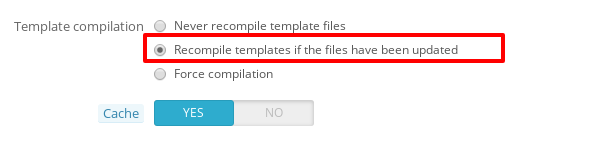
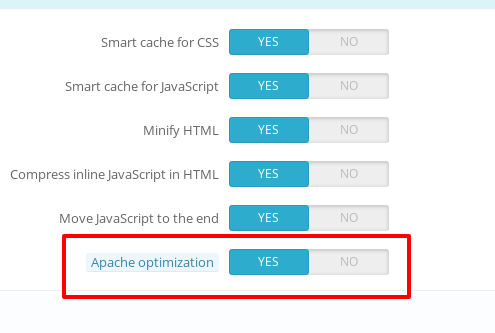
Thanks!
khouloudbelguith
on 27 Nov 2018
I've had all these settings exept the Yes at Cache - the caption says this should be only turned on in debug mode. I turned Cache on now but it didn't help.
Falataya
on 27 Nov 2018
Hi @Falataya,
Despite our several trials, we could not reproduce your issue with the provided information.
It seems that your issue is not a PrestaShop's core bug but most likely a server configuration or customization problem.
I invite you to contact our support team: http://addons.prestashop.com/en/388-support to help you solve your issue.
As it's not the default theme, provided by Prestashop, we can't do anything with this.
You should contact the theme author via your addons.prestashop.com account, they are the only ones to help you with it.
Thanks!
khouloudbelguith
on 27 Nov 2018
@Falataya let's talk on Skype. Maybe we can fix this.
rdy4ever
on 27 Nov 2018
Just to let you know, it turned out the site was hacked. It was waiting for an outside source and it only loaded after not getting a response.
Falataya
on 29 Nov 2018
skype me maybe I can help user:luisleitaoaudio
 luisleitaoaudio
on 14 Oct 2019
luisleitaoaudio
on 14 Oct 2019
Related issues
khouloudbelguith
·
3Comments
 vincent-dp
·
3Comments
vincent-dp
·
3Comments
 matks
·
3Comments
matks
·
3Comments
 prestonBot
·
3Comments
matks
·
3Comments
prestonBot
·
3Comments
matks
·
3Comments