Prestashop: 1-Click Autoupgrade from 1.7.3.3 to 1.7.4.3 (Ajax / Server Error for action upgradeComplete)
Describe the bug
I try the 1click upgrade (with the last module v4.4.0 without backup) from 1.7.3.3 to 1.7.4.3:
<<
All files upgraded. Now upgrading database...
Database upgraded. Now upgrading your Addons modules...
Addons modules files have been upgraded.
The database has been cleaned.
[Ajax / Server Error for action upgradeComplete] textStatus: "error " errorThrown:"Internal Server Error " jqXHR: "
Internal Server Error
The server encountered an internal error or misconfiguration and was unable to complete your request.
Please contact the server administrator, [no address given] and inform them of the time the error occurred, and anything you might have done that may have caused the error.
More information about this error may be available in the server error log."
>
PHP Errors log:
[27-Oct-2018 17:10:47 Europe/Kiev] PHP Fatal error: Undefined class constant 'HEADER_X_FORWARDED_ALL' in /home/virtwww//http/admin/index.php on line 84
javascript console log:
index.php?controller=AdminSelfUpgrade&token=fe41c03e4093c371cc9ff92e3b6b386d:1 [DOM] Found 2 elements with non-unique id #addons_login_button: (More info: https://goo.gl/9p2vKq) ? ?
index.php?controller=AdminSelfUpgrade&token=fe41c03e4093c371cc9ff92e3b6b386d:1 [DOM] Found 2 elements with non-unique id #addons_login_form: (More info: https://goo.gl/9p2vKq)
index.php?controller=AdminSelfUpgrade&token=fe41c03e4093c371cc9ff92e3b6b386d:1 [DOM] Found 2 elements with non-unique id #password_addons: (More info: https://goo.gl/9p2vKq) ? ?
index.php?controller=AdminSelfUpgrade&token=fe41c03e4093c371cc9ff92e3b6b386d:1 [DOM] Found 2 elements with non-unique id #username_addons: (More info: https://goo.gl/9p2vKq) ? ?
/admin/index.php?controller=AdminLogin&redirect=/admin/ajax.php?rand=1540649442395:1 Failed to load resource: the server responded with a status of 500 (Internal Server Error)
/admin*/autoupgrade/ajax-upgradetab.php:1 Failed to load resource: the server responded with a status of 500 (Internal Server Error)
Server information:
Server software version: Apache/2.2
PHP version: 5.6.38
Memory limit: 512M
Max execution time: 120
Upload Max File size: 256M
Database information:
MySQL version: 5.7.13-6-log
MySQL engine: InnoDB
MySQL driver: DbPDO
 weddingtextile
All 10 comments
After updating PrestaShop works.
How critical was the error when updating?
weddingtextile
on 30 Oct 2018
Hi @weddingtextile,
Can you please provide us the log of your upgrade? It can be found in the log.txt file, available in
Thanks!
 khouloudbelguith
on 30 Oct 2018
weddingtextile
on 30 Oct 2018
weddingtextile
on 30 Oct 2018
khouloudbelguith
on 30 Oct 2018
weddingtextile
on 30 Oct 2018
weddingtextile
on 30 Oct 2018
Hi @weddingtextile,
Thanks for your feedback.
I did not manage to reproduce the issue, I made an upfrade from 1.7.3.3 to 1.7.4.3 with the 1-click upgrade 4.4.0.
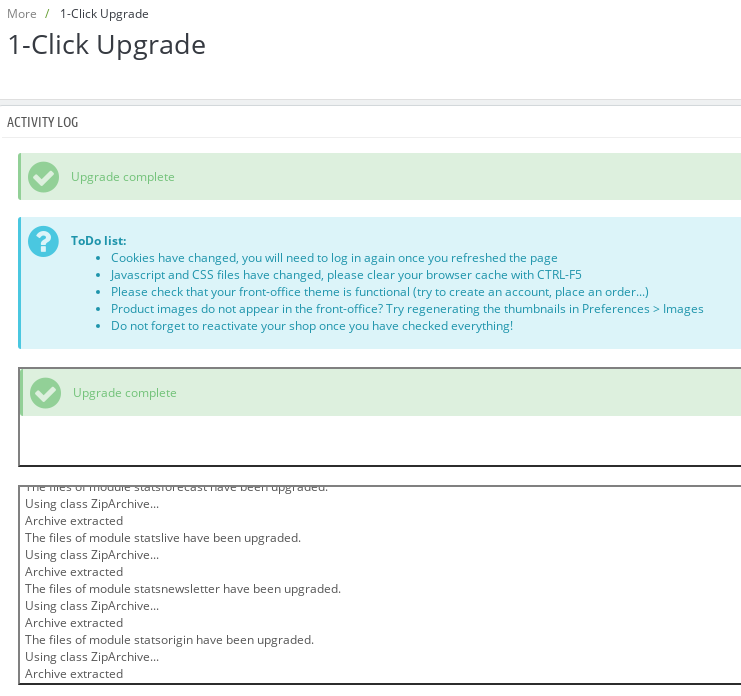
In your case, In your file log.txt, I found this:
Database upgrade OK
[2018-10-27 16:11:10] [SKIP] directory "/app/cache/" does not exist and cannot be emptied.
[2018-10-27 16:11:16] Warning detected during upgrade.
[2018-10-27 16:11:16] Database upgraded. Now upgrading your Addons modules...
[2018-10-27 17:11:16] Addons modules files have been upgraded.
[2018-10-27 17:11:16] The database has been cleaned.
So the upgrade is done successfully.
In your error_ul14_apache_aux1_18-10-27.log file,
Sometimes when migrating sites are switching between mod_php and FCGId permissions can get mangled which cause errors such as:
(104)Connection reset by peer: mod_fcgid: error reading data from FastCGI server
when running in FCGId mode.
Here's a solution to be ass follows.
- Go to /home/sitename/fcgi-bin
- Use the following command to reset the immutable flag
chattr -i php5.fcgi - Then delete the /home/sitename/etc and /home/sitename/fcgi-bin directories (making sure that anything that's not php related in etc is saved)
- Using virtualmin switch back to apache mod_php mode and then back to FCGId mode. The site should now work Don't forget to chown any files/directories in public_html that were apache to : Note that these are both usually the sitename.
PS: for more details about this issue, you need to check it with your host.
About the javascript console log: this is a different issue fixed in this PR: #10684
Could you please try to clear cache manually by deleting all the folder into var/cache (prod & dev).
Thanks to check and feedback.
khouloudbelguith
on 30 Oct 2018
Thanks for the detailed answer.
One more question.
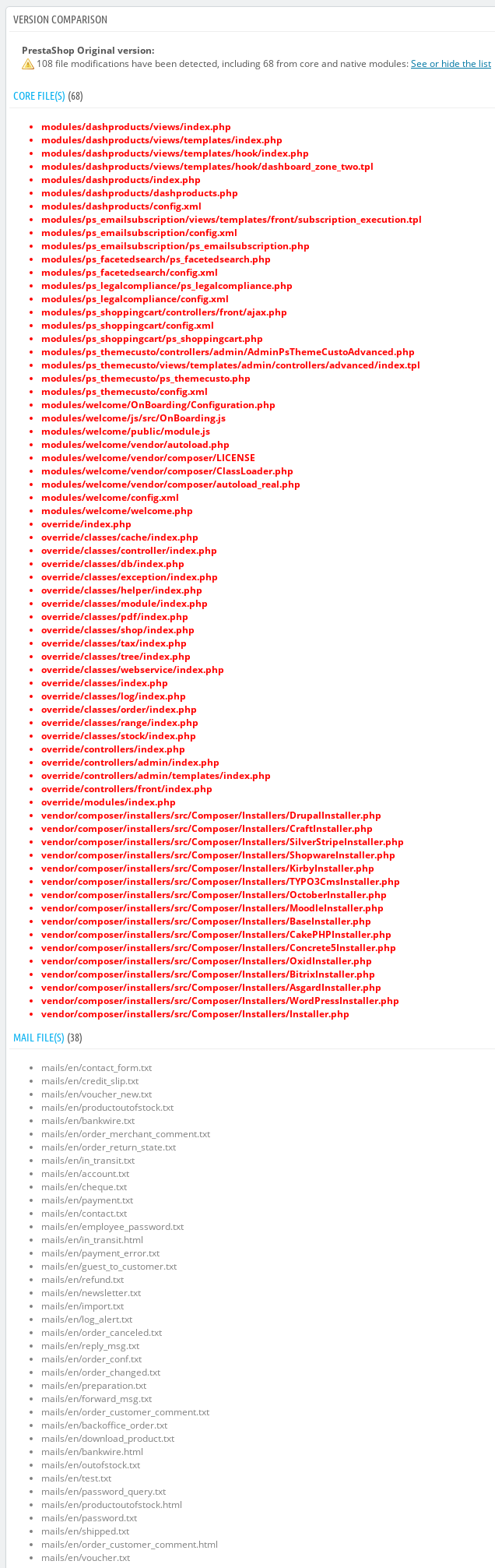
Is it normal after upgrade? See VERSION COMPARISON.txt
VERSION COMPARISON.txt
weddingtextile
on 30 Oct 2018
@weddingtextile, yes, it is normal.
I have changes in my case also.
Thanks!
khouloudbelguith
on 30 Oct 2018
Always use local directory upgrade mode with unpacked prestsahop files copied in autoupgrade/latest folder. I have done this version upgrade without any problem (1.7.3.3 to 1.7.4.3).
 PrestaShark
on 30 Oct 2018
PrestaShark
on 30 Oct 2018
Hi @weddingtextile,
Since we had no news from you for more than 30 days, I'll close this ticket. Feel free to open another one if you can give specific details.
Thanks!
khouloudbelguith
on 30 Nov 2018
when i had problem to update my prestashop, it was because a module cause problem
try to desinstall the modules you installed one by one, and try to update after each desinstall
 nlezoray
on 26 May 2019
nlezoray
on 26 May 2019
Related issues
 itisco
·
3Comments
itisco
·
3Comments
 zuk3975
·
3Comments
zuk3975
·
3Comments
PrestaShark
·
3Comments
zuk3975
·
3Comments
zuk3975
·
3Comments
PrestaShark
·
3Comments
 rGaillard
·
3Comments
rGaillard
·
3Comments