Prestashop: Customer fields added in the Address format from the BO are not displayed in the FO / BO
Describe the bug
In the BO => International => Locations => Countries Tab => Edit an enabled country (for example France), when we add the Customer fields in the Address format
- Customer:birthday
- Customer:email
- Customer:website
- Customer:company
- Customer:siret
- Customer:reset_password_token
& save.

In the FO, after signing in with a customer, when we try to add an address, Those fields are not displayed, but a new select without options is displayed => has no effects.

To Reproduce
Steps to reproduce the behavior:
- BO => International => Locations => Countries Tab => Edit an enabled country (France)
- Add the Customer fields in the Address format
- Customer:birthday
- Customer:email
- Customer:website
- Customer:company
- Customer:siret
- Customer:reset_password_token
- Click on save
- Go to FO
- Add a new address ( Country "France")
- See error
PS: same issue in the BO => Customers => Addresses => when we try to add a new address => those fields are not displayed.
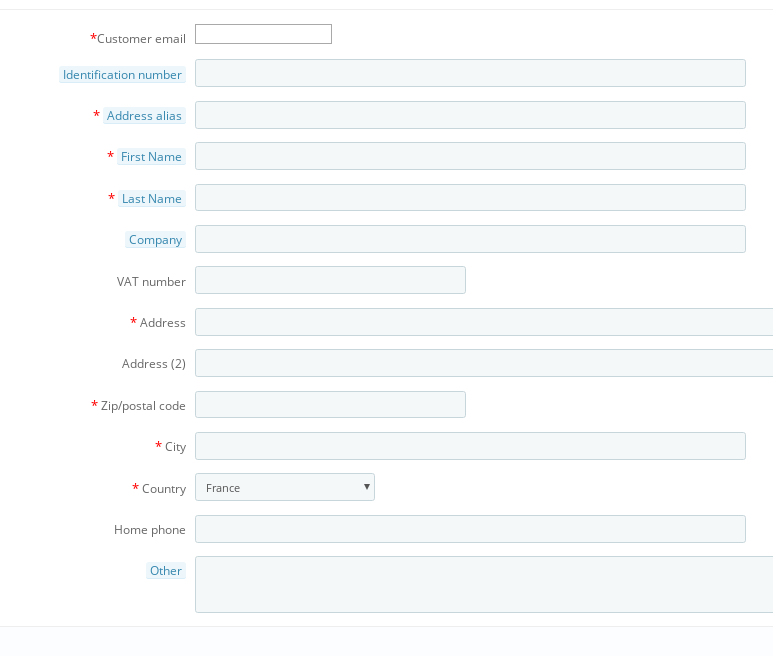
Additionnal information
PrestaShop version: 1.7.4.3 / 1.7.5.0
PHP version: 7.1
 khouloudbelguith
All 2 comments
I have the same issue with a fresh 1.7.5.1 Prestashop install + classic theme.
To reproduce it, just insert any "customer:field" to the address format and try to add a new address at the front office.
 cesarfierro
on 24 Feb 2019
cesarfierro
on 24 Feb 2019
hello, it's pretty not minor bug :( still no one assigned
Bug also exist in prestashop 1.7.6
problem is in file: CustomerAddressFormatter.php class
from line: 103, there is missing format for customer
 slupostrupek
on 5 May 2019
slupostrupek
on 5 May 2019
Related issues
 wikao2
·
3Comments
wikao2
·
3Comments
 centoasa
·
3Comments
khouloudbelguith
·
3Comments
centoasa
·
3Comments
khouloudbelguith
·
3Comments
 Prestaworks
·
3Comments
Prestaworks
·
3Comments
 zuk3975
·
3Comments
zuk3975
·
3Comments
Most helpful comment
I have the same issue with a fresh 1.7.5.1 Prestashop install + classic theme.
To reproduce it, just insert any "customer:field" to the address format and try to add a new address at the front office.