Prestashop: 500 Internal Server Error
Describe the bug
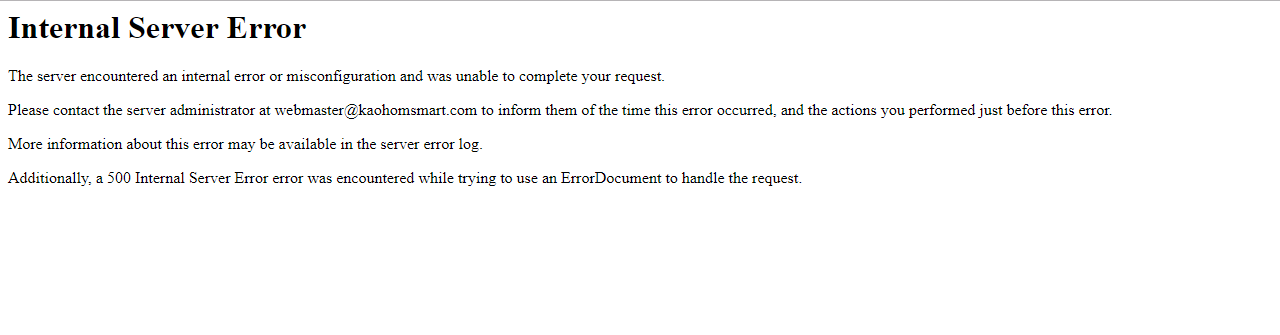
500 Internal Server Error
To Reproduce
Steps to reproduce the behavior:
Login background
Click on Modules & Services menu

wait a minute
then show error
Additionnal information
PrestaShop version: 1.6.1.4
PHP version: 5.5.38
 k2165
k2165
All 39 comments
Hi @k2165,
Could you please provide us with more info? We need more details to understand how we can reproduce your issue:
- debug mode report
- PHP error logs
- apache error log
- javascript console log
Don't you know how to get this information? Please read the following article:
Adding logs
Sometimes you just don’t know what’s wrong: something’s not happening, that’s all.
That’s where log data can be helpful. They keep track of what is happening and allows to trace back to the moment when the issue happens.
There are several different log data that you can add as a file to your ticket:
Server log:
Apache: /var/log/apache/apache_error.log
Nginx: /var/log/nginx/nginx_error.log
IIS: %SystemDrive%\inetpub\logs\LogFiles
PHP error log:
Apache: /var/log/apache/php_error.log
Nginx: /var/log/php-fpm/default/error.log
IIS: %SystemDrive%\inetpub\logs\LogFiles
Console log:
Firefox and Chrome: press Ctrl+Shit+J or Cmd+Shift+J.
Internet Explorer and Edge: press F12 then go to the Console tab.
Copy the content relevant to your issue (or to the time the issue appeared), and paste it into the ticket (or in a text file attached to the ticket).
Enabling Debug Mode + cache
PrestaShop has a debug mode, which can be used to see the non-obvious errors in your shop. For instance, in these situations:
The browser displays a blank page.
The browser displays a 500 Internal Server Error.
You cannot log into your dashboard, or access certain pages of the back office.
To turn on the Debug mode on PrestaShop, follow these steps using an FTP client (for instance the free Filezilla tool) to edit the config/defines.inc.php file. Find the following line in the file:
define('PS_MODE_DEV', false);
… and change it to:
define('PS_MODE_DEV', true);
Finally, emptying the cache of PrestaShop can also be useful, because it ensures that your browser only displays newly-generated files instead of old cached ones. In PrestaShop, you can empty the cache here:
Go to Advanced Parameters > Performance.
Click on the “Clear Cache” button at the top right.
Thanks!
 khouloudbelguith
on 8 Oct 2018
khouloudbelguith
on 8 Oct 2018
Hi khouloudbelguith :
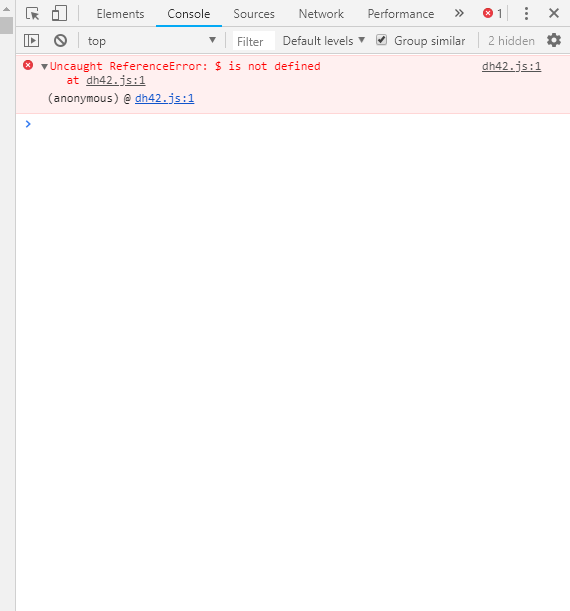
I press Ctrl + Shit + J when I Click on Modules & Services menu.
Here is snapshot.
k2165
on 8 Oct 2018
Enable debug mode and paste the error that you get
 idnovate
on 8 Oct 2018
idnovate
on 8 Oct 2018
Hi @k2165,
We need to retrieve the PHP error log and the debug mode report in order to find out what's wrong.
Could you please try to configure your smarty by disabling the cache, set the option "Template compilation" to Force compilation and clear cache from your shop & your browser.
Thanks to check and feedback.
khouloudbelguith
on 8 Oct 2018
Hi khouloudbelguith :
I press Ctrl + Shit + J when I Click on Modules & Services menu.
Here is snapshot.
@k2165
This JS error is not related with the other error. This is an error throwed by a moduel from @Dh42
idnovate
on 8 Oct 2018
Unhook the module from the header, that will solve the javascript error. That is our advertising block it is trying to load.
 Dh42
on 8 Oct 2018
Dh42
on 8 Oct 2018
@k2165,
As it's not the module provided by Prestashop, we can't do anything with this.
I close the issue, feel free to open a new one when needed.
Thanks!
khouloudbelguith
on 8 Oct 2018
The 500 error is not caused by our module, it just loads a javascript snippet. There would be no javascript snippet in the source of the 500 error page. This is a prestashop issue.
Dh42
on 8 Oct 2018
@Dh42 thanks!
@k2165 we need to retrieve the PHP error log and the debug mode report in order to find out what's wrong.
khouloudbelguith
on 8 Oct 2018
@Dh42 thanks!
@k2165 we need to retrieve the PHP error log and the debug mode report in order to find out what's wrong.
Hi khouloudbelguith:
Is this PHP error log ?

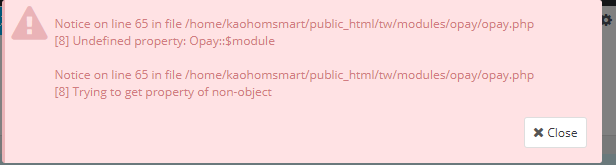
And after I Enable Debug Mode then click on Modules & Services menu.
The following screen pops up:
k2165
on 9 Oct 2018
FTP into your site, and go to the modules directory, find the module named newsletterpro and rename it with an underscore in front of the name, like _newsletterpro.
Dh42
on 9 Oct 2018
FTP into your site, and go to the modules directory, find the module named newsletterpro and rename it with an underscore in front of the name, like _newsletterpro.
Hi Dh42:
I can find and rename it .
And the next ?Try again?
thanks !
k2165
on 9 Oct 2018
Yeah, try to load the modules page again and see if you get the 500 error.
Dh42
on 9 Oct 2018
Yeah, try to load the modules page again and see if you get the 500 error.
Hi Dh42:
Actually, it didn’t appear 500 error in the morning.
So I am not sure if it is related to this change.
But it still appears this image:
And I am afraid that it will be good or bad.
I want to know the cause or the root problem.
thanks a lot.
k2165
on 9 Oct 2018
The cause of the problem is the person that wrote the opay module has some undefined variables and a couple other things. Nothing major, turn debug mode off and move on.
Dh42
on 9 Oct 2018
@k2165, yes the error is caused because of the opay module, for a quick fix you need to connect to your FTP, in the PROJECT_FOLDER/modules search for the opay folder, rename it.
You should contact the module author via your addons.prestashop.com account.
Thanks!
khouloudbelguith
on 9 Oct 2018
@k2165, yes the error is caused because of the opay module, for a quick fix you need to connect to your FTP, in the PROJECT_FOLDER/modules search for the opay folder, rename it.
You should contact the module author via your addons.prestashop.com account.
Thanks!
Hi khouloudbelguith .
Ok thank you
And Thank you,every respondent.
k2165
on 9 Oct 2018
@k2165, the issue is solved?
khouloudbelguith
on 9 Oct 2018
@k2165, the issue is solved?
Hi khouloudbelguith:
Yes, thanks a lot.
k2165
on 9 Oct 2018
@k2165 thanks for your feedback.
I close the issue, feel free to open a new one when needed.
Thanks!
khouloudbelguith
on 9 Oct 2018
Hi
I'm back again .
Today 500 Internal Server Error appear again.
This is the once error text in my exception.log:
ERROR 2018/10/12 - 17:07:17: Unknown column 'everywhere' in 'where clause'
SELECT * FROM ps_ppbp_block WHERE block_position=1 AND active=1 AND (product ="210" OR global_cat=1 OR global_man=1 OR global_prod=1 OR global_features=1 OR everywhere=1) AND shop="1" ORDER BY position at line 791 in file classes/db/Db.php
And this time I also Enble Debug Mode.
But it didn't appear any messages.
thanks
k2165
on 12 Oct 2018
This is a problem with a module and you should not report it here. It seems it's a problem with Related Products Pro module, could be?
idnovate
on 12 Oct 2018
@k2165, you need to disable the Products Pro module.
Thanks!
khouloudbelguith
on 12 Oct 2018
@k2165, you need to disable the Products Pro module.
Thanks!
How can I disable the Products Pro module?
k2165
on 15 Oct 2018
@k2165, you need to navigate to BO => Modules and Services => search for this module in the list module & disable it.
Thanks!
khouloudbelguith
on 15 Oct 2018
@k2165, you need to navigate to BO => Modules and Services => search for this module in the list module & disable it.
Thanks!
I just can't enter Modules and Services .
So, is there any other way?
thanks
k2165
on 15 Oct 2018
Hi @k2165,
So, in your project folder, in the PROJECT_FOLDER/modules/, you need to rename the folder of this product pro module, it should be displayed with teck name.
khouloudbelguith
on 15 Oct 2018
Hi @k2165,
So, in your project folder, in the PROJECT_FOLDER/modules/, you need to rename the folder of this product pro module, it should be displayed with teck name.
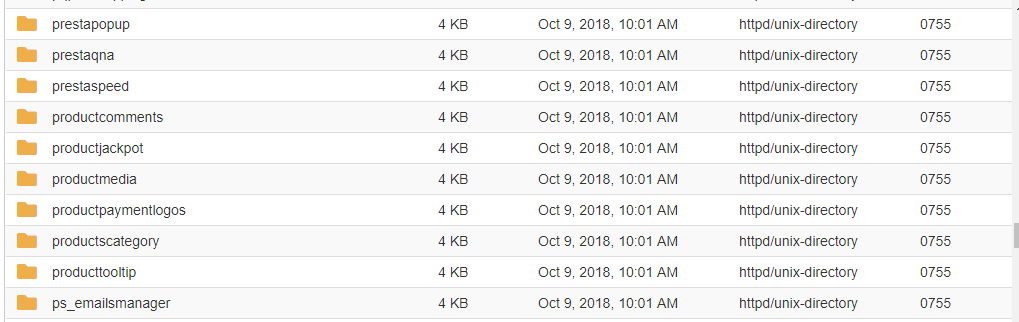
I don't have product pro folder.
But there are many folders that about the product.
thanks
k2165
on 16 Oct 2018
@k2165, you need to rename one by one, clear cache & check.
As you can see here : the maintenance of PrestaShop 1.6 is extended to June 2018 for security and critical bugs.
khouloudbelguith
on 16 Oct 2018
Maybe the folder is called "relatedproductpro"
idnovate
on 16 Oct 2018
@k2165, you need to rename one by one, clear cache & check.
As you can see here : the maintenance of PrestaShop 1.6 is extended to June 2018 for security and critical bugs.
Hi @khouloudbelguith :
I want to ask the cache is in browser or website?
But,I have tried both of them.
And it's no change in results.
thanks!
k2165
on 18 Oct 2018
Maybe the folder is called "relatedproductpro"
Hi @idnovate :
I find a folder name relatedproduct and rename it.
I can successfully click on the Modules & Services test for the first time.
But the second time is fail.
thanks !
k2165
on 18 Oct 2018
It's the log in error log.
[15-Oct-2018 10:44:02 Asia/Taipei] PHP Warning: call_user_func() expects parameter 1 to be a valid callback, class 'smush' not found in /projectname/modules/prestaspeed/smushit.inc.php on line 72
[18-Oct-2018 09:22:40 Asia/Taipei] PHP Notice: ob_flush(): failed to flush buffer. No buffer to flush in /project/modules/cronjobs/cronjobs.php on line 287
And it's the message in debug mode.

k2165
on 18 Oct 2018
Hi @k2165,
You need to disable also the ppb module.
You can rename the ppb folder into the folder Project_folder/modules/
Thanks!
khouloudbelguith
on 18 Oct 2018
Hi @k2165,
You need to disable also the ppb module.
You can rename the ppb folder into the folder Project_folder/modules/
Thanks!
Hi @khouloudbelguith :
I rename it and it appear this error:
ERROR 2018/10/18 - 18:04:23: Table 'kaohomsm_ps4.ps_extratabsproextracontents' doesn't exist
SELECT id_extracontents FROMat line 791 in file classes/db/Db.phpps_extratabsproextracontentsAS tab WHERE (tab.id_product= 2364 AND tab.id_tab= 1)
k2165
on 18 Oct 2018
@k2165, it is a problem from a custom module "extratabsproextracontents".
You need to disable it.
Thanks!
khouloudbelguith
on 18 Oct 2018
Hi @khouloudbelguith :
I just have extratabspro module ,and I disable.
But that makes me unable to use debug mode..
thanks!
k2165
on 18 Oct 2018
Hi @k2165,
As it's not a module provided by Prestashop, we can't do anything with this.
You should contact the module author via your addons.prestashop.com account, they are the only ones to help you with it.
Thanks!
khouloudbelguith
on 18 Oct 2018
Hi @k2165,
As it's not a module provided by Prestashop, we can't do anything with this.
You should contact the module author via your addons.prestashop.com account, they are the only ones to help you with it.
Thanks!
Hi @khouloudbelguith :
Ok! I will try it.
thank you for your response.
k2165
on 18 Oct 2018
Related issues
khouloudbelguith
·
3Comments
 hiousi
·
3Comments
hiousi
·
3Comments
 Fabuloops
·
3Comments
Fabuloops
·
3Comments
 PrestaShark
·
3Comments
PrestaShark
·
3Comments
 zuk3975
·
3Comments
zuk3975
·
3Comments
Most helpful comment
Maybe the folder is called "relatedproductpro"