Prestashop: Modules bug - error 500
I wanted to test a new Theme, I uploaded it but, during its installation, something went wrong and it showed me a page with this message:
_"Oops! An Error Occurred
The server returned a "500 Internal Server Error".
Something is broken. Please let us know what you were doing when this error occurred. We will fix it as soon as possible. Sorry for any inconvenience caused."_
Now my website doesn't work anymore because some modules are not working properly. In fact, If I click on "Modules & Services" in my back office I have the same error page as above. The same error comes out if I try to do a search in my back office.
In the "information page", at the very bottom, there is the message: _"Changed/missing files have been detected: robots.txt"_ (See image below)
I have just started to use Prestashop and my site is still empty. The question is: there is a "RESET" to restart ALL and solve the problem?
Thank you in advance.
Frank
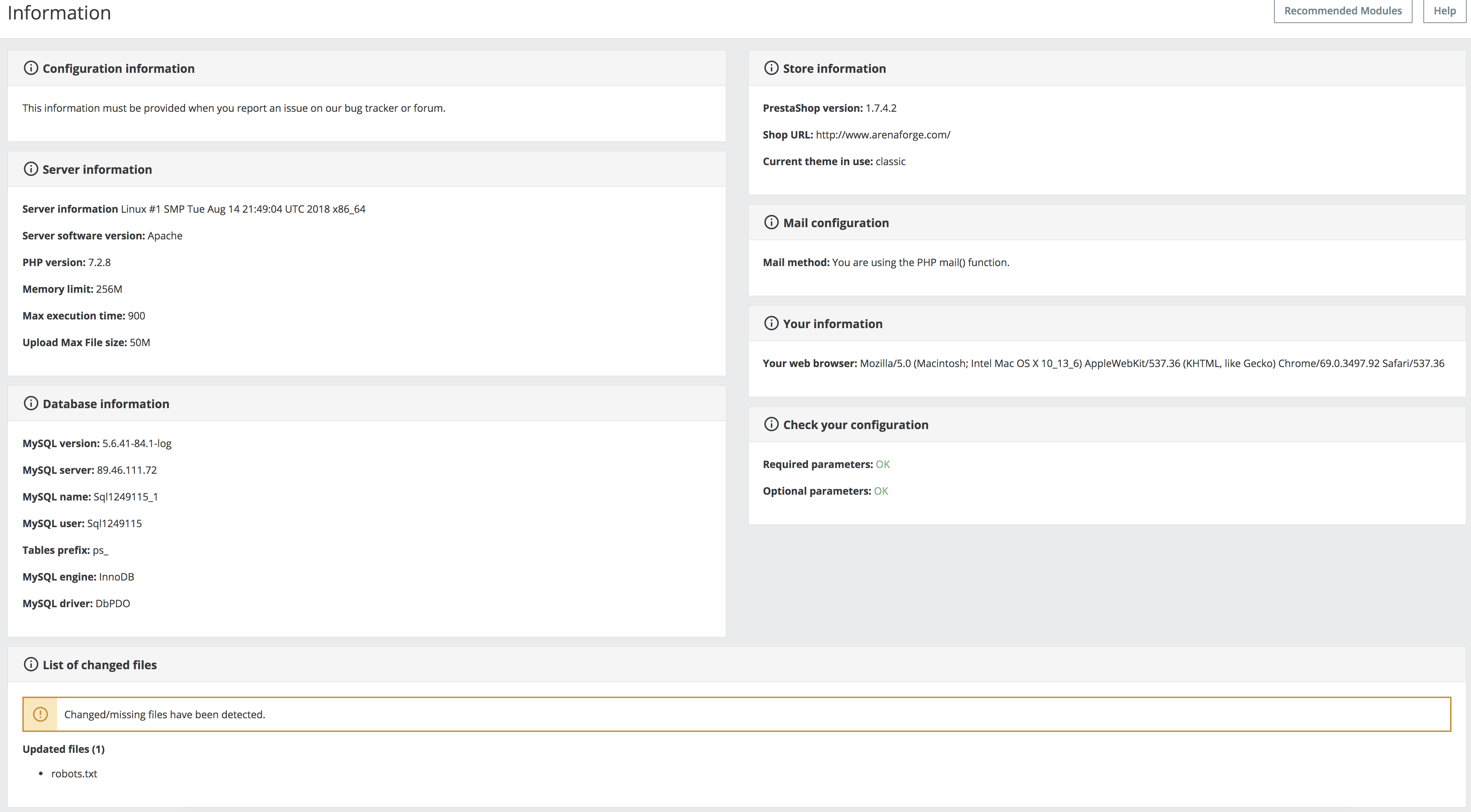
PrestaShop version: 1.7.4.2
PHP version: 7.2.8
Current theme in use: classic (Default theme)
 francesco-arenaforge
All 6 comments
Hi @francesco-arenaforge,
As it's not the default theme, provided by Prestashop, we can't do anything with this.
You should contact the theme author via your addons.prestashop.com account, they are the only ones to help you with it.
Thanks to check with them & feedback.
Best regards, Khouloud
 khouloudbelguith
on 17 Sep 2018
khouloudbelguith
on 17 Sep 2018
Hi Khouloud,
I'm not so happy with your reply.
Because I didn't ask you how to repair the new, not official, theme I tried to install but I asked you if there is a way to restore the default theme of Prestashop _(Quote: "The question is: there is a "RESET" to restart ALL and solve the problem?")_. Independently from the cause of the error, I think that Prestashop has a way to "reset" itself, but I don't know how.
In any case, I will cancel all the present installation and will install all again. I'm sure it will work.
Kind regards,
Frank
francesco-arenaforge
on 17 Sep 2018
Hi @francesco-arenaforge,
Could you please provide us with more info? We need more details to understand how we can reproduce your issue:
- debug mode report
- PHP error logs
- apache error log
- javascript console log
- screenshots
Don't you know how to get this information? Please read the following article:
http://build.prestashop.com/howtos/misc/how-to-create-bug-report/
Thanks!
Best regards, Khouloud
khouloudbelguith
on 18 Sep 2018
Hi there. It looks like the theme you tried to install also installed some modules that may cause your problems. You should enable debug mode to see what modules cause problems and uninstall them.
Also, you could look in the 3rd party theme config file (config/theme.yml) to see what modules it installed and uninstall them:
global_settings:
    modules:
      to_enable:
 rdy4ever
on 18 Sep 2018
rdy4ever
on 18 Sep 2018
I'm sorry, guys, too late.
Since I had not made any other changes, I deleted and reinstalled everything. In any case, the theme that gave problems was the following: Leo Trump Template 1723. The malfunction was related to the main menu (which had disappeared) while the single pages could be loaded using the link "sitemap".
Thank you.
Kind regards,
Frank.
francesco-arenaforge
on 19 Sep 2018
Hi @francesco-arenaforge,
Thanks for your feedback.
I could be a compatibility problem with 1.7.4.
I close the issue, feel free to open a new one when needed.
Best regards, Khouloud
khouloudbelguith
on 19 Sep 2018
Related issues
 Fabuloops
·
3Comments
Fabuloops
·
3Comments
 zuk3975
·
3Comments
zuk3975
·
3Comments
 matks
·
3Comments
matks
·
3Comments
 sandra2n
·
3Comments
sandra2n
·
3Comments
 Prestaworks
·
3Comments
Prestaworks
·
3Comments