Prestashop: [BOOM-4364] PDF translation not working
This issue has been migrated from the Forge. Read the original ticket here.
- _Reporter:_ digit89
- _Created at:_ Thu, 23 Nov 2017 17:43:05 +0100
Using in Front Office another theme than the original, translations are not working on the invoice.
How to reproduce the issue ?
Activate a template
- Go to international > translations
- Select Template > Custom emplate
- Fields PDF are not displaying and generated PDF can't be translated manually. The section Shop.Pdf is not displaying.
 prestonBot
All 22 comments
This comment has been migrated from the Forge. Read the original comment here.
- _Author:_ salma.moakhar
- _Created at:_ Thu, 23 Nov 2017 18:18:37 +0100
Hi Nicolas Millot,
I manage to reproduce the issue with the last version : 1.7.2.4.
’ll add this to the debug roadmap so that it’s fixed. If you have already fixed it on your end or if you think you can do it, please do send us a pull request!
Thanks & best regards, Salma
prestonBot
on 22 Aug 2018
This comment has been migrated from the Forge. Read the original comment here.
- _Author:_ dealercd
- _Created at:_ Fri, 3 Aug 2018 11:37:24 +0200
Hello Salma,
we have the same problem. Is there any chance to fix it?
Kind regards
prestonBot
on 22 Aug 2018
This comment has been migrated from the Forge. Read the original comment here.
- _Author:_ khouloud.belguith
- _Created at:_ Fri, 3 Aug 2018 11:49:32 +0200
Hi Hishem,
Sorry, not yet.
Best regards,
Khouloud
prestonBot
on 22 Aug 2018
This comment has been migrated from the Forge. Read the original comment here.
- _Author:_ waschier-design
- _Created at:_ Fri, 10 Aug 2018 09:11:29 +0200
This is very important for every merchant and for me it's a major bug and has to be fixed soon.
prestonBot
on 22 Aug 2018
This comment has been migrated from the Forge. Read the original comment here.
- _Author:_ khouloud.belguith
- _Created at:_ Fri, 10 Aug 2018 09:17:28 +0200
Hi Nicolas,
Sorry but there are some major issues to solve before this one.
So, it will probably not solved right now.
But PrestaShop is an open source project, so it can be solved before if someone submits a pull request to solve it.
Best regards, Khouloud
prestonBot
on 22 Aug 2018
This comment has been migrated from the Forge. Read the original comment here.
- _Author:_ waschier-design
- _Created at:_ Fri, 10 Aug 2018 09:21:43 +0200
Hi Khouloud,
I think it is a major bug. Because PrestaShop is not a usable system without working language translations for invoices and delivery slips. A german merchant does not want to send an english invoice.
prestonBot
on 22 Aug 2018
I just realized this problem after spending hundreds of hours to configure my fresh setup of presta 1.7.5. ... btw not as bad as everyone is saying ... but when it comes to languages and translation more than suboptimal. Let´s say very very bad. It seems none of you programmers ever had to translate (or fixing bad wording) presta into more than one language (even this is a pain).
This bug now is the tip of the iceberg!
Guys, you´re out of your minds not fixing essential problems like that. If i hadn´t spend all this time i would directly erase Presta and move over to whatever usable platform. And as my former writer pointed out before me this way presta is not usable (10.08.2018 - more than half a year and nobody is even assigned to fix this????!).
I´m sorry to not being able to offer any contribution besides this stupid rant, but sometimes priorities needs to be directed in the right direction.
 holle75
on 1 Feb 2019
holle75
on 1 Feb 2019
Hi there,
Not having an issue fixed immediately (or in a fixed timeframe) does not mean that it won't be fixed, or that we don't care. It doesn't mean that the issue is NOT important either. It just means that other issues have been considered, for whatever reason, more important, so they were (or are being) tackled first. There's an immense amount of work to be done (965 issues right now, and growing!), and tasks take time.
Developer time is limited, so if the amount of issues opened in a certain timeframe exceeds the amount of issues that can be processed using the available developer time, tasks will simply pile up. This is common to ALL projects. Due to the number of pending issues, sometimes they may get lost in the pile and be forgotten about, so it's not a bad idea to ping us there from time to time to remind us about it, even if it's been a long while.
But here's the upside: PrestaShop is an open source, community project. If you find that any issue is critical for you, and it's important to have it fixed ASAP, then you can _invest_ into having it done. You can hire a developer to fix it, or if you are a developer yourself, you can try doing it on your own. The most important thing is to share that fix with everyone by submitting a Pull Request -- that's what the open source spirit is all about.
 eternoendless
on 1 Feb 2019
eternoendless
on 1 Feb 2019
Yes, hi there. You´re right. It´s just very frustrating when you realize such a big bummer when you already spent so many hours in fixing small bugs and configuring your shop. And no, i´m not able to fix this problem by myself and contribute it to the community cause it´s a core problem and not a simple rewrite in 1-2 files i think. Anyways thank you for your quick response and maybe this bug will be solved in future versions. I´m quite familiar with presta (from years ago), created different shops in different versions and don´t want to spend time to "get into" a new shopsystem. Probably I´m going to try thirty bees now (hopefully it´s better) cause i can´t use the shop this way.
best regards
H.
holle75
on 1 Feb 2019
I have moved translation files to theme directory @holle75 and I see translations in backoffice, can you check that ?
 dovbau
on 13 Feb 2019
dovbau
on 13 Feb 2019
Hi @dovbau, i simply can´t find pdf translations anymore. Where do you find them in BO? which files did you move or copy to theme directory?
holle75
on 14 Feb 2019
@holle75 I moved them to themes/themename/pdf, but my prestashop version is 1.7.3. And then I can find them in theme translations
dovbau
on 14 Feb 2019
ok, i copied the pdf folder from root to theme folder. In BO still i do not see the pdf in the pulldownlist. See attachment.
Or you mean you have to search in the Theme translation for the text in the pdf´s?

holle75
on 14 Feb 2019
Select theme translations. It's written {l s='Account' d='Shop.Pdf' pdf='true'} in template, so I find them Shop -> Pdf tab
dovbau
on 14 Feb 2019
Ha, you´re right! ... i also figured out, thanks to your remark, that even without copying the pdf folder to your theme you can find pdf translations in the "classic" theme. Which genius had this idea? I remember in 1.5 (1.6 i don´t know) you had a separate "pdf" in the dropdownlist to pick.
Another hint; whenever you are desperately searching for a translation that you can´t find -> go to classic theme translations (probably should have tried this with the pdf too). Even when you are not using the classic theme, there are a lot of translations hidden. Hail Presta 1.7 for it´s sweet logic
thank you very much @dovbau
and thank you @eternoendless for reminding me of contributing before. Probably it would have been more helpful to just explain where to find the pdf-translations? You are a Presta-Coder, no?
holle75
on 14 Feb 2019
It's weird, I hade to translate pdfs and just checked translation class or controller, don't remember and saw their logic, if pdf's are in theme they are assigned to theme translations. I guess there is a need to add additional pdf option in select you were refering to. Need to check how it's implemented in other versions
dovbau
on 14 Feb 2019
Anyway the whole translation thing is killing you. Very often you can´t find the text you are looking for in the logic designated area.
holle75
on 14 Feb 2019
Agree on that. How do you think it should be done ? Everything in one place ? Then it will be very slow, they have to be separated somehow
dovbau
on 14 Feb 2019
1) Probably not very different from now but if you have categories, they should be right -> big step.
2a) Maybe you have xx top categories like "Admin" (here everything that is not Theme), "Theme xx", "Theme yy", "Theme xy"
2b) in those categories you define everything with expandable subcategories (for ADMIN -> errors, pdf, field, whatever, etc). This way you could open up all of them (via button on top "expand all") and search with your browsers search function (every browser has a search function nowadays, no?) and skip through the findings. Or keep all subcategories closed and just open the subcategory you are interested in. Again to search with your browser. very fast, very efficient imho. You could completely circumvent the "dont find the line problem".
Wasn´t it like this way back? can´t remember. Performancewise i don´t know if this works.
Now, most of the time one don´t even know in which category this piece of text should be. Is it a module or theme?... and so on.
holle75
on 14 Feb 2019
) Maybe you have xx top categories like "Admin" (here everything that is not Theme), "Theme xx", "Theme yy", "Theme xy"
You mean something like that?
 mickaelandrieu
on 18 Feb 2019
mickaelandrieu
on 18 Feb 2019
Hi Mickael, to long and technical an article to be understandable to me ;) .... I just know, with 3 languages in my shop i just barely make it happen (1.7.5). I think what i wrote would make things much easier. Maybe i elaborated whats already written in the article you linked?
Main idea is to have max minimum of main categories which separate content (the less the better) and in those categories foldable/unfoldable subcategories (with even more subcategories if necessary). This way (if you have a button "on top" called "unfold") you can search comfortably through all data with your browsers search and not a shop based search. Importance here is to have max data on ONE Page. Scrolling became so quick nowadays ;)
Due to the title of the subcategories (fold/unfoldable by itself) you know where you are ... but still have all data (if unfolded by top button) searchable on one page. WinWin for every challenge.
exclamation mark on "search in your browser"! ... you could even put a little hint/help above the main categories so everybody understand how browser search works.
... and i think back then in Presta 1.5 it was similar to this?
holle75
on 18 Feb 2019
I found a solution (for me)
PrestaShop 1.7.6.5
In the .tpl PDFs , find your translation who doesn't work and verify if d='Shop.Pdf' is present.
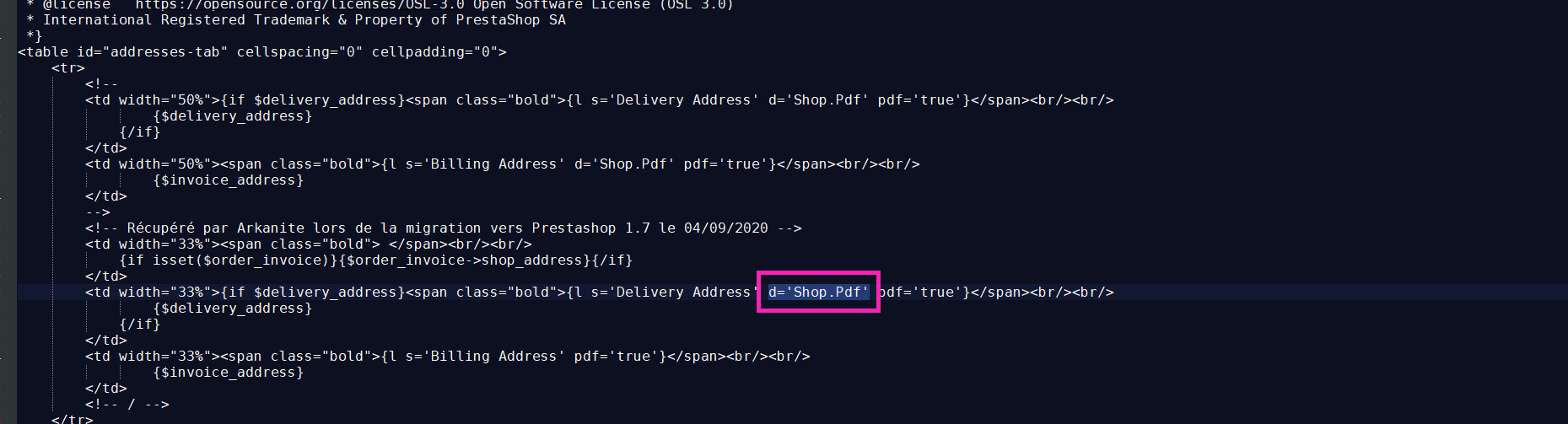
If not, you need to add it.
Hope help you
 ArkaKnight
on 17 Sep 2020
ArkaKnight
on 17 Sep 2020
Related issues
 PrestaShark
·
3Comments
PrestaShark
·
3Comments
 hiousi
·
3Comments
prestonBot
·
3Comments
hiousi
·
3Comments
prestonBot
·
3Comments
 marionf
·
3Comments
marionf
·
3Comments
 khouloudbelguith
·
3Comments
khouloudbelguith
·
3Comments