Prestashop: [BOOM-6001] Missing PHP function mb_split
This issue has been migrated from the Forge. Read the original ticket here.
- _Reporter:_ Lilian
- _Created at:_ Mon, 16 Jul 2018 15:41:55 +0200
Hi,
I just installed Prestashop. After my first clicks in the backoffice I encountered an Internal Error 500 after trying to display the categories or commands.
Thanks to the DEBUG mode I see the problem is the mb_split function that is missing.
After installing the php-mbstring package in my ubuntu distribution, the problem is solved.
As the Prestashop install process asked me to install some missing things, I think this is a check that is missing in the install process.
Regards
- How to reproduce the issue ?
Download prestashop_1.7.4.0.zip
Follow installation instructions to install it on Linux Mint 19 Tara
Connect to the backoffice
Enable Debug mode
Go to Vendre / Catalogue / Categories or Vendre / Commandes / Commandes
 prestonBot
All 23 comments
This comment has been migrated from the Forge. Read the original comment here.
- _Author:_ khouloud.belguith
- _Created at:_ Mon, 16 Jul 2018 16:03:12 +0200
Hi ROBERT,
Could you please provide us with more info? We need more details to understand how we can reproduce your issue:
- host
- server setup and configuration
- PrestaShop version (source)
- debug mode report
- PHP error logs
- apache error log
- javascript console log
- screenshots
Don't you know how to get this information? Please read the following article:
http://build.prestashop.com/howtos/misc/how-to-create-bug-report/
Thanks!
Best regards, Khouloud
prestonBot
on 22 Aug 2018
This comment has been migrated from the Forge. Read the original comment here.
- _Author:_ lilian
- _Created at:_ Mon, 16 Jul 2018 16:28:32 +0200
Hi,
Host : Linux Mint 19 Tara, 4.15.0-24-generic #26-Ubuntu SMP Wed Jun 13 08:44:47 UTC 2018 x86_64 x86_64 x86_64 GNU/Linux
Server : Apache 2.4.29-1, PHP 7.2, MySql5.7
Debug Mode set to ON in backoffice configuration
PHP errors logs : nothing appears in error log and I dont see the trace because I solved the problem as said before
Apache errors log : nothing
Javascript console log : n/a
Screenshots : n/a
If you really need a specific information, let me know which one.
Regards
prestonBot
on 22 Aug 2018
This comment has been migrated from the Forge. Read the original comment here.
- _Author:_ khouloud.belguith
- _Created at:_ Mon, 16 Jul 2018 17:04:30 +0200
Hi ROBERT !
Thank you for your report.
We'll first try to reproduce it and we'll come back to you if we need more information.
Best regards, Khouloud
prestonBot
on 22 Aug 2018
This comment has been migrated from the Forge. Read the original comment here.
- _Author:_ lilian
- _Created at:_ Mon, 16 Jul 2018 22:09:17 +0200
Hi Khouloud,
I think you will succeed in reproduce it on any debian based linux distribution where package php-mbstring in not installed.
And I think you should add a check for the php mb_split function or the php mbstring module in the install process where other checks for missing components are performed.
But I am very new in prestashop and I never go into the code.
Best regards
prestonBot
on 22 Aug 2018
This comment has been migrated from the Forge. Read the original comment here.
- _Author:_ [email protected]
- _Created at:_ Tue, 17 Jul 2018 22:50:37 +0200
Hi,
reproduced on Ubuntu 16.04 on a fresh installation after clicking on "Orders -> Orders". Will try out to install php-mbstring tmrw.
best
/david
prestonBot
on 22 Aug 2018
This comment has been migrated from the Forge. Read the original comment here.
- _Author:_ khouloud.belguith
- _Created at:_ Wed, 18 Jul 2018 17:41:24 +0200
Hi all,
We'll first try to reproduce it and we'll come back to you if we need more information.
Best regards, Khouloud
prestonBot
on 22 Aug 2018
This comment has been migrated from the Forge. Read the original comment here.
- _Author:_ [email protected]
- _Created at:_ Sun, 22 Jul 2018 10:14:10 +0200
Here the promised result, installing php-mbstring fixed it.
Tested with: prestashop 1.7.4.1.
best
/david
prestonBot
on 22 Aug 2018
This comment has been migrated from the Forge. Read the original comment here.
- _Author:_ khouloud.belguith
- _Created at:_ Wed, 8 Aug 2018 11:54:22 +0200
Hi ROBERT,
In my local, I edited the php.ini file like the picture attached

But I did not manage to reproduce the issue with PS1.7.4.2.
Thanks to check and feedback.
Best regards, Khouloud
prestonBot
on 22 Aug 2018
Hi,
Since we had no news from you for more than 30 days, I'll close this ticket. Feel free to open another one if you can give specific details.
Best regards, Khouloud
 khouloudbelguith
on 28 Sep 2018
khouloudbelguith
on 28 Sep 2018
@khouloudbelguith
Hello! I fully confirm the issue! If php-mbstring is not installed then prestashop gives 500 on Orders-Orders after upgrade. You need to switch mbstring module completely.
The other problem is that whole logs are clear. Nothing in php server logs. I was able to get some error logs only by setting PS_MODE_DEV to true. Tell me please how can I get such errors in logs not on pages of my shop?
Here is stack trace:
Symfony\Component\Debug\Exception\UndefinedFunctionException:
Attempted to call function "mb_split" from the global namespace.
at vendor/smarty/smarty/libs/plugins/shared.mb_str_replace.php:47
at smarty_mb_str_replace('&', '&', '')
(vendor/smarty/smarty/libs/plugins/modifier.replace.php:35)
at smarty_modifier_replace('', '&', '&')
(var/cache/dev/smarty/compile/6b/0d/58/6b0d580ca80b1fbdc5b00af885124a3085b6bc88_0.file.kpi.tpl.php:46)
at content_5bbe2bd8c5c4e0_88724701(object(Smarty_Internal_Template))
(vendor/smarty/smarty/libs/sysplugins/smarty_template_resource_base.php:123)
at Smarty_Template_Resource_Base->getRenderedTemplateCode(object(Smarty_Internal_Template))
(vendor/smarty/smarty/libs/sysplugins/smarty_template_compiled.php:114)
at Smarty_Template_Compiled->render(object(Smarty_Internal_Template))
(vendor/smarty/smarty/libs/sysplugins/smarty_internal_template.php:206)
at Smarty_Internal_Template->render(false, 0)
(vendor/smarty/smarty/libs/sysplugins/smarty_internal_templatebase.php:232)
at Smarty_Internal_TemplateBase->_execute(object(Smarty_Internal_Template), null, null, null, 0)
(vendor/smarty/smarty/libs/sysplugins/smarty_internal_templatebase.php:116)
at Smarty_Internal_TemplateBase->fetch()
(classes/helper/HelperKpi.php:63)
at HelperKpiCore->generate()
(controllers/admin/AdminOrdersController.php:1624)
at AdminOrdersControllerCore->renderKpis()
(classes/controller/AdminController.php:2081)
at AdminControllerCore->initContent()
(classes/controller/Controller.php:255)
at ControllerCore->run()
(classes/Dispatcher.php:428)
at DispatcherCore->dispatch()
(admin501mksv3m/index.php:99)
Here is Logs tab:
CRITICAL17:42:00 | php | Call to undefined function mb_split()
-- | -- | --
DEBUG17:42:00 | doctrine | SELECT name FROM ps_module WHERE active = 1
CRITICAL17:42:00 | request | Uncaught PHP Exception Symfony\Component\Debug\Exception\UndefinedFunctionException: "Attempted to call function "mb_split" from the global namespace." at /var/www/prestashop/vendor/smarty/smarty/libs/plugins/shared.mb_str_replace.php line 47
And here is Exception tab:
Symfony\Component\Debug\Exception\
UndefinedFunctionException
in vendor/smarty/smarty/libs/plugins/shared.mb_str_replace.php (line 47)
smarty_mb_str_replace('&', '&', '')
in vendor/smarty/smarty/libs/plugins/modifier.replace.php (line 35)
smarty_modifier_replace('', '&', '&')
in var/cache/dev/smarty/compile/6b/0d/58/6b0d580ca80b1fbdc5b00af885124a3085b6bc88_0.file.kpi.tpl.php (line 46)
content_5bbe2bd8c5c4e0_88724701(object(Smarty_Internal_Template))
in vendor/smarty/smarty/libs/sysplugins/smarty_template_resource_base.php (line 123)
Smarty_Template_Resource_Base->getRenderedTemplateCode(object(Smarty_Internal_Template))
in vendor/smarty/smarty/libs/sysplugins/smarty_template_compiled.php (line 114)
Smarty_Template_Compiled->render(object(Smarty_Internal_Template))
in vendor/smarty/smarty/libs/sysplugins/smarty_internal_template.php (line 206)
Smarty_Internal_Template->render(false, 0)
in vendor/smarty/smarty/libs/sysplugins/smarty_internal_templatebase.php (line 232)
Smarty_Internal_TemplateBase->_execute(object(Smarty_Internal_Template), null, null, null, 0)
in vendor/smarty/smarty/libs/sysplugins/smarty_internal_templatebase.php (line 116)
Smarty_Internal_TemplateBase->fetch()
in classes/helper/HelperKpi.php (line 63)
HelperKpiCore->generate()
in controllers/admin/AdminOrdersController.php (line 1624)
AdminOrdersControllerCore->renderKpis()
in classes/controller/AdminController.php (line 2081)
AdminControllerCore->initContent()
in classes/controller/Controller.php (line 255)
ControllerCore->run()
in classes/Dispatcher.php (line 428)
DispatcherCore->dispatch()
in admin501mksv3m/index.php (line 99)
Seems that you just need to check if mb_split is defined or check whether mbstring module is installed somehow.
 iprok
on 10 Oct 2018
iprok
on 10 Oct 2018
Hi @iprok,
Thanks!
@marionf, I did not manage to reproduce the issue.
Could you please try to reproduce it?
Thanks!
khouloudbelguith
on 10 Oct 2018
@khouloudbelguith it's 100% reproducable if mbstring is compiled as a module in your php (most of popular distros). Just remove "extension=mbstring.so" from your php.ini.
iprok
on 10 Oct 2018
@khouloudbelguith
I can't reproduce
 marionf
on 11 Oct 2018
marionf
on 11 Oct 2018
@marionf thanks!
@iprok I followed this link: https://www.drupal.org/project/drupal/issues/87138 to disable mbstring.
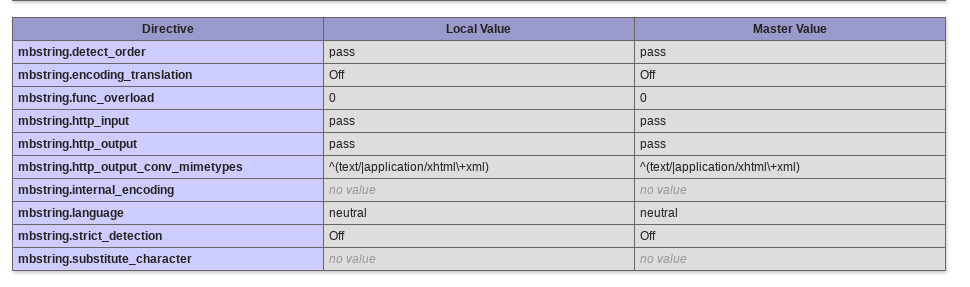
In fact, I don't have "extension=mbstring.so" on my php.ini file.
khouloudbelguith
on 11 Oct 2018
@marionf thanks!
@iprok I followed this link: https://www.drupal.org/project/drupal/issues/87138 to disable mbstring.
@marionf @khouloudbelguith
It's not the way disabling mbstring completely. Just turning it off, but all its functions still are defined so it's normal that you can't reproduce the bug.
In fact, I don't have "extension=mbstring.so" on my php.ini file.
I can help you to disable the module, but please give me the information for it:
1) What OS do you run php on? (I can help only with linux so I need exact distro version)
2) Give me this sections of phpinfo output:
Server API
Scan this dir for additional .ini files
Additional .ini files parsed
For example I have them so:
Server API => Command Line Interface
Scan this dir for additional .ini files => /etc/php5/cli/conf.d
Additional .ini files parsed => /etc/php5/cli/conf.d/05-opcache.ini,
/etc/php5/cli/conf.d/10-mysqlnd.ini,
/etc/php5/cli/conf.d/10-pdo.ini,
/etc/php5/cli/conf.d/20-curl.ini,
/etc/php5/cli/conf.d/20-gd.ini,
/etc/php5/cli/conf.d/20-imagick.ini,
/etc/php5/cli/conf.d/20-json.ini,
/etc/php5/cli/conf.d/20-memcached.ini,
/etc/php5/cli/conf.d/20-mysql.ini,
/etc/php5/cli/conf.d/20-mysqli.ini,
/etc/php5/cli/conf.d/20-pdo_mysql.ini,
/etc/php5/cli/conf.d/20-pinba.ini,
/etc/php5/cli/conf.d/20-readline.ini,
/etc/php5/cli/conf.d/20-redis.ini
iprok
on 11 Oct 2018
Hi @iprok,
I attached the phpinfo file
phpinfo().pdf
Thanks!
khouloudbelguith
on 11 Oct 2018
@khouloudbelguith
You use php in docker with mbstring compiled in (not module). We can see it in "Configure command" in your phpinfo (--enable-mbstring). And it's the problem cause in Debian (for example) php-mbstring is compiled as module and the module isn't installed by default.
To reproduce the bug you have to use php where mbstring is compiled as module. Seems that docker version goes only with compiled in. May me you can try php on fresh debian (not in docker).
I don't know how to help you further, sorry. But at least all users of debian servers are affected.
iprok
on 11 Oct 2018
Hi @iprok,
We'll first try to reproduce it and we'll come back to you if we need more information.
Thanks!
khouloudbelguith
on 11 Oct 2018
Hi,
I manage to reproduce the issue finally.
I just comment the line extension=php_mbstring.dll in the php.ini
In Orders page, I have this error
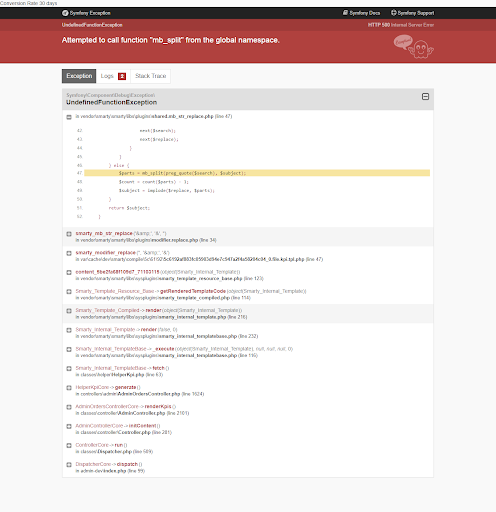
We will see how to fix it.
Thanks for your help & your understanding!
khouloudbelguith
on 7 Nov 2018
Hello @iprok
mbstring is required for prestashop
marionf
on 8 Nov 2018
Hello @iprok
mbstring is required for prestashop
@marionf
Very appreciated because of your answer. The reporter, me and other users who were touched by the issue want just to tell you "Prestashop require mbstring to work. BUT it's not mentioned anywhere: nor in manual, nor in prestashop admin panel - nowhere, so we (prestashop users) get this information only after facing the error. So be so kind just to add to prestashop installation script checking that mbstring is installed and information about that mbstring is required to your installation guides.
iprok
on 8 Nov 2018
Yes, you are right, we need to add it in the documentation and check it during installation
marionf
on 8 Nov 2018
I have the same problem now in my VPS. With an installation of Prestashop 1.7.6.0 and PHP 7.2.21
With the mstring module enabled in my PHP.
gd
gettext
hash
iconv
intl
json
libxml
mbstring
mysqli
mysqlnd
openssl
pcntl
pcre
PDO
pdo_mysql
Phar
posix
readline
Reflection
session
shmop
SimpleXML
sockets
sodium
SPL
standard
sysvmsg
sysvsem
sysvshm
tokenizer
wddx
xml
xmlreader
xmlwriter
xsl
Zend OPcache
zip
zlib
[Zend Modules]
Zend OPcache
 Esmoof
on 10 Aug 2019
Esmoof
on 10 Aug 2019
Related issues
 centoasa
·
3Comments
centoasa
·
3Comments
 Van-peterson
·
3Comments
Van-peterson
·
3Comments
 rGaillard
·
3Comments
rGaillard
·
3Comments
 hiousi
·
3Comments
hiousi
·
3Comments
 itisco
·
3Comments
itisco
·
3Comments