Prestashop: [BOOM-6225] Unable to call an undefined method name "parseFIle" in Back Office
This issue has been migrated from the Forge. Read the original ticket here.
- _Reporter:_ Hitacs
- _Created at:_ Fri, 10 Aug 2018 10:24:28 +0200
We have this ERROR and we can´t go to Backoffice after update.
Someone can help us?
- How to reproduce the issue ?
 prestonBot
All 38 comments
This comment has been migrated from the Forge. Read the original comment here.
- _Author:_ khouloud.belguith
- _Created at:_ Fri, 10 Aug 2018 10:45:12 +0200
Hi Hitacs,
What is the exact version of the 1-click upgrade did you use?
Best regards, Khouloud
prestonBot
on 22 Aug 2018
This comment has been migrated from the Forge. Read the original comment here.
- _Author:_ hitacs
- _Created at:_ Fri, 10 Aug 2018 12:02:48 +0200
Was the last version. 3.0.5
prestonBot
on 22 Aug 2018
This comment has been migrated from the Forge. Read the original comment here.
- _Author:_ khouloud.belguith
- _Created at:_ Fri, 10 Aug 2018 12:05:35 +0200
Hi Hitacs,
No, this is not the last version.
The Auto Upgrade module version 4.0 has been released after 5 betas.
Thanks to check & feedback.
Best regards, Khouloud
prestonBot
on 22 Aug 2018
This comment has been migrated from the Forge. Read the original comment here.
- _Author:_ aulika
- _Created at:_ Tue, 14 Aug 2018 09:12:06 +0200
Hi
I have the same ERRORs.
prestonBot
on 22 Aug 2018
This comment has been migrated from the Forge. Read the original comment here.
- _Author:_ khouloud.belguith
- _Created at:_ Tue, 14 Aug 2018 10:49:40 +0200
Hi Julija Sepp,
Did you use the last version of the 1-click upgrade module?
Can you please provide us the log of your upgrade? It can be found in the log.txt file, available in
Best regards, Khouloud
prestonBot
on 22 Aug 2018
This comment has been migrated from the Forge. Read the original comment here.
- _Author:_ aulika
- _Created at:_ Tue, 14 Aug 2018 11:07:45 +0200
Hi, Khouloud
I do not know what version of module I was used. And I have not log.txt file in
Best Regards,
Julija
prestonBot
on 22 Aug 2018
This comment has been migrated from the Forge. Read the original comment here.
- _Author:_ khouloud.belguith
- _Created at:_ Tue, 14 Aug 2018 11:50:42 +0200
Hi Julija Sepp,
In the config.xml file into the path PROJECT_FOLDER/modules/autoupgrade/config.xml you can find the module's version.
Thanks to check and feedback.
Best regards, Khouloud
prestonBot
on 22 Aug 2018
This comment has been migrated from the Forge. Read the original comment here.
- _Author:_ aulika
- _Created at:_ Tue, 14 Aug 2018 11:53:46 +0200
Hi, Khouloud
version 3.0.5
Best Regards,
Julija
prestonBot
on 22 Aug 2018
This comment has been migrated from the Forge. Read the original comment here.
- _Author:_ urecheatu007
- _Created at:_ Tue, 14 Aug 2018 12:05:54 +0200
I got the same exact error.
Re-done the upgrade process over 3 times, from 1.7.1.1 to 1.7.4.2 using 4.0 version of the autoupgrade module. Latest atempt was with all non-prestashop modules uninstalled/erased and the default theme.log.txt
prestonBot
on 22 Aug 2018
This comment has been migrated from the Forge. Read the original comment here.
- _Author:_ khouloud.belguith
- _Created at:_ Tue, 14 Aug 2018 12:06:05 +0200
Hi Hitacs,
No, this is not the last version.
The last version for the Auto Upgrade module is v4.0.0.
Please follow the link: https://github.com/PrestaShop/autoupgrade/releases
Thanks to check & feedback.
Best regards,
Khouloud
prestonBot
on 22 Aug 2018
This comment has been migrated from the Forge. Read the original comment here.
- _Author:_ urecheatu007
- _Created at:_ Tue, 14 Aug 2018 13:32:58 +0200
I solved the issue (at least until the real fix comes in the core).
There are 2 files involved, in both of them you have calls like the commented line, to parseFile method. I replaced those 2 calls with the old version and it works.
Both files are sumfony core and called YamlFileLoader.php, one in Symfony\Component\Routing\Loader and the other in Symfony\Component\DependencyInjection\Loader
//$configuration = $this->yamlParser->parseFile($file, Yaml::PARSE_CONSTANT | Yaml::PARSE_CUSTOM_TAGS); -> the bugged line
$configuration = $this->yamlParser->parse(file_get_contents($file)); -> the modified way, also the old way it was called by them.
prestonBot
on 22 Aug 2018
This comment has been migrated from the Forge. Read the original comment here.
- _Author:_ khouloud.belguith
- _Created at:_ Tue, 14 Aug 2018 15:48:22 +0200
Hi urecheatu007,
Thanks for your feedback & your fix.
Hitacs, Julija Sepp any news about our issues? did you try to use the solution proposed by Cosmin Hutanu?
Best regards, Khouloud
prestonBot
on 22 Aug 2018
This comment has been migrated from the Forge. Read the original comment here.
- _Author:_ mclovin
- _Created at:_ Wed, 15 Aug 2018 16:25:44 +0200
Hi all,
FYI
- I manually upgraded to PS 1.7.4.1 (well through my Plesk server interface) - and had no issues with the Classic theme.
- Then I began to upgrade ALL the native modules and then I had all the same Kernel errors at all the same places as the original poster had (see above)
- I had to restore the site to fix this.
prestonBot
on 22 Aug 2018
This comment has been migrated from the Forge. Read the original comment here.
- _Author:_ khouloud.belguith
- _Created at:_ Wed, 15 Aug 2018 16:32:42 +0200
Hi Andreas,
Can you please provide us the log of your upgrade? It can be found in the log.txt file, available in
Best regards, Khouloud
prestonBot
on 22 Aug 2018
This comment has been migrated from the Forge. Read the original comment here.
- _Author:_ mclovin
- _Created at:_ Wed, 15 Aug 2018 17:50:40 +0200
I have replicated the manual installation of ALL the native Module updates on a functional 1.7.4.2 installation and I still get a blank BackOffice page (default) and the same Kernel errors again. But I cannot give you any logs as I don't use Autoupdate and there are no log files inside
prestonBot
on 22 Aug 2018
This comment has been migrated from the Forge. Read the original comment here.
- _Author:_ khouloud.belguith
- _Created at:_ Wed, 15 Aug 2018 17:56:46 +0200
Hi Andreas,
Could you please provide us with more info? We need more details to understand how we can reproduce your issue:
- host
- server setup and configuration
- PrestaShop version (source)
- debug mode report
- PHP error logs
- apache error log
- javascript console log
- screenshots
Don't you know how to get this information? Please read the following article:
http://build.prestashop.com/howtos/misc/how-to-create-bug-report/
Thanks!
Best regards, Khouloud
prestonBot
on 22 Aug 2018
This comment has been migrated from the Forge. Read the original comment here.
- _Author:_ mclovin
- _Created at:_ Wed, 15 Aug 2018 18:02:54 +0200
Good Bug guide there!
I would love to assist but as this a non-production site and I have a few other issues on my production site I will have to focus on that, I'm so sorry.
I will try to get back to it once/if my other issues are solved on my production site.
prestonBot
on 22 Aug 2018
This comment has been migrated from the Forge. Read the original comment here.
- _Author:_ khouloud.belguith
- _Created at:_ Wed, 15 Aug 2018 18:04:06 +0200
Hi Andreas,
Thanks!
Waiting for your feedback.
Best regards, Khouloud
prestonBot
on 22 Aug 2018
I am currently having this error in a PS 1.7.4.2.
I was trying to upgrade 1-click upgrade module as suggested by notifications. At first try, it displayed a red error message. At second try, it tells me "Module successfully installed" but when I tried immediately to upgrade another built-in module, the exception occurred.
 arouiadib
on 25 Aug 2018
arouiadib
on 25 Aug 2018
yes me too, now .
after upgrate module 1click upgrate show me same error ..
(1/1) UndefinedMethodExceptionAttempted to call an undefined method named "parseFile" of class "Symfony\Component\Yaml\Parser".
in YamlFileLoader.php line 667
at YamlFileLoader->loadFile('/var/www/vhosts/fershop.it/httpdocs/app/config/config_dev.yml')in YamlFileLoader.php line 117
at YamlFileLoader->load('/var/www/vhosts/fershop.it/httpdocs/app/config/config_dev.yml', null)in DelegatingLoader.php line 40
at DelegatingLoader->load('/var/www/vhosts/fershop.it/httpdocs/app/config/config_dev.yml')in AppKernel.php line 137
at AppKernel->registerContainerConfiguration(object(DelegatingLoader))in Kernel.php line 774
at Kernel->buildContainer()in Kernel.php line 640
at Kernel->initializeContainer()in Kernel.php line 135
at Kernel->boot()in Kernel.php line 195
at Kernel->handle(object(Request), 1, false)in index.php line 88
 tone87
on 25 Aug 2018
tone87
on 25 Aug 2018
same :(
after uninstall module 1click and upgrade 4.0.0
(1/1) UndefinedMethodException
Attempted to call an undefined method named "parseFile" of class "Symfony\Component\Yaml\Parser".
in YamlFileLoader.php line 667
at YamlFileLoader->loadFile('/home/songelabne/www/boutiquev2/app/config/config_dev.yml')in YamlFileLoader.php line 117
at YamlFileLoader->load('/home/songelabne/www/boutiquev2/app/config/config_dev.yml', null)in DelegatingLoader.php line 40
at DelegatingLoader->load('/home/songelabne/www/boutiquev2/app/config/config_dev.yml')in AppKernel.php line 137
at AppKernel->registerContainerConfiguration(object(DelegatingLoader))in Kernel.php line 774
at Kernel->buildContainer()in Kernel.php line 640
at Kernel->initializeContainer()in Kernel.php line 135
at Kernel->boot()in Kernel.php line 195
at Kernel->handle(object(Request), 1, false)in index.php line 89
how can I reactivate the module, without backoffice, please it's urgent
thanks
 lugio
on 25 Aug 2018
lugio
on 25 Aug 2018
i solved with this steps:
- backup file of this folder /modules/autoupgrade
- after backup delete all file in that folder.
- dowload beta version of this module here https://github.com/PrestaShop/autoupgrade/releases/download/v4.1.0-beta.2/autoupgrade-v4.1.0-beta.2.zip
extract the contents in modules/autoupgrade folder
go to phpmyadmin , in modules table, set on column "active" the value 0 at row "autoupgrade"
- reload Backoffice page in your browser
- now go to phpmyadmin , in modules table, set on column "active" the value 1 at row "autoupgrade"
- reload Backoffice page and it work
tone87
on 26 Aug 2018
Hi,
I had same problem on 2 websites PS 1.7.4.2 and I fixed it
I also was trying to upgrade 1-click upgrade module as suggested by notifications.
At first try, it displayed nothing (or I have not seen the red error message), then I tryed again because the module was not upgraded, finally I gave up, but when I opened another page I had the same error page: UndefinedMethodException...
I changed 2 lines on these 2 files:
in /vendor/symfony/symfony/src/Symfony/Component/DependencyInjection/Loader/YamlFileLoader.php
Change this:
$configuration = $this->yamlParser->parseFile($file, Yaml::PARSE_CONSTANT | Yaml::PARSE_CUSTOM_TAGS);
By this:
$configuration = $this->yamlParser->parse(file_get_contents($file));
and in /vendor/symfony/symfony/src/Symfony/Component/Routing/Loader/YamlFileLoader.php
Change this line:
$parsedConfig = $this->yamlParser->parseFile($path);
By this:
$parsedConfig = $this->yamlParser->parse(file_get_contents($path));
Now it seems to work, I can open the backoffice.
This problem is not part of this bug, this option doesn't work if a second language is active on website:
The Quick-view option in front office doesn't work anymore on home and category pages.
 Host84
on 26 Aug 2018
Host84
on 26 Aug 2018
Hi, Also got this issue:
Upgrade also today, the autoupgrade from modules tab, complete BackOffice broken. Like @Host84... described.
 sdwebdesign
on 26 Aug 2018
sdwebdesign
on 26 Aug 2018
I got the same issue on PrestaShop 1.7.4.2 upon upgrading the “Auto upgrade” to the newer version, as was suggested by BO on Prestashop 1.7.4.2 notification under Module and right after successfully upgrading the module I got
Oops! An Error Occurred
The server returned a "500 Internal Server Error".
Something is broken. Please let us know what you were doing when this error occurred. We will fix it as soon as possible. Sorry for any inconvenience caused.
And now I can’t access the BO but the FO is running.
The Error I get:
[Mon Aug 20 08:52:22.765221 2018] [authz_core:error] [pid 2196:tid 140247497086720] [client 192.115.229.66:60974] AH01630: client denied by server configuration: /home/iriwaq/public_html/translations/cldr/datas/supplemental/plurals.json, referer: https://iriwaq.com/iRadmin123/index.php/product/form/644?_token=-Vkr61lWst0fIrq4M40J4hbstLfqrNpxO1oEFWWxUnw
[Mon Aug 20 08:52:22.440129 2018] [authz_core:error] [pid 2167:tid 140247497086720] [client 192.115.229.66:60973] AH01630: client denied by server configuration: /home/iriwaq/public_html/translations/cldr/datas/supplemental/currencyData.json, referer: https://iriwaq.com/iRadmin123/index.php/product/form/644?_token=-Vkr61lWst0fIrq4M40J4hbstLfqrNpxO1oEFWWxUnw
[Mon Aug 20 08:52:21.500406 2018] [authz_core:error] [pid 2224:tid 140247507576576] [client 192.115.229.66:60971] AH01630: client denied by server configuration: /home/iriwaq/public_html/translations/cldr/datas/supplemental/likelySubtags.json, referer: https://iriwaq.com/iRadmin123/index.php/product/form/644?_token=-Vkr61lWst0fIrq4M40J4hbstLfqrNpxO1oEFWWxUnw
[Mon Aug 20 08:52:21.427958 2018] [authz_core:error] [pid 2167:tid 140247507576576] [client 192.115.229.66:60969] AH01630: client denied by server configuration: /home/iriwaq/public_html/translations/cldr/datas/main/en-US/currencies.json, referer: https://iriwaq.com/iRadmin123/index.php/product/form/644?_token=-Vkr61lWst0fIrq4M40J4hbstLfqrNpxO1oEFWWxUnw
[Mon Aug 20 08:52:21.362802 2018] [authz_core:error] [pid 2224:tid 140247497086720] [client 192.115.229.66:60975] AH01630: client denied by server configuration: /home/iriwaq/public_html/translations/cldr/datas/main/en-US/numbers.json, referer: https://iriwaq.com/iRadmin123/index.php/product/form/644?_token=-Vkr61lWst0fIrq4M40J4hbstLfqrNpxO1oEFWWxUnw
[
I appreciate the help to get the BO working again.
 anj7
on 27 Aug 2018
anj7
on 27 Aug 2018
Same here, after upgrading 1click on 1.7.4.2, but different error messages. What solved my issue was to rename(or delete) the folder /vendor/ in /modules/ps_facetedsearch/
I checked a backup and that folder wasn't there. I have no idea why, but this worked for me.
 VictorVSa
on 27 Aug 2018
VictorVSa
on 27 Aug 2018
Hi,
The stable version 4.1.0 is released: you can follow this link: https://github.com/PrestaShop/autoupgrade/releases/tag/v4.1.0, please try again with this one and let us know if the issue still occurs.
Best regards, Khouloud
 khouloudbelguith
on 27 Aug 2018
khouloudbelguith
on 27 Aug 2018
Hi,
like @VictorVSa said, to solve the problem we can also remove or rename the folder:
/modules/ps_facetedsearch/vendor
I checked again and he’s right, this folder and others was not there before this bug, as you can see on this screenshot:
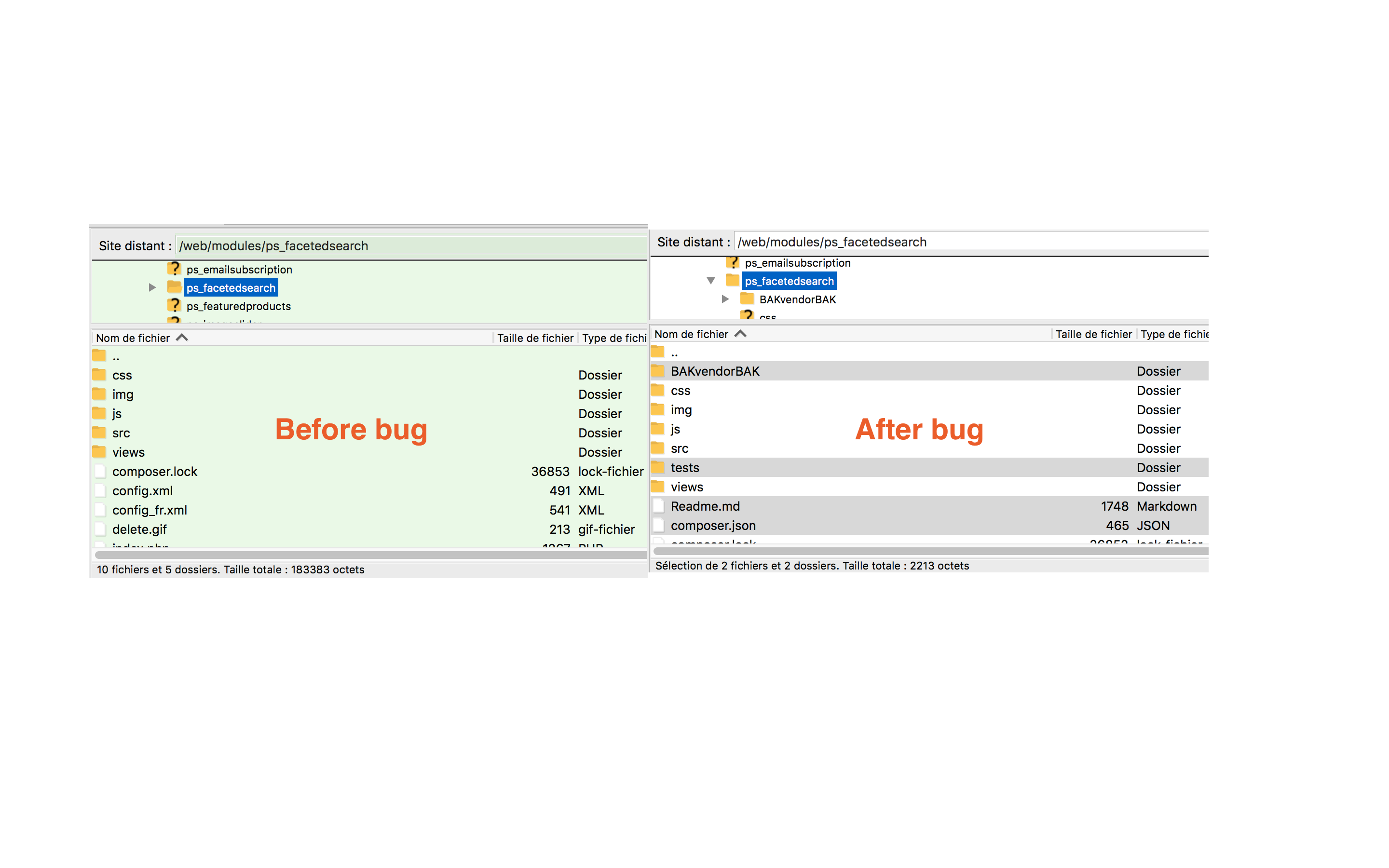
Thank you Khouloud, I will try it, but should I delete and reinstall ps_facetedsearch module or no need ?
Host84
on 27 Aug 2018
Hi Khouloud, The errors that I get as shown above revolves around .json, do you think the solution you presented equally works in my case? if not, how best should I tackle the error to enable me to access BO.
anj7
on 28 Aug 2018
Hi aalshariff,
did you activate the debug mode ?
Host84
on 28 Aug 2018
For people who having this errors with their modules, you can use https://getcomposer.org/doc/06-config.md#prepend-autoloader .
 PierreRambaud
on 28 Aug 2018
PierreRambaud
on 28 Aug 2018
I have The same issue after updating the Module "1 click upgrade" in prestashop 1.7.4.2
This happens when I update the module from v4.0.0 arrow_forward v4.1.0
Also when I try to delete the module the same thing happens.
- manual update same result
- remove module same result
After updating the "1 click upgrade" module the following issue occurs on the backend.
Frontend is working normally.
Oops! An Error Occurred
The server returned a "500 Internal Server Error".
Something is broken. Please let us know what you were doing when this error occurred. We will fix it as soon as possible. Sorry for any inconvenience caused.
I have enabled debug mode and get the following message.
Check the screenshot!
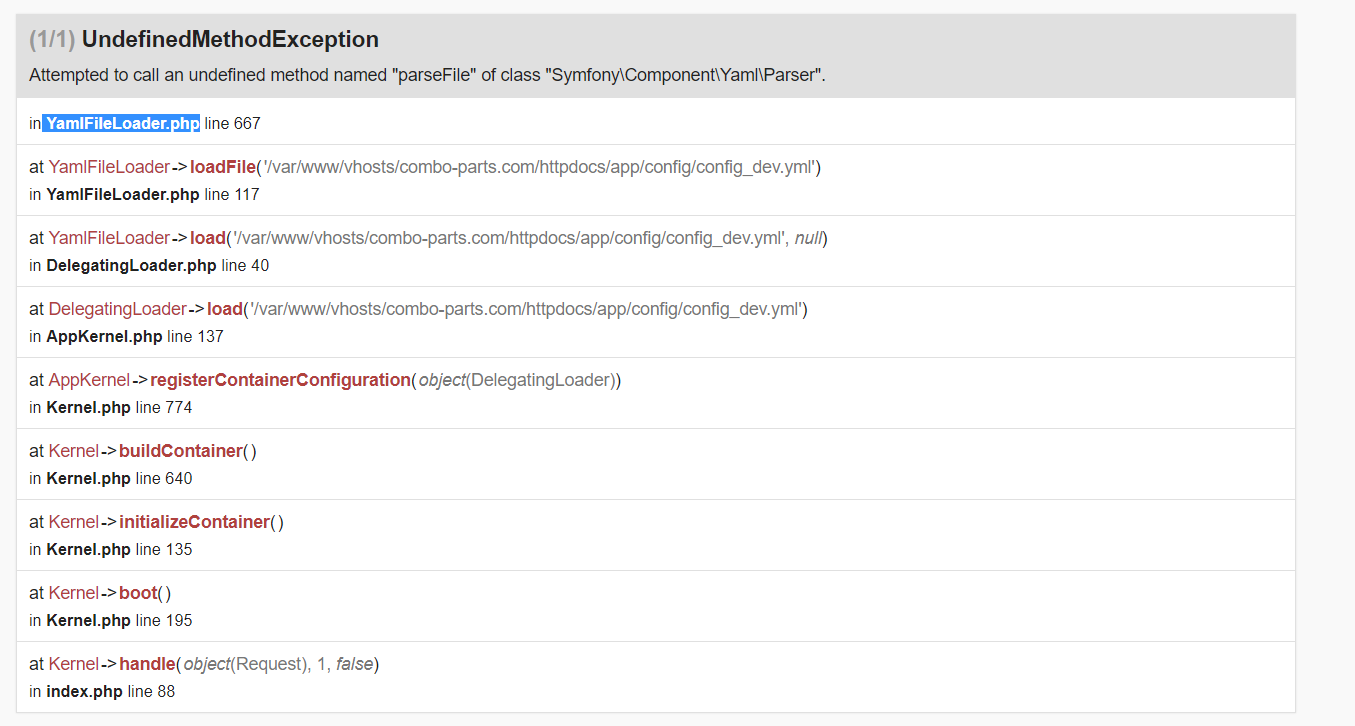
like @VictorVSa said, to solve the problem we can also remove or rename the folder:
/modules/ps_facetedsearch/vendor
But what do I break like this! is it save to rename that folder?
I have further pinpointed it to /httpdocs/modules/ps_facetedsearch/vendor/symfony/yaml
renaming the yaml , brings up the backend again.
BUT IS THIS SAFE ????
 DTGMAZE
on 30 Aug 2018
DTGMAZE
on 30 Aug 2018
@DTGMAZE Yes it is safe because this folder and others was not there before this bug, as you can see on my screenshot, so don't worry, just rename it like I did on screenshot (no need delete).
YOUR_PRESTASHOP_FOLDER/modules/ps_facetedsearch/vendorBAK
Host84
on 30 Aug 2018
Hi @DTGMAZE,
This issue could be a conflict between ps_facetedsearch and autoupgrade. Try to temporarily remove it and see if get your BO back.
Best regards, Khouloud
khouloudbelguith
on 30 Aug 2018
Hi,
@DTGMAZE I faced the exact same issue, and can confirm that deleting (or renaming) /modules/ps_facetedsearch/vendor is safe and fixes the problem w/ BO.
Thank you @Host84 for your precious help.
 ggardin
on 30 Aug 2018
ggardin
on 30 Aug 2018
OK. Same error after updating autoupgrade module, same fix solved it. But what's the catch? Before renaming the vendor folder in ps_facetedsearch I have also tried renaming autoupgrade in order to disable it, but still it didn't work.
Now I've got the dreaded "Required parameters: Please fix the following error(s)" in Advanced parameters->Information with no errors listed, meaning that I will not be able to update using 1 click upgrade. Anybody else got this now?
 rdy4ever
on 2 Sep 2018
rdy4ever
on 2 Sep 2018
Hi @rdy4ever,
It seems that a description is missing, and that's why it could not be listed in the "following errors".
Here's the PR about that issue in https://github.com/PrestaShop/PrestaShop/pull/9407.
If you're confident in modifying the core files manually, you can apply the changes to show the test in failure.
Best regards, Khouloud
khouloudbelguith
on 3 Sep 2018
Hi,
Since we had no news from you for more than 30 days, I'll close this ticket. Feel free to open another one if you can give specific details.
Thanks!
khouloudbelguith
on 6 Feb 2019
Related issues
 zuk3975
·
3Comments
zuk3975
·
3Comments
 vincent-dp
·
3Comments
vincent-dp
·
3Comments
 esistgut
·
3Comments
esistgut
·
3Comments
 PrestaShark
·
3Comments
zuk3975
·
3Comments
PrestaShark
·
3Comments
zuk3975
·
3Comments