Prestashop: [BOOM-6253] Prestashop cart object is undefined after refresh
This issue has been migrated from the Forge. Read the original ticket here.
- _Reporter:_ DennisPW
- _Created at:_ Wed, 15 Aug 2018 16:42:44 +0200
Using the prestashop.cart object in javascript together with various events we can create some very interesting and effective solutions.
However, this breaks on the cart page. Try the following snippet on a product page:
Now go to the cart page (with a few products added). Modify the quantity of any product. It will work the first time. Try it a second time, a third time. Now the prestashop.cart object will be `undefined`.
It's seems to somehow be related the the cart?ajax=1&action=refresh. If you are really quick and log the prestashop.cart constantly until the refresh happens you should be able to see that the information is updated and correct. As soon as the refresh happens the prestashop.cart object becomes undefined.
- How to reproduce the issue ?
- Set up a simple function that logs out the prestashop.cart object on the "updateCart" event
- Try adding a product from the product page
- Go to the cart
- Update a quantity, it will work the first time
- Update a quantity, it will not work from now on
 prestonBot
All 12 comments
This comment has been migrated from the Forge. Read the original comment here.
- _Author:_ khouloud.belguith
- _Created at:_ Wed, 15 Aug 2018 17:22:52 +0200
Hi Dennis,
Thanks for your report.
Could you please provide us the exact file that we should edit and setting up into it a simple function that logs out the prestashop.cart object on the "updateCart" event.
Best regards, Khouloud
prestonBot
on 22 Aug 2018
This comment has been migrated from the Forge. Read the original comment here.
- _Author:_ dennispw
- _Created at:_ Thu, 16 Aug 2018 08:54:05 +0200
I've attached the custom.js file. Just add it to the standard "Classic" theme as per usual.
prestonBot
on 22 Aug 2018
This comment has been migrated from the Forge. Read the original comment here.
- _Author:_ khouloud.belguith
- _Created at:_ Thu, 16 Aug 2018 10:32:56 +0200
Hi Dennis,
I attached a video record.
Aug 16 2018 10_31 AM.webm
Thanks to check and feedback.
Best regards, Khouloud
prestonBot
on 22 Aug 2018
This comment has been migrated from the Forge. Read the original comment here.
- _Author:_ dennispw
- _Created at:_ Thu, 16 Aug 2018 11:24:22 +0200
I've attached a video.
The prestashop.cart object is there, everytime you add a product or update the quantity.
As soon as you get to the cart page, it will only be correct the first time you update the cart. The rest of the times it will be undefined.
prestonBot
on 22 Aug 2018
This comment has been migrated from the Forge. Read the original comment here.
- _Author:_ khouloud.belguith
- _Created at:_ Thu, 16 Aug 2018 11:45:16 +0200
Hi Dennis,
Thanks for this clarifications.
I manage to reproduce the issue with the last version 1.7.4.2.
[As soon as I get to the cart page, it will only be correct the first time you update the cart. The rest of the times it will be undefined.]

We will see how to fix it.
Best regards, Khouloud
prestonBot
on 22 Aug 2018
@khouloudbelguith Could you try to reproduce it with 1.7.6.x ?
 marionf
on 20 May 2019
marionf
on 20 May 2019
Hi @marionf,
Yes, I manage to reproduce the issue with PS1.7.6.0.
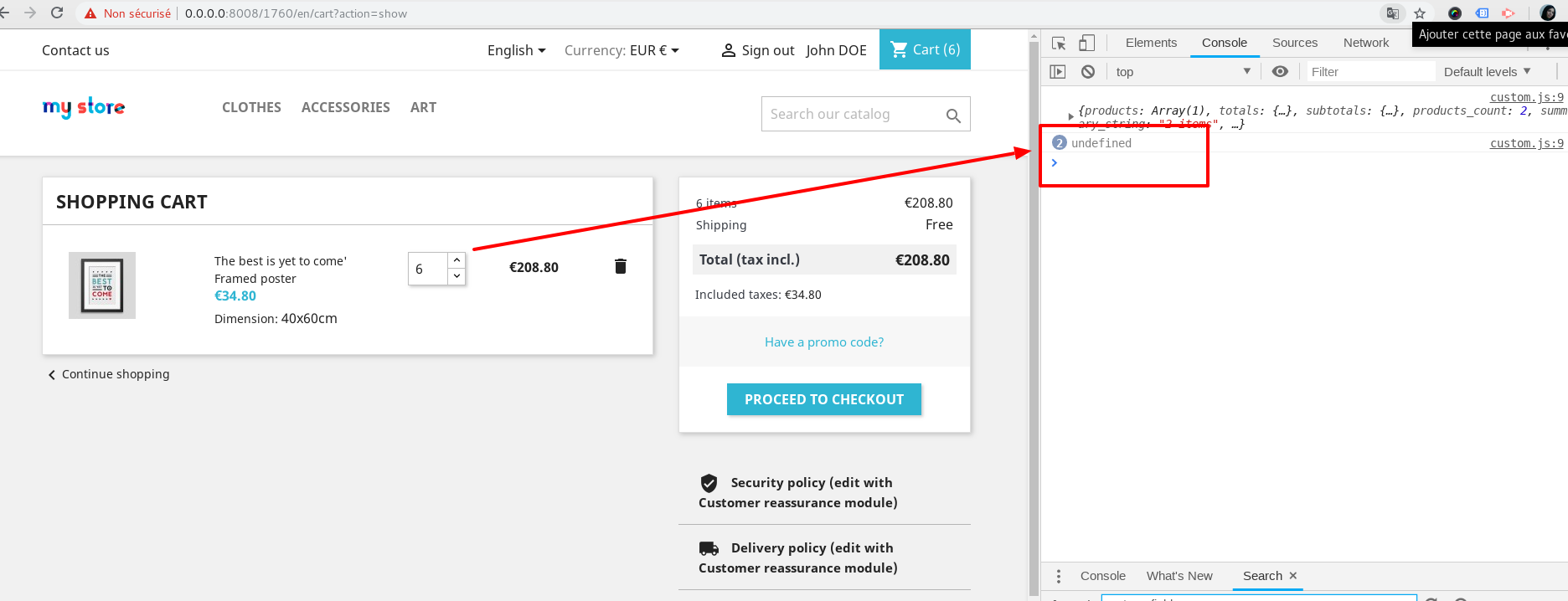
It will only be correct the first time you update the cart. The rest of the time it will be undefined.
Thanks!
 khouloudbelguith
on 20 May 2019
khouloudbelguith
on 20 May 2019
The issue is still present in 1.7.6.1 - any news when it will be fixed @khouloudbelguith? Without is it is difficult to dynamically react on cart changes in JS.
I think it is caused in line 31 in cart.js where prestashop.cart is overwritten with event data that don't contain a cart object - not sure what is the intention of this code:
prestashop.cart = event.reason.cart;
 JBWModules
on 8 Nov 2019
JBWModules
on 8 Nov 2019
@JBWModules, Sorry not yet.
PrestaShop is an open-source project, so it can be solved before if someone submits a pull request to solve it.
Thanks!
khouloudbelguith
on 8 Nov 2019
Also this bug is revealed when removing product from cart. Is there any workaround on this bug?
 Tehnikus
on 17 Dec 2019
Tehnikus
on 17 Dec 2019
Hi @Tehnikus,
Sorry not yet.
Thanks!
khouloudbelguith
on 17 Dec 2019
Found simmilar issue with updating cart count in header default theme
for updating cart count I use
prestashop.on('updateCart', function(event) {
if(event.resp != undefined && event.resp.cart != undefined) {
$(".cart-preview .cart-products-count").text(event.resp.cart.products_count);
}
});
~
removing from cart not worked so I fix code in theme.js to, now its working like expected :100:
b = function (t) {
t.preventDefault();
var e = (0, a.default)(t.currentTarget), n = t.currentTarget.dataset, i = o(e, t.namespace), r = {ajax: "1", action: "update"};
void 0 !== i && (v(), a.default.ajax({
url: i.url, method: "POST", data: r, dataType: "json", beforeSend: function (t) {
m.push(t)
}
}).then(function (t) {
p.checkUpdateOpertation(t), y(e).val(t.quantity), l.default.emit("updateCart", {reason: n, resp: t})
}).fail(function (t) {
l.default.emit("handleError", {eventType: "updateProductInCart", resp: t, cartAction: i.type})
}))
};
fix was with adding , resp: t to emit event so now is cart available there
 sjurajpuchky
on 25 Jul 2020
sjurajpuchky
on 25 Jul 2020
Related issues
 Van-peterson
·
3Comments
Van-peterson
·
3Comments
 PrestaShark
·
3Comments
PrestaShark
·
3Comments
 zuk3975
·
3Comments
zuk3975
·
3Comments
 wikao2
·
3Comments
wikao2
·
3Comments
 Fabuloops
·
3Comments
Fabuloops
·
3Comments