Prefect: Improve client API behavior when interacting with an unauthorized client api
Current behavior
Authorization of the client api is supposed to happen automatically through tokens specified in environment variables, configs or parameters. When tokens are not provided correctly, the api fails in various ways without telling specifically whats wrong - like a missing or wrong token.
Proposed behavior
Give better guidance on how to fix the underlying problem - failing authentication of the client or agent.
Example
- When
PREFECT__CLOUD__AUTH_TOKENisn't configured, callingagent.registerleads to the errorprefect.utilities.exceptions.ClientError: Malformed response received from Cloud - please ensure that you have an API token properly configuredwithout telling specifically which token is missing and how to make sure it is provided. - When a token is provided, but the system hasn't ever been logged on _properly_,
agent.registertries to search for the project using an unauthorized API, thus failing withprefect.utilities.exceptions.ClientError: [{'path': ['project'], 'message': 'field "project" not found in type: \'query_root\'', 'extensions': {'path': '$.selectionSet.project', 'code': 'validation-failed', 'exception': {'message': 'field "project" not found in type: \'query_root\''}}}]
 lcorneliussen
All 16 comments
Thanks for raising the issue, I agree we could definitely do better here. Adding it to our todo list.
 jcrist
on 24 Sep 2020
jcrist
on 24 Sep 2020
Still struggling to actually get it working though. Lost in 100 tokens 👍
lcorneliussen
on 24 Sep 2020
I'm sorry to hear that. It looks like you're dealing with agent? Have you followed the steps here for creating an agent token and configuring it in your environment? https://docs.prefect.io/orchestration/tutorial/configure.html#authenticating-with-prefect-cloud.
jcrist
on 24 Sep 2020
What kind of tokens are actually supported for PREFECT__CLOUD__AUTH_TOKEN and PREFECT__CLOUD__AGENT__AUTH_TOKEN in order for flow.register to work without specifically authenticating the session first?
lcorneliussen
on 24 Sep 2020
I'm not sure I follow the question, so a few general comments:
PREFECT__CLOUD__AUTH_TOKENtakes aUSERtoken,PREFECT__CLOUD__AGENT__AUTH_TOKENtakes aRUNNERtoken (https://docs.prefect.io/orchestration/tutorial/configure.html#authenticating-with-prefect-cloud).- Running
flow.registershould only require a user token, as you're doing a user action. Generally we recommend users authenticate beforehand withprefect auth login -t <USER TOKEN>, which persists your authentication locally, but settingPREFECT__CLOUD__AUTH_TOKENto aUSERtoken should also work.
jcrist
on 24 Sep 2020
Apologies! I was incorrect with the above (I freely admit our current auth story is a bit confusing, we're working to simplify it in the next quarter). You cannot provide a USER token to PREFECT__CLOUD__AUTH_TOKEN instead of logging in with prefect auth login, USER tokens only work with prefect auth login because they're associated with a user only (not a tenant). If you want to be able to do user-scoped activities without doing a persistent login, you need to create a TENANT token (https://docs.prefect.io/orchestration/concepts/tokens.html#tenant) and assign it to PREFECT__CLOUD__AUTH_TOKEN.
jcrist
on 24 Sep 2020
@lcorneliussen sorry for the confusion here - as @jcrist mentioned, we're already working on a complete overhaul of Prefect's auth patterns and expect to release it early next quarter. Existing tokens will all continue to work, but we know this has become quite convoluted and even gets us confused, so we're looking forward to introducing a more streamlined set up.
 jlowin
on 24 Sep 2020
jlowin
on 24 Sep 2020
Or call client.login_to_tenant - but then I'd need to know the tenant identifier.
lcorneliussen
on 24 Sep 2020
you need to create a TENANT token (https://docs.prefect.io/orchestration/concepts/tokens.html#tenant) and assign it to PREFECT__CLOUD__AUTH_TOKEN.
That I tried. Didn't work either.
lcorneliussen
on 24 Sep 2020
Seems like it is only restoring a serialized active_tenant_id - but not persisting one from an auth token.
lcorneliussen
on 24 Sep 2020
Seems like it is only restoring a serialized
active_tenant_id- but not persisting one from an auth token.
Registering a flow never accesses the _active_tenant_id attribute.
That I tried. Didn't work either.
I'm unable to replicate your issue. With no other login credentials active, setting a tenant token as PREFECT__CLOUD__AUTH_TOKEN and registering a flow works for me. I've also verified below that the tenant token is picked up by the Client and is the only credential active in my session.
$ export PREFECT__CLOUD__AUTH_TOKEN=<TENANT_TOKEN>

$ python    # demonstrating the tenant token is used
Python 3.8.5 (default, Sep  4 2020, 02:22:02)
[Clang 10.0.0 ] :: Anaconda, Inc. on darwin
Type "help", "copyright", "credits" or "license" for more information.
>>> from prefect import Client
>>> client = Client()
>>> client._active_tenant_id  is None # is None, since tenant token is used
True
>>> client._api_token  # matches my tenant token above
"<REDACTED>"
>>> exit()

$ cat temp.py
from prefect import Flow, task

@task
def hello():
    print("HELLO")

with Flow("test-tenant") as flow:
    hello()

flow.register("testing")

$ python temp.py
Result check: OK
Flow URL: https://cloud.prefect.io/jim-prefectio/flow/fb30711a-ce12-4e31-b9c1-aa0cf7f49aa0
 └── ID: fb30711a-ce12-4e31-b9c1-aa0cf7f49aa0
 └── Project: testing
 └── Labels: ['Jims-MacBook-Pro.local']
I'm then also starting the agent using flow.run_agent().
In order to get everything working from docker (isolated env) I had to:
1) Provide a tenant token for PREFECT__CLOUD__AUTH_TOKEN
2) Provide a runner token for PREFECT__CLOUD__AGENT__AUTH_TOKEN
3) Authenticate using prefect auth login -t ${PREFECT__CLOUD__AUTH_TOKEN}
4) Then start the script that registers the flow and starts the agent
What a beautiful picture in Azure Container Services towards the end of the week.
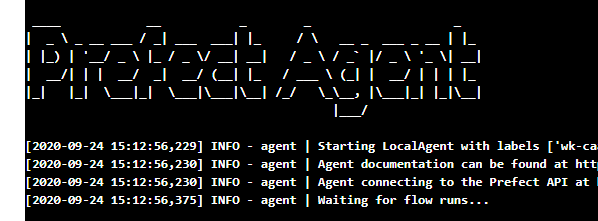
The goal was to get a minimal setup running with prefect and great expectations. Done.
lcorneliussen
on 24 Sep 2020
I'm then also starting the agent using
flow.run_agent().
Ah, for that you'd also need a RUNNER token configured.
Note that you shouldn't need to do both 1 and 3, doing either 1 or 3 should be sufficient.
Glad to hear you got things working, even though you ran into a few issues. We'll work to improve our docs and error messages around authentication to simplify this in the future.
jcrist
on 24 Sep 2020
I'm getting the same error. Based on the docs providing a runner token (PREFECT__CLOUD__AGENT__AUTH_TOKEN) should be enough but for the last two hours, I could make a simple sample to work even after setting (PREFECT__CLOUD__AUTH_TOKEN). I was evaluating PREFECT to suggest it to my company. Not the best first impression.
 amin010
on 5 Oct 2020
amin010
on 5 Oct 2020
Hi @amin010, I'm sorry to hear that you're having issues.
I'm unable to replicate, tokens seem to be working fine here and for other users. Can you provide an example of what you're doing and how it's failing (ideally this would be the command you're running and the error(s) that it generates)?
jcrist
on 5 Oct 2020
I felt like I had the same issue. Simply had the prefect.utilities.exceptions.ClientError: Malformed response received from Cloud - please ensure that you have an API token properly configured error pop up. In my case, I hadn't made the distinction between RUNNER and TENANT tokens. I tried setting PREFECT__CLOUD__AGENT__AUTH_TOKEN, PREFECT__CLOUD__AUTH_TOKEN individually and then together, but always to the same RUNNER token value, which was my mistake.
And this was only giving an error in the docker container and not on my machine, since I had previously logged in as a USER with prefect auth login.
So for those of you new to Prefect such as myself who might have the same issue, you need a different token for PREFECT__CLOUD__AGENT__AUTH_TOKEN and PREFECT__CLOUD__AUTH_TOKEN, not the same one.
 larochew
on 19 Oct 2020
larochew
on 19 Oct 2020
Related issues
 joshmeek
·
4Comments
joshmeek
·
4Comments
 Trymzet
·
4Comments
Trymzet
·
4Comments
 GZangl
·
3Comments
GZangl
·
3Comments
 rej-jsa
·
4Comments
rej-jsa
·
4Comments
 fgblomqvist
·
4Comments
fgblomqvist
·
4Comments
Most helpful comment
I'm then also starting the agent using
flow.run_agent().In order to get everything working from docker (isolated env) I had to:
1) Provide a tenant token for
PREFECT__CLOUD__AUTH_TOKEN2) Provide a runner token for
PREFECT__CLOUD__AGENT__AUTH_TOKEN3) Authenticate using
prefect auth login -t ${PREFECT__CLOUD__AUTH_TOKEN}4) Then start the script that registers the flow and starts the agent
What a beautiful picture in Azure Container Services towards the end of the week.

The goal was to get a minimal setup running with prefect and great expectations. Done.