Prefect: Add a --no-cache option to prefect server start command
Description
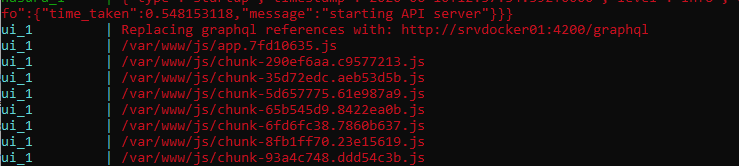
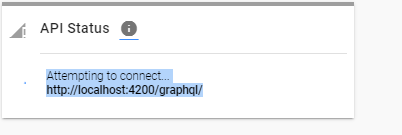
I'm deploying the Prefect Server on a remote Docker Host. I therefore change the address for server.ui.graphql_url in config.toml to reflect this. However this isn't reflected in UI, which keeps referring to localhost. It does show in the deployment logs though.
Expected Behavior
I expected the address to be replaced.
Reproduction
1) set DOCKER_HOST to use remote Docker. In my case I have called itsrvdocker01
2) use the following config.toml
backend = "server"

[server]
host = "http://srvdocker01"
port = "4200"
host_port = "4200"
endpoint = "${server.host}:${server.port}"

   [server.graphql]
    host = "srvdocker01"

    [server.ui]
    host = "http://srvdocker01"
    port = "8081"
    host_port = "8081"
    endpoint = "${server.ui.host}:${server.ui.port}"
    graphql_url = "http://srvdocker01:4200/graphql"
3) run prefect server start
4) go to http://srvdocker01:8081
Environment
>prefect diagnostics
{
  "config_overrides": {
    "backend": true,
    "server": {
      "endpoint": true,
      "graphql": {
        "host": true
      },
      "host": true,
      "host_port": true,
      "port": true,
      "ui": {
        "endpoint": true,
        "graphql_url": true,
        "host": true,
        "host_port": true,
        "port": true
      }
    }
  },
  "env_vars": [],
  "system_information": {
    "platform": "Windows-10-10.0.18362-SP0",
    "prefect_version": "0.11.5",
    "python_version": "3.7.0"
  }
}
 thomasfrederikhoeck
All 5 comments
@thomasfrederikhoeck can you try removing your cached docker images and pulling them again (prefect start server should do this automatically if the images don't exist)?
 znicholasbrown
on 10 Jun 2020
znicholasbrown
on 10 Jun 2020
Running docker system prune -a solved it. However though I would expect when I run prefect server start and it says that it is using the setting from my config.toml it should also do it to avoid confusion.
thomasfrederikhoeck
on 12 Jun 2020
Does this means it is fixed, or that is deemed unnecessary to fix ? A simple fix would be to at a --no-cache option to prefect server start that would be given to docker-compose up such that the user doesn't have to do the cleaning themselfs in Docker.
thomasfrederikhoeck
on 15 Jun 2020
Hi @thomasfrederikhoeck apologies I didn't see the possible action item lurking in your comment above - reopening to consider the --no-cache option
 cicdw
on 15 Jun 2020
cicdw
on 15 Jun 2020
No worries @cicdw
thomasfrederikhoeck
on 16 Jun 2020
Related issues
 petermorrow
·
3Comments
petermorrow
·
3Comments
 fgblomqvist
·
4Comments
fgblomqvist
·
4Comments
 kforti
·
3Comments
kforti
·
3Comments
 emcake
·
3Comments
emcake
·
3Comments
 rej-jsa
·
4Comments
rej-jsa
·
4Comments
Most helpful comment
Running
docker system prune -asolved it. However though I would expect when I runprefect server startand it says that it is using the setting from myconfig.tomlit should also do it to avoid confusion.