Preact: Lazy loading styled-components component triggers warning message incorrectly
Reproduction
https://github.com/TLadd/preact-styled-components-lazy-load-warning.
The relevant files are
- https://github.com/TLadd/preact-styled-components-lazy-load-warning/blob/master/src/index.js
- https://github.com/TLadd/preact-styled-components-lazy-load-warning/blob/master/src/StyledDiv.js
Steps to reproduce
Load the app and observe the following warning message is printed:
The component styled.div with the id of "sc-AxjAm" has been created dynamically.
You may see this warning because you've called styled inside another component.
To resolve this only create new StyledComponents outside of any render method and function component.
This warning occurs only when lazy loading a styled component or lazy loading something that renders a styled component with preact. The warning message is not printed if a dynamic import is not used or if using React instead of preact.
Looking at styled-components, it's triggering this warning message if calling useRef doesn't throw when declaring the component.
Expected Behavior
The warning message should not be printed.
Actual Behavior
The warning message is printed.
 TLadd
TLadd
All 27 comments
Intentionally triggering an exception as a debug helper is pretty strange behavior, so I'm not sure if it's worth fixing this - unless there's a cheap and useful way to have all hooks throw when called outside a component context. Currently Preact is permissive about this, but it's one of the reasons why we are able to support using hooks in class components and lifecycle methods.
 developit
on 14 Jun 2020
developit
on 14 Jun 2020
Oof that's a really strange thing to do. The hook is being called outside of a component, so Preact is correct to display an error message. I'm really curious why the styled-component team went that route as it seems like a very sketchy thing to do.
 marvinhagemeister
on 14 Jun 2020
marvinhagemeister
on 14 Jun 2020
Does it make sense that the warning only gets triggered when lazy loading the components? If it has to do with preact's permissiveness vs react when it comes to where hooks are called, I would think it would happen regardless of whether lazy loading were occurring or not. I'll file an issue with styled-components as well tomorrow to get the other side of this as well.
To be clear here @marvinhagemeister, it is styled-components, not Preact, that is displaying the error message because useRef is not throwing an error when the components are lazy loaded.
TLadd
on 15 Jun 2020
Hiya 👋
I’ve put in the warning and it triggers when we a hook _doesn’t_ throw during StyledComponent creation. I’m not sure what context this permissiv behaviour happens in, but it does seem like a tiny issue in preact/compat to me as during the time of import we shouldn’t be inside any component context; that being said it’s safe to ignore.
The reason why I’ve proposed the change and we’ve added it is that this is still a common mistake when styled-components are used. We get a lot of issues that relate to dynamically created components: unexpected edge cases that are usually impossible, memory leaks on the client-side and in SSR, out of memory errors, rerender bugs triggered by this, etc.
After having seen probably hundreds of these issues and comments, it’s clear that once people create more than a thousand components, telling them to track down the few cases where they’re dynamically created (and explaining this to beginners) is a daunting ask.
Hence this warning was introduced to rule this mistake out entirely, which has mostly eliminated this category of issues entirely 😅
 kitten
on 15 Jun 2020
kitten
on 15 Jun 2020
As @kitten suggested, is anyone able to confirm that it is a "tiny issue in preact/compat" that is causing these warnings, since as @TLadd pointed out in the description it is only happening with Preact and _not_ React?
 JesseKuntz
on 28 Sep 2020
JesseKuntz
on 28 Sep 2020
@JesseKuntz Preact will always print that warning when a hook is used outside of a component and that's what styled-components is doing. A simplified example:
useRef();

function MyComponent(props) {
  ...
}
EDIT: I'm going back and forth on this. It seems like to support this we'd need to upgrade our warning to an error.
EDIT2: I'm confused, we _do_ throw a warning when it's called outside of a component. There seems to be something else going on.
marvinhagemeister
on 28 Sep 2020
Ok, I think I got to the bottom of this. We correctly throw an error when preact/debug is present. Without any preact/debug imports we won't display any messages or errors only intended for debugging purposes.
This issue can be resolved by adding import "preact/debug" at the top of the main entry file.
import "preact/debug"; // <-- This enables debugging warnings/errors
import React from "react";
import ReactDOM from "react-dom";

// ...
If I do this, @marvinhagemeister, I get the following error: Error: Hook can only be invoked from render methods. (Using NextJS).
 heymartinadams
on 28 Sep 2020
heymartinadams
on 28 Sep 2020
@heymartinadams do you have a repro? The one from the original poster uses CRA and the above is all that's needed to fix it there.
marvinhagemeister
on 28 Sep 2020
@heymartinadams ~that seems like a React error, not a Preact error.~ You're likely missing preact/debug. Here's how to enable it in Next.js:
https://github.com/developit/nextjs-preact-demo/blob/77f928b754910f8d44687a3a6eb38c3e08f646c3/next.config.js#L33-L40
There's also a plugin that does all this automatically, which we're likely going to be marking as an official Preact project:
https://github.com/sventschui/next-plugin-preact
developit
on 28 Sep 2020
Thanks, @developit, that added the preact/debug. Though, still getting the error 😕 Will try the plugin.
Sorry, @marvinhagemeister don’t have an easily reproducible repo set up.
The component SplashLogo with the id of "SplashLogo-f09blk-0" has been created dynamically.
You may see this warning because you've called styled inside another component.
To resolve this only create new StyledComponents outside of any render method and function component.
@heymartinadams this can also happen if you end up with 2 copies of Preact in your bundle, or if there is both Preact and React.
developit
on 29 Sep 2020
@developit Mmh... tried the plugin, didn’t work. Today, upgraded to latest NextJS 9.5.4 and ended up doing a total hack since our Preact integration stopped working with that latest NextJS version. Somehow, it all works now, and the warnings are gone, too! Total noob here, so I’m not sure the stuff I put together is legit. Probably not. But works for some reason. 😅
heymartinadams
on 8 Oct 2020
@heymartinadams that "total hack" how you call it seems a bit off to me. Adding the react-refresh runtime manually doesn't feel right. @JoviDeCroock spent quite some time to create prefresh - the react-refresh alternative for preact. It even features a next.js plugin (https://github.com/JoviDeCroock/prefresh/tree/main/packages/next).
As @developit mentioned I maintain a next.js plugin that will take care of the aliasing of react to preact and also includes prefresh: https://github.com/sventschui/next-plugin-preact . I guess this plugin would be your best bet for a stable setup. If you experience any issues with that and styled-components it would be helpful if you could share a small reproduction project where we could take a closer look.
 sventschui
on 12 Oct 2020
sventschui
on 12 Oct 2020
@sventschui While I wasn’t able to use @JoviDeCroock’s @prefresh/next in conjunction with your withPreact package, it seems your withPreact package alone did the trick — thank you (and thanks, @developit for pointing it out)!
next.config.js
const withPlugins = require('next-compose-plugins')
const withPreact = require('next-plugin-preact')
const optimizedImages = require('next-optimized-images')

module.exports = withPlugins(
    [withPreact, [optimizedImages, { handleImages: ['jpeg', 'png', 'svg'] }]],
    nextConfig
)
Oh, totally. when it comes to Webpack and configurations, I’m like a toddler in the pilot’s seat: I have no business being there 😬 You’re right, the hack doesn’t work (in that fast refresh is best left to your Preact packages) — it only removes the TypeError: $RefreshReg$ is not a function error message that appeared since the latest NextJS 9.5.4 upgrade. Sorry, a little off-topic, I realize.
_app.js
const MyApp = props => {...}

// This removes the `TypeError: $RefreshReg$ is not a function` error message; it probably does nothing else
const ReactRefresh = props => {
    if (process.env.NODE_ENV === 'development' && typeof window !== 'undefined') {
        window.$RefreshSig$ = () => type => type
        const prevRefreshSig = window.$RefreshSig$
        try {
            return MyApp(props)
        } finally {
            window.$RefreshSig$ = prevRefreshSig
        }
    }
    // For production, hosted on Vercel
    else return MyApp(props)
}

export default ReactRefresh
@heymartinadams the next-plugin-preact already includes prefresh/next and thus you do not have to add it manually.
sventschui
on 21 Oct 2020
@heymartinadams i have exactly the same problem as you but unfortunately simply moving to next-plugin-preact did not change anything for me. Is there anything else you had to do in order to make this work?
 tbgse
on 5 Nov 2020
tbgse
on 5 Nov 2020
@tbgse did the following:
next.config.js
const withPlugins = require('next-compose-plugins')
const withPreact = require('next-plugin-preact')

module.exports = withPlugins(
  [withPreact, /* other plugins */, {/* Your NextJS config */}]
)
package.json
{
  "dependencies": {
    "next-compose-plugins": "^2.2.0",
    "next-plugin-preact": "^3.0.2",
    "preact": "^10.5.5",
    "preact-render-to-string": "^5.1.11",
    "react": "npm:@preact/compat",
    "react-dom": "npm:@preact/compat",
    "react-ssr-prepass": "npm:preact-ssr-prepass@^1.0.1",
  }
}
@marvinhagemeister i just updated my example repo mentioned here https://github.com/developit/nextjs-preact-demo/issues/34 to the latest version of preact (10.5.7) but the error still seems to appear. Could this have to do with the specific setup of the next-plugin-preact or prefresh?
tbgse
on 13 Nov 2020
@tbgse I couldn't reproduce that issue anymore. Happy to look into it but not sure how to reproduce it.
marvinhagemeister
on 13 Nov 2020
@marvinhagemeister thanks for looking into this. Did you try this out with the example repo that I posted in the issue I opened? (https://github.com/tbgse/preact-next-styled-component) That'd be probably the easiest way to reproduce. It's a very minimal setup, and I immediately get these errors in the console when running the dev server as soon as i open any of the routes in the browser.
tbgse
on 13 Nov 2020
I get no errors, @tbgse, FYI. (Got an error during install when I installed using npm — Error: Cannot find module 'nan' — so I installed using yarn instead, but that’s probably unrelated.)
heymartinadams
on 13 Nov 2020
@tbgse Yup, that's the one I tried. I can't reproduce the error there anymore.
marvinhagemeister
on 14 Nov 2020
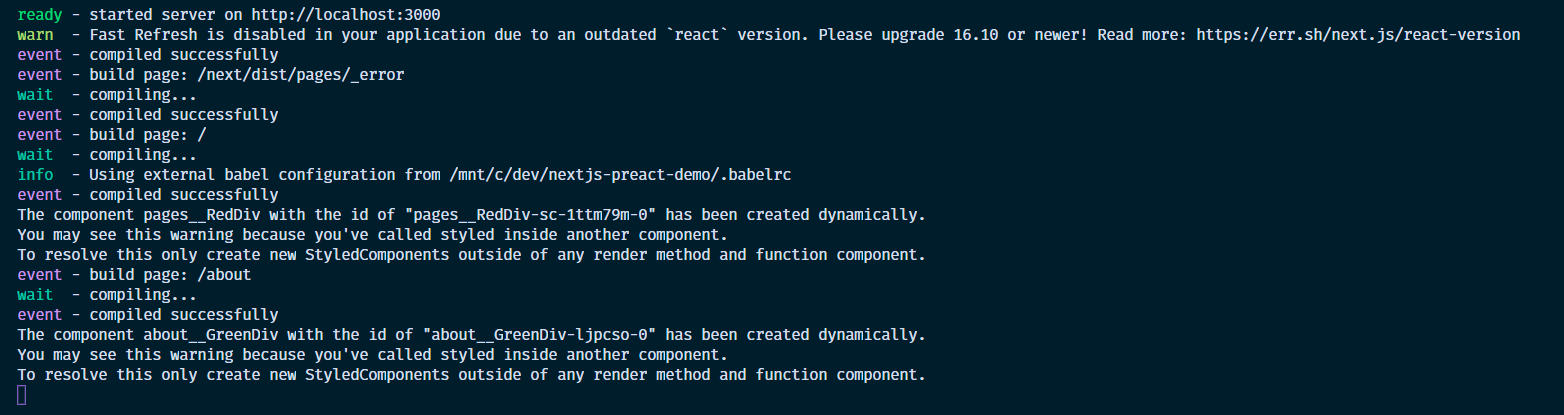
@marvinhagemeister okay that's very interesting. I just tried also to completely delete the node_modules folder, reinstall with both npm and yarn, but i keep getting the error, especially when navigating between the /about route and the home route. This never happens the first time a page is loaded, but usually the second time,after i refresh the page. I've also completely cleared the local .next folder to ensure that this isn't some cache related issue as well...
I'll try to investigate some more and ask some of my colleagues next week to try this out on their machines as well, to rule out that there is something fishy going on with my system.
EDIT: Also to clarify those errors are occurring during SSR on the server, so look out for them in the terminal that's running the dev server, not on the client. (see below)
tbgse
on 14 Nov 2020
@tbgse Awesome, thanks for sharing more information. I checked on another machine and there I'm able to reproduce it too, like in the screenshot you provided. I think I've found a fix for this, but need to add a few more tests to verify it later today 👍
marvinhagemeister
on 14 Nov 2020
Great! I'll keep an eye on those PRs
tbgse
on 14 Nov 2020
@marvinhagemeister After having installed the last version of preact-render-to-string with your fix, the errors have disappeared for both my small reproduction example and our larger codebase where we use preact with next in the real world. 🎉 🎉 🎉
Thanks again for looking into this.
tbgse
on 16 Nov 2020
Related issues
 simonjoom
·
3Comments
simonjoom
·
3Comments
 skaraman
·
3Comments
skaraman
·
3Comments
 matthewmueller
·
3Comments
matthewmueller
·
3Comments
 SabirAmeen
·
3Comments
SabirAmeen
·
3Comments
 Zashy
·
3Comments
Zashy
·
3Comments
Most helpful comment
Hiya 👋
I’ve put in the warning and it triggers when we a hook _doesn’t_ throw during StyledComponent creation. I’m not sure what context this permissiv behaviour happens in, but it does seem like a tiny issue in
preact/compatto me as during the time of import we shouldn’t be inside any component context; that being said it’s safe to ignore.The reason why I’ve proposed the change and we’ve added it is that this is still a common mistake when styled-components are used. We get a lot of issues that relate to dynamically created components: unexpected edge cases that are usually impossible, memory leaks on the client-side and in SSR, out of memory errors, rerender bugs triggered by this, etc.
After having seen probably hundreds of these issues and comments, it’s clear that once people create more than a thousand components, telling them to track down the few cases where they’re dynamically created (and explaining this to beginners) is a daunting ask.
Hence this warning was introduced to rule this mistake out entirely, which has mostly eliminated this category of issues entirely 😅