Preact: Material-UI 4: popover loose positioning
We are using Gatsbyjs and switched out React with Preact X. Everything works fine, except all the popover loose their positioning and open in the top let corner (x: 0, y:0).
[email protected]
@material-ui/[email protected]
@material-ui/styles@^4.8.2
As I haven't found any information, that would suggest, that these wouldn't work with Preact.
===
Edit: Added an Example.
 rubas
rubas
All 29 comments
Could you create a small reproduction demo on CodeSandbox?
Would be easier to understand the problem and try to fix it!
 porfirioribeiro
on 15 Jan 2020
porfirioribeiro
on 15 Jan 2020
I prepare this reproduction instead.
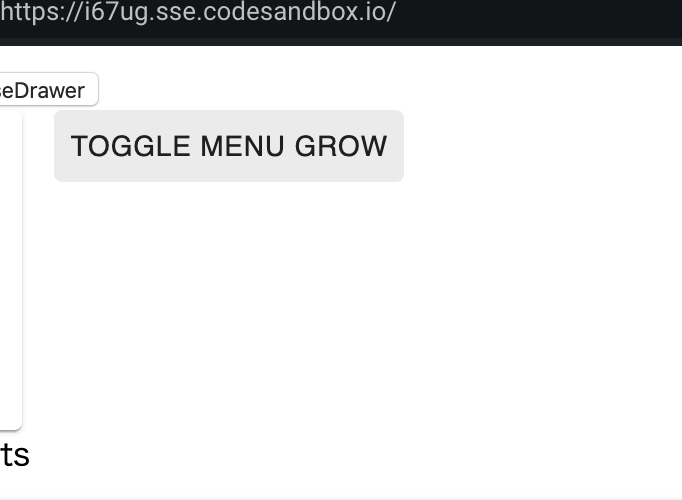
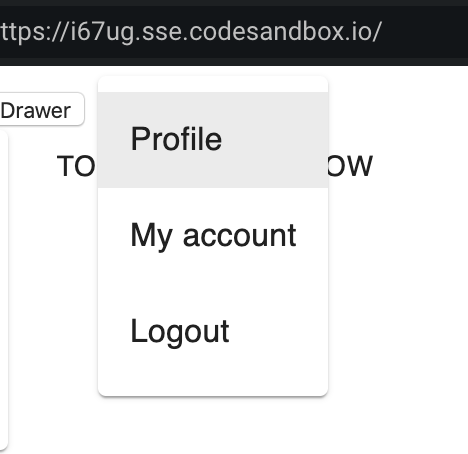
please click TOGGLE MENU GROW and compare normal work.
(in this case, position is not top left corner (x: 0, y:0), however popover lost proper position.)
https://codesandbox.io/s/exciting-worker-i67ug?fontsize=14&hidenavigation=1&theme=dark
 tky5622
on 17 Jan 2020
tky5622
on 17 Jan 2020
It seems to be working fine, maybe i misunderstood something

porfirioribeiro
on 18 Jan 2020
I get the same result as @porfirioribeiro .
 marvinhagemeister
on 18 Jan 2020
marvinhagemeister
on 18 Jan 2020
Thanks. Sorry for the delay, I try to provide an isolated sample later today.
rubas
on 18 Jan 2020
Example: https://codesandbox.io/s/relaxed-kepler-gn2sj?fontsize=14&hidenavigation=1&theme=dark
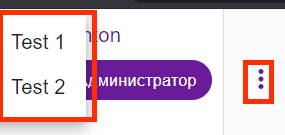
Bug Dropdown is opening at 0,0.
import { render, h } from 'preact';
import { PureComponent } from 'preact/compat';
import { FormControl, Select, MenuItem } from "@material-ui/core"

class Foo extends PureComponent {
  render() {
    return (

        <FormControl style={{position: 'absolute',top: 120, left: 120}}>
          <Select value={0}>
            <MenuItem value="0">Test 0</MenuItem>
            <MenuItem value="1">Test 1</MenuItem>
            <MenuItem value="3">Test 3</MenuItem>
          </Select>
        </FormControl>

    );
  }
}

const dom = document.getElementById('app');
render(<Foo />, dom);
Same issue with Menu component and anchorEl.
@porfirioribeiro Sorry. Can you please show your example of working code?
 antonbashir
on 22 Jan 2020
antonbashir
on 22 Jan 2020
@antonbashir the code that was working was this codesandbox @tky5622 sent:
Now @rubas codesandbox i totaly not working
Can you have a look @marvinhagemeister ?
porfirioribeiro
on 22 Jan 2020
Same issue with Menu component and anchorEl.
@porfirioribeiro Sorry. Can you please show your example of working code?
it seems that the menu can not be displayed properly unless you get the button's ref and set it to Menu Component in preact project.
In the case of react, it still works correctly without Button's ref, but in the case of preact, Menu Component is displayed in the upper left instead.
tky5622
on 29 Jan 2020
@tky5622 do you have a working example to fetch the button's ref?
 eryon
on 4 Feb 2020
eryon
on 4 Feb 2020
I identified the issue, this seems to be a regression in 4.8.2 --> 4.8.3 related to Preact. We'll have to see in what sense we handle the following scenario differently: https://github.com/mui-org/material-ui/pull/19046/files
I'd assume our function is called too late
 JoviDeCroock
on 7 Feb 2020
JoviDeCroock
on 7 Feb 2020
@JoviDeCroock is there any progress on this already or a recommendation on how to work around it? I'm struggling to make this work at the moment.
 tbgse
on 26 Feb 2020
tbgse
on 26 Feb 2020
So I haven't had the most time to look into this but from what I can understand this could be due to findDOMNode not going outside the createPortal similarly to React or a timing issue, I should have more time the following week to look into this.
What you could do to have a temporary solution is set the anchor like in the one codesandbox where it works or use material ui 4.8.2 instead.
JoviDeCroock
on 26 Feb 2020
I'm also seeing an error in the console, whenever the popover is opened.
Failed ForwardRef(Portal) type: The following props are not supported: `ref`. Please remove them.
I wonder if this might be related? 🤔
Downgrading to 4.8.2 worked well, that should do it for now. Will keep an eye on this thread for updates.
tbgse
on 26 Feb 2020
@JoviDeCroock we had to upgrade MUI because of some important fixes that were introduced on their end in the latest updates. Now we're stuck again with the dropdown problem here. I looked into the workaround you mentioned with setting the anchor like in the codesandbox but i believe the only reason why this is working in the sandbox posted here is because it was using an older MUI version before the regression occured (4.8.1).
tbgse
on 4 Mar 2020
Hey @tbgse
It's extremely hard to debug MUI and there are a lot of patterns used interchangeably, it's quite hard to see what exactly is going wrong.
The error you mentioned above about ForwardRef is not a Preact error, this could be indicative of something weird happening, maybe React has some implicit behavior when it comes to Portals, I have no idea atm. I'll look for that error in mui.
ForwardRef(createPortal) might be failing from what I can tell https://github.com/mui-org/material-ui/blob/0773703c027bf22a537a27853f587c5dfbd076f3/packages/material-ui-utils/src/exactProp.test.js
Could you tell me what mui component this happens in and if createPortal is used?
JoviDeCroock
on 4 Mar 2020
@JoviDeCroock this is happening for both popovers ('@material-ui/core/Popover') and select components ('@material-ui/core/Select'). According to their docs the popover is built on top of the modal component (https://material-ui.com/components/popover/) which uses the mui portal api. I'm pretty sure that the select component is also just another layer on top the popover.
tbgse
on 4 Mar 2020
I'll try to dedicate tonight to this issue, might have to see what semantics differ from our createPortal implementation that being said it could also just be that the mountNode is losing a reference or the semantics of findDOMNode being a bit different.
EDIT: this is probably the issue
Would you mind trying to pass in a container as prop to your Popover? https://github.com/mui-org/material-ui/blob/master/packages/material-ui/src/Popover/Popover.js#L386
JoviDeCroock
on 4 Mar 2020
thanks a lot 🙏 , if you need any further info, i'll be around. I prepared a very simple implementation of the dropdown here that highlights the issue: https://codesandbox.io/s/divine-breeze-h8xbi?fontsize=14&hidenavigation=1&theme=dark
EDIT 2: The above does not seem to lead to a solution for me. I updated the example to include a popover component that receives a container prop or anchorRef prop => container causes some extra issues with the entire screen becoming a clickable trigger. Both cases do not seem to open the popover relative to the element.
tbgse
on 4 Mar 2020
@JoviDeCroock any further progress on this?
tbgse
on 9 Mar 2020
I think I’ll have to find a way to test in mui itself since it’s too hard to debug/reproduce on the Preact side. Problem there being that it’s really hard in their build-setup.
Sorry about this, it’s really hard to debug deep integration issues that revolve around an abundance of moving parts.
JoviDeCroock
on 9 Mar 2020
After a fair amount of debugging I found the small discrepancy that is making this fail miserably... The difference between Preact and React is that we'll always resolve children.
This means that for instance in the following scenario you see that children is the Wrapper functional vnode. If you'd make the same sandbox in Preact this would be div since we have resolved it downwards.
Material-ui uses a concept called a forked ref when the children are a real dom-node, which for React isn't the case.
A potential "fix":
  const handleEntering = (element, isAppearing) => {
    if (onEntering) {
      onEntering(element, isAppearing);
    }

    if (!paperRef.current) paperRef.current = element;
    setPositioningStyles();
  };
On this line
This would not solve the whole issue ofcourse but can be temporarily used
JoviDeCroock
on 10 Mar 2020
After further investigation the scenario described above isn't the issue, so there are some options worth exploring for me tomorrow relating to createPortal.
JoviDeCroock
on 10 Mar 2020
Thanks for the updates, at first you got me all hopeful, then i read your second message. Fingers crossed you can identify the issue with createPortal
tbgse
on 10 Mar 2020
@tbgse glad to tell you I've found a solution
JoviDeCroock
on 10 Mar 2020
@JoviDeCroock you're a legend! 💪 thanks for all the effort to make this happen.
tbgse
on 10 Mar 2020
This has been released: https://github.com/preactjs/preact/releases/tag/10.3.4
JoviDeCroock
on 11 Mar 2020
fantastic, works like a charm!
tbgse
on 12 Mar 2020
Glad I could help, wasn't possible without all the help and nice reproductions so a big shoutout to all of you commenting here!
JoviDeCroock
on 12 Mar 2020
Related issues
 paulkatich
·
3Comments
paulkatich
·
3Comments
 mizchi
·
3Comments
mizchi
·
3Comments
 Zashy
·
3Comments
Zashy
·
3Comments
 skaraman
·
3Comments
skaraman
·
3Comments
 k15a
·
3Comments
k15a
·
3Comments
Most helpful comment
I identified the issue, this seems to be a regression in 4.8.2 --> 4.8.3 related to Preact. We'll have to see in what sense we handle the following scenario differently: https://github.com/mui-org/material-ui/pull/19046/files
I'd assume our function is called too late