Preact: Error with undefined __hooks property
Hi,
sorry for this confusing issue, but I haven't found anything so far:
I have the issue that __hooks is suddenly undefined:

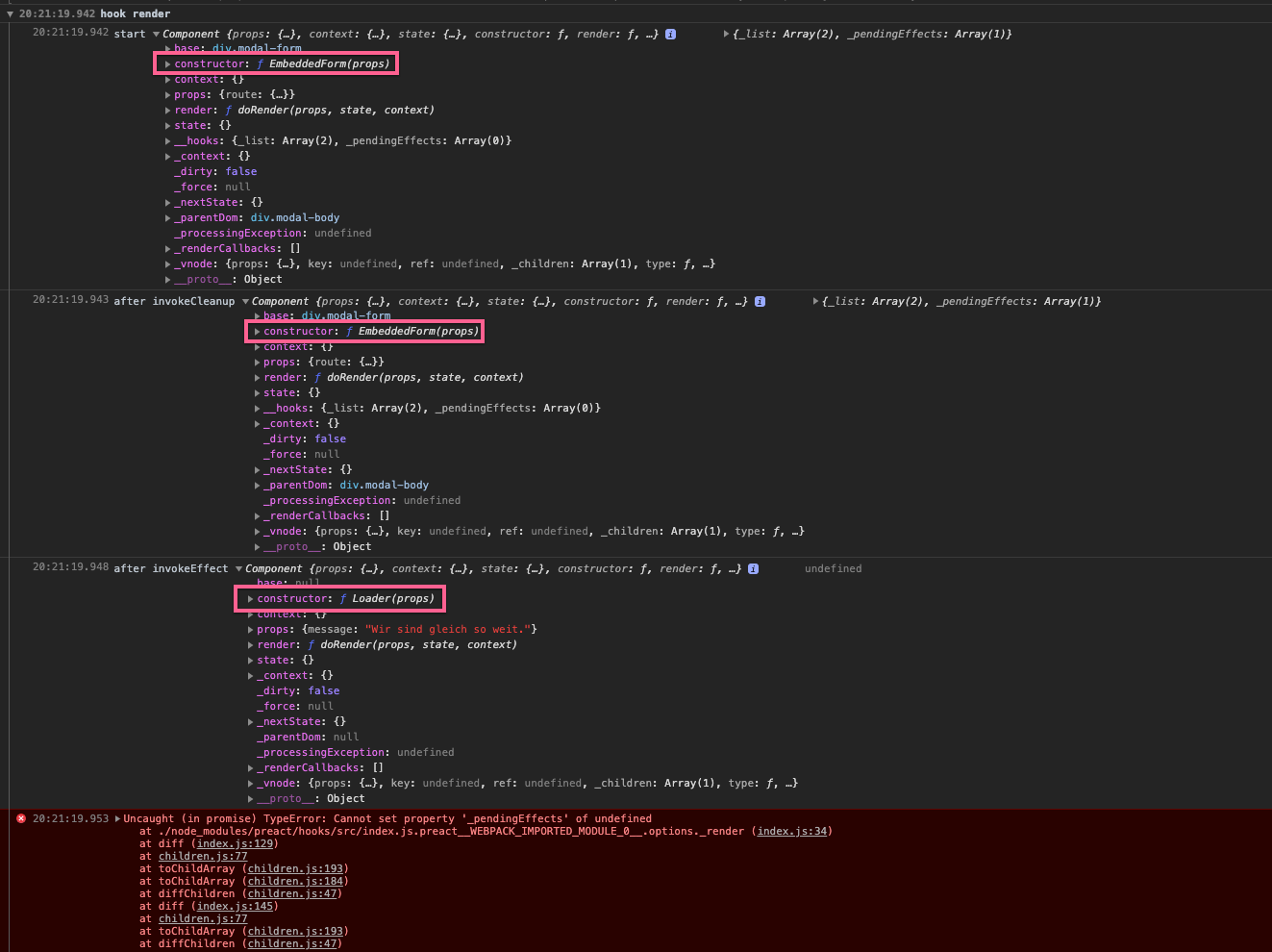
Both of the forEach before succeed, but here __hooks is suddenly undefined (ie it must be through a side effect of one the invokeEffect calls):
Error in console:

My hooks.module.js (extended by some console.log() calls):

I highlighted the one that is right before the error.
The component that is triggering this error seems innocent enough (it is not yet finished 😉):
Show screenshot

Happy to provide any additional info, if you could give me some pointers on where to look.
 apfelbox
All 15 comments
I tried reproducing your issue here but can't seem to figure out as to why it's failing https://codesandbox.io/s/brave-panini-i3iho
 JoviDeCroock
on 10 Dec 2019
JoviDeCroock
on 10 Dec 2019
Hi @JoviDeCroock,
thank you for taking a look!
I narrowed it down to this case: if I call fetch.request() in my effect it errors out, if I don't call it it works.
So, works:
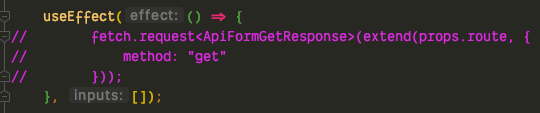
Doesn't work:
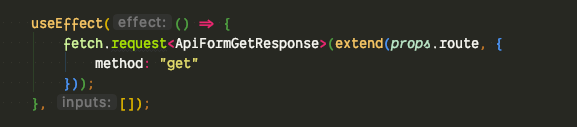
I have no idea on how the hooks are implemented in preact, but do you know of anything that might lead to issues in combination with hooks – even if my callback doesn't even return anything (so just some side effects)?
apfelbox
on 10 Dec 2019
I'm unable to create a reproducible scenario. Is there any way you can narrow it down further to a specific component? We'd love to help but without access to the quote we're shooting in the dark :S
 marvinhagemeister
on 10 Dec 2019
marvinhagemeister
on 10 Dec 2019
Yeah, sorry about being so unspecific, the issue occurs in my app which is spread across ~5 private projects. I am currently trying to reproduce this issue in sandbox.
What I have so far:
My fetch.request() method is internally calling a global service, that renders a global loader overlay. That global loader overlay is a JS class that internally calls render() (from preact) and as soon as it is calling that it fails with the error.
It doesn't matter what it renders, or where, just that it renders at all.
I am still trying to create a minimal reproducible example, so that you can take a look at it more closely.
apfelbox
on 10 Dec 2019
Still trying to reproduce it, but I at least can tell you what happens:
So somehow the component shifts, I added some logging to the _render in hooks/index:
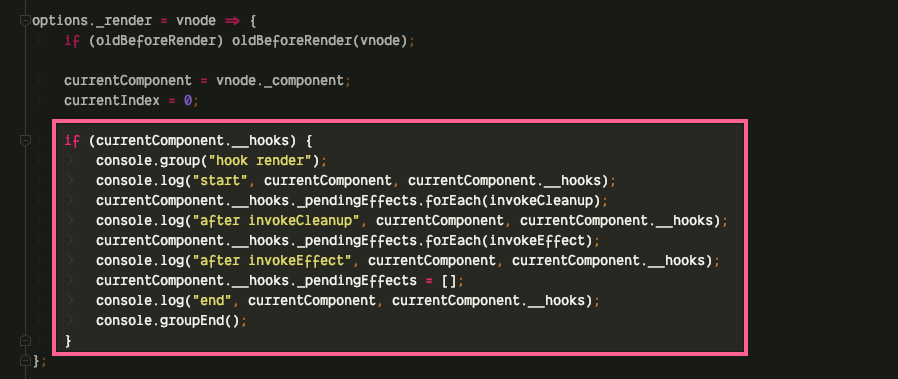
And somehow the component changes!
apfelbox
on 10 Dec 2019
Ok wow, so I finally got it reproducible. (I don't want to admit that finding this just took me around 4.5 hours 😬)
Please, before investing time into "fixing this": if my code / architecture is 💩 (ie that is a "won't fix"), please tell me beforehand so that I can clean it up on my side and you don't have to support super obscure use cases. 😬
Here is the reproducer: https://codesandbox.io/s/mystifying-frost-u6b7v
- pass a state hook setter into a nested prop
- immediately call this setter synchronously
- in the inner element render something (somewhere else using
render()) in an effect.
I have absolutely no idea what is happening here, but what I can tell you is:
- if move the
render()code outside of theuseEffectit works. - if I remove the state hook setter call it works
I guess step 2 is not supposed to be done like this, but I actually have no idea anymore now 😄
apfelbox
on 10 Dec 2019
Generally calling a parent setter in a child is not encouraged most of the time you pass a callback to achieve such a thing.
This means that instead of doing
<MyChild set={mySetState}
You can do
<MyChild set={(val) => mySetState(val)}
The difference is small but this means that your set will always be executed in the context of that particular component. At this point in time it will work.
I forked your repro but it just works for me: https://codesandbox.io/s/competent-joliot-h082q
JoviDeCroock
on 11 Dec 2019
It works, but it throws in a promise:
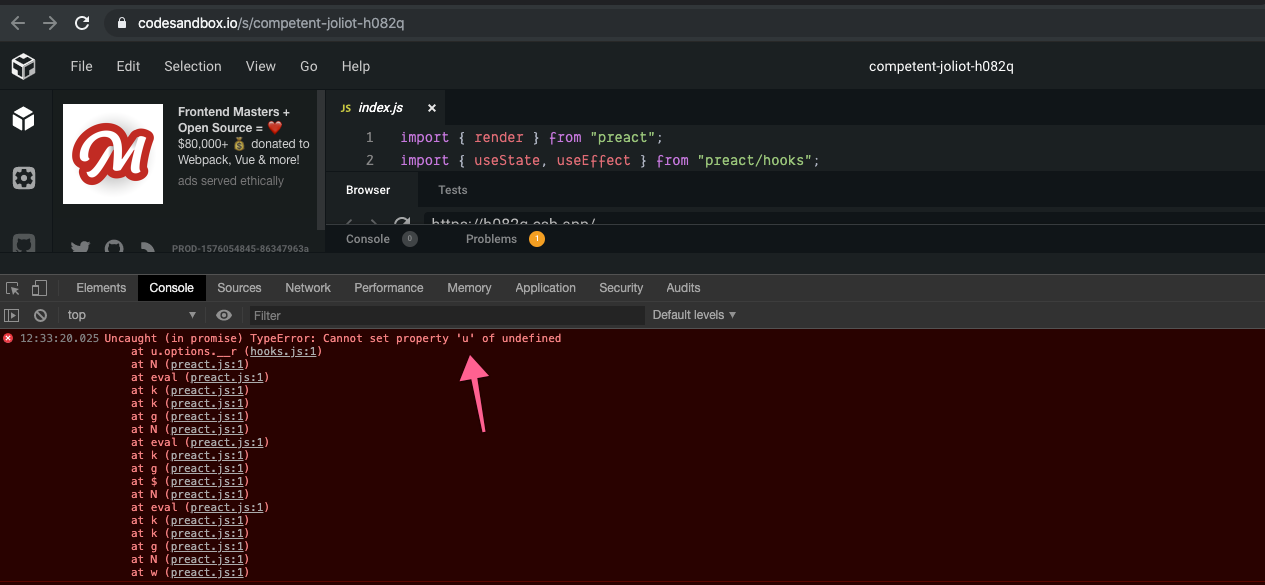
So... it isn't breaking, but it accesses a (possibly, if the other component doesn't use hooks) undefined property and throws (even if that doesn't have any influence on the rest of the app).
The error still occurs if I wrap the state setter in a closure:
const Modal = ({ Content }) => {
  let [canProceed, setCanProceed] = useState(true);

  return (
    <div>
      <Content setCanProceed={(val) => setCanProceed(val)} />
    </div>
  );
};
(it isn't too bad, I just rewrote my whole component, because on second look the architecture was.. well, not good. Just wanted to inform you that if this is something you want to fix, even if it isn't breaking the app flow.)
apfelbox
on 11 Dec 2019
Hmm - in your sandbox, you're calling render() on an existing render root from within a component. That's sortof like telling Preact to change a bunch of things, then during those changes also telling Preact to undo everything and make different changes.
In terms of architecture, I'm guessing you're looking to implement some sort of authorization or gating thing - would it be possible to just render null instead of doing another whole render(<div>global</div>,container) call? A component with insufficient data or permissions rendering null to show nothing would be more in keeping with the philosophy of top-down rendering.
FWIW the error in your most recent screenshot essentially comes from this: calling render() inside of useEffect() actually wipes away a bunch of important state. Wrapping that render() in a setTimeout() would fix the issue if you are 100% sure you want to use this approach.
 developit
on 21 Dec 2019
developit
on 21 Dec 2019
Ran into this issue as well. Maybe it doesn't add much, but here's another sandbox that reproduces the issue - type somewhat quickly into the input field to trigger the race condition.
https://codesandbox.io/s/xenodochial-feather-9qu8n
The real case I'm trying to implement is a Popup component that wraps a third party modal popup, and renders its children into the third party modal during an effect. Sort of like a Portal except I'm not bothering with an actual createPortal here.
I will look into "throttling" the render (setTimeout), so that it doesn't occur during an effect, as a workaround.
 wnayes
on 5 Feb 2020
wnayes
on 5 Feb 2020
@developit thanks for your explanation, it clears a lot of things up.
I would like to describe my use case / architecture style to make my point more concrete.
My architecture is that my backend renders most of the page server side and my frontend just injects small isolated components that live inside that larger prerendered HTML page. So I have a page with let's say 5 individually mounted components. I quite like this architecture, as it is really fast and simple to integrate.
However, this exact issue arises if one of these isolated components triggers a change in a different isolated component (due to global state).
I like that preact is really well suited for this type of "enhancing" a plain old HTML page, however this is the one issue I quite frequently run into.
It appears that preact has some global state, that just breaks in certain conditions when having multiple separate render roots that interact with each other.
Edit: the second issue in preact X is the missing control over where the component is actually rendered. As there is no way to avoid accidentally hydrating something, we need to scatter <div>s around everywhere, to have no sibling elements. But that's a different issue 😉
apfelbox
on 21 Apr 2020
Hey @apfelbox
I'd be happy to look into this if you have a concrete example I could try this in (a sandbox or something else)
JoviDeCroock
on 21 Apr 2020
@JoviDeCroock thanks for your response!
The issue is still present in the codesandbox linked above: https://github.com/preactjs/preact/issues/2175#issuecomment-564249500
The issue comes basically down to this:
useEffect() in any component
-> change some global state
-> render() a different component
If that is a synchronous call chain, this will just break. While I understand that this is a maybe suboptimal architecture, this is a quite common setup in the "isolated components" architecture.
And from a DX perspective it is weird that this breaks, as the two components are completely isolated from each other.
apfelbox
on 21 Apr 2020
@apfelbox I put up a PR that is aimed at fixing this issue. Sorry I totally missed that repro
JoviDeCroock
on 21 Apr 2020
@JoviDeCroock wow, thank you! 🚀
apfelbox
on 21 Apr 2020
Related issues
 marcosguti
·
3Comments
marcosguti
·
3Comments
 Zashy
·
3Comments
Zashy
·
3Comments
 kossnocorp
·
3Comments
kossnocorp
·
3Comments
 mizchi
·
3Comments
mizchi
·
3Comments
 paulkatich
·
3Comments
paulkatich
·
3Comments
Most helpful comment
Ok wow, so I finally got it reproducible. (I don't want to admit that finding this just took me around 4.5 hours 😬)
Please, before investing time into "fixing this": if my code / architecture is 💩 (ie that is a "won't fix"), please tell me beforehand so that I can clean it up on my side and you don't have to support super obscure use cases. 😬
Here is the reproducer: https://codesandbox.io/s/mystifying-frost-u6b7v
render()) in an effect.I have absolutely no idea what is happening here, but what I can tell you is:
render()code outside of theuseEffectit works.I guess step 2 is not supposed to be done like this, but I actually have no idea anymore now 😄