Preact: EDGE + svg + dangerouslySetInnerHTML = void
When I use dangerouslySetInnerHTML to render svg it works everywhere except EDGE.
I've created repo with the bug demo: https://github.com/kossnocorp/preact-bug-edge-svg/commit/4d89779717320f1073ba63c25fc98cb0c9642fc1

When I inline the SVG it works fine:

 kossnocorp
All 3 comments
Hiya - looking into this. Here's the repro as a jsfiddle. https://jsfiddle.net/developit/L0pp3yp2/
 developit
on 20 Aug 2017
developit
on 20 Aug 2017
I took a deep-ish look into this and my first observations are:
- good things first: this issue is fixed in the current EDGE version (as of writing this is 15.15063)
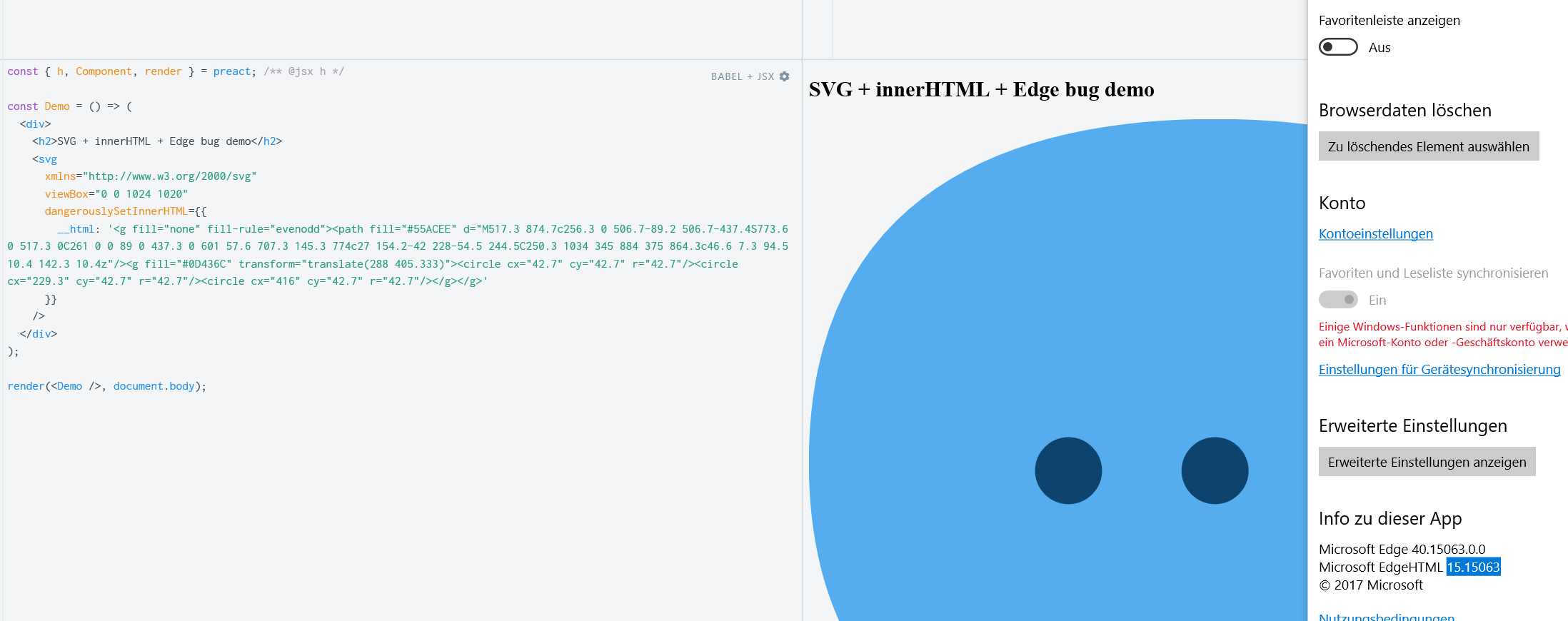
- bad thing: I can reproduce it in EDGE version 14 and all IE versions (tested from IE 9 up)
- It looks like EDGE v14 doesn't render the content set via innerHTML on SVGs. This plain javascript
innerHTMLdemo with the same SVG fails just like preact does. - In EDGE
<svg child node>.namespaceURIis"http://www.w3.org/1999/xhtml"on a "normal" (in HTML embedded) SVG the child nodes have the correctnamespaceURI"http://www.w3.org/2000/svg".
So it looks like innerHTML doesn't set the correct namespace and therefore EDGE treats it like custom elements.
Possible solutions:
- creating a temporary container and inserting a complete SVG via innerHTML and move the childNodes over to the "real" SVG.
- example code:
javascript const temp = document.createElement('div'); temp.innerHTML =`<svg xmlns="http://www.w3.org/2000/svg">${value}</svg>`; for (const key in temp.firstChild.childNodes) { node.appendChild(temp.firstChild.childNodes[key]); } - advantages: it works
- disadvantages: slows down other browser, "garbage" nodes for the transfer
- example code:
creating the svg in a temporary container, move it over and then set possible other attributes:
- example code (would need more work to integrate it into preact):
const temp = document.createElement('div'); temp.innerHTML = `<svg xmlns="http://www.w3.org/2000/svg">${value}</svg>`; node.parentNode.replaceChild(temp.firstChild, node); // TODO. Copy over (possibly already set attributes)- advantages: also works
- disadvantages: slow, the need to copy over attributes/create them multiple times, bigger changes on preact to allow this modification compared to solution 1
Don't fix the issue and leave a hint in the documentation for developers to use the vnode representation of an svg to render it to the dom.
- advantages: no code changes,
- disadvantages: doesn't fix the issue, there are situations where this isn't possible
Disclaimer:
I haven't "really" worked with preact until now and thought this would be a complex enough "bug" to learn something about it, so I can't decide what would be the "right" decission to make. I probably would leave it as it is and add a hint to the docs.
I haven't performance or memory leak tested the "solutions" above. But I would test them if you make a decission that this is worth fixing.
Also I'm sorry for misstakes i've made while writing this comment. English isn't my mother tongue and I regularly make misstakes when writing it.
 Kanaye
on 6 Sep 2017
Kanaye
on 6 Sep 2017
Some googling reveals that older versions of IE do have their fair share of troubles with innerHTML and svg. I don't think it's something we need to fix in Preact, but I'm happy to be convinced otherwise. The most common approach to use svgs that I've come across is to declare them straight up in jsx instead of inserting them via dangerouslySetInnerHTML :+1:
 marvinhagemeister
on 30 Jun 2019
marvinhagemeister
on 30 Jun 2019
Related issues
 matuscongrady
·
3Comments
matuscongrady
·
3Comments
 philipwalton
·
3Comments
philipwalton
·
3Comments
 jescalan
·
3Comments
jescalan
·
3Comments
 kay-is
·
3Comments
kay-is
·
3Comments
 noise-machines
·
3Comments
noise-machines
·
3Comments
Most helpful comment
I took a deep-ish look into this and my first observations are:
innerHTMLdemo with the same SVG fails just like preact does.<svg child node>.namespaceURIis"http://www.w3.org/1999/xhtml"on a "normal" (in HTML embedded) SVG the child nodes have the correctnamespaceURI"http://www.w3.org/2000/svg".So it looks like
innerHTMLdoesn't set the correct namespace and therefore EDGE treats it like custom elements.Possible solutions:
javascript const temp = document.createElement('div'); temp.innerHTML =`<svg xmlns="http://www.w3.org/2000/svg">${value}</svg>`; for (const key in temp.firstChild.childNodes) { node.appendChild(temp.firstChild.childNodes[key]); }creating the svg in a temporary container, move it over and then set possible other attributes:
Don't fix the issue and leave a hint in the documentation for developers to use the vnode representation of an svg to render it to the dom.
Disclaimer:
I haven't "really" worked with preact until now and thought this would be a complex enough "bug" to learn something about it, so I can't decide what would be the "right" decission to make. I probably would leave it as it is and add a hint to the docs.
I haven't performance or memory leak tested the "solutions" above. But I would test them if you make a decission that this is worth fixing.
Also I'm sorry for misstakes i've made while writing this comment. English isn't my mother tongue and I regularly make misstakes when writing it.