Preact: Very specific issue with passing state of deleted component to another, automatically.
You can recreate situation here: http://www.webpackbin.com/4kqannbZ-
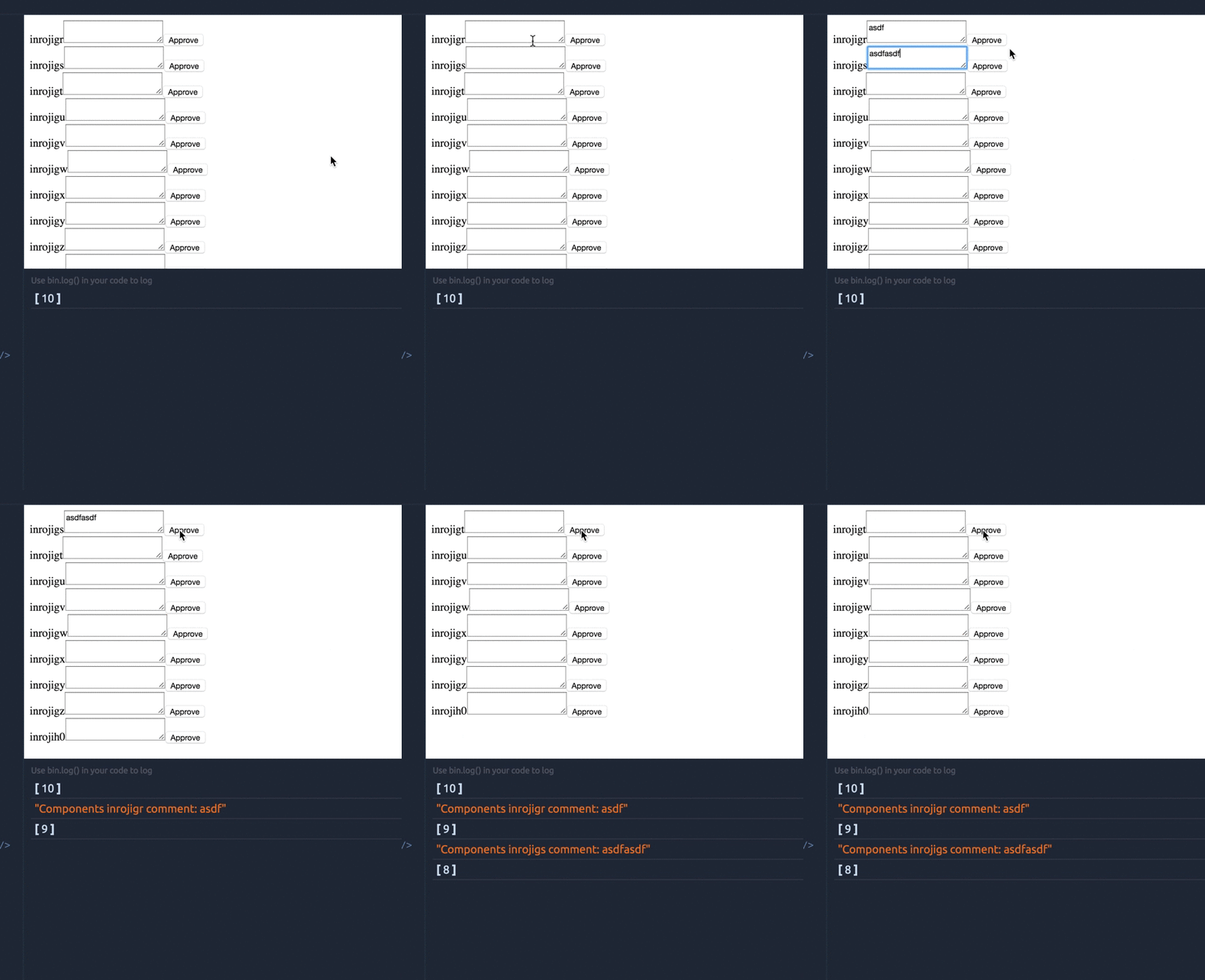
Write something in first textarea and press approve. Component removed. But state passed to another component. How is this possible? There debug message down in log. State is really there!
 idchlife
All 8 comments
Hmm - @idchlife I'm not sure I am reproducing this correctly? This is what I see:
 developit
on 3 May 2016
developit
on 3 May 2016
@developit try not to type anything in the second field. Just first and then approve.
I'm sorry, I actually found the solution, updated bin and forgot that bin saves all the updates by the link.
Ok, without key={some_id} component will receive state from deleted component. Updated bin, removed key={id} again
idchlife
on 3 May 2016
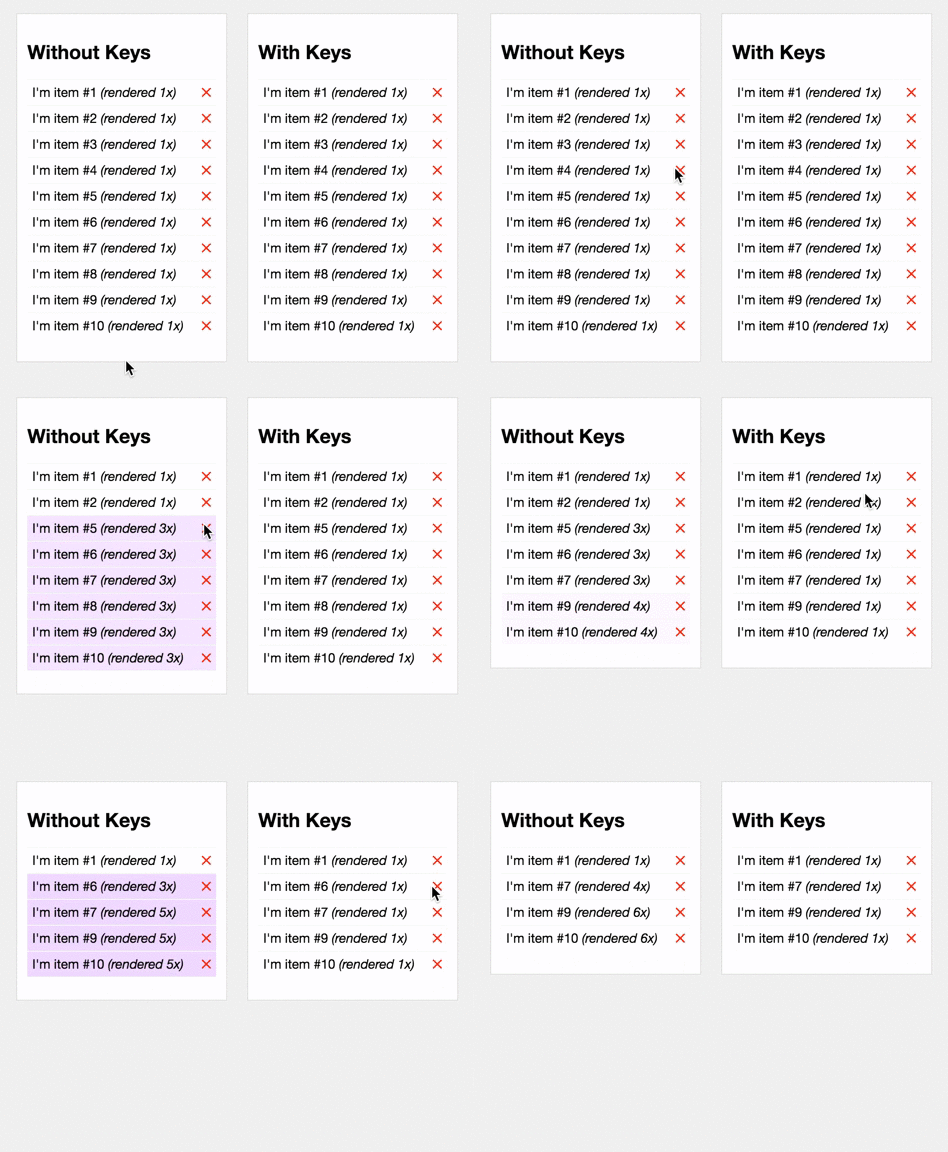
Ah yes. So without keys, Preact can't know that you only removed the first item in the list - it simply attempts to preserve the existing ordering, which means the first component in the list is now rendering the new first item (previously the second item). In this case it's simply iterating over the list and setting props to match the new values. With keys, preact is able to see that the first entry in the list was actually removed, and the rest remain in-position, so it simply removes the first Component and the rest are diffed against the correct indices in the list.
You can see the effect in this codepen:
developit
on 3 May 2016
@idchlife Let me know if I can close this issue since the behavior, though perhaps a little strange, is technically correct.
developit
on 3 May 2016
I'm thinking - why not to make warnings like react in console? Just my opinion though
@developit close it of course! And thanks for the excellent library, I'm using it now as main library^_^
idchlife
on 3 May 2016
I'd like to add better errors/warnings for sure. First one I'd like to add is for missing components (currently the error Preact emits is something like "cannot call method toLowerCase() of undefined", but it should be something like "missing component for JSX element".
As for the ordering thing, I'm not sure how I could have it actually detect that keys would have been better in a given situation. I think React has a warning about not using keys, but it's basically just "always use keys", which seems a bit overbearing. Definitely something to look into though, since the library already has dev and prod builds set up for that reason.
Glad to hear you're finding Preact useful! :)
developit
on 3 May 2016
@developit wow, toLowerCase - I encountered it several times and then I found out I forgot to export component or something like this (actually don't remember). This warning will really help out.
About keys. What's in your opinion the best case for not using the keys instead of using them? I see in your example multiple renders without keys.
idchlife
on 3 May 2016
Keys are useful when you intend to re-arrange items but not modify them. An example would be something like a stream of <Card> components, where each card is created from data with a unique ID. You can set that ID as the key for each card, and then when you re-arrange or append new Cards to the list, any re-arranged cards are moved (via appendChild) and added cards are added (even if they change the original list ordering).
Typically, if you're using keys you should also be using shouldComponentUpdate() to disable re-rendering of keyed components. Without that optimization, there's little difference since everything gets re-diffed anyway.
developit
on 3 May 2016
Related issues
 marcosguti
·
3Comments
marcosguti
·
3Comments
 simonjoom
·
3Comments
simonjoom
·
3Comments
 rajaraodv
·
3Comments
rajaraodv
·
3Comments
 kay-is
·
3Comments
kay-is
·
3Comments
 paulkatich
·
3Comments
paulkatich
·
3Comments