Preact-cli: Custom CLI arguments failing in version 3.0.5
Do you want to request a _feature_ or report a _bug_?
Reporting a bug
What is the current behaviour?
When upgrading an application to 3.0.5, custom CLI arguments no longer work and throw an error when attempting to run via "npm run dev". This behavior works in 3.0.3, so something with the upgrade removed the ability to do this. This seems to be a breaking change, as projects using custom CLI commands will no longer work post-upgrade.
Custom CLI arguments are insanely useful for providing global variables and customizing behavior based on things like instance or client - and the breaking change caused by the minor version upgrade should be prevented in any case, as applications using custom CLI arguments no longer function when upgraded from 3.0.3 to 3.0.5.
Thank you much for the help!
If the current behaviour is a bug, please provide the steps to reproduce.
- In a preact application with [email protected], add a custom CLI argument to the "dev" script in the package.json file. This can be a fresh project made from "preact create"
"dev": "preact watch --port 9090 --CUSTOM my-value",
Run the script via "npm run dev". This should work fine and the application should start.
Upgrade to [email protected]
Run the script again via "npm run dev" and note that the script fails with the following error.
× ERROR Invalid argument CUSTOM passed to watch. Please refer to 'preact watch --help' for full list of options.

What is the expected behaviour?
Custom CLI arguments should be accepted, or some other way to provide custom parameters should be provided.
If this is a feature request, what is motivation or use case for changing the behaviour?
Please mention other relevant information.
Please paste the results of preact info here.
System:
OS: Windows 10 10.0.18363
CPU: (12) x64 Intel(R) Core(TM) i7-9750H CPU @ 2.60GHz
Binaries:
Node: 12.16.1 - C:Program Filesnodejsnode.EXE
npm: 6.13.4 - C:Program Filesnodejsnpm.CMD
Browsers:
Chrome: 87.0.4280.141
Edge: Spartan (44.18362.449.0)
npmPackages:
preact: ^10.3.2 => 10.5.9
preact-cli: ^3.0.5 => 3.0.5
preact-render-to-string: ^5.1.4 => 5.1.12
preact-router: ^3.2.1 => 3.2.1
 Dmurl5
All 10 comments
Just for my own edification, how are you then consuming these? For example, what would CUSTOM be and how would you end up using it?
Not that it wouldn't be breaking, but I'm wondering if this can't be solved with a preact.config.js.
 rschristian
on 11 Jan 2021
rschristian
on 11 Jan 2021
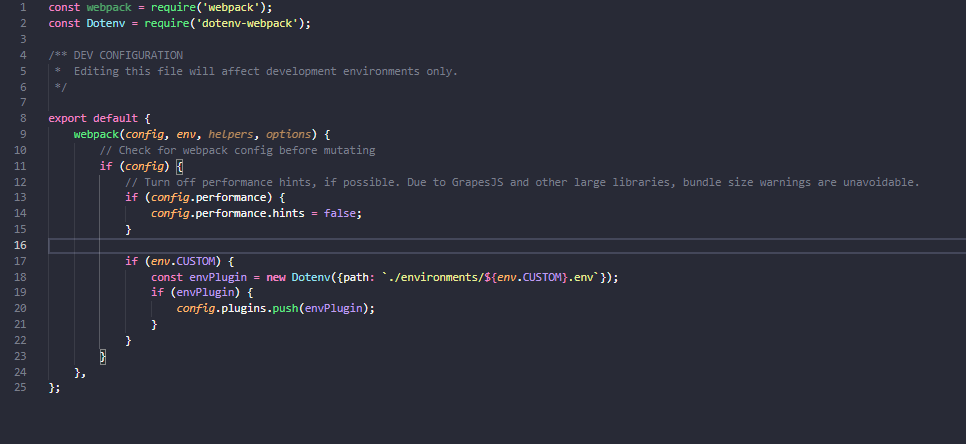
@rschristian great question - for my implementation, I'm using it in combination with dotenv-webpack to provide a path to a .env file based on the custom CLI argument. I've changed some business logic-y code, but the basic setup in my preact.config.js file looks like the screenshot below. I check for the custom CLI variable on env, then use it to pull a custom .env file with various values like portions of the URL, some style objects, et cetera
In the actual implementation the custom CLI variable is the client's name, and it pulls a .env file unique to that client. I'm definitely open to other ways of doing this if the preact-cli has a more recommended way of passing things like client name to the preact.config.js from a build command, but for us the "NODE_ENV" system probably won't work as each client has its own set of environments as well.
Thanks!
Screenshot of preact.config.js:
Dmurl5
on 11 Jan 2021
Interesting!
I'm thinking that while breaking, this wasn't intended behavior. Flags should be limited to the scope of the software itself. As you're essentially adding values into the CLI environment that it's not expecting, there is the possibility of adding a conflicting value (though you haven't).
You can set Node env vars using the following syntax, and it's far more idiomatic:
"dev": "CUSTOM=my-value preact watch --port 9090",
Consume via process.env.CUSTOM.
rschristian
on 11 Jan 2021
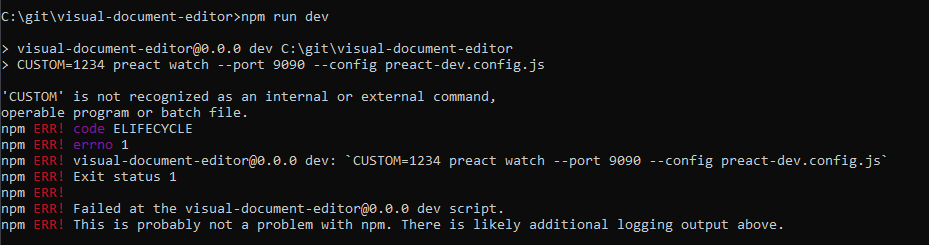
@rschristian attempting the refactor you mentioned - the setup with the CUSTOM=my-value at the beginning fails immediately when ran, see screenshot "CUSTOM at start error" below. Moving it to the end, i.e. "preact watch --port 9090 CUSTOM=my-value" also seems to not work, with some preact cli entry point error logged (see screenshot "CUSTOM at end error")
Any further guidance? Can't figure out how else to change up your recommendation - I don't think separating the commands would work, as the CUSTOM=my-value seems to need to come after a real node or CLI command to not break the system, and preact watch doesn't seem to like Node env vars set afterwards.
I like the idea of using Node env vars default stuff, but it doesn't seem to play well with Preact watch or other Preact CLI commands. Would it be possible for the preact-cli to allow the old custom flags, or provide a specific way of providing environment variables and/or custom flags with values? Being able to parameterize what happens in the preact.config.js is pretty powerful (dynamic plugin usage, this .env file pattern, etc). Even just one or two "freestyle" CLI flags, like a preset "CUSTOM_FLAG" that allows you to pass whatever values you want to the preact.config.js file from the command line would solve my use case entirely.
Thanks again for the help!
CUSTOM at start error
CUSTOM at end error

Dmurl5
on 11 Jan 2021
Ah, Windows user, sorry. That's my fault. Syntax is different. cross-env is probably easiest: https://www.npmjs.com/package/cross-env
I'm not sure on custom flags. Let me ask around. See how others feel.
rschristian
on 11 Jan 2021
Thanks, @rschristian the cross-env library seemed to allow me to do the refactor as you mentioned. Happy to mark this ticket as done - but a custom flag option would prevent me from having to install another library (cross-env) everywhere and fit our use case better, so any updates on that provided here would be much appreciated
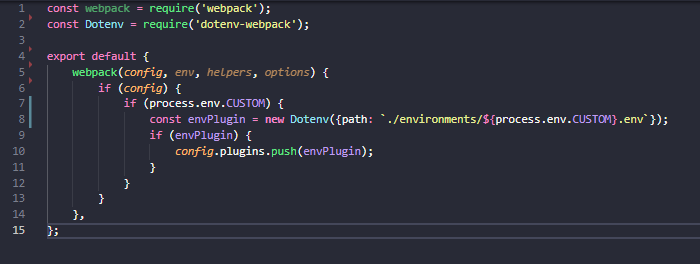
Adding this for posterity's sake, in case someone else runs in to a similar issue as me. Using this command and the "cross-env" library, you can pass values to the preact.config.js file. For the example of "CUSTOM=my-value", the following script:
"dev": "cross-env CUSTOM=my-value preact watch --port 9090 --config preact-dev.config.js",
Will make CUSTOM available in your preact.config.js file under process.env.CUSTOM. An example use is in this screenshot - I define a custom path to a .env file based on the value of that environment variable
Dmurl5
on 11 Jan 2021
We can leave this open for now, wait for feedback.
You don't have to use cross-env, but it seems like Windows is quite touchy about white space which seemed like a hassle. Here's SO thread with a few solutions, not sure which would work for you: https://stackoverflow.com/questions/9249830/how-can-i-set-node-env-production-on-windows
If you are an organization which could be cross platform, cross-env is the simplest solution usually.
rschristian
on 11 Jan 2021
@Dmurl5 Looks like custom flags will be a no-go. Environment variables are the way to go for that.
rschristian
on 12 Jan 2021
@rschristian much appreciated on the response/research! Environment variables work fine for me
Dmurl5
on 12 Jan 2021
Sorry that this broke for you, but I do think this was unintended by the team. Not sure anyone knew people were using this.
I'm going to close this issue now, but certainly feel free to reply if something else isn't working as intended.
rschristian
on 12 Jan 2021
Related issues
 higimo
·
3Comments
higimo
·
3Comments
 jpoo90
·
4Comments
jpoo90
·
4Comments
 ajay28kumar
·
3Comments
ajay28kumar
·
3Comments
 thangngoc89
·
3Comments
thangngoc89
·
3Comments
 haggen
·
3Comments
haggen
·
3Comments