Pptxgenjs: breakLine not behaving correctly when "align" property set in .addText?
I am parsing HTML strings with bold tags to make them appear in PowerPoint.
For some reason, the breakLine property does not work when the 'align' property is set in a call to .addText. Line breaks are introduced after every element of the text snippet array. Removing the 'align' property makes it work again, but the text is moved to the left as a result. (Trial and error from my side)
It is still a bit hard to find the issue myself, maybe it is somewhere around these lines in the screen shot.
Mystery 😄

 Slidemagic
All 14 comments
Similar Issues: #369 #448 #460
Working on this issue for v3.3.0
 gitbrent
on 28 May 2020
gitbrent
on 28 May 2020
Thank you!
Slidemagic
on 28 May 2020
@gitbrent have you started on this one at all? I did some local testing and t looks like two small changes resolve the issue, without any side effects in my decks. Haven't run through a test suite yet.
Modify (around line 2420):
else if (idx > 0 && (typeof textObj.options.bullet !== 'undefined' || typeof textObj.options.align !== 'undefined')) {
to
else if (idx > 0 && (typeof textObj.options.bullet !== 'undefined' )) {
The alignment seems to happen on the first alignment it hits though, so modifying to reverse the sequence (around line 2405):
textObj.options.align = textObj.options.align || opts.align;
to
textObj.options.align = opts.align || textObj.options.align;
Keeps it to the alignment set for the main object rather than an individual line within the text block.
 ReimaFrgos
on 15 Jun 2020
ReimaFrgos
on 15 Jun 2020
@ReimaFrgos - I actually have not started as of yet, so thanks a ton for looking more closely at this.
I'll start on this very shortly and report back...
gitbrent
on 16 Jun 2020
I've managed to fix this. Would you like a PR @gitbrent or are you on this?
 brandonkal
on 17 Jun 2020
brandonkal
on 17 Jun 2020
The entire text generation method has been rewritten and should be rock solid from here out.
Fixes: #369, #448, #460, #751, #772
Some collected test cases:
var pptx = new PptxGenJS();
var slide = pptx.addSlide();

slide.addText(
    [
        { text: "line 1: 1st word ", options: { fontSize: 24, color: "99ABCC" } },
        { text: "2nd word ", options: { fontSize: 36, color: "FFFF00" } },
        { text: "3rd word ", options: { fontSize: 48, color: "0088CC" } },
    ],
    { x: 1.5, y: 0.3, w: 7, h: 1, margin: 0.1, fill: "232323" }
);

slide.addText(
    [
        { text: "line 1: 1st word ", options: { color: "99ABCC", italic: true } },
        { text: "2nd word ", options: { color: "FFFF00", bold: true } },
        { text: "3rd word ", options: { color: "0088CC" } },
    ],
    { x: 1.5, y: 1.6, w: 7, h: 1, margin: 0.1, fill: "232323", align: "center" }
);

slide.addText(
    [
        { text: "line 1: 1st word ", options: { color: "99ABCC", align: "center" } },
        { text: "2nd word ", options: { color: "FFFF00", align: "center" } },
        { text: "3rd word ", options: { color: "0088CC", align: "center" } },
    ],
    { x: 1.5, y: 2.9, w: 7, h: 1, margin: 0.1, fill: "336699" }
);

slide.addText(
    [
        { text: "line 1: 1st word ", options: { color: "99ABCC", align: "left" } },
        { text: "line 2: 1st word ", options: { color: "FFFF00", align: "center" } },
        { text: "2nd word ", options: { color: "0088CC", align: "center", breakLine: true } },
        { text: "\nline 4: 1st word", options: { color: "0088CC", align: "center" } },
    ],
    { x: 1.5, y: 4.2, w: 7, h: 1.3, margin: 0.1, fill: "224466" }
);

pptx.writeFile("PptxGenJS-TextRuns");
Results:
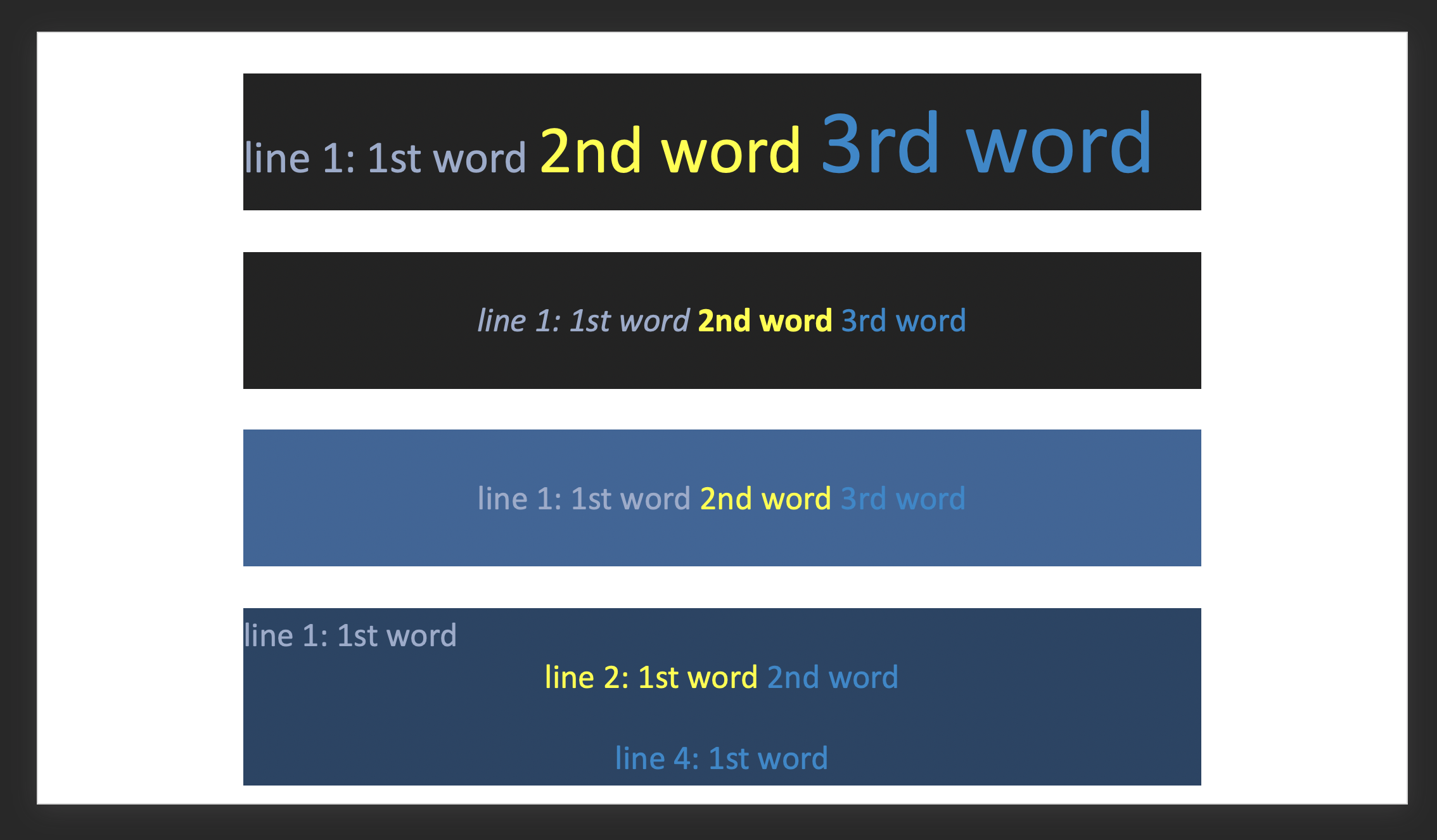
@brandonkal @Slidemagic @ReimaFrgos @ellisgl
If you have any breaking test cases, please provide them.
gitbrent
on 22 Jun 2020
@gitbrent I've run the latest beta against all my decks and all works succesfully for me.
ReimaFrgos
on 1 Jul 2020
@ReimaFrgos - thanks!
Closing for inclusion in v3.3.0. If anyone else finds a breaking test case, please provide it.
gitbrent
on 2 Jul 2020
Hi @gitbrent, Hope align right for multiple words would result in single line with v3.3.0 release
 sandeep-pamujula
on 11 Aug 2020
sandeep-pamujula
on 11 Aug 2020
@gitbrent
Now that the update has been released, I have tested it and have some breaking cases (3.3.1):
This input (centered):
///
R. Bolded text
Line 1
Line 2
R. Bolded text
////
Prints as
///
R.
Bolded text
Line 1 (notice extra line before and after bolded text)
Line 2
R.
Bolded text
////
Case 2:
////
Line 1
Line 2
Line 3
Line 5
Bolded Line 6
////
Prints as
////
Line 1
Line 2
Line 3
Line 5
Bolded Line 7
////
brandonkal
on 1 Sep 2020
@brandonkal - I’ll need to see the code and the output, similar to my update on Jun 21
gitbrent
on 1 Sep 2020
@gitbrent:
Test cases provided. See linked PR #839. I'd like to see that as part of the test suite to avoid a regression here.
Thank you!
brandonkal
on 1 Sep 2020
@brandonkal - thanks for the PR. The demos.js file has 4400 diffs, can you just add the new test code here?
gitbrent
on 2 Sep 2020
Run prettier on the file and you'll see the diff is much smaller.
The file wasn't formatted to your style.
If you look at the PR, the prettier run is in its own commit to make review easy.
brandonkal
on 2 Sep 2020
Related issues
 LeoFC97
·
3Comments
LeoFC97
·
3Comments
 kevinresol
·
3Comments
kevinresol
·
3Comments
 yodasodabob
·
6Comments
yodasodabob
·
6Comments
 adrienco88
·
3Comments
adrienco88
·
3Comments
 readeral
·
5Comments
readeral
·
5Comments
Most helpful comment
The entire text generation method has been rewritten and should be rock solid from here out.
Fixes: #369, #448, #460, #751, #772
Some collected test cases:
Results:

@brandonkal @Slidemagic @ReimaFrgos @ellisgl
If you have any breaking test cases, please provide them.