Pptxgenjs: Tables not being displayed after update
Hi, I've just updated from 1.10.0 to 2.5.0 and after adapting all listed breaking changes I've found that tables are completely gone from my ppt. I've tried using code from sample files, but still nothing :(
``` activitiesSlide: (title, subtitle, imageIndex, data) => {
let items = data,
tableBlock = [],
chunks = '',
header = items.splice(0,1),
toTable = [],
baseTitle = title,
iterations = 0;
        while(items.length > 0){
            if((iterations == 0) && items.length < 12){
                title = baseTitle;
            }
            else{
                title = baseTitle + ' - Part ' + (iterations + 1);
            }
            toTable = items.splice(0,10);
            toTable.unshift(header[0]);
            let slide = new pptx.addNewSlide('COMPANY_PPT'),
            rows = [];

        toTable.forEach(function(item, parentIndex){
            let row = [];
            item.forEach(function(elem, index){
                let options = {};
                if(index === 0 && parentIndex != 0){
                    options.color = '4ca3b5';
                    options.bold = true;
                    options.align = 'left';
                }
                if(parentIndex === 0){
                    options.bold = true;
                    options.fontSize = 10;
                }
                if(index != 0){
                    options.align = 'right';
                }
                options.border = [{pt: 0, color: 'ffffff'},{pt: 0, color: 'ffffff'},{pt: 1, color: 'E3E3E1'}, {pt: 0, color: 'ffffff'}];
                row.push({text: elem, options: options})
            });
            rows.push(row);
        });
        let options = {w: '60%', y: pptData.simpleLayout ? '21%' : '17%', x: pptData.simpleLayout ? '18%' : '35%', lineWeight: 5,  fontSize: 13, rowH: 0.5, valign: 'middle'};
        slide.addTable(rows, options);
```
The function gets executed - I'm able to pass any other sample code from the docs and it gets displayed: e.g: texts, images... - but anytime I try adding tables (sample or old working code), they won't display...
Is there any breaking change from v1 to v2 I'm missing? Thanks a lot!
 emartz404
All 9 comments
Facing similar issue.
 somprabhsharma
on 14 Jun 2019
somprabhsharma
on 14 Jun 2019
@somprabhsharma did you make it work?
emartz404
on 20 Aug 2019
Hi @emartz404
I dont know what the data in let items = data looks like, but tables definitely work in the most recent version using the sample code provided...
 gitbrent
on 23 Aug 2019
gitbrent
on 23 Aug 2019
I've tried with the sample code and happens the same... Anyway, found that if I downgrade to v2.3.0 they work okay again
emartz404
on 23 Aug 2019
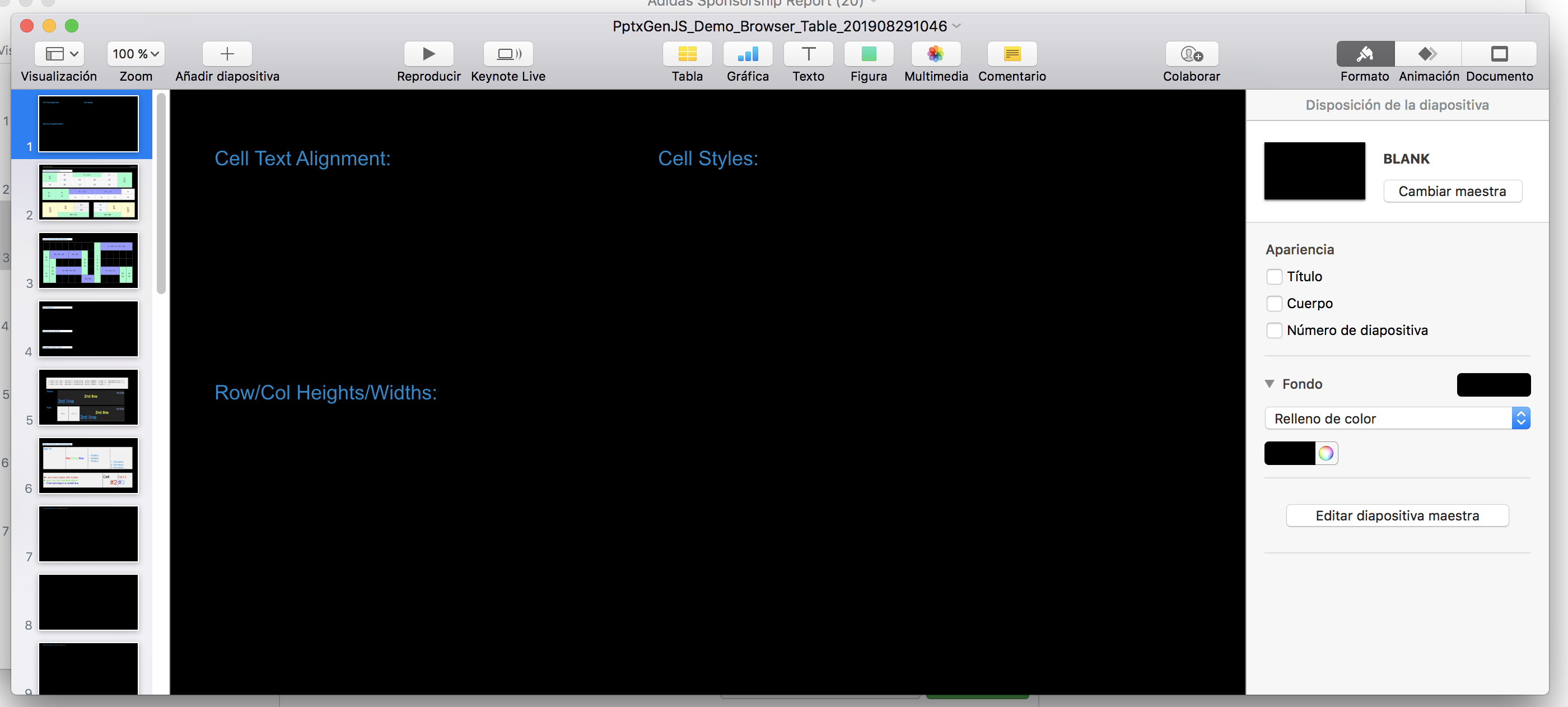
@gitbrent Found out it's a Keynote issue: if I open the demo file in google drive it's ok:

but in keynote:
emartz404
on 29 Aug 2019
@emartz404 Hey, I could make it work. To make it work in keynote too, you need to set the background color to white. Use below code to create slide.
pptx.addNewSlide('slide name', {bkgd: 'ffffff', color: '000000'})
somprabhsharma
on 30 Aug 2019
@somprabhsharma is correct - the only issue with Keynote is the default background.
If you explicitly set one (e.g.: white) it'll appear as it does in PowerPoint.
This defect will be fixed in the upcoming 3.0 release.
gitbrent
on 3 Sep 2019
Thanks a lot @somprabhsharma @gitbrent !
emartz404
on 3 Sep 2019
The issue of missing default [white] background in Keynote has been fixed in the 3.0 branch and will be released with 3.0.
Thanks @emartz404 @somprabhsharma
gitbrent
on 4 Sep 2019
Related issues
 DSheffield
·
3Comments
DSheffield
·
3Comments
 kevinresol
·
3Comments
kevinresol
·
3Comments
 luism-s
·
3Comments
luism-s
·
3Comments
 yodasodabob
·
6Comments
yodasodabob
·
6Comments
 adrienco88
·
3Comments
adrienco88
·
3Comments
Most helpful comment
@somprabhsharma is correct - the only issue with Keynote is the default background.
If you explicitly set one (e.g.: white) it'll appear as it does in PowerPoint.
This defect will be fixed in the upcoming 3.0 release.