Ppsspp: Phantasy Star Portable 2 Infinity Adhoc Multi Mode Issue
What happens?
When attempting to start a mission in Phantasy Star Portable 2 Infinity only the host is able to enter the dungeon. Other players attempting to enter the dungeon are stuck on loading screen. This issue is not present in the latest stable version.
What should happen?
When attempting to start a mission in Phantasy Star Portable 2 Infinity all players should be able to enter the dungeon.
What hardware, operating system, and PPSSPP version? On desktop, GPU matters for graphical issues.
Both computers I'm testing on have nearly identical hardware. Only difference is that one machine has a 2060 SUPER and the other has a 1070.
Operating System
Windows 10 Enterprise 64-bit
CPU
Intel Core i7 7700 @ 3.60GHz
Kaby Lake 14nm Technology
RAM
32.0GB
Motherboard
Micro-Star International Co. Ltd. Z390-A PRO (MS-7B98) (U3E1)
Graphics
VG248 (1920x1080@144Hz)
4095MB NVIDIA GeForce GTX 1070 (EVGA)
Storage
465GB Samsung SSD 850 EVO 500GB (SATA (SSD))
465GB Samsung SSD 850 EVO 500GB (SATA (SSD))
2794GB TOSHIBA HDWD130 (SATA )
Optical Drives
ASUS DRW-24B1ST j
Audio
Realtek High Definition Audio
 Peduls
All 34 comments
Oddly enough we were able to play around in the lobby together with no problems at all. Not until trying to enter a dungeon together did we encounter any issues.
Peduls
on 10 Nov 2020
I've seen that this is a common issue with computers running Windows 7 and older but we both have up-to-date versions of Windows 10. We've tried installing win10pcap and npcap but the only thing that worked was reverting to the latest stable version of PPSSPP.
Peduls
on 10 Nov 2020
@Peduls Have you tried to Enable "Forced First Connect" in Networking settings?
I've heard about this issue in forum for quite sometime, but i can't reproduce it on both localhost and LAN (PC vs Android)
PS: I only tested it on PSP2 not the Infinity one, i'll test it on PSP2i later
 ANR2ME
on 10 Nov 2020
ANR2ME
on 10 Nov 2020
Just tried with latest development build and both computers "Forced First Connect" turned on. Same problem.
Peduls
on 10 Nov 2020
Is this issue consistent or might it happen randomly?
It might be possible to reproduce it if you try enough times.
I think I also got that behavior once but later times it worked.
 MojoJojoDojo
on 10 Nov 2020
MojoJojoDojo
on 10 Nov 2020
I cannot get it to work using developmental builds but it always works using the latest stable. Doesn't seem to be random. I did some more testing and found something interesting. I tried having the host use the latest developmental build and the 2nd player using the stable build. Same problem. So I can only figure that this issue is host dependent.
Peduls
on 10 Nov 2020
Also you didnt say if you use a VPN software or using a public server like sushicat or socom.cc .
On a VPN software the chances are higher to work.
MojoJojoDojo
on 11 Nov 2020
Oh, sorry. We are both using Radmin VPN.
Peduls
on 11 Nov 2020
@Peduls could you provide a savedata file/folder for PSP2i? i couldn't find one at gamespot
Edit: Nevermind, apparently i can import it from PSP2 (J)
ANR2ME
on 11 Nov 2020
Localhost with 3 players doesn't seems to have any issue

But if i try to simulate 200ms latency all 3 of them stuck on this loading screen when starting the mission, i guess the latency also affecting the stability.

Since this game is using non-blocking PTP (TCP) it's less-likely to be related to packet loss, nor blocking-simulation.
It's going to be hard to find out what causing it without the ability to reproduce it, since i won't be able to tell whether it got fixed or not :(
ANR2ME
on 11 Nov 2020
Maybe its possible to see the difference in the code between the stable release and the latest dev builds and find out the issue.
MojoJojoDojo
on 11 Nov 2020
There is a lot of changes since the latest stable, if only @Peduls can find the exact dev build when this issue started to happen.
Then again i won't be able to tell whether i managed to fix it or not without the ability to reproduce it, since i only have 1 PC and only have 1 internet connection, and most VPN will try to use the fastest route (LAN) when both device/PC are on the same LAN instead of relaying it through the internet (unless it was using a forced relayed-mode)
ANR2ME
on 11 Nov 2020
If anyone wants to help me test I can invite you to my Radmin VPN group and we can try to get into a dungeon.
Peduls
on 12 Nov 2020
Been testing builds. I am up to v1.10.3-499-g611161b87 from the last stable build and it still works fine. I will continue to narrow it down when I have time.
Peduls
on 12 Nov 2020
You should narrow it from around 600+ roughly not 499 @Peduls
MojoJojoDojo
on 12 Nov 2020
Localhost with 3 players doesn't seems to have any issue
But if i try to simulate 200ms latency all 3 of them stuck on this loading screen when starting the mission, i guess the latency also affecting the stability.
Since this game is using non-blocking PTP (TCP) it's less-likely to be related to packet loss, nor blocking-simulation.It's going to be hard to find out what causing it without the ability to reproduce it, since i won't be able to tell whether it got fixed or not :(
its a well known bug since ancient time , even if the tcp data transfer looks good in high latency the game refuse to process further after meet that 200ms threshold , try to inspect other than tcp area likes on matching context that game uses
 adenovan
on 12 Nov 2020
adenovan
on 12 Nov 2020
I'm think I am getting very close to figuring out what build first causes this. I've been testing in increments of 100 or so and I just tested build v1.10.3-801-ga1964ca1a and it actually has a different issue where the second player couldn't join the host's game at all even after trying several times. Then I moved on to build v1.10.3-898-gcccdfe414 and it has the issue I have been looking for where the player can join a host's game but cannot enter a dungeon together.
Peduls
on 12 Nov 2020
Okay! I found out the first build that has connection issues. v1.10.3-753-g9637a9d02 has the issue where players cannot join a host's game at all. v1.10.3-747-gb78bb3d92 was the last build to have no issues. Now I need to find out when the issue changed from not being able to connect at all to being able to connect but not able to enter dungeons together.
Peduls
on 12 Nov 2020
Thank @Peduls, but since i won't be able to test it my self, i will create 3 test builds to shorten the gap between v1.10.3-747 ~ v1.10.3-753
ANR2ME
on 13 Nov 2020
Sorry for the late test build, i was busy with interview yesterday.
@Peduls here is a zip containing 3 test exe between 747 and 753, please give it a try to find out the exact commit.
https://www.dropbox.com/s/8rkq49p5vfgpraw/ppsspp-test.zip?dl=0
ANR2ME
on 14 Nov 2020
Test 1 & 2 appear to be the same build. Was this a mistake?

Peduls
on 14 Nov 2020
Okay, nevermind. They must be different. It worked perfectly in test 2 & 3. I couldn't even form a lobby in test 1.
Peduls
on 14 Nov 2020
I see, so the issue is related to socket's buffer size on this commit https://github.com/hrydgard/ppsspp/commit/59f8369cd7fd1d7c906c048b687cf383032e389e
Hmm.. that doesn't sounds good, since it could affects FPS drops on games like Warriors Orochi 2 if one player is faster than the other, where the faster player will flood the slower player, and with the way the game is reading/receiving the socket buffer the more message in it the lower the FPS will be (down to a crawling 0~6 FPS & VPS), and limiting the socket buffer size will prevent the FPS to drop too low.
May be i should make a compatibility option for games that use such netcode (there aren't many i think, mostly from the same developer with Warriors Orochi 2)
ANR2ME
on 14 Nov 2020
Sometime between v1.10.3-753-g9637a9d02 and the most recent dev build the issue changed though. In the latest dev build you CAN join a host's lobby but just not enter a dungeon. A change made somewhere between those builds improved the issue but not completely fixed it. I would imagine the two issues are very much related though. I'll continue testing until I find when the issue changed.
Peduls
on 14 Nov 2020
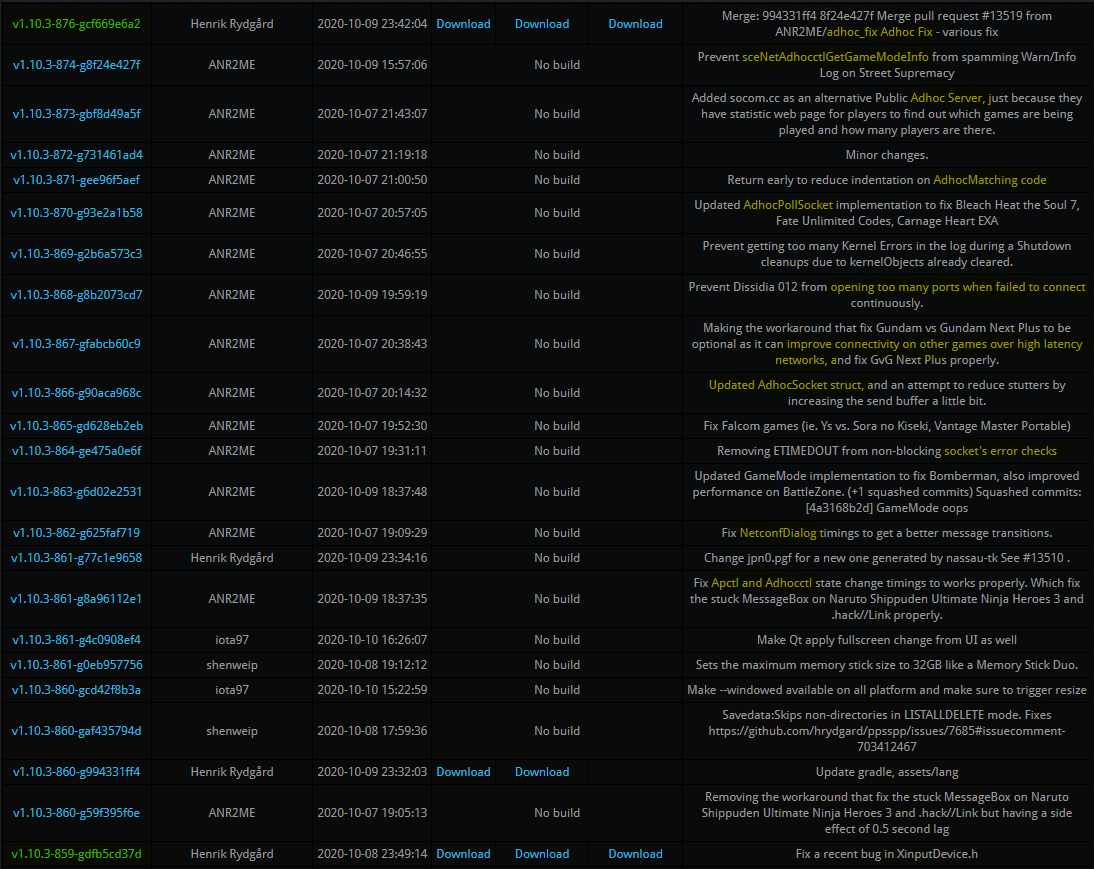
Found it! Okay, so the last dev build where I couldn't get a second player to join my game at all was v1.10.3-859-gdfb5cd37d and then in build v1.10.3-876-gcf669e6a2 the problem improved to letting other players join my game but not able to enter a dungeon together.
Peduls
on 15 Nov 2020
@Peduls Are you sure it's 876? because there is no 876 on auto build https://buildbot.orphis.net/ppsspp/index.php?m=fulllist
And between 859 to 878 there are no network related commits either.. O.o
Btw, does with my previous test2 & test3 both players can enter dungeon?
And one more thing, with the latest dev build have you tried Enabling TCP No Delay in Networking settings?
I'm planning to remove that option if it have no use.
ANR2ME
on 15 Nov 2020
There's a build for 876. I've highlighted any mentions of networking/adhoc.
Peduls
on 15 Nov 2020
Test 2 & 3 both worked flawlessly. Just tested the latest dev build with turning on "TCP No Delay" and it didn't seem to help.
Peduls
on 15 Nov 2020
Ah sorry abut that, i must've lost focus seeing to many numbers since i haven't had enough sleep lately while preparing for interviews.
Anyway, i'll try to create a test build using the latest dev but with socket's buffer size as in 747 to see if it makes any difference.
But i need to get some sleep first.
ANR2ME
on 15 Nov 2020
Ah, no worries. Thank you for taking the time fix this. Good luck with your interviews!
Peduls
on 15 Nov 2020
@Peduls Here are 3 more test build based on the latest dev build https://www.dropbox.com/s/x2miwvszvugmzes/ppsspp_test456.zip?dl=0
Btw, just wondering if this issue only happened on RadminVPN or not...
Have you tried a different VPN like Hamachi for example? since Hamachi is also as easy to setup like RadminVPN and both of them can be active at the same time without problem.
ANR2ME
on 16 Nov 2020
@Peduls Here are 3 more test build based on the latest dev build https://www.dropbox.com/s/x2miwvszvugmzes/ppsspp_test456.zip?dl=0
Btw, just wondering if this issue only happened on RadminVPN or not...
Have you tried a different VPN like Hamachi for example? since Hamachi is also as easy to setup like RadminVPN and both of them can be active at the same time without problem.
RadminVPN is supposed to be the best VPN software in the market right now.
To be honest I played the game online in the past over a public server like sushi and it was still stable and good.
MojoJojoDojo
on 16 Nov 2020
Test 4 we were able to form a party but couldn't enter a dungeon. Test 5 & 6 worked perfectly!
Peduls
on 16 Nov 2020
Thanks for testing, i'll go with test5 for the PR if it have no difference with test6.
ANR2ME
on 16 Nov 2020
Related issues
 soredake
·
4Comments
soredake
·
4Comments
 radiocaravan
·
6Comments
radiocaravan
·
6Comments
 thedax
·
6Comments
thedax
·
6Comments
 fuentescg
·
4Comments
fuentescg
·
4Comments
 tilkinsc
·
3Comments
tilkinsc
·
3Comments