Ppsspp: Failed to saved settings need to restart/reboot the phone to saved
Using ppsspp build 1.5.7-971 failed to saved settings.
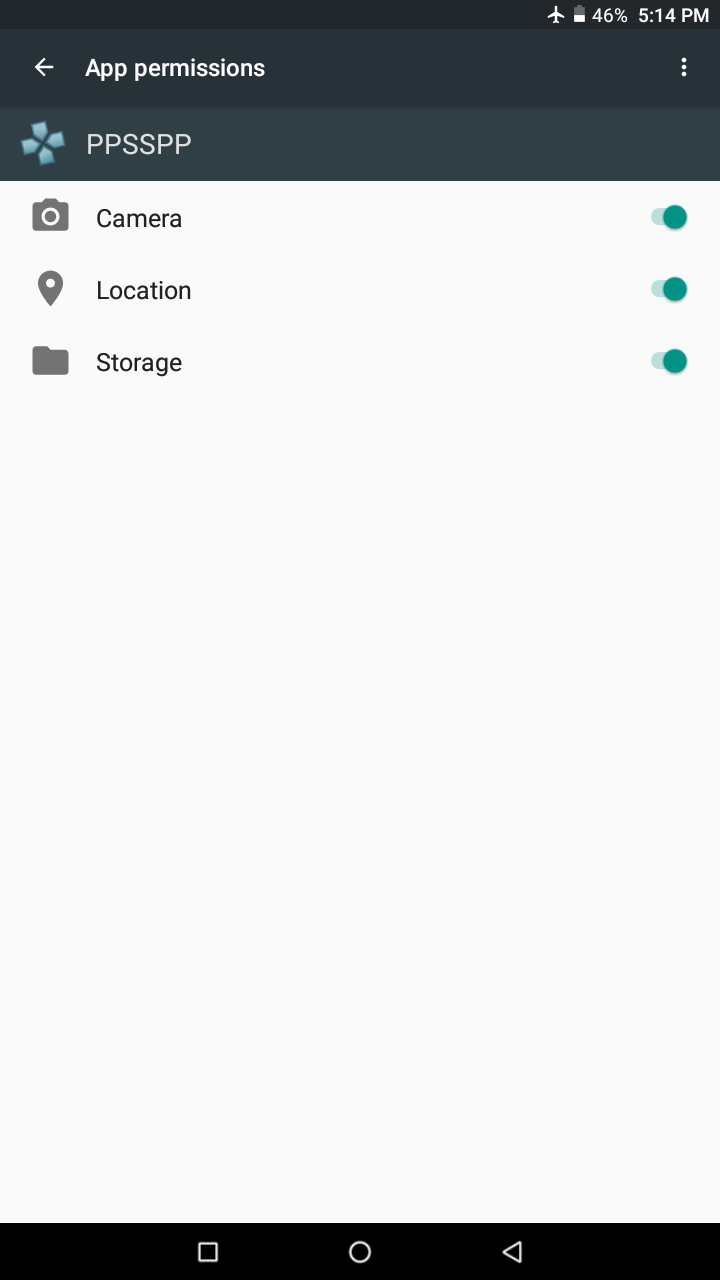
I need to manually on the permission in phone
settings if not need to restart/reboot the phone
Android 6.0
Mali-T720
 Gamemulatorer
All 26 comments
Even granted the permission ppsspp always say failed to saved

Gamemulatorer
on 8 May 2018
So I need to manually on the permission in the phone settings
Gamemulatorer
on 8 May 2018
@Jinzombie
So you mean if you uninstall the app and reinstall it, the permission dialog doesn't appear automatically? Or maybe not saving the granted permission?
Have you cleared the app data? It can also reset the permissions.
@hrydgard
I think the issue here is that PPSSPP doesn't ask again for the storage permission if the user has somehow turned it off.
Maybe you should ask again if saving fails? 🤔
 leopard20
on 8 May 2018
leopard20
on 8 May 2018
We do show a button to allow the user to retrigger the question. Or at least I think we do...
 hrydgard
on 8 May 2018
hrydgard
on 8 May 2018
Here's my screen recorder it show up the button and I allow the permission but always failed to saved settings.
https://youtu.be/nSdbdPAssFQ
Gamemulatorer
on 9 May 2018
So permission was definitely granted then, if it could see the games, right? I wonder why the setting had to be turned on again?
-[Unknown]
 unknownbrackets
on 9 May 2018
unknownbrackets
on 9 May 2018
If I exit in the ppsspp (remove from recent app) and open it again all of the changes in the settings will back to default.
Gamemulatorer
on 9 May 2018
That means it has indeed failed to save the config... Or failed to load it on the next startup, hm.
hrydgard
on 9 May 2018
Yes
Gamemulatorer
on 9 May 2018
Tried a lot of things but can't get it to misbehave on my S8...
hrydgard
on 9 May 2018
Maybe my tablet has the problem and not the ppsspp? 😟
Gamemulatorer
on 10 May 2018
Just downloaded now build 1.5.4-980 and I test it on android 7.1 Mali-400 my friend phone but the issue of saved settings is still happen.
Note:First time to install in his android phone
Gamemulatorer
on 10 May 2018
Well, we do ask the system for the path to the SD card...
Ideally we should probably move ppsspp.ini to app-private storage which always works, with an option to have it in the current location too in case you want to manually edit it..
hrydgard
on 10 May 2018
Why not save it in the private storage in these cases (when error occurs), then try to move it to the PSP directory?
leopard20
on 10 May 2018
Oops! Deleted my comment accidentally! 😅 Here it is again:
@hrydgard
I don't think this has anything to do with storage permission. If the permission was not granted or saved, then you couldn't even display the contents of the sdcard.
The real issue here is (or at least I think it is) that you're accessing the sdcard from an invalid path, which only grants reading permissions not writing permissions. You have to access it via the valid path which is not that easy and varies across devices (or rather ROMs).
It's a ROM bug not that of PPSSPP. (seen it a lot on Huawei phones)
@Jinzombie
I have 2 questions for you
- Have you inserted a memory card into your device?
- Does your device allow you to change the default storage for apps?
leopard20
on 10 May 2018
I plan to do something like that but it's too scary a change for 1.6, I can foresee all sorts of bizarre problems that could arise...
hrydgard
on 10 May 2018
Maybe create a temporary PoC app for testing? (do not merge it to the main branch just upload it here!)
leopard20
on 10 May 2018
@leopard20
No! Phone Storage Only.
This issue can easily bypass by rebooting/restarting my android phone 😅
Gamemulatorer
on 10 May 2018
Opps... I will close this because I figured out if I delete the system folder or just newly installed a ppsspp build the problem happen but if I had already a system folder this isn't happen and also restarting the ppsspp fix the issue ✌😅
*Sorry for mistake 🙇
Gamemulatorer
on 10 May 2018
Oh! Hm, that's worth fixing....
hrydgard
on 10 May 2018
Told you it was because of invalid path! Although not exactly what I had in mind! ;)
leopard20
on 10 May 2018
@hrydgard
What about the SYSTEM directory? I didn't see it in the diff.
leopard20
on 10 May 2018
Adding it.
hrydgard
on 10 May 2018
This should be ok now, please confirm :)
hrydgard
on 11 May 2018
its OK now 👍
@hrydgard thank you!
Gamemulatorer
on 11 May 2018
Awesome, glad to hear it.
-[Unknown]
unknownbrackets
on 11 May 2018
Related issues
 moura464
·
3Comments
moura464
·
3Comments
 ewlkkf
·
6Comments
ewlkkf
·
6Comments
 nassau-tk
·
5Comments
nassau-tk
·
5Comments
 Deivmsr
·
6Comments
Deivmsr
·
6Comments
 thedax
·
6Comments
thedax
·
6Comments