Powertoys: [KBM] Remapping `Play/pause/App/Mail/Calculator` buttons does not work
Environment
Windows build number: `10.0.19041.264`
PowerToys version: `0.18.0`
PowerToy module for which you are reporting the bug (if applicable): `Keyboard Manager`
Tested using a Surface Pro 6 type cover (Australian model) and a Microsoft Sculpt™ Comfort Keyboard
Steps to reproduce
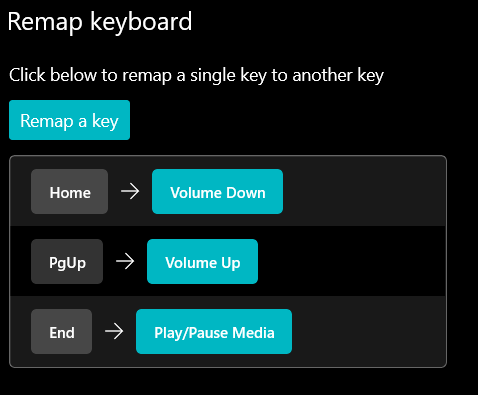
Attempt to map Play/Pause Media to any other key (e.g. End)
Expected behaviour
In my example above, pressing End should play/pause media.
Actual behaviour
Pressing End does nothing. The original Play/Pause Media button still works. Testing with Spotify Desktop and YouTube playing in Edge Chromium.
Other keymaps work fine (see the attached screenshot).
Screenshots
 k-yle
k-yle
All 7 comments
Hi @k-yle I tried the exact set of remappings in the screenshot and all of them worked for me. I tested Play/Pause in Spotify and in Edge Chromium on Youtube/Netflix. Does this only happen when you remap End to Play/Pause or does it also happen for any other key like A to Play/Pause?
 arjunbalgovind
on 20 May 2020
arjunbalgovind
on 20 May 2020
Does this only happen when you remap End to Play/Pause or does it also happen for any other key like A to Play/Pause?
It doesn't work with any key, I tried End and A.
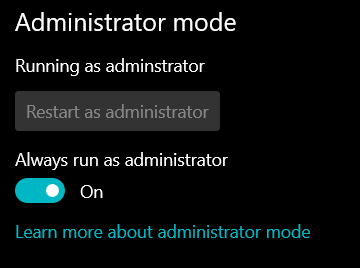
But I have some more Information - If the PowerApps application is open in the foreground, AND running as administrator with this toggle then it works. But when PowerTools is minimized to the tray, Play/Pause does not work.
k-yle
on 20 May 2020
I can repro as well. steps to:
- map End (or any key) to Play/Pause
- open youtube or spotify
- try to play or pause with remapped Key --> doesn't work
- open PT settings in Admin
- bring to foreground and press remapped Key --> works as Play/Pause
 saahmedm
on 20 May 2020
saahmedm
on 20 May 2020
hi @k-yle , we're looking into it but seems like this issue has to do with the insider build. I was able to repro this on my computer on insider but not on a VM without it. @arjunbalgovind as well.
saahmedm
on 20 May 2020
But I have some more Information - If the PowerApps application is open in the foreground, AND running as administrator with this toggle then it works. But when PowerTools is minimized to the tray, Play/Pause does not work.
Hi, just want to add that have just the same behavior as mentioned above
powertoys 0.18.2
win 1909 18363.418
any button for pause/play, several other functions are working
tested for music in chrome
 xever117
on 9 Jun 2020
xever117
on 9 Jun 2020
I have the same issue. I tried mapping several keys to the play/pause key.
Windows 10 Pro 64-bit [Version 10.0.18363.959] Intel i5-3470 12 GB RAM
I've tried another utility called uncap, to run this change as well, but it didn't work either: uncap 0x6A:0xB3 should map the multiply key * on the numpad to the play/pause key.
I know that it is possible, because using sharpkeys it did work.
.
 lemero
on 13 Aug 2020
lemero
on 13 Aug 2020
My issue got closed as dup so i gonna insert my work around here.
I assign Pause/Break key on my keyboard to Play/Pause Media.
I could only trigger the by shortcut by combo Shift + Break
 quangkieu
on 10 Oct 2020
quangkieu
on 10 Oct 2020
Related issues
 Martin-Hausleitner
·
3Comments
Martin-Hausleitner
·
3Comments
 amorenew
·
3Comments
amorenew
·
3Comments
 Garconis
·
3Comments
Garconis
·
3Comments
 patware
·
3Comments
patware
·
3Comments
 verglor
·
3Comments
verglor
·
3Comments