Powershell: ValidateSet/Register-ArgumentCompleter/Enum completions does not work correctly on Arrays
Steps to reproduce
function New-Function {
    [cmdletBinding()]
    param(
        [validateSet('New', 'Old', 'Other')][string[]] $Test1,
        [validateSet('New', 'Old', 'Other')][string[]] $Test2
    )
}
New-Function -Test1 New -Test2 New
New-Function -Test1 New, Old -Test2 New
New-Function -Test1 New, Old -Test2 New
Paste in VSCode. Try to autocomplete Test2 parameter on line 8 (first instance in the script). It will work for 1st element of array, but if you try adding 2nd or 3rd element autocomplete fails.
It works correctly if you start from top to bottom as in
function New-Function {
    [cmdletBinding()]
    param(
        [validateSet('New', 'Old', 'Other')][string[]] $Test1,
        [validateSet('New', 'Old', 'Other')][string[]] $Test2
    )
}
New-Function -Test1 New -Test2 New
It will work on line 8
function New-Function {
    [cmdletBinding()]
    param(
        [validateSet('New', 'Old', 'Other')][string[]] $Test1,
        [validateSet('New', 'Old', 'Other')][string[]] $Test2
    )
}
New-Function -Test1 New -Test2 New
New-Function -Test1 New, Old -Test2 New
New-Function -Test1 New, Old -Test2 New
It will work on line 10 but fails for lines 8 and 9.

Originally reported in VSCode PowerShell extension where more discussion is present: https://github.com/PowerShell/vscode-powershell/issues/2982
Expected behavior
Autocomplete working on arrays in any order. On first line, last line, middle line.
Actual behavior
Environment data
Name                           Value
----                           -----
PSVersion                      7.1.0-rc.1
PSEdition                      Core
GitCommitId                    7.1.0-rc.1
OS                             Microsoft Windows 10.0.19042
Platform                       Win32NT
PSCompatibleVersions           {1.0, 2.0, 3.0, 4.0…}
PSRemotingProtocolVersion      2.3
SerializationVersion           1.1.0.1
WSManStackVersion              3.0
 PrzemyslawKlys
All 4 comments
Simplified repo
Steps to Reproduce
$withoutTrailingCommands = @'
function New-Function {
    [CmdletBinding()]
    param(
        [ValidateSet('New', 'Old', 'Other')]
        [string[]] $Test
    )
}

New-Function -Test New, Old,
'@

$withTrailingCommands = @'
function New-Function {
    [CmdletBinding()]
    param(
        [ValidateSet('New', 'Old', 'Other')]
        [string[]] $Test
    )
}
New-Function -Test New, Old,
anythinghere
'@

$cursor = $withoutTrailingCommands.Length

(TabExpansion2 -inputScript $withoutTrailingCommands -cursorColumn $cursor).CompletionMatches
'----'
(TabExpansion2 -inputScript $withTrailingCommands -cursorColumn $cursor).CompletionMatches
Expected behavior
Both return the same results
CompletionText ListItemText     ResultType ToolTip
-------------- ------------     ---------- -------
New            New          ParameterValue New
Old            Old          ParameterValue Old
Other          Other        ParameterValue Other
----
New            New          ParameterValue New
Old            Old          ParameterValue Old
Other          Other        ParameterValue Other
Actual behavior
Only the first tabexpansion call actually worked. Validate set string array argument completion works only when there are no following statements. Or following parameters it seems.
CompletionText ListItemText     ResultType ToolTip
-------------- ------------     ---------- -------
New            New          ParameterValue New
Old            Old          ParameterValue Old
Other          Other        ParameterValue Other
----
.\Documents    Documents    ProviderContainer etc
.\Downloads    Downloads    ProviderContainer etc
...etc
 SeeminglyScience
on 7 Oct 2020
SeeminglyScience
on 7 Oct 2020
It's even worse than I thought it is. Thank you
PrzemyslawKlys
on 7 Oct 2020
I just wanted to add I often have issue with autocomplete for 1st element as well
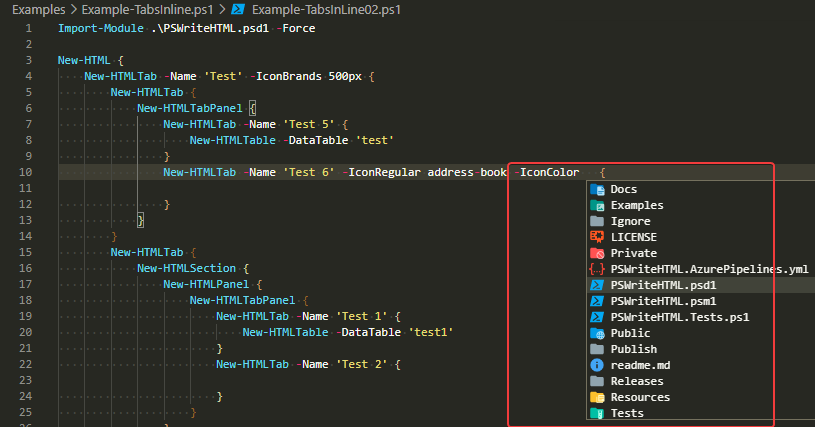
Especially when using Register-ArgumentCompleter
        [parameter(ParameterSetName = "FontAwesomeBrands")]
        [parameter(ParameterSetName = "FontAwesomeRegular")]
        [parameter(ParameterSetName = "FontAwesomeSolid")][string] $IconColor,

....


Register-ArgumentCompleter -CommandName New-HTMLTab -ParameterName IconColor -ScriptBlock $Script:ScriptBlockColors
I wasn't able to reproduce it easily so there must be something in play that impacts how things are autocomplete when used the way I use it.
PrzemyslawKlys
on 10 Oct 2020
It would seem for PowerShell 5.1 this fails very often
function Test-Me1 {
    [cmdletBinding()]
    param(
        [string[]] $IconColor,
        [string[]] $TextColor
    )
}

function Test-Me2 {
    [cmdletBinding()]
    param(
        [string[]] $IconColor
    )
}


$ScriptBlock = {
    param($commandName, $parameterName, $wordToComplete, $commandAst, $fakeBoundParameters)
    'One', 'Two', 'Three' | Where-Object { $_ -like "*$wordToComplete*" }
}

Register-ArgumentCompleter -CommandName Test-Me1 -ParameterName IconColor -ScriptBlock $ScriptBlock
Register-ArgumentCompleter -CommandName Test-Me1 -ParameterName TextColor -ScriptBlock $ScriptBlock


Register-ArgumentCompleter -CommandName Test-Me2 -ParameterName IconColor -ScriptBlock $ScriptBlock

Test-Me1 -IconColor One -TextColor One

Test-Me2 -IconColor One
In PowerShell 7 it seems to work (for 1st entry only, not for 2nd. So I guess somewhere along the road it was fixed partially.
PrzemyslawKlys
on 10 Oct 2020
Related issues
 mklement0
·
3Comments
mklement0
·
3Comments
 JohnLBevan
·
3Comments
JohnLBevan
·
3Comments
 garegin16
·
3Comments
garegin16
·
3Comments
 aragula12
·
3Comments
aragula12
·
3Comments
 andschwa
·
3Comments
andschwa
·
3Comments
Most helpful comment
Simplified repo
Steps to Reproduce
Expected behavior
Both return the same results
Actual behavior
Only the first tabexpansion call actually worked. Validate set string array argument completion works only when there are no following statements. Or following parameters it seems.