Powershell: "ADD_EXPLORER_CONTEXT_MENU_OPENPOWERSHELL" Does not work properly
Steps to reproduce
adding ADD_EXPLORER_CONTEXT_MENU_OPENPOWERSHELL=0 to msiexec options for

Powershell 7.0.3
&
Powershell 7.1.0

does not work, as context menu options are still added regardless of the value set.
Expected behavior
Powershell installer should not add context menu option to registry if value is set to 0
Actual behavior
Powershell installer is still adding context menu for powershell in explorer window
Environment data
Name                           Value
----                           -----
PSVersion                      7.0.3
PSEdition                      Core
GitCommitId                    7.0.3
OS                             Microsoft Windows 10.0.18363
Platform                       Win32NT
PSCompatibleVersions           {1.0, 2.0, 3.0, 4.0…}
PSRemotingProtocolVersion      2.3
SerializationVersion           1.1.0.1
WSManStackVersion              3.0


Name                           Value
----                           -----
PSVersion                      7.1.0-preview.7
PSEdition                      Core
GitCommitId                    7.1.0-preview.7
OS                             Microsoft Windows 10.0.18363
Platform                       Win32NT
PSCompatibleVersions           {1.0, 2.0, 3.0, 4.0…}
PSRemotingProtocolVersion      2.3
SerializationVersion           1.1.0.1
WSManStackVersion              3.0
 NinjaRMMTheming
All 7 comments
Perhaps @heaths could comment the issue.
 iSazonov
on 24 Sep 2020
iSazonov
on 24 Sep 2020
Property condition checks in Windows Installer are traditionally, is it set or not? 0 is not treated as false. This is true of Winodws Insatller standard properties as well. If you want to force a property to "off" (undefined), set it's value to nothing:
msiexec /i powershell.msi /l*v "%TEMP%"\install.log" /qn ADD_EXPLORER_CONTEXT_MENU_OPENPOWERSHELL=
 heaths
on 25 Sep 2020
heaths
on 25 Sep 2020
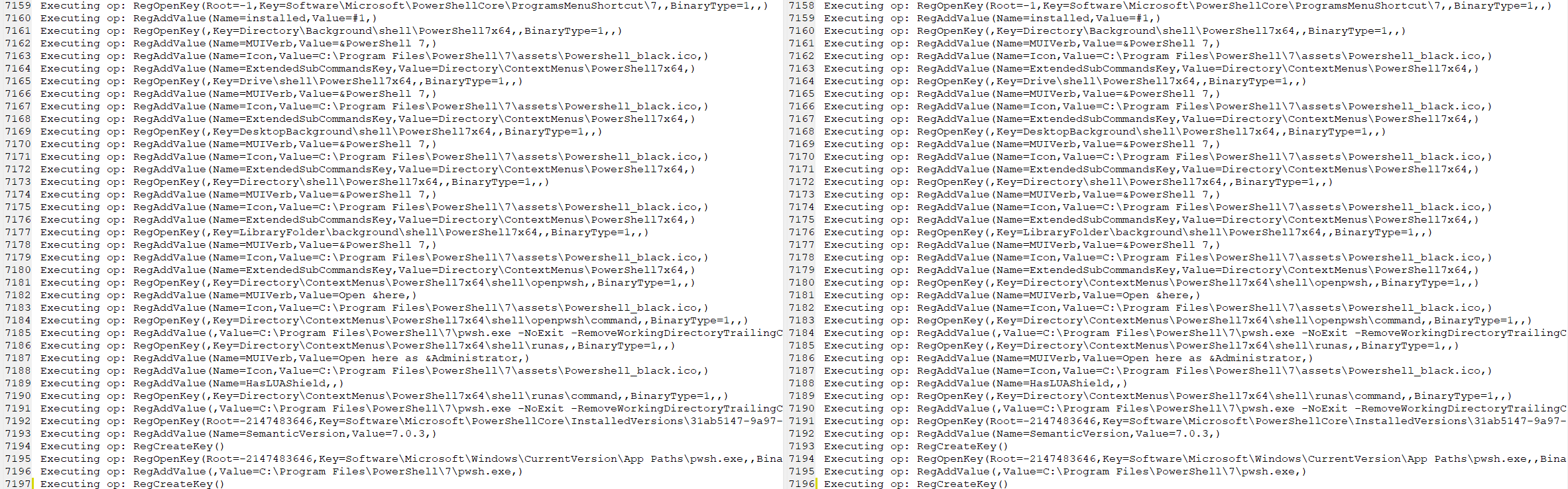
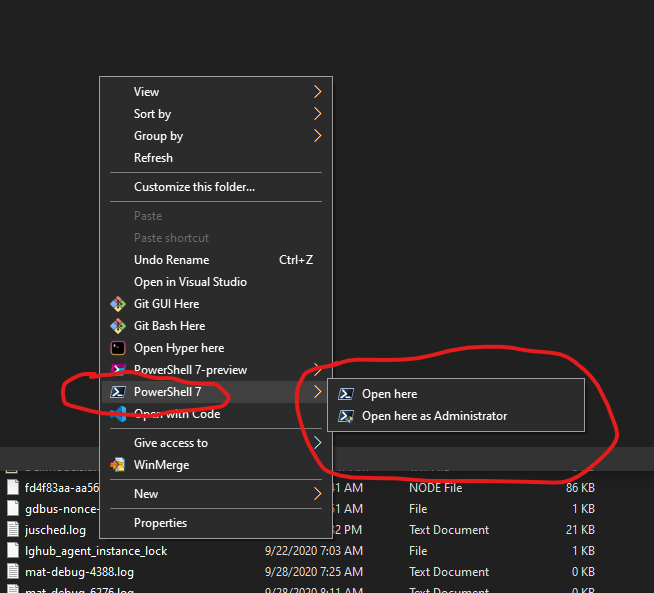
I have already tested every variation of this condition. I install MSI's all the time as im the IT Admin for my company. I have used all possible variations of this flag to test true and false and none work. The other 2 flags of the install do infact work. I have created the installer logs and used a difference comparison program to weed out the differences. As you will see from the raw logs themselves as well as the screenshots I have included, the first install (left) shows the True flag for context menu and the second install (right) shwos the False flag, and both show adding the context menu registry keys and the other screenshot is showing the context menu existing (after specifying dont add to context menu) for powershell 7.0.3 in file explorer. This exact same thing happens with the latest 7.1.x release of powershell preview.
powershell-install(ADD-CONTEXT).log
powershell-install2(DONT-ADD-CONTEXT).log

NinjaRMMTheming
on 28 Sep 2020
Setting it to 0 still defines the property. Windows Installer only checks if the property is defined when using it in conditions like PROPNAME or NOT PROPNAME. As described above, to make sure a property is undefined in Windows Installer, simply set it to empty: PROPNAME= (no value).
heaths
on 28 Sep 2020
Okay, going based off what you said, that did not work as adding the property undefined still adds the context menu option
MSI (s) (30:D0) [07:31:19:045]: Command Line: ADD_EXPLORER_CONTEXT_MENU_OPENPOWERSHELL=ENABLE_PSREMOTING=1 REGISTER_MANIFEST=1 CURRENTDIRECTORY=C:\ CLIENTUILEVEL=3 CLIENTPROCESSID=4104
But, if I leave out the Property entirely, then it does not add the context menu option
[cid:eaaf7faf-b2bb-45af-b9fe-92965a3dec67]
Command:
Install-GitPowershell -Version Preview -AddContextMenu $false -EnableRemoting $true -Manifest $true
Result:
MSI (s) (CC:70) [07:37:26:562]: Command Line: ENABLE_PSREMOTING=1 REGISTER_MANIFEST=1 CURRENTDIRECTORY=C:\ CLIENTUILEVEL=3 CLIENTPROCESSID=16140
Thank you for the helpful advice. I am creating a powershell module to grab and install the latest powershell version based on stable and preview releases and this is the only part that did not work.
So, thank you!
Thanks,
Dennis Fair | I.T Systems Admin
Four Peaks Landscape Management
p: 480-967-0376
m: 480-319-5345
e: [email protected]it@fourpeakslandscape.com
[http://fourpeakslandscape.com/images/four-peaks-landscape-management.png]
NinjaRMMTheming
on 29 Sep 2020
There's no space in your property setting:
ADD_EXPLORER_CONTEXT_MENU_OPENPOWERSHELL=ENABLE_PSREMOTING=1
That's setting ADD_EXPLORER_CONTEXT_MENU_OPENPOWERSHELL to ENABLE_PSREMOTING=1.
This is always how conditions in Windows Installer have always worked. Even if custom properties did have to change to handle 0 as false, that not only complicates conditions everywhere - risking regressions - but is not possible for standard properties handled by Windows Installer itself. To undefine a property, you set it to an empty string (same with environment variables across platforms).
heaths
on 29 Sep 2020
I have corrected the error I made on my end as I did not add the null string concentrator to the property. I have added it as so
[cid:75c6549e-7ea0-42b6-bbf7-142497611dc2]
and the module uses boolean validate parametersets to distinguish null or enable for context menu
[cid:18ae2e64-bee9-4f4c-ba6a-9e0d72de532d]
The other 2 flags handle $False as 0 with no issues though so im not understanding why thats the case for those 2 but not for the first one?
[cid:fe617fb4-be95-496d-be45-6d477b250734]
I changed the ENABLE_PSREMOTING to null as well
[cid:2f836f66-57fe-47d3-a66d-f14e4c8f2e2e]
and ran
[cid:602e4a1a-2e5b-47e2-b106-8710b601c94c]
And it still kept the install from applying PSRemoting
As best practices should I set the default $False value to a null concentrator?
Either way, the null string works perfectly on the contextmenu property so thank you very much for your insight!
Thanks,
Dennis Fair | I.T Systems Admin
Four Peaks Landscape Management
p: 480-967-0376
m: 480-319-5345
e: [email protected]it@fourpeakslandscape.com
[http://fourpeakslandscape.com/images/four-peaks-landscape-management.png]
NinjaRMMTheming
on 29 Sep 2020
Related issues
 lzybkr
·
3Comments
lzybkr
·
3Comments
 andschwa
·
3Comments
andschwa
·
3Comments
 JohnLBevan
·
3Comments
JohnLBevan
·
3Comments
 Michal-Ziemba
·
3Comments
Michal-Ziemba
·
3Comments
 concentrateddon
·
3Comments
concentrateddon
·
3Comments
Most helpful comment
Property condition checks in Windows Installer are traditionally, is it set or not? 0 is not treated as false. This is true of Winodws Insatller standard properties as well. If you want to force a property to "off" (undefined), set it's value to nothing: