Powershell: ConvertTo-JSON should allow nesting 0
There seems to be an oversight of what ConvertTo-JSON allows when it comes to nesting. Since the default value is 2 (not 0) it's impossible to set it to 0, as minimal value is 1.
Steps to reproduce
[PSCustomObject] @{
    Test  = 1
    Test2 = 2
    Test3 = [PSCustomObject] @{
        IdontWantThat = 1
    }
} | ConvertTo-Json -Depth 0
Expected behavior
[PSCustomObject] @{
    Test  = 1
    Test2 = 2
    Test3 = [PSCustomObject] @{
        IdontWantThat = 1
    }
} | ConvertTo-Json -Depth 0
Should be:
{
"Test":"1",
"Test2":"2",
"Test3":"@{IDontWantThat=1}"}
or similar
Actual behavior
[PSCustomObject] @{
    Test  = 1
    Test2 = 2
    Test3 = [PSCustomObject] @{
        IdontWantThat = 1
    }
} | ConvertTo-Json -Depth 0
ConvertTo-Json : Cannot validate argument on parameter 'Depth'. The 0 argument is less than the minimum allowed range of 1. Supply an argument that is greater than or equal to 1 and then try the command again.
Environment data
 PrzemyslawKlys
All 15 comments
@iSazonov Are we okay to change min to 0 ?
 kvprasoon
on 24 Sep 2020
kvprasoon
on 24 Sep 2020
I hope we will to move to new .Net JSON API in next milestone (7.2 LTS). In the time we will review all JSON cmdlet's issues. I expect we will get many minor and major (breaking) changes.
If the request is to make a shift 1->0, 2->1 and so on it is a breaking change. I don't see a value in the change as standalone but among many other breaking changes, this could be favored.
 iSazonov
on 25 Sep 2020
iSazonov
on 25 Sep 2020
I think the request is just only to make min depth value to 0.
kvprasoon
on 25 Sep 2020
Yep, the request is allow 0 instead of 1 as minimum value. Pretty sure it's not breaking change as long as it behaves correctly.
PrzemyslawKlys
on 25 Sep 2020
Yeah, allowing a lower minimum shouldn't break anything.
 vexx32
on 25 Sep 2020
vexx32
on 25 Sep 2020
With Depth 2 we get
{
  "Test": 1,
  "Test2": 2,
  "Test3": {
    "IdontWantThat": 1
  }
}
With Depth 1
{
  "Test": 1,
  "Test2": 2,
  "Test3": {
    "IdontWantThat": 1
  }
}
So with Depth 0:
{
}
Yeah, allowing a lower minimum shouldn't break anything.
It seems we already discussed this - truncating is data lost - it is bad.
iSazonov
on 25 Sep 2020
Depth 0 should have:
{
  "Test": 1,
  "Test2" : 2,
  "Test3": "{IdontWantThat=1}"
}
As for truncating data, sure. This is an opt in mechanism. Nothing existing will break.
vexx32
on 25 Sep 2020
Depth 0 with code change has
{
  "Test": 1,
  "Test2": 2,
  "Test3": "@{IdontWantThat=1}"
}
I am using ConvertTo-Json to generate javascript data.
$Data = [PSCustomObject] @{
    Test  = 1
    Test2 = 2
    Test3 = [PSCustomObject] @{
        IdontWantThat = 1
    }
}

New-HTML {
    New-HTMLTable -DataTable $Data -DataStore JavaScript
} -FilePath $Env:USERPROFILE\Desktop\test.html -ShowHTML
Aside from having unusable data - that is not displayed anyway, the file size gets much larger.
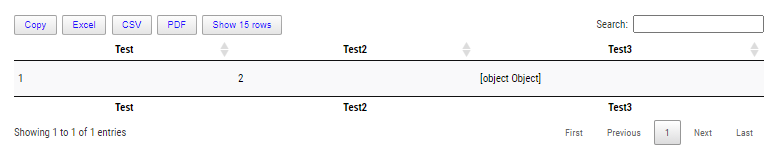
I've rolled out my own ConvertTo-JsonLiteral which solves this in 5.1 but I would appreciate the issue being fixed in PowerShell 7 so in the future users can decide what to do.
This is how it looks inside HTML
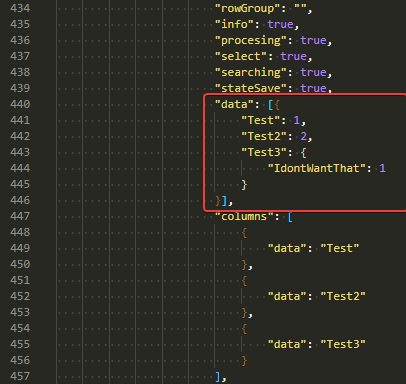
As @vexx32 said this is opt-in so no loss of data unless you specifically ask for it. One could argue that putting default at 2, makes anything over 2 at the same disadvantage as having 0 for nesting of 1.
PrzemyslawKlys
on 25 Sep 2020
What is an output difference in Depth 0 and Depth 1?
iSazonov
on 27 Sep 2020
Depth 1:
{
  "Test": 1,
  "Test2": 2,
  "Test3": {
    "IdontWantThat": 1
  }
}
Depth 0:
{
  "Test": 1,
  "Test2": 2,
  "Test3": "@{IdontWantThat=1}"
}
@vexx32 Thanks! I don't see a value in this. From other discussions current intention is to follow new .Net API behavior - remove default depth, throw on truncating by default.
iSazonov
on 27 Sep 2020
🤷 clearly someone does, or we wouldn't have this issue. 😂
vexx32
on 27 Sep 2020
It's even worse for DateTime...
[PSCustomObject] @{
    Test  = 1
    Test2 = 2
    Test3 = [PSCustomObject] @{
        IdontWantThat = Get-Date
    }
} | ConvertTo-Json -Depth 1
{
    "Test":  1,
    "Test2":  2,
    "Test3":  {
                  "IdontWantThat":  {
                                        "value":  "\/Date(1601231994118)\/",
                                        "DisplayHint":  2,
                                        "DateTime":  "niedziela, 27 września 2020 20:39:54"
                                    }
              }
}
It's useless to my use case. While I understand you don't want to truncate data I have no way to show this data in one dimension view outside of PowerShell. It just adds junk that I don't need.
This is what my version of ConvertTo-JsonLiteral does
{
"Test":1,
"Test2":2,
"Test3":{
"IdontWantThat":"2020-09-27 20:42:01"}}
And with depth 0
{
"Test":1,
"Test2":2,
"Test3":"@{IdontWantThat=09/27/2020 20:42:27}"}
And this is also an idea for what I would like from New Convert-ToJson. Ability to define DateTime format just like you have added the ability for enum.
Output for Depth 1 for Date or INT:

Output for Depth 0

At least I can see something and act. I want ConvertTo-JSON to act a bit like ConvertTo-HTML where it does what I'm asking for.
PrzemyslawKlys
on 27 Sep 2020
Related issues
 pcgeek86
·
3Comments
pcgeek86
·
3Comments
 garegin16
·
3Comments
garegin16
·
3Comments
 abock
·
3Comments
pcgeek86
·
3Comments
abock
·
3Comments
pcgeek86
·
3Comments
 HumanEquivalentUnit
·
3Comments
HumanEquivalentUnit
·
3Comments