PowerShell will not allow me to enable unencrypted connections, due to missing Network Connection Profiles
Steps to reproduce
- Enable Hyper-V
- Install Cisco VPN client
- Install Proton VPN client
- Enable Windows Subsystem for Linux (WSL)
- Install Wireshark with NPCAP virtual adapter
C:\Users\TrevorSullivan> Set-Item -Path WSMan:\localhost\Service\AllowUnencrypted -Value true
Set-Item: WinRM firewall exception will not work since one of the network connection types on this machine is set to Public. Change the network connection type to either Domain or Private and try again.
C:\Users\TrevorSullivan> Get-NetConnectionProfile

Name             : Andromeda
InterfaceAlias   : Wi-Fi
InterfaceIndex   : 3
NetworkCategory  : Private
IPv4Connectivity : Internet
IPv6Connectivity : NoTraffic

C:\Users\TrevorSullivan> Enter-PSSession -ComputerName localhost
Enter-PSSession: Connecting to remote server localhost failed with the following error message : Access is denied. For more information, see the about_Remote_Troubleshooting Help topic.
Obviously, the Enter-PSSession command fails with Access is denied. I traced this back to the AllowUnencrypted setting on the WinRM service.

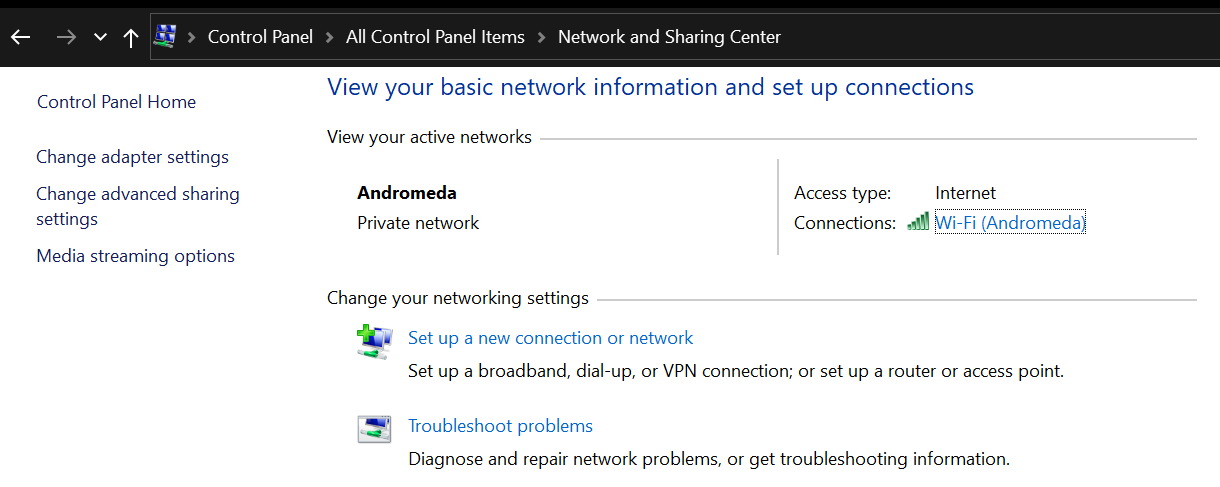
As you can see from the screenshots, the "Network Category" field is straight up missing for all but one of my network connections. Also, there's only one connection profile returned by Get-NetConnectionProfile, and it's already set to Private.
How am I supposed to discover which of my network connections is being detected as public?
Expected behavior
- Network Category is set for all network connections
Get-NetConnectionProfileshows me which of my networks ispublic- PowerShell sets WinRM configuration to allow unencrypted, without throwing any error messages
Actual behavior
PowerShell indicates that one of my network connections is public, although as best I can tell, none of them are set that way. There's a conflict between what's being reported by PowerShell and what's being reported by Windows 10.
Environment data
Name                           Value
----                           -----
PSVersion                      7.0.3
PSEdition                      Core
GitCommitId                    7.0.3
OS                             Microsoft Windows 10.0.19041
Platform                       Win32NT
PSCompatibleVersions           {1.0, 2.0, 3.0, 4.0…}
PSRemotingProtocolVersion      2.3
SerializationVersion           1.1.0.1
WSManStackVersion              3.0
 pcgeek86
All 5 comments
@SteveL-MSFT this might need to be passed along to the windows team responsible for this module; if their module is reporting incorrect information, it'll make life difficult for folks trying to handle this kind of thing in any automated fashion.
 vexx32
on 18 Sep 2020
vexx32
on 18 Sep 2020
Yeah I don't know what's up with that API, but try this:
using namespace System.Runtime.InteropServices

$ERROR_NOT_CONNECTED = 0x800708CA
$NLM_ENUM_NETWORK_ALL = 0x03

enum NlmNetworkCategory {
    Public = 0x00
    Private = 0x01
    DomainAuthenticated = 0x02
}

# Don't know the progid, but here's the docs:
# https://docs.microsoft.com/en-us/windows/win32/api/netlistmgr/nn-netlistmgr-inetworklistmanager
$type = [type]::GetTypeFromCLSID('DCB00C01-570F-4A9B-8D69-199FDBA5723B')
$netMgr = $null
$networks = $null
try {
    $netMgr = [Activator]::CreateInstance($type)

    $networks = $netMgr.GetNetworks($NLM_ENUM_NETWORK_ALL)
    foreach ($network in $networks) {
        try {
            $category = [NlmNetworkCategory]::DomainAuthenticated
            $category.value__ = $network.GetCategory()

            <# yield return #> [PSCustomObject]@{
                Name = $network.GetName()
                Category = $category
            }

            # Uncomment to set all public to private.
            # if ($category -eq [NlmNetworkCategory]::Public) {
            #     try {
            #         $network.SetCategory([NlmNetworkCategory]::Private)
            #     } catch [System.Runtime.InteropServices.COMException] {
            #         # SetCategory will throw when it's not connected, but it'll still work anyway.
            #         if ($PSItem.Exception.HResult -ne $ERROR_NOT_CONNECTED) {
            #             throw $PSItem
            #         }
            #     }
            # }
        } finally {
            if ($null -ne $network) {
                $null = [Marshal]::ReleaseComObject($network)
            }
        }
    }
} finally {
    if ($null -ne $networks) {
        $null = [Marshal]::ReleaseComObject($networks)
    }

    if ($null -ne $netMgr) {
        $null = [Marshal]::ReleaseComObject($netMgr)
    }
}
 SeeminglyScience
on 18 Sep 2020
SeeminglyScience
on 18 Sep 2020
I was able to work around this problem by creating a self-signed certificate, and setting up an HTTPS listener for WinRM. That way, I don't need to worry about enabling AllowUnencrypted.
Still, this should be considered a bug.
@SeeminglyScience good idea. I tried that code, and it seems to have set the category to private. However, PowerShell is still complaining. See below.
C:\Users\TrevorSullivan> $networks | % { $_.getcategory() }
1
1
1
1
1
1
1
1
1
1
1
1
1
1
1
1
C:\Users\TrevorSullivan> Set-Item -Path WSMan:\localhost\Service\AllowUnencrypted -Value true
Set-Item: WinRM firewall exception will not work since one of the network connection types on this machine is set to Public. Change the network connection type to either Domain or Private and try again.
Curious why you are enabling unencrypted connections, that's just plain bad behaviour and should be avoidable of any decent WinRM client.
 jborean93
on 18 Sep 2020
jborean93
on 18 Sep 2020
So I had a look into this and the code that is generating this error is not in PowerShell but the native WSMan API that PowerShell is calling. You can verify this by finding that exact same error message in C:\Windows\System32\en-US\WsmRes.dll.mui

So PowerShell is effectively calling https://github.com/PowerShell/PowerShell/blob/3effa204103460c996a8612aa70718fdf924047d/src/Microsoft.WSMan.Management/ConfigProvider.cs#L2689 and the exception from this is what you are seeing in the error message. PowerShell can't do much about this as the check is performed in a dll not owned by this team so @vexx32 suggestion is the next step https://github.com/PowerShell/PowerShell/issues/13654#issuecomment-694944801.
For your actual issue, you shouldn't ever really set this config option to True. Unless you are using a 3rd party WinRM library that doesn't support message encryption over NTLM or Kerberos then your only real option is to use HTTPS as you've pointed out. By having to set this to True any data that is exchanged will be in plaintext which is really dangerous, considering how easy it is to set up a self signed cert then a HTTPS listener isn't really that harder to do. I would even consider finding a different WinRM client if possible as this should be something added from the get go.
If you really, really, really want to shoot yourself in the foot I believe you can set this policy through GPO which effectively means it's a registry key. Searching the registry for AllowUnencrypted might yield some extra info.
jborean93
on 19 Sep 2020
Related issues
 MaximoTrinidad
·
3Comments
MaximoTrinidad
·
3Comments
 andschwa
·
3Comments
pcgeek86
·
3Comments
pcgeek86
·
3Comments
andschwa
·
3Comments
pcgeek86
·
3Comments
pcgeek86
·
3Comments
 rudolfvesely
·
3Comments
rudolfvesely
·
3Comments