Powershell: Move-Item explodes contents of first top-level folder
Steps to reproduce
Run the script below in a new folder.
if (Test-Path src){
    remove-item src -force -recurse
}

if (Test-Path dest){
    remove-item dest -force -recurse
}

New-Item -ItemType directory -Path src | out-null
New-Item -ItemType directory -Path src\foo | out-null
New-Item src\foo.txt | out-null
New-Item src\foo\foo.txt | out-null

move-item -path "src\*" -Destination "dest"
It will create a simple folder structure like this...

...and then move the contents of src into a new folder dest.
Expected behavior

Actual behavior
We end up with a folder structure like this...
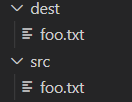
...as well as the following error.
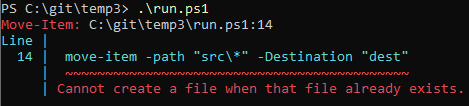
I assume the error appears because when foo is moved, the contents are moved instead of the whole folder, so foo.txt is moved directly under dest. When the root level foo.txt is then attempted to be moved, there is already a foo.txt in its destination path.
Environment data
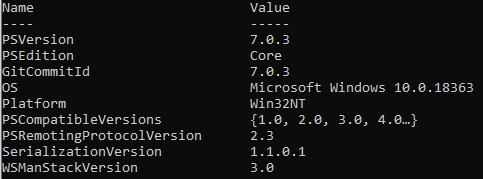
 yohosuff
All 2 comments
In this case, Move-Item performs a two-step operation in sequence.
First, it RENAMES the src/foo folder to the dest folder.
Next, it tries to MOVE the src/foo.txt file to the dest folder. However, there is already a foo.txt file in the dest folder and an error occurs.
That is, Move-Item will "move" the item if the destination already exists, but otherwise it will "rename" the item.
I don't know if this behavior is intended or if it's a bug. Please wait for reply from PowerShell Pros. :-(
An easy workaround is to create a dest folder before you run Move-Item. This will allow you to achieve the behavior you expected.
if (Test-Path src){
    remove-item src -force -recurse
}

if (Test-Path dest){
    remove-item dest -force -recurse
}

New-Item -ItemType directory -Path src | out-null
New-Item -ItemType directory -Path src\foo | out-null
New-Item src\foo.txt | out-null
New-Item src\foo\foo.txt | out-null

# Create a dest folder explicitly
New-Item -ItemType directory -Path dest | out-null

# Then, move items
move-item -path "src\*" -Destination "dest"
 mkht
on 5 Aug 2020
mkht
on 5 Aug 2020
Couldn't Move-Item be modified to first create the destination if it doesn't exist? If it did, would that solve the original problem?
 jdhitsolutions
on 27 Aug 2020
jdhitsolutions
on 27 Aug 2020
Related issues
 rkeithhill
·
3Comments
rkeithhill
·
3Comments
 lzybkr
·
3Comments
lzybkr
·
3Comments
 mklement0
·
3Comments
mklement0
·
3Comments
 ajensenwaud
·
3Comments
ajensenwaud
·
3Comments
 JohnLBevan
·
3Comments
JohnLBevan
·
3Comments
Most helpful comment
In this case, Move-Item performs a two-step operation in sequence.
First, it RENAMES the
src/foofolder to thedestfolder.Next, it tries to MOVE the
src/foo.txtfile to thedestfolder. However, there is already afoo.txtfile in thedestfolder and an error occurs.That is, Move-Item will "move" the item if the destination already exists, but otherwise it will "rename" the item.
I don't know if this behavior is intended or if it's a bug. Please wait for reply from PowerShell Pros. :-(
An easy workaround is to create a
destfolder before you run Move-Item. This will allow you to achieve the behavior you expected.