Powershell: Powershell Core is typing @ before some special characters like ~ or ´ with brazilian keyboard layout
NOTE: It didnt happen before, it worked as expected.
Steps to reproduce
Open powershell core
Try to type ~ or ´ with a brazilian keyboard ABNT2
Expected behavior
Just type ~ or ´
Actual behavior
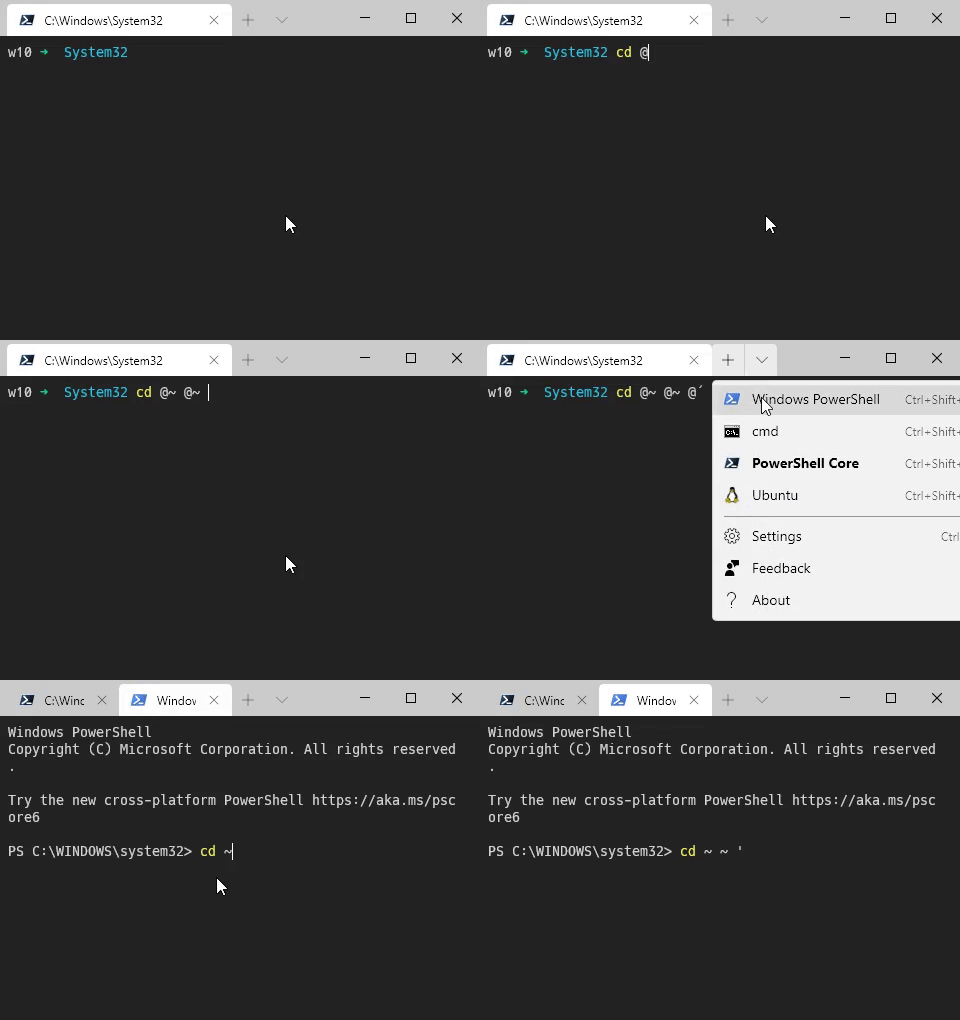
Environment data
Name                           Value
----                           -----
PSVersion                      7.0.3
PSEdition                      Core
GitCommitId                    7.0.3
OS                             Microsoft Windows 10.0.…
Platform                       Win32NT
PSCompatibleVersions           {1.0, 2.0, 3.0, 4.0…}
PSRemotingProtocolVersion      2.3
SerializationVersion           1.1.0.1
WSManStackVersion              3.0
 chiniara
All 7 comments
@chiniara does the same occur after calling Remove-Module PSReadline?
 vexx32
on 31 Jul 2020
vexx32
on 31 Jul 2020
@vexx32
It doesnt!
But i find it weird because it was working fine before.
Maybe it was an update to PSReadline ?
chiniara
on 31 Jul 2020
Yeah, potentially. Check Get-Module -List PSReadLine and see what versions you have installed. It's possible there's a newer version available as well; you can try Update-Module PSReadLine.
If there is an update, restart your powershell session and try it again to see if it's still an issue.
If not, or it's still happening anyway, please file an issue in the PSReadLine repo 🙂
vexx32
on 31 Jul 2020
/cc @daxian-dbw
 rjmholt
on 31 Jul 2020
rjmholt
on 31 Jul 2020
@vexx32
Thank you very much, updating it fixed the problem!
I think this is solved then.
chiniara
on 31 Jul 2020
Will let the bot close it
rjmholt
on 31 Jul 2020
This issue has been marked as answered and has not had any activity for 1 day. It has been closed for housekeeping purposes.
![msftbot[bot] picture](https://avatars2.githubusercontent.com/in/26612?v=4&s=40) msftbot[bot]
on 2 Aug 2020
msftbot[bot]
on 2 Aug 2020
Related issues
 JohnLBevan
·
3Comments
JohnLBevan
·
3Comments
 HumanEquivalentUnit
·
3Comments
HumanEquivalentUnit
·
3Comments
 rkeithhill
·
3Comments
rkeithhill
·
3Comments
 pcgeek86
·
3Comments
pcgeek86
·
3Comments
 concentrateddon
·
3Comments
concentrateddon
·
3Comments