Powershell: Millions of remoteIPMoProxy_* powershell logs under temp
Hi everyone,
There are millions of PowerShell command logs under temp directory. Their naming is:
remoteIpMoProxy_ScheduledTasks_1.0.0.0_localhost_GUID
This week, our server became unresponsive time to time and today it's completely dead. because of these log files. We tried to remove them but filesystem does not give any response. Temp directroy makes >10 MB IO per second.
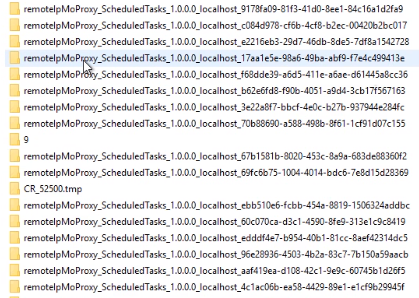
I don't know why and how these logs are generated but we use PowerShell 7.0. We will update to latest version after we resolve this incident. There is a scheduled task for every 5 minutes to check some ScheduledTask status, and here is the command of it:
```$GetSystemRoot = $env:SystemRoot;
$DefaultPSModulePath = $GetSystemRoot + '\system32\WindowsPowerShell\v1.0\Modules\';
$GetPSModulePath = $env:PSModulePath;
$PSModulePathCheck = '0';
$PSModulePathStrings = $GetPSModulePath.Split(';');
foreach ($PSModulePathString in $PSModulePathStrings) {
if ($PSModulePathString -eq $DefaultPSModulePath) { $PSModulePathCheck = '1'; }
}
if ($PSModulePathCheck -ne '1') {
$env:PSModulePath = $env:PSModulePath + ';' + $DefaultPSModulePath;
}
Import-Module ScheduledTasks;
$result = 'false';
try
{
if ((Get-ScheduledTask -TaskName 'VirtualMetric Trigger').State -ne 'Running')
{
$result = 'false';
Start-ScheduledTask -TaskName 'VirtualMetric Trigger'
}
else
{
$result = 'true';
}
}
catch
{
$result = 'false';
}
$result;
```
I don't know how to produce this. Is this a result of some kind of logging?
I also see this part under master/src/System.Management.Automation/engine/Modules/RemoteDiscoveryHelper.cs:
We just want to know why this would happen and why there is no purging system for this. Do we have to check our temp files and remove these powershell logs?
Thanks,
Yusuf
 yusufozturk
All 6 comments
Please add $PSTableVersion info.
 iSazonov
on 20 Jul 2020
iSazonov
on 20 Jul 2020
Do you say that you can reproduce the issue with script above?
Your temp directory shows that there are created many runspaces and ScheduledTasks module is imported by remoting in the runspaces.
iSazonov
on 20 Jul 2020
They are created by the Windows PowerShell module compatibility feature.
It looks that the ScheduledTasks module is not compatible with PowerShell 7 (missing CompatiblePSEditions = @('Desktop', 'Core') in the .psd1 file), and in that case, the module will be loaded in PS 7 through this compatibility feature via a proxy module that communicates with a powershell.exe process started in the background.
Loop in @anmenaga to comment on the proxy modules not being cleaned up issue.
@yusufozturk The ScheduledTasks module is a CDXML module, and I think it would work PS 7 directly, even though it's missing that declaration in its psd1 file. You can try importing it with -SkipEditionCheck flag, so that the module will be forcefully loaded in the pwsh process, instead of going through the proxy module. Please give it a try.
 daxian-dbw
on 22 Jul 2020
daxian-dbw
on 22 Jul 2020
On my system the ScheduledTasks module is compatible with PowerShell 7 (I see CompatiblePSEditions = @('Desktop', 'Core') in the .psd1 file).
@yusufozturk You can update your system to latest version or use a workaround meantioned above with -SkipEditionCheck flag.
iSazonov
on 22 Jul 2020
This issue has been marked as answered and has not had any activity for 1 day. It has been closed for housekeeping purposes.
![msftbot[bot] picture](https://avatars2.githubusercontent.com/in/26612?v=4&s=40) msftbot[bot]
on 23 Jul 2020
msftbot[bot]
on 23 Jul 2020
Reopen the issue. It looks to me a real problem that the "WinPS Compat" feature creates proxy modules without cleaning them up.
Assign to @anmenaga to take further action.
daxian-dbw
on 23 Jul 2020
Related issues
 pcgeek86
·
3Comments
pcgeek86
·
3Comments
 HumanEquivalentUnit
·
3Comments
HumanEquivalentUnit
·
3Comments
 abock
·
3Comments
abock
·
3Comments
 lzybkr
·
3Comments
lzybkr
·
3Comments
 rkeithhill
·
3Comments
rkeithhill
·
3Comments
Most helpful comment
Reopen the issue. It looks to me a real problem that the "WinPS Compat" feature creates proxy modules without cleaning them up.
Assign to @anmenaga to take further action.