Powershell: Powershell doesn't list all installed monospace fonts
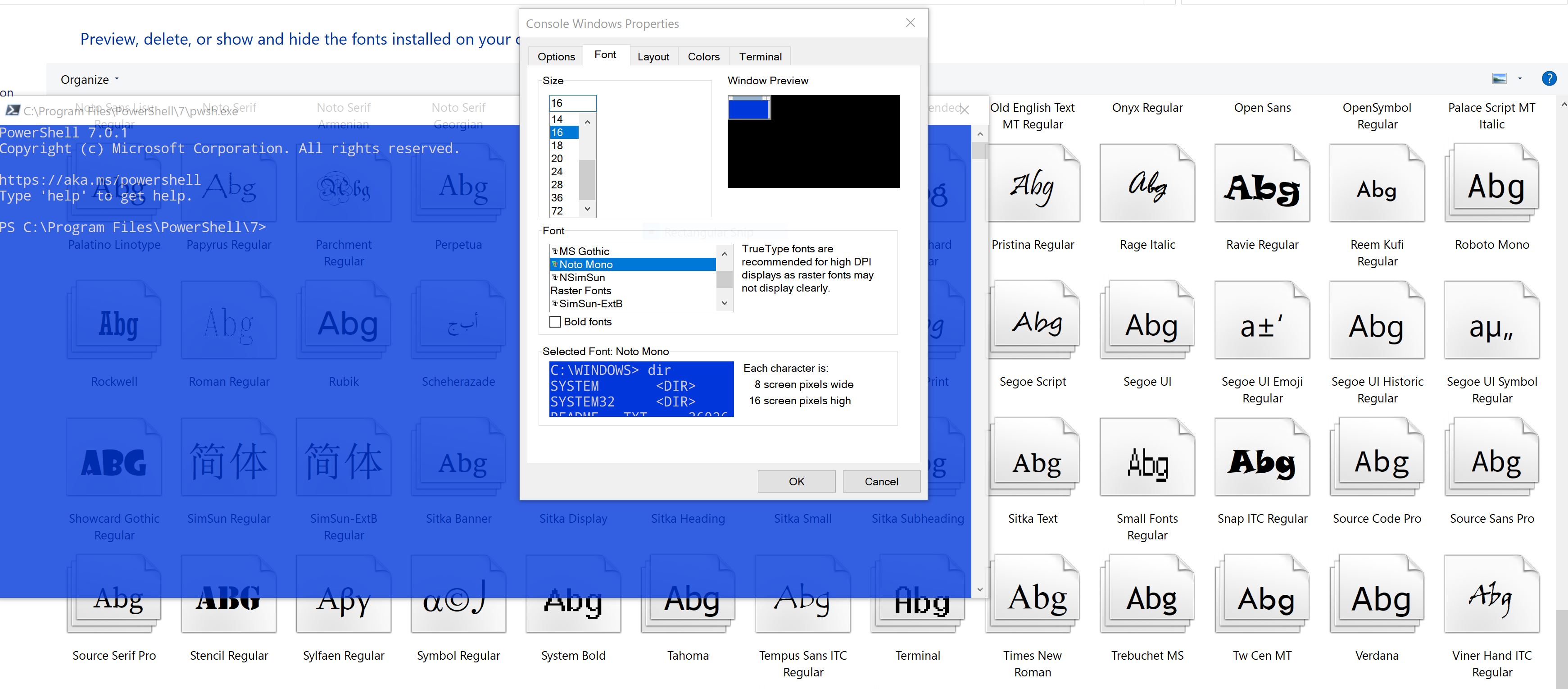
Powershell 7.0.0 and 7.0.1 don't list all installed monospace fonts. In particular, they don't list Roboto Mono, my preferred font. Screenshot and system details below.
The Powershell font settings are in the Defaults and Properties menus. Same issue in both.
The installed Roboto Mono font file is a .ttf, and it's version 2.002 of that font (the latest).
Name Value
---- -----
PSVersion 7.0.1
PSEdition Core
GitCommitId 7.0.1
OS Microsoft Windows 10.0.18363
Platform Win32NT
PSCompatibleVersions {1.0, 2.0, 3.0, 4.0…}
PSRemotingProtocolVersion 2.3
SerializationVersion 1.1.0.1
WSManStackVersion 3.0
 JoeUX
JoeUX
All 14 comments
Do you see the same for Windows PowerShell window? For cmd.exe?
 iSazonov
on 19 May 2020
iSazonov
on 19 May 2020
Yes, I see the same problem in Windows Powershell and cmd.exe.
JoeUX
on 19 May 2020
The problem is not in the applications.
Perhaps @DHowett could add more info.
iSazonov
on 19 May 2020
If anything this would be an OS issue rather than a PowerShell issue. PowerShell has zero control over what the OS chooses to show in that menu. From what I recall, fonts shown in that menu may require some changes to the registry if you want to add more than what is shown by default.
There's a good walkthrough of how to go about that here: https://www.maketecheasier.com/add-custom-fonts-command-prompt-windows10/
Make Tech EasierThe Command Prompt in Windows comes with only a limited selection of fonts. This shows how you can add your favorite custom fonts to the Command Prompt.

 vexx32
on 19 May 2020
vexx32
on 19 May 2020
@vexx32 FYI, there are at least three applications that correctly show all the monospaced fonts, including Roboto Mono:
- Windows Terminal (from Microsoft)
- Sublime Text
- UltraEdit
So applications seem to have some control over it, though I'm not sure how they interface with the relevant APIs.
With Windows Terminal, I just edited the settings.json file to specify Roboto Mono. For the two editors, Roboto Mono shows up in their font selector UI.
JoeUX
on 20 May 2020
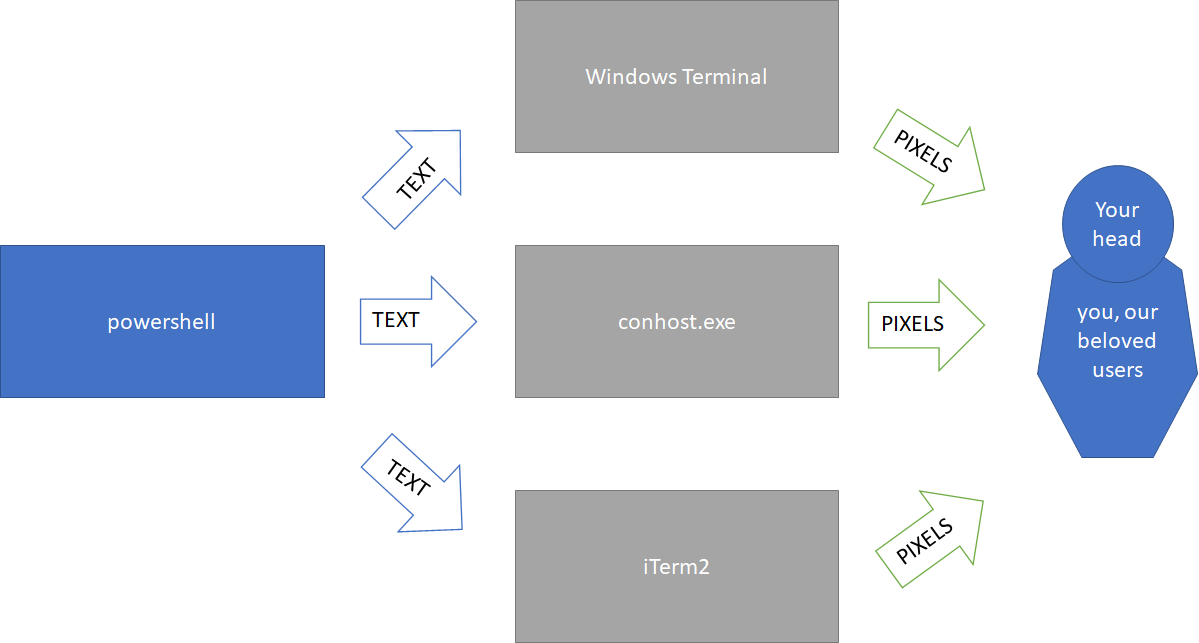
Yep. Applications not using Windows' own conhost can handle fonts however they like... but as far as I'm aware, using conhost means you essentially have to take what you're given when it comes to fonts. Windows Terminal uses conpty (a newer implementation that IIRC is also developed by the Windows Terminal team) rather than the older conhost.
PowerShell operates _within_ a terminal rather than being a terminal in and of itself... so it's beholden to whatever rules the terminal itself sets in terms of fonts etc.
vexx32
on 20 May 2020
 DHowett
on 20 May 2020
DHowett
on 20 May 2020
Conhost has very specific rules for what fonts it presents, and we are not likely to change those rules. Sorry!
DHowett
on 20 May 2020
Note that some of the fonts that don't show up can still be used if manually set. I use this in my profile to set the font to FuraCode NF from nerd fonts:
GitHub
Contribute to SeeminglyScience/dotfiles development by creating an account on GitHub.

 SeeminglyScience
on 20 May 2020
SeeminglyScience
on 20 May 2020
@SeeminglyScience Thanks, how do I run that? Do I just invoke that .ps1 file on the command line?
JoeUX
on 20 May 2020
Yeah, here's where I call it in my profile.ps1
Contribute to SeeminglyScience/dotfiles development by creating an account on GitHub.
SeeminglyScience
on 20 May 2020
@SeeminglyScience Oh, okay, I'm not familiar with profile.ps1 files. Are they comprehensive settings for Powershell? I'm glad there's a way to set up any font.
JoeUX
on 20 May 2020
It's essentially just a script that gets run whenever you start PowerShell.
You can call $profile in your PowerShell console to see the path it'll be looking for, and create or edit the file at that location to add anything you need available in your typical powershell sessions 🙂
vexx32
on 20 May 2020
This issue has been marked as external and has not had any activity for 1 day. It has been be closed for housekeeping purposes.
![msftbot[bot] picture](https://avatars2.githubusercontent.com/in/26612?v=4&s=40) msftbot[bot]
on 21 May 2020
msftbot[bot]
on 21 May 2020
Related issues
 mklement0
·
3Comments
mklement0
·
3Comments
 abock
·
3Comments
abock
·
3Comments
 andschwa
·
3Comments
andschwa
·
3Comments
 HumanEquivalentUnit
·
3Comments
HumanEquivalentUnit
·
3Comments
 alx9r
·
3Comments
alx9r
·
3Comments
Most helpful comment
It's essentially just a script that gets run whenever you start PowerShell.
You can call
$profilein your PowerShell console to see the path it'll be looking for, and create or edit the file at that location to add anything you need available in your typical powershell sessions 🙂