Powershell: Powershell 7 ConvertFrom-Json Throw " startIndex cannot be larger than length of string. (Parameter 'startIndex')"
Steps to reproduce
'{
  "log_level": 1,
  "log_type": 1,
  "trace_id": 0,
  "title": "NA",
  "message": "吉隆坡市吉隆坡市中心吉隆坡吉隆坡马来西亚吉隆坡市中心吉隆坡中心吉隆坡市中心吉隆坡中心吉隆坡马来西亚吉隆坡市中心吉隆坡中心吉隆坡市中心吉隆坡中心吉隆坡马来西亚吉隆坡市中心吉隆坡中心吉隆坡市中心吉隆坡中心吉隆坡马来西亚"
}'|ConvertFrom-Json
Expected behavior
log_level : 1
log_type  : 1
trace_id  : 0
title     : NA
message   : 吉隆坡市吉隆坡市中心吉隆坡吉隆坡马来西亚吉隆坡市中心吉隆坡中心吉隆坡市中心吉隆坡中心吉隆坡马来西亚吉隆坡
            市中心吉隆坡中心吉隆坡市中心吉隆坡中心吉隆坡马来西亚吉隆坡市中心吉隆坡中心吉隆坡市中心吉隆坡中心吉隆坡马来
西亚
Actual behavior
log_level : 1
log_type : 1
trace_id : 0
title : NA
out-lineoutput:
Line |
74 | $steppablePipeline.Process($_)
| ~~~~~~~~~~~~~~~~~~~~~~~~~~~~~~
| startIndex cannot be larger than length of string. (Parameter 'startIndex')
Get-Error
[92mException : [0m
[92mType : [0mSystem.ArgumentOutOfRangeException
[92mMessage : [0mstartIndex cannot be larger than length of string. (Parameter 'startIndex')
[92mParamName : [0mstartIndex
[92mTargetSite : [0m
[92mName : [0mSubstring
[92mDeclaringType : [0mstring
[92mMemberType : [0mMethod
[92mModule : [0mSystem.Private.CoreLib.dll
[92mStackTrace : [0m
at System.String.Substring(Int32 startIndex, Int32 length)
at Microsoft.PowerShell.Commands.Internal.Format.StringManipulationHelper.GenerateLinesWithoutWordWrap(DisplayCells displayCells, String val, Int32 firstLineLen, Int32 followingLinesLen)
at Microsoft.PowerShell.Commands.Internal.Format.ListWriter.WriteSingleLineHelper(String prependString, String line, LineOutput lo)
at Microsoft.PowerShell.Commands.Internal.Format.ListWriter.WriteProperty(Int32 k, String propertyValue, LineOutput lo)
at Microsoft.PowerShell.Commands.Internal.Format.ListWriter.WriteProperties(String[] values, LineOutput lo)
at Microsoft.PowerShell.Commands.Internal.Format.OutCommandInner.ListOutputContext.ProcessPayload(FormatEntryData fed)
at Microsoft.PowerShell.Commands.Internal.Format.OutCommandInner.ProcessPayload(FormatEntryData fed, OutputContext c)
at Microsoft.PowerShell.Commands.Internal.Format.OutCommandInner.ProcessObject(PSObject so)
at Microsoft.PowerShell.Commands.Internal.Format.OutCommandInner.ProcessRecord()
at System.Management.Automation.CommandProcessor.ProcessRecord()
[92mSource : [0mSystem.Private.CoreLib
[92mHResult : [0m-2146233086
[92mCategoryInfo : [0mNotSpecified: (:) [out-lineoutput], ArgumentOutOfRangeException
[92mFullyQualifiedErrorId : [0mSystem.ArgumentOutOfRangeException,Microsoft.PowerShell.Commands.OutLineOutputCommand
[92mInvocationInfo : [0m
[92mMyCommand : [0mout-lineoutput
[92mScriptLineNumber : [0m74
[92mOffsetInLine : [0m9
[92mHistoryId : [0m83
[92mLine : [0m$steppablePipeline.Process($_)
[92mPositionMessage : [0mAt line:74 char:9
+ $steppablePipeline.Process($_)
+ ~~~~~~~~~~~~~~~~~~~~~~~~~~~~~~
[92mCommandOrigin : [0mInternal
[92mScriptStackTrace : [0mat <ScriptBlock><Process>, <No file>: line 74
at <ScriptBlock>, <No file>: line 1
And it works as expected in ps6. More werid is that deleting some characters makes it work.
Maybe it's related to encoding.
Environment data
Name                           Value
----                           -----
PSVersion                      7.0.0
PSEdition                      Core
GitCommitId                    7.0.0
OS                             Microsoft Windows 10.0.18363
Platform                       Win32NT
PSCompatibleVersions           {1.0, 2.0, 3.0, 4.0…}
PSRemotingProtocolVersion      2.3
SerializationVersion           1.1.0.1
WSManStackVersion              3.0

# [Console]::OutputEncoding

Preamble          :
BodyName          : utf-8
EncodingName      : Unicode (UTF-8)
HeaderName        : utf-8
WebName           : utf-8
WindowsCodePage   : 1200
IsBrowserDisplay  : True
IsBrowserSave     : True
IsMailNewsDisplay : True
IsMailNewsSave    : True
IsSingleByte      : False
EncoderFallback   : System.Text.EncoderReplacementFallback
DecoderFallback   : System.Text.DecoderReplacementFallback
IsReadOnly        : False
CodePage          : 65001
 onriv
onriv
All 22 comments
I can't reproduce this at this time.
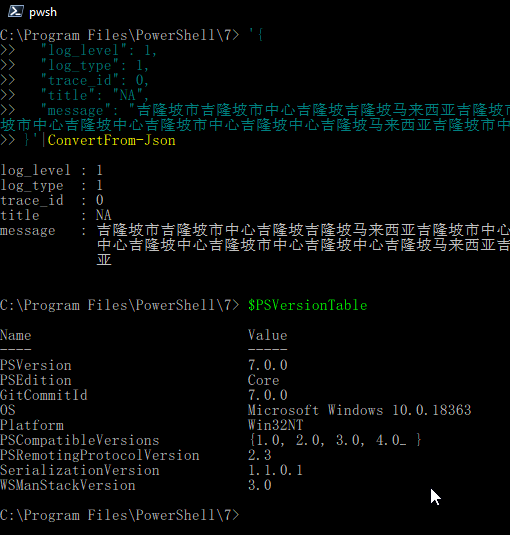
(Sidenote: I changed my font to 'SimSun-Ext B' for this. With 'Consolas', this only renders empty UTF8 character placeholders, but no error like OP.)
 Jawz84
on 20 Mar 2020
Jawz84
on 20 Mar 2020
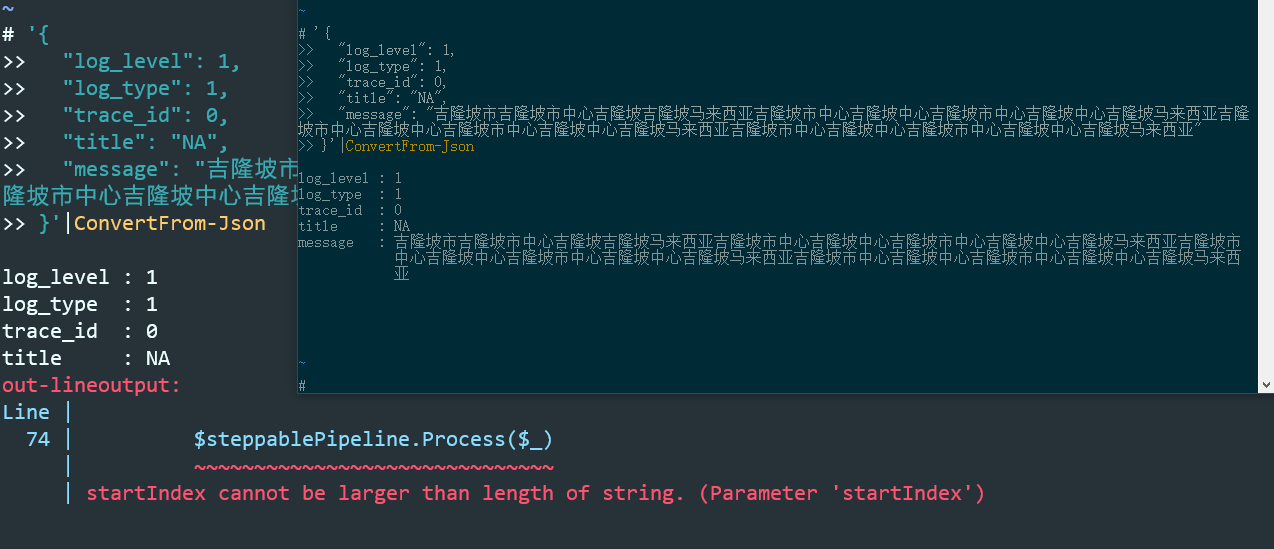
@Jawz84 It's weird. I tried it again, it's only wrong in microsoft terminal:
onriv
on 20 Mar 2020
I've tried Windows Terminal too for you, but I can't reproduce it there either:

Jawz84
on 20 Mar 2020
@Jawz84 in my env, the json can be convert to psobject, but the object is un printable. I can't find the reason too and the object can still be used or print in other ways. Since it's unreproducable, i just let it go.

onriv
on 20 Mar 2020
maybe someone else has an idea how to further pinpoint this with you.
Jawz84
on 20 Mar 2020
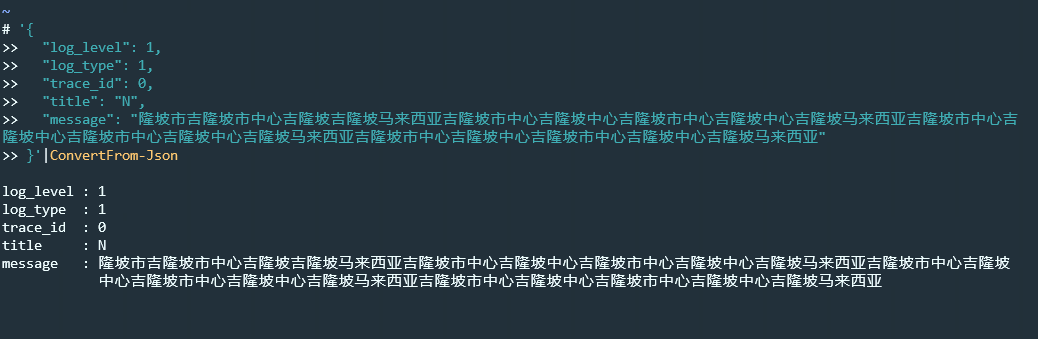
@Jawz84 thank you for your kindly help. I tried it again and I found that resizing the font size in microsoft terminal may sometimes reproduce the problem occured to me:
Bigger size:

Smaller size:
onriv
on 20 Mar 2020
是的,这是遇到双字节字符时的特定错误。
https://github.com/PowerShell/PowerShell/issues/12112
https://github.com/PowerShell/PowerShell/issues/12111
估计与换行长度计算有关

@iSazonov
 he852100
on 22 Mar 2020
he852100
on 22 Mar 2020
yeah in order to reproduce the problem, may better try various font sizes I think.
onriv
on 22 Mar 2020
Is it reproducible too without PSReadLine? Is it reproducible outside Windows Terminal?
Jawz84
on 22 Mar 2020
ps7+psreadline still has the problem in my host env. But clean ps7 in windows sandbox is ok.
maybe it's related to psreadline?
onriv
on 22 Mar 2020
/cc @daxian-dbw for information.
 iSazonov
on 22 Mar 2020
iSazonov
on 22 Mar 2020
Quoted from https://github.com/PowerShell/PowerShell/issues/12161#issuecomment-601768709:
in my env, the json can be convert to psobject, but the object is un printable.
With this observation, I think it's unlikely a PSReadLine issue. The error happens in Out-LineOutput, which is the default rendering of PowerShell and has nothing to do with PSReadLine.
@onriv Can you please get the full error details by running Get-Error after this particular failure?
@he852100 Any chance you can provide a consistent repro?
 daxian-dbw
on 27 Mar 2020
daxian-dbw
on 27 Mar 2020
@daxian-dbw I posted Get-Error result in my first issue comment (in the actual behavior session)
since it’s a long profile in my host env and installed many modules, and unreproducible in a clean window sandbox, I may divide-and-conquer my profile to give a minimum reproducible profile later
onriv
on 27 Mar 2020
Thanks @onriv, I missed detailed error from the issue description.
This might be related to the ambiguous width char issue which is fixed by https://github.com/microsoft/terminal/pull/2928
Can you upgrade to the latest Windows Terminal (0.10.781.0?) and see if the issue still happens?
daxian-dbw
on 27 Mar 2020
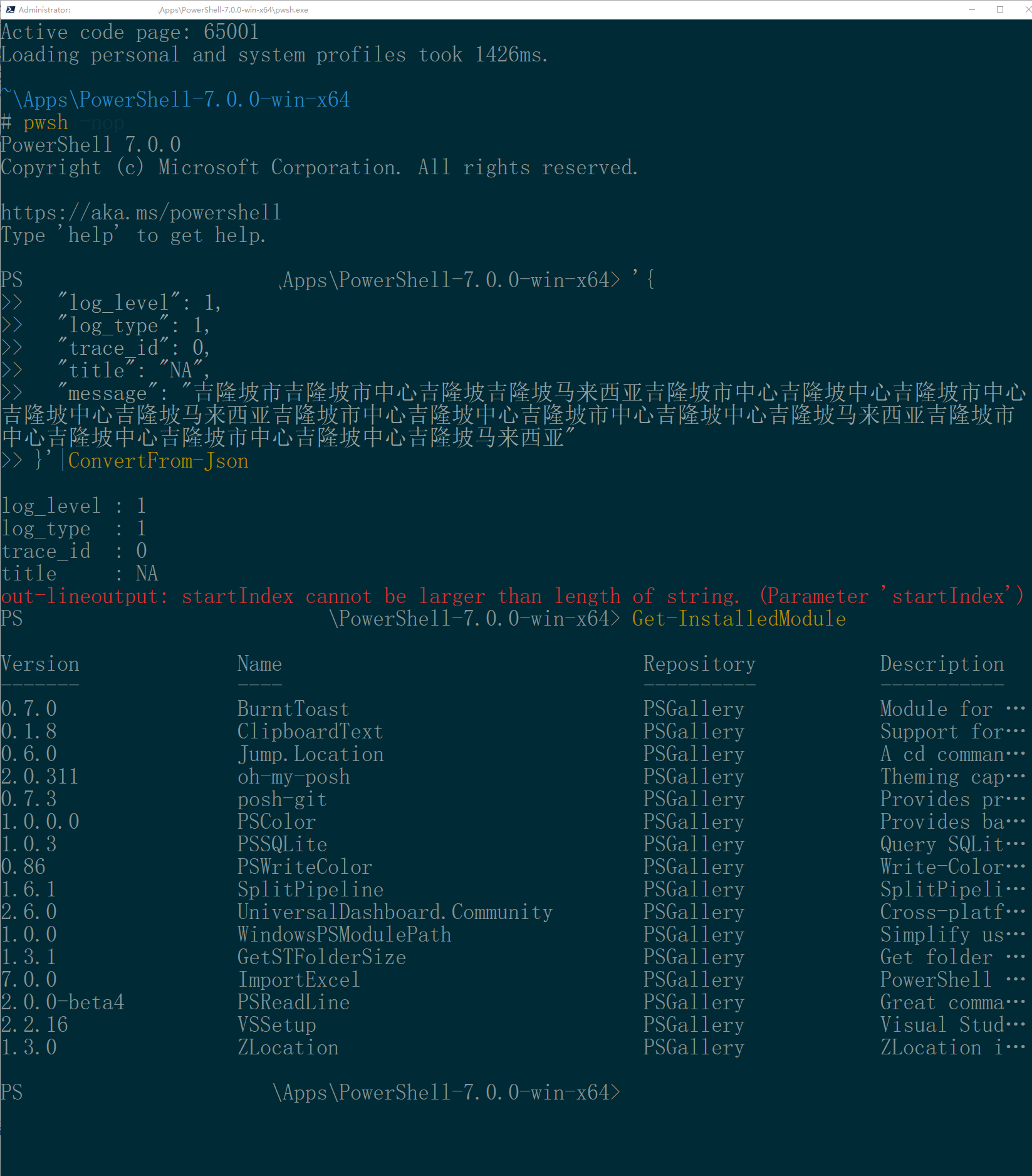
@daxian-dbw I tried wt 0.10.781.0, it got the error too. And in the original console, I tried "pwsh -nop", still got the error:
onriv
on 27 Mar 2020
@onriv Thanks for the follow-up and additional information. If you can "divide-and-conquer your profile" and get a consistent repro, that would be very helpful.
daxian-dbw
on 27 Mar 2020
@daxian-dbw I have built a debug version of ps 7.0.0 , and am debuging the case,
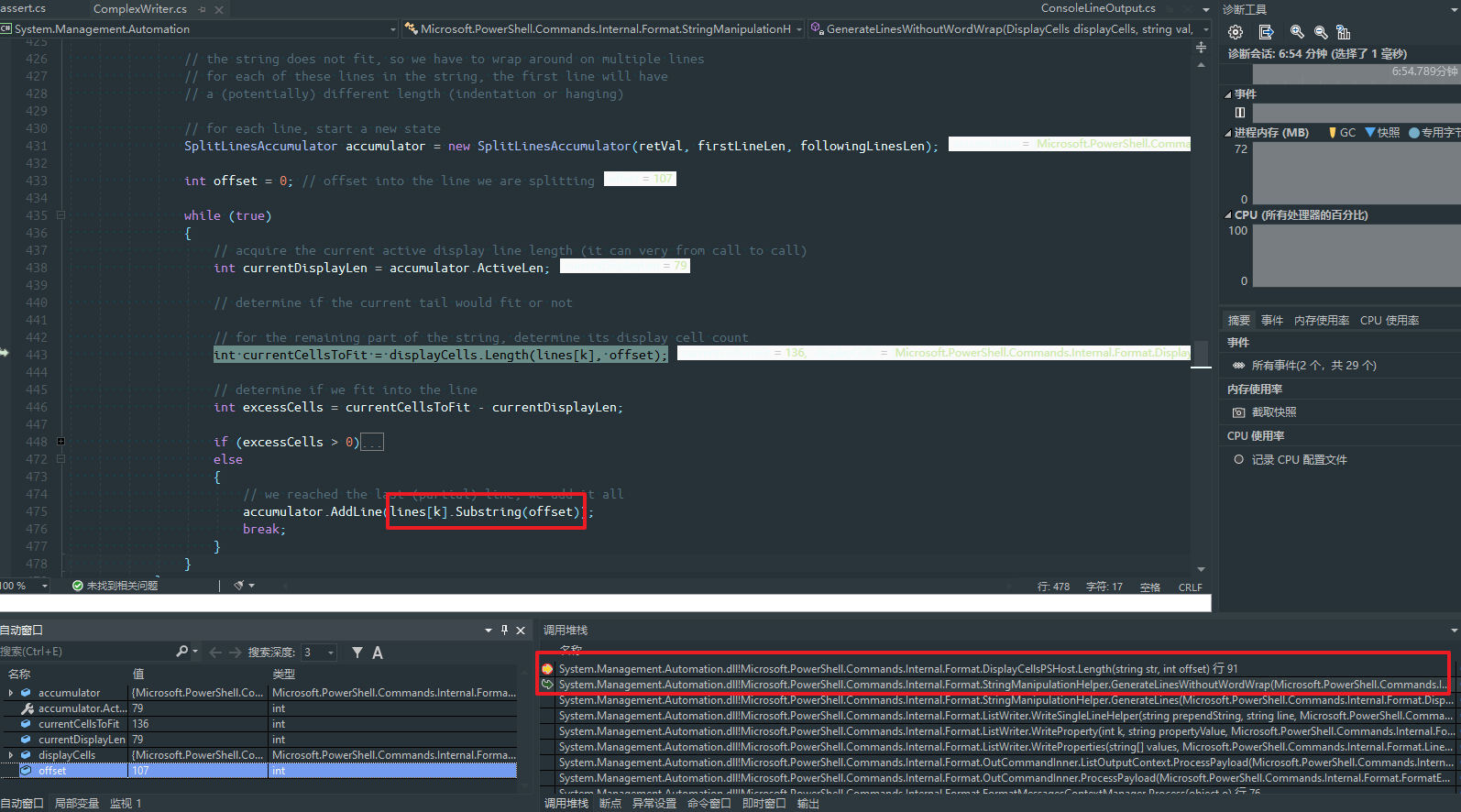
it seems that offset will be equal to lines[k].Length (In Debug mode, it can't reach the substring line for assert exception:

onriv
on 27 Mar 2020
@daxian-dbw anyway, I targeted the line threw the excpetion:
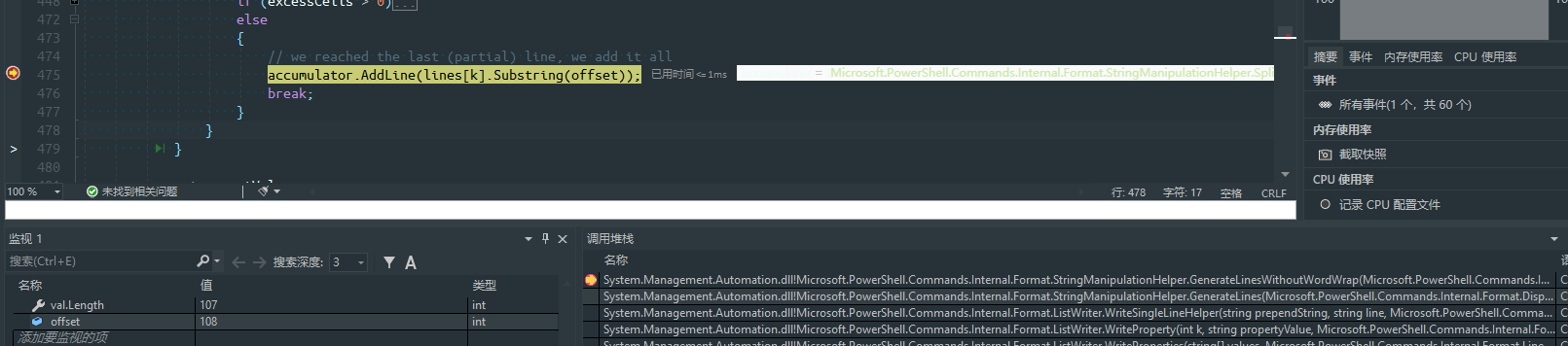
But got no idea why it would exceed the total length. Since it's a raw and debug build, my profile is not loaded. (And I think modules installed on my host env are not loaded too)
onriv
on 27 Mar 2020
update:
it went into the corner case, maybe it's related to GetHeadSplitLength

onriv
on 27 Mar 2020
$host.ui.rawui.WindowSize
Width Height
----- ------
73     40
$string='<p style="margin-bottom: 16px; padding: 0px; color: rgb(68, 68, 68); line-height: 22px; overflow-x: auto; text-align: justify;">很多人喜欢把 <code style="font-family: Monaco, Menlo, Consolas, "Courier New", monospace; color: rgb(102, 102, 102); font-size: 0.9em; border: 1px solid rgb(221, 221, 221);">-r</code> 选项放在前面… 按照某个早就忘记在哪的邮件列表里的说法,<code style="font-family: Monaco, Menlo, Consolas, "Courier New", monospace; color: rgb(102, 102, 102); font-size: 0.9em; border: 1px solid rgb(221, 221, 221);">-r</code> 放在 <span style="margin: 0px; padding: 0px;">输入文件</span> 的 <span style="margin: 0px; padding: 0px;">后面</span> 才是输出文 件的效果。上面的命令出来的结果就是分辨率为<code style="font-family: Monaco, Menlo, Consolas, "Courier New", monospace; color: rgb(102, 102, 102); font-size: 0.9em; border: 1px solid rgb(221, 221, 221);">640×320</code>��帧率为15的gif 了。<code style="font-family: Monaco, Menlo, Consolas, "Courier New", monospace; line-height: 22px; color: rgb(102, 102, 102); font-size: 0.9em; border: 1px solid rgb(221, 221, 221);">640x320</code><span style="margin: 0px; padding: 0px; line-height: 22px;"> 中间是小写字母 </span><code style="font-family: Monaco, Menlo, Consolas, "Courier New", monospace; line-height: 22px; color: rgb(102, 102, 102); font-size: 0.9em; border: 1px solid rgb(221, 221, 221);">x</code></p> '
$string|select-string -pattern 'px'
md5-cbd439e40659679b723e828dd29dfe13
out-lineoutput: startIndex cannot be larger than length of string. (Parameter 'startIndex')
Another way to throw out the same error in powershell 7. But Powershell 5 is fine.


 LqkUWp
on 6 Jul 2020
LqkUWp
on 6 Jul 2020
@852456941 It is another issue. If you can reproduce with latest 7.1 build please open new issue.
iSazonov
on 6 Jul 2020
Related issues
 rkeithhill
·
3Comments
rkeithhill
·
3Comments
 HumanEquivalentUnit
·
3Comments
HumanEquivalentUnit
·
3Comments
 Michal-Ziemba
·
3Comments
Michal-Ziemba
·
3Comments
 alx9r
·
3Comments
alx9r
·
3Comments
 andschwa
·
3Comments
andschwa
·
3Comments