Powershell: Missing win-arm64 msi build for 7.0
The earlier builds have a win-arm64 build but I do not see one from 7.0 (even the RCs have them). Would it be possible to get one so we can use on Microsoft's own Surface Pro X device without x86 emulation. Thanks.
 harrisonmetz
All 17 comments
/cc @heaths for information.
 iSazonov
on 16 Mar 2020
iSazonov
on 16 Mar 2020
@iSazonov I don't own the installers. I'm not sure who does. I'm only fixing the many upgrade issues.
 heaths
on 16 Mar 2020
heaths
on 16 Mar 2020
@heaths I ping you only for information so that this request is not a surprise for you.
iSazonov
on 17 Mar 2020
I see. That will have to be a separate fix, I believe. The WiX authoring needs to be updated to support it, but there's various conditions that assume BUILD64 and whatever else are only two options, unless ARM64 is part of BUILD64. I haven't looked at that specifically. If it were, that's fine - you only need a minimum of 2 UpgradeCodes since x64 and x86 can be installed SxS. Not sure if that's true of ARM/ARM64 but you can't mix the ARM and x86-based platforms together for MSI, I don't believe.
There is an easier, more permissive way to write all this but it would be a huge undertaking. I'm trying to make significant but less invasive changes to keep the churn down and avoid unforeseen problems. I'm also trying to consolidate the authoring and conditions into the .wxs files themselves, rather than splattering various conditions in the calling scripts as well (wasn't necessary, and there are better ways than setting environment variables in the calling process, which might affect some other scripts later).
heaths
on 17 Mar 2020
WiX added ARM64 support recently: https://github.com/wixtoolset/issues/issues/5558
 reli-msft
on 30 Apr 2020
reli-msft
on 30 Apr 2020
I see. That will have to be a separate fix, I believe. The WiX authoring needs to be updated to support it, but there's various conditions that assume BUILD64 and whatever else are only two options, unless ARM64 is part of BUILD64. I haven't looked at that specifically. If it were, that's fine - you only need a minimum of 2 UpgradeCodes since x64 and x86 can be installed SxS. Not sure if that's true of ARM/ARM64 but you can't mix the ARM and x86-based platforms together for MSI, I don't believe.
There is an easier, more permissive way to write all this but it would be a huge undertaking. I'm trying to make significant but less invasive changes to keep the churn down and avoid unforeseen problems. I'm also trying to consolidate the authoring and conditions into the .wxs files themselves, rather than splattering various conditions in the calling scripts as well (wasn't necessary, and there are better ways than setting environment variables in the calling process, which might affect some other scripts later).
Yes, on ARM64 x86 and ARM64 can be installed SxS. MiX support for ARM64 has been upstream quite some time ago now. ARM64 should not require any special handling.
Do you think we can get this added?
Thanks.
 pmsjt
on 27 Jul 2020
pmsjt
on 27 Jul 2020
+1 for this, it's quite annoying that there are .msi installers for the x86 and x64 builds, but none for ARM64.
 awakecoding
on 2 Nov 2020
awakecoding
on 2 Nov 2020
@TravisEz13 Is this important for 7.1 release?
iSazonov
on 2 Nov 2020
I think we'll see about doing this for 7.2.
 SteveL-MSFT
on 2 Nov 2020
SteveL-MSFT
on 2 Nov 2020
Even with the 7.1 release being on dotnet 5.0 and the big thing there is that it works on windows arm64, there still isn't an arm64 windows build?
harrisonmetz
on 12 Nov 2020
There is a build: https://github.com/PowerShell/PowerShell/releases/download/v7.1.0/PowerShell-7.1.0-win-arm64.zip
 TravisEz13
on 12 Nov 2020
TravisEz13
on 12 Nov 2020
But it's not an msix
harrisonmetz
on 12 Nov 2020
There is a build: https://github.com/PowerShell/PowerShell/releases/download/v7.1.0/PowerShell-7.1.0-win-arm64.zip
Yeah, no setup of any kind tho, right? No MSI or MSIX.
pmsjt
on 12 Nov 2020
@harrisonmetz @pmsjt Welcome to contribute if you have an interest! PowerShell team is very small to address all requests quickly.
iSazonov
on 13 Nov 2020
While I still think we need an .msi installer, I did manage to "install" it for my needs from the zip file and configure a profile in Windows Terminal. I first installed PowerShell 7.1 x86 to get a profile added in Windows Terminal, which I could copy and edit to point to PowerShell 7.1 ARM64.
I downloaded PowerShell-7.1.0-win-arm64.zip and extracted its contents to "C:\Program Files (Arm)\PowerShell\7.1.0"
In Windows Terminal, I clicked the downward arrow and then clicked "settings" to edit settings.json. I copy/pasted the PowerShell 7.1 x86 entry to end up with the following:
    {
        "guid": "{574e775e-4f2a-5b96-ac1e-a2962a402336}",
        "hidden": false,
        "name": "PowerShell 7 (ARM64)",
        "commandline": "C:\\Program Files (Arm)\\PowerShell\\7.1.0\\pwsh.exe"
    },
    {
        "guid": "{34a13805-9b56-5e89-9234-f02de44bd971}",
        "hidden": false,
        "name": "PowerShell 7 (x86)",
        "source": "Windows.Terminal.PowershellCore"
    },`
`
I now have "PowerShell 7 (ARM64)" and "PowerShell 7 (x86)" in Windows Terminal, alongside other entries like Windows PowerShell and the old Command Prompt. It is good enough for me now, but I'd rather have an .msi installer.
awakecoding
on 13 Nov 2020
Even though PowerShell MSIs or MSIXs are not being made available here, they are somehow managing to make their way into the Store.
https://www.microsoft.com/store/productId/9MZ1SNWT0N5D
Installing from the store is actually more convenient - at least for me - because it takes care of the updating automatically for me.
Microsoft StoreDownload this app from Microsoft Store for Windows 10. See screenshots, read the latest customer reviews, and compare ratings for PowerShell.
 pmsjt
on 18 Nov 2020
pmsjt
on 18 Nov 2020
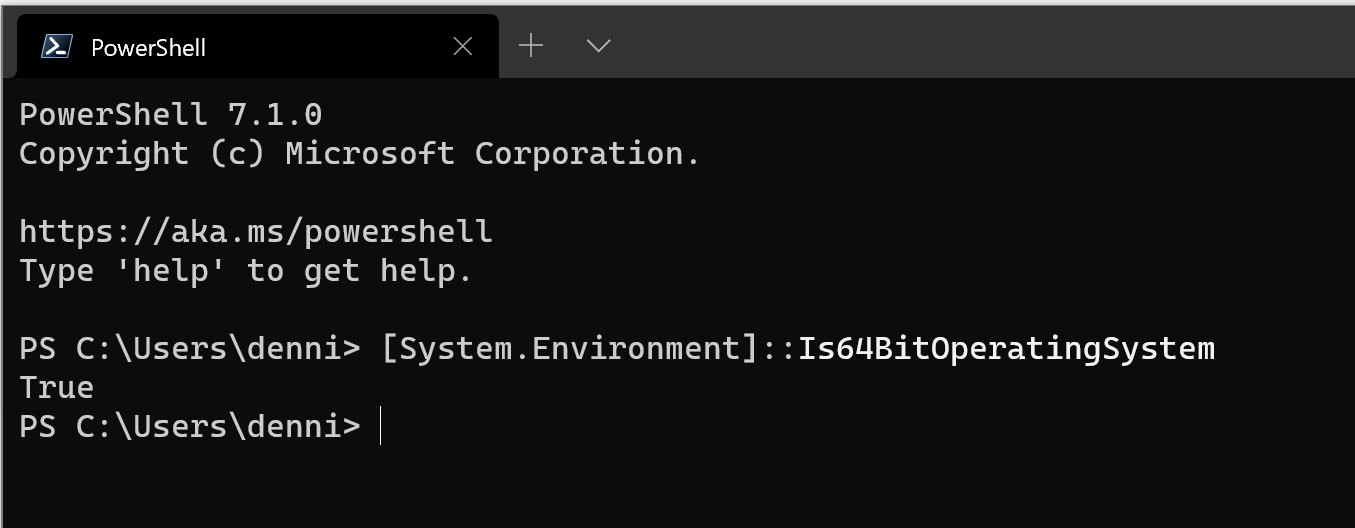
Can confirm the version from the Store is native ARM64 🚀 Thanks for sharing @pmsjt!
 dennisameling
on 18 Nov 2020
dennisameling
on 18 Nov 2020
Related issues
 Michal-Ziemba
·
3Comments
Michal-Ziemba
·
3Comments
 aragula12
·
3Comments
aragula12
·
3Comments
 abock
·
3Comments
abock
·
3Comments
 ajensenwaud
·
3Comments
ajensenwaud
·
3Comments
 garegin16
·
3Comments
garegin16
·
3Comments