Powershell: Older/other versions of pwsh are not cleaned up during upgrade to 7.0.0 or manual uninstallation.
I installed the latest and greatest PowerShell 7.0.0 using the x64 MSI. But not all remnants of older/other PowerShell versions are cleaned up.
Both the System environment variables for 7-preview and/or 6 remained intact.
Both context menus for 7-preview and 6 remained intact, though not functioning.
Steps to reproduce
Install PowerShell 6.2.4 with context menu's enabled.
Install PowerShell 7.0.0 RC3-preview with context menu's enabled.
Install PowerShell 7.0.0 (with context menu's enabled)
(manual) Uninstall PowerShell 7.0.0 RC3
Expected behavior
No context menu's for PowerShell 6 and/or PowerShell 7-preview.
No system environment variables in $PATH pointing to PowerShell 6 and/or 7-preview.
Actual behavior
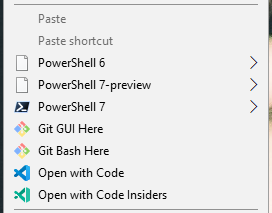
Environment data
Name                           Value
----                           -----
PSVersion                      7.0.0
PSEdition                      Core
GitCommitId                    7.0.0
OS                             Microsoft Windows 10.0.17763
Platform                       Win32NT
PSCompatibleVersions           {1.0, 2.0, 3.0, 4.0…}
PSRemotingProtocolVersion      2.3
SerializationVersion           1.1.0.1
WSManStackVersion              3.0
 pminnebach
All 26 comments
I wonder if we should always clean up the added registry entries in the MSI then reapply if the user chose them? cc @bergmeister
 SteveL-MSFT
on 4 Mar 2020
SteveL-MSFT
on 4 Mar 2020
Perhaps @heaths could comment.
 iSazonov
on 5 Mar 2020
iSazonov
on 5 Mar 2020
Why not just have the same UpgradeCode and a properly authored Upgrade table? Was there some intent to leave the preview behind to run both simultaneously? If that's the case, there is a way to make removing the old optional with a pure MSI. I could author and submit a PR if you want.
 heaths
on 5 Mar 2020
heaths
on 5 Mar 2020
There's 2 solutions: Either keep it simple and not support upgrade any more and let users do an uninstall and re-install for major/minor updates (because in that case WiX will remove everything) or have custom upgrade procedure/scripts
 bergmeister
on 5 Mar 2020
bergmeister
on 5 Mar 2020
You don't need a custom upgrade procedure and should avoid custom actions - especially scripts.
heaths
on 5 Mar 2020
I was a WiX dev for years and worked with MSI since it was codename "Darwin". Just use the same UpgradeCode with the right Upgrade table. If you want to make it conditional, you can have a dialog resource with a checkbox and condition the RemoveExistingProducts action on the checkbox (also backed by a public property for silent installs). Simple. Want a PR? Decide which way you want it.
heaths
on 5 Mar 2020
I'd definitely say PR please. I myself have some experience with WiX for the products that I've built at my previous company but I am far away from being an expert. Please have a look at the following script that builds the MSI on a high level in addition to the product.wxs file
https://github.com/PowerShell/PowerShell/blob/master/tools/packaging/packaging.psm1#L2892
bergmeister
on 5 Mar 2020
While I'm at it, I'd like to fix #11995. Can you take a look at my open question there?
heaths
on 5 Mar 2020
Oh, and did you want removal of previews optional, or always? IMO, always removing it would be consistent with most other products.
heaths
on 5 Mar 2020
If I remember correctly we discussed this and release package should remove preview. In the time we have issues with SxS scenarios. So our design for MSI is to have only single "main" version installed. (Users can install over versions side-by-side from zip packages). (The design is true for Unix package managers too.) The same is for servicing updates.
iSazonov
on 5 Mar 2020
I can fix this such that previews have one UpgradeCode while releases have another but still remove the old previews for the same major version using support I added to WiX years back. Or world you want updates to only remove previews for the same major.minor? I need to know what the desired behavior should be.
For example, why remove older male versions when the install directory is versioned? Component GUIDs should also vary, which WiX does correctly if you don't author them. Too late to change for 7, though, unless we schedule RemoveExistingProducts before InstallInitialize.
heaths
on 7 Mar 2020
Here's what I propose and could use confirmation if this works with your desired behaviors for the install and upgrade experience. /cc @SteveL-MSFT
- Simplify upgrades: release versions will upgrade all previous releases, regardless of major versions, e.g. 7 will upgrade 6, 8 will upgrade 6 or 7, etc.
- Simplify upgrades: release versions will upgrade preview versions for the same major version, i.e. 7 will upgrade 7-preview. The minor version will be ignored, given how upgrades have worked throughout 6 (i.e. only major version mattered).
- Because of those behaviors, the install directory will not use "-preview" because it would be redundant and is something that has to manually corrected in pinned shortcuts, Windows Terminal profiles, and more. Since a preview and release cannot exist on the machine at once (at least for MSI installs), there's no point in having a "7-preview" directory, right?
- Simplify upgrade authoring: WiX recommends you do not hardcode component GUIDs unless you have good reason to. When I was a long-time dev on WiX, we did a lot of work to make auto-GUID'ing work correctly for most cases. As long as the install directory is based on standard directories (it is in your case), the same GUID will be generated for the same path (file or registry), and conversely will be different for different paths. When someone hardcoded the GUIDs to fix the upgrade problem, it was unnecessary. Having the same GUID for components in different directories introduces shared components, which exhibit all sorts of problems.
- Because component GUIDs will be changed and because it's often safer - if not slightly slower if the same version of files are being replaced - I'll reschedule
RemoteExistingProductsright afterInstallInitialize. This will still make the upgrade part of the Windows Installer transaction and can be rolled back if there are any failures during upgrade (i.e. leave customer with previous install in tact), but also allow us to fix the GUIDs. - Icons: with all those changes, it now makes it easy to fix the [icon issue][(#11995). The preview icon will be embedded as the icon in pwsh.exe, and the release icon for releases. The icon will still be used for
ARPPRODUCTICON, but for shortcuts will not be used since the default is the first icon in the product. This means the product icon will be consistent no matter how it's used, e.g. in installer-created shortcuts, user-created shortcuts, pinned shortcuts (i.e. solves the upgrade problem with pinned shortcuts), viewed in Windows Explorer, etc.
If we're agreed, I'll make the changes, test the desired changes, and submit a PR.
To note, the component GUIDs are something my old team - the Visual Studio Setup team - cleaned up years ago in Visual Studio to simplify not only moving to a new major version, but have a more reliable upgrade experience within a major version (i.e. servicing with major upgrades since MSPs have even more problems). It's quite well tested for both large and small products.
heaths
on 7 Mar 2020
@heaths I like your proposals. Some notes:
- I am not sure about 3. Our idea was to have one main version for release version and one main version for preview version SxS with release version. So we could have 6.2.4 and 7.0-preview1 (we use
pwsh-preview.cmdto run the preview.) - We need to support servicing by Window Update. I guess hardcoding components was made for this. If you can avoid this it would be great.
- It is still not clear for me future version numbering. See #12057. We should think about LTS.
iSazonov
on 7 Mar 2020
My solution for #3 doesn't preclude that. previews wouldn't upgrade releases. It's not a hard change at all. Been doing this for 20 years. ;)
Component GUIDs have nothing to do with Windows Update. Also have been authoring those packages for years. Only needs to know product information. Every MSI should have a unique ProductCode (GUID) but UpgradeCode can be fixed for all versions. The Upgrade table accepts min and max ranges, which is what allows me to have releases upgrade older releases, but also previews with the same major version.
heaths
on 7 Mar 2020
I have a lot of that information on my old blog: https://devblogs.microsoft.com/setup (used to be https://blogs.msdn.com/heaths - my personal-but-also-semi-official-setup blog for many years).
Visual Studio Setup
Installation and containerization of the Visual Studio family of products
 heaths
on 7 Mar 2020
heaths
on 7 Mar 2020
Had a discussion with @heaths, the intent is to have preview and stable channels as distinct and updated independently as they are used side-by-side independently. This means that on a system with 6.2.4 and 7.0-rc.2 installed, when installing 7.0 GA you would get:
- 6.2.4 uninstalled
- 7.0-rc.2 left alone
- 7.0 GA installed
When 7.1 preview.1 gets published and installed on this same system, you would get:
- 7.0 GA left alone
- 7.0-rc.2 uninstalled
- 7.1-preview.1 installed
When 7.1 GA gets published and installed on this same system, you would get:
- 7.0 GA uninstalled
- 7.1 GA installed
- 7.1-preview.1 left alone
Perhaps we should consider a separate LTS MSI pkg for 7.2, but we can defer that a bit.
As for the context menus, we should probably always remove them unless that option is checked in the installer. Ideally the installer should check if the context menus are installed and have that option checked in the installer.
SteveL-MSFT
on 10 Mar 2020
Just to confirm, all prerelease metadata ("rc", "preview", etc.) should be treated the same, right? MSI only cares about the ProductVersion property in an MSI when it comes to sequencing versions of MSIs, but previews and releases can have separate UpgradeCodes to achieve what you want.
heaths
on 10 Mar 2020
Yes, all prerelease metadata is treated the same.
SteveL-MSFT
on 10 Mar 2020
To note, nearly all of the component GUIDs have to go. These are the source of some issues. WiX will - for components with files and registry - correctly create a durable component GUID that varies when the key path changes. This is what you want. However, it means having to run RemoveExistingProducts earlier, which might break pinned shortcuts. I will test this.
In general, don't hard-code GUIDs. What you were doing was creating shared components in different directories, which are still ref-counted but can be left behind.
heaths
on 15 Mar 2020
To note, the issue about context menu entries left behind is because of the shared components. Ref-counting happens based solely on the component GUID. Directories and files have special casing in Windows Installer, but registry entries will get orphaned if the package is removed that wrote them but the components only get their ref-count (an actual count of which MSIs installed which component GUIDs) decremented, so no MSI knows how to remove them either even if you removed all of them. I'm fixing that by normalizing the components (some are shared and should be, and some need to be split) as well.
heaths
on 15 Mar 2020
What about powershell that's built into windows 10? Can it be replaced completely with 7.0? C:\Windows\System32\WindowsPowerShell\v1.0\powershell.exe
 bugproof
on 1 Jun 2020
bugproof
on 1 Jun 2020
@bugproof some of the native Windows APIs are missing in .NET Core, and as a result any commands depending on them are not present in PowerShell 7.
This includes quite a number of the Windows-specific modules designed to interact with OS functionality and features. Those teams are individually responsible for their modules, and many are still not updated to work correctly in PowerShell 7.
I would not recommend replacing the built in powershell with pwsh, but you're free to try if you're particularly adventurous. Definitely make backups beforehand, though; I'd fully expect it to break some things.
 vexx32
on 2 Jun 2020
vexx32
on 2 Jun 2020
Main issue with PowerShell 7 becoming Windows component is that .Net and PowerShell 7 maintenance cycle does not match with Windows one.
We could expect that this occurs after .Net 6 release.
iSazonov
on 2 Jun 2020
To add to @iSazonov's comment,you do not "replace" windows Powershell with pwsh, except in usage. You still need windows Powershell in pwsh for compatibility. Best practice is to use pwsh for what is easy and makes sense.
 doctordns
on 2 Jun 2020
doctordns
on 2 Jun 2020
Windows PowerShell is also a CBS component and likely can't be replaced by pwsh. Any files overwritten - even if allowed (probably not because of TrustedInstaller) - would be replaced automatically very quickly after (the latter is how SFC worked in older versions of Windows, IIRC).
heaths
on 2 Jun 2020
:tada:This issue was addressed in #12792, which has now been successfully released as v7.1.0-preview.4.:tada:
Handy links:
![msftbot[bot] picture](https://avatars2.githubusercontent.com/in/26612?v=4&s=40) msftbot[bot]
on 25 Jun 2020
msftbot[bot]
on 25 Jun 2020
Related issues
 MaximoTrinidad
·
3Comments
MaximoTrinidad
·
3Comments
 pcgeek86
·
3Comments
pcgeek86
·
3Comments
 manofspirit
·
3Comments
manofspirit
·
3Comments
 mklement0
·
3Comments
mklement0
·
3Comments
 abock
·
3Comments
abock
·
3Comments