Powershell: Changing window width disturbs the startup text blurb
Steps to reproduce
- Put the following in $profile:
Invoke-WebRequest https://raw.github.com/trapd00r/LS_COLORS/master/LS_COLORS -OutFile ~\LS_COLORS - Start pwsh.exe
- Change window width
Expected behavior
Text shouldn't float around.
Actual behavior
The version blurb is pulled along.
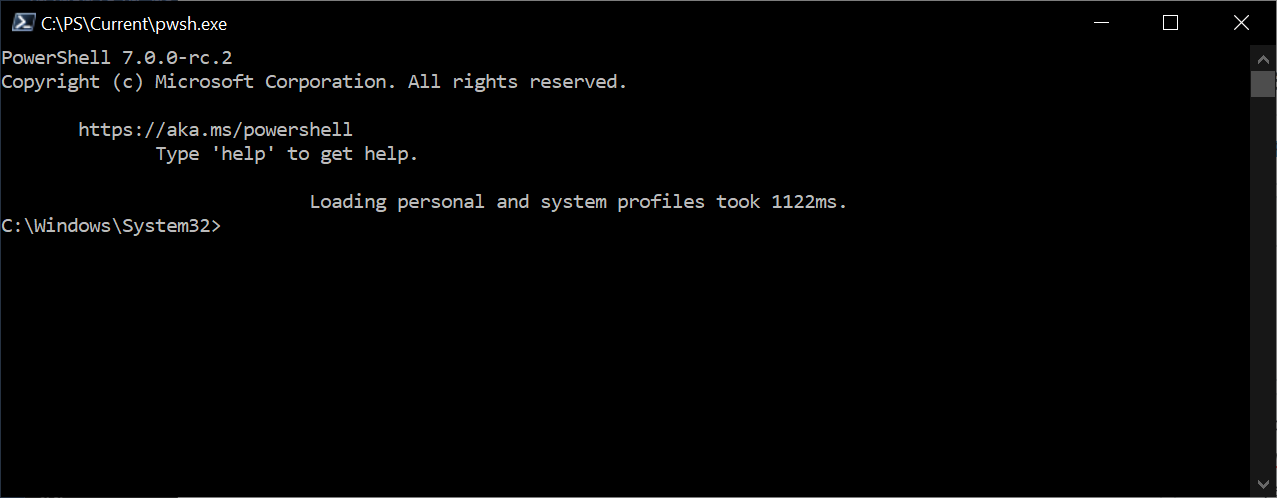
Identical behavior when launched from Windows Terminal.
Environment data
Name                           Value
----                           -----
PSVersion                      7.0.0-rc.2
PSEdition                      Core
GitCommitId                    7.0.0-rc.2
OS                             Microsoft Windows 10.0.18363
Platform                       Win32NT
PSCompatibleVersions           {1.0, 2.0, 3.0, 4.0…}
PSRemotingProtocolVersion      2.3
SerializationVersion           1.1.0.1
WSManStackVersion              3.0
(Edited to add missing repro step. Invoking a web-request flashes a blue text dialog on the screen, which seems to screw up the text formatting underneath)
 9Rune5
All 11 comments
Intriguing, I'm not seeing these symptoms, neither in a regular console window nor in Windows Terminal.
Either way, I think the right place to post this issue is https://github.com/microsoft/terminal, because I don't think PowerShell or PSReadLine modify the existing screen buffer in response to window resizing.
GitHub
The new Windows Terminal and the original Windows console host, all in the same place! - microsoft/terminal
 mklement0
on 20 Feb 2020
mklement0
on 20 Feb 2020
Added a missing step to my reproduce steps.
Is this still a terminal issue?
9Rune5
on 20 Feb 2020
Your repro steps do nothing but perform a _file download_, which shouldn't have any side effects - and doesn't in my tests.
Are there steps missing?
mklement0
on 20 Feb 2020
While downloading, it displays a progress bar. At least I think it is a progress bar, but it flashes by pretty quickly to tell for sure.
I believe the action of displaying that 'thing' disrupts the console output. After this, modifying the window width behaves abnormally for the text that was temporarily placed underneath the 'thing'.
(I apologize for calling it a 'thing', it is an UDE: Unidentified Display Element)
9Rune5
on 20 Feb 2020
I see. Yes, it is a progress bar.
Since I assume you don't want that to show anyway, the pragmatic workaround is to do this:
& { $ProgressPreference = 'SilentlyContinue'; Invoke-WebRequest https://raw.github.com/trapd00r/LS_COLORS/master/LS_COLORS -OutFile ~\LS_COLORS }
Apart from that, for the reasons stated above (I only see it in Windows Terminal, btw), I still suggest you report the issue at https://github.com/microsoft/terminal/issues
The new Windows Terminal and the original Windows console host, all in the same place! - microsoft/terminal
mklement0
on 20 Feb 2020
This happens for me, and has been for a long time. Windows 10, PS 7 RC2 currently.
This is after resizing the window immediately after opening.
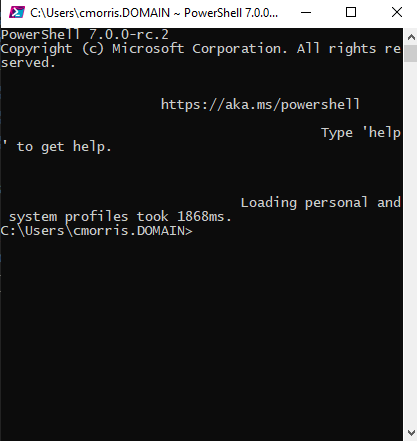
I only have a couple settings and poshgit in my profile for startup.
 msftrncs
on 21 Feb 2020
msftrncs
on 21 Feb 2020
@msftrncs, is it related to the specific content of your $PROFILE, such as poshgit?
Does it still occur if you (selectively) comment out statements?
mklement0
on 21 Feb 2020
Surprisingly my other machine (I'm at now) does not do it ... it is nearly the same profile, the biggest difference in machines is that this other machine (that is behaving) is Win 10 insiders build 19564. I'll have to dig deeper on the profile part tomorrow.
I can mention this, my profile comes from a network redirected resource on the machine I notice this issue on.
msftrncs
on 21 Feb 2020
I can reproduce this as well in 6.2.4, in the same conditions as originally.
Removing the profile (pwsh -noprofile) seems to keep the problem from occurring.
My profile.ps1 file is pretty simple.
Import-Module posh-git

Set-PSReadLineOption  -Colors  @{
     Command    = [ConsoleColor]::DarkYellow
     Comment    = [ConsoleColor]::DarkGray
     Keyword    = [ConsoleColor]::Magenta
     Member     = [ConsoleColor]::White
     Number     = [ConsoleColor]::Cyan
     Operator   = [ConsoleColor]::Blue
     Parameter  = [ConsoleColor]::Yellow
     String     = [ConsoleColor]::Green
     Type       = [ConsoleColor]::Red
     Variable   = [ConsoleColor]::DarkCyan
 } -PromptText '> '
If I comment out the Import-Module posh-git, then the issue doesn't occur.
However, simply executing that command after the shell opens without it, and the issue occurs again. It is something about the process of importing posh-git in my case, and the text on those lines. Those lines are in the same place as the progress bar would appear.
If I have something else on the screen when the progress bar appears, its those lines that then become corrupted. Importing posh-git causes a progress bar to very momentarily appear.
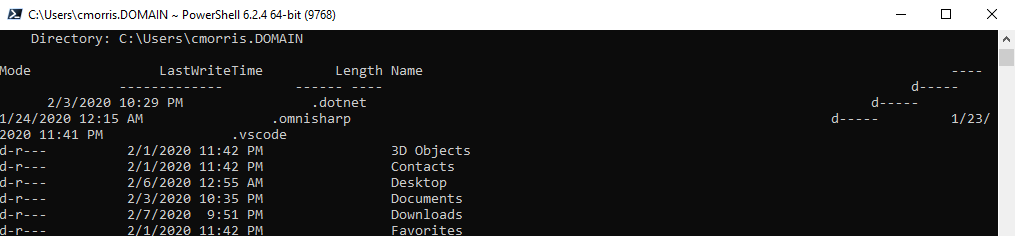
The issue is that the progress bar corrupts the display buffer due to it removing and then replacing that text.
msftrncs
on 21 Feb 2020
The progress bar also affects the colors on the text it temporarily displaced (see updated screenshot in the winterm issue I opened https://github.com/microsoft/terminal/issues/4677).
Are you still confident it is a conhost/winterm issue @mklement0 ? If so then I'll close this issue here.
9Rune5
on 21 Feb 2020
Nice sleuthing, @msftrncs.
@9Rune5, I'm now unclear on whether this is a PowerShell issue, we'd have to look at the progress-bar code to see if the way it saves and restores the screen buffer is delegated to console API calls that malfunction or if there's something else going on on the PowerShell side (e.g., incorrect use of these calls).
I suggest starting in _this_ repo, which means closing this issue and moving the content of https://github.com/microsoft/terminal/issues/4677 _here_ (closing it there and re-creating it here), with a link to _this_ issue for background info.
https://github.com/microsoft/terminal/issues/4677 can always be reopened if it does turn out to be a console issue after all.
mklement0
on 21 Feb 2020
Related issues
 pcgeek86
·
3Comments
pcgeek86
·
3Comments
 rkeithhill
·
3Comments
pcgeek86
·
3Comments
mklement0
·
3Comments
rkeithhill
·
3Comments
pcgeek86
·
3Comments
mklement0
·
3Comments
 Michal-Ziemba
·
3Comments
Michal-Ziemba
·
3Comments