Powershell: Unwanted empty lines in the output of gci
> gci


    Directory: C:\Users\Mus

Mode                LastWriteTime         Length Name
----                -------------         ------ ----
d-r---         2/2/2020   4:59 PM                Documents
d-r---        2/13/2020   1:21 PM                Downloads
can we get rid of the extra new lines right after entering gci
 musm
musm
All 5 comments
Please follow our issue template and share $PSTableVersion.
 iSazonov
on 14 Feb 2020
iSazonov
on 14 Feb 2020
@musm I think there is two line before and one after. We could remove the first one but maybe there is a reason for it. Which line would you like to remove?
Steps to reproduce
Get-ChildItem
Expected behavior
    Directory: C:\Users\josua\Documents\SQL Server Management Studio

Mode                 LastWriteTime         Length Name
----                 -------------         ------ ----
d----          2018-06-16    01:09                Settings
Actual behavior
    Directory: C:\Users\josua\Documents\SQL Server Management Studio

Mode                 LastWriteTime         Length Name
----                 -------------         ------ ----
d----          2018-06-16    01:09                Settings
Environment data
Name                           Value
----                           -----
PSVersion                      7.0.0-rc.2
PSEdition                      Core
GitCommitId                    7.0.0-rc.2
OS                             Microsoft Windows 10.0.19569
Platform                       Win32NT
PSCompatibleVersions           {1.0, 2.0, 3.0, 4.0…}
PSRemotingProtocolVersion      2.3
SerializationVersion           1.1.0.1
WSManStackVersion              3.0
 meterien
on 29 Feb 2020
meterien
on 29 Feb 2020
@meterien I would at least remove one of the two first new lines, it's really necessary and takes up a lot of terminal space.
musm
on 2 Mar 2020
👍2
Here's another example why this is so annoying:
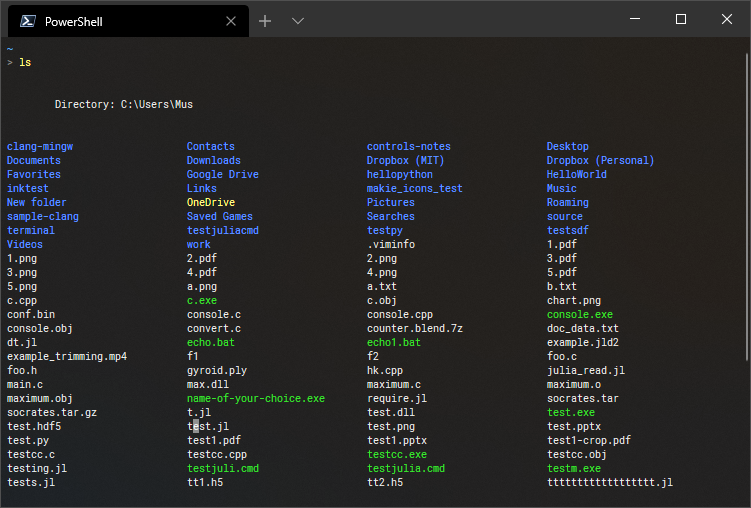
For some reason powershell thinks it's a good idea to steal 4 newlines and reduce more space on my 13" laptop's screen.
musm
on 19 Mar 2020
:tada:This issue was addressed in #12163, which has now been successfully released as v7.1.0-preview.4.:tada:
Handy links:
![msftbot[bot] picture](https://avatars2.githubusercontent.com/in/26612?v=4&s=40) msftbot[bot]
on 25 Jun 2020
msftbot[bot]
on 25 Jun 2020
Was this page helpful?
0 / 5 - 0 ratings
Related issues
 pcgeek86
·
3Comments
pcgeek86
·
3Comments
pcgeek86
·
3Comments
pcgeek86
·
3Comments
 concentrateddon
·
3Comments
concentrateddon
·
3Comments
 rkeithhill
·
3Comments
rkeithhill
·
3Comments
 abock
·
3Comments
abock
·
3Comments
Most helpful comment
@meterien I would at least remove one of the two first new lines, it's really necessary and takes up a lot of terminal space.