Powershell: Escape character garbage on command line (Win81)
I've been using PWSH 6.1.1 since introduced and that shell has been working great, mostly.
Decided to give the 7.0.0-rc.2 a run...
- Good News: start up is 25% faster
- Bad news: Lots of escape character garbage on command line, appearing as soon as you type anything. (In particular the
[104m.)
Steps to reproduce
# type a "$" (the first one is part of the prompt)
$ $⬜[104m
(I had to manually paste a box character above, since it didn't show in the github markup.)
----------------------------------------------------------
  PowerShell Version    : 7.0.0-rc.2
  OS Name               : Microsoft Windows 8.1 (64-bit)
  OS Version            : 6.3.9600  [2014-08-16 00:50:01]
  OS BuildLabEx         : 9600.19538
  OS HAL                : 6.3.9600.18969
  OS Kernel             : 6.3.9600.18217
  OS UBR                : 19599
  -------------------------------------------------------
  on Host               : xxxx
  as User               : xxxx
  with Privilege        : Administrator
  -------------------------------------------------------
  ExecutionPolicy :
        MachinePolicy   : Undefined
        UserPolicy      : Undefined
        Process         : Undefined
        CurrentUser     : Bypass
        LocalMachine    : RemoteSigned

  Console Settings:
      Type              : ConsoleHost
      OutputEncoding    : Unicode (UTF-8)
      Color Capability  : 151
      Registry VT Level : 1
      CodePage (input)  : 437
      CodePage (output) : 437
      Mode (input)      : 0x1f7
      Mode (output)     :

Name                           Value
----                           -----
PSVersion                      7.0.0-rc.2
PSEdition                      Core
GitCommitId                    7.0.0-rc.2
OS                             Microsoft Windows 6.3.9600
Platform                       Win32NT
PSCompatibleVersions           {1.0, 2.0, 3.0, 4.0…}
PSRemotingProtocolVersion      2.3
SerializationVersion           1.1.0.1
WSManStackVersion              3.0
Possibly related issues:
- #9491
- #9420
- #7570
- #2381
- https://www.twitch.tv/videos/424738436?t=00h05m36s
 E3V3A
E3V3A
All 12 comments
Can you repo without PSReadline? What font do you use (can change)?
 iSazonov
on 27 Jan 2020
iSazonov
on 27 Jan 2020
@iSazonov
Can you repo without PSReadline?
I don't understand. What do you want me to do?
I tried all fonts and also just tried this in the latest 7.1.1 and it's still the same issue.
powershell -NoProfile -c "'?[104mWHOOT ?[m'.Replace('?', [char]27);"
I don't understand. What do you want me to do?
Run pwsh.exe, remove PSReadline module Remove-Module PSReadline and try repo.
powershell -NoProfile
It is not PowerShell 7 - you run Windows PowerShell.
iSazonov
on 30 Apr 2020
@iSazonov
It is not PowerShell 7
It was just for example to try to print colored output, works even in Cygwin. Replace with whatever term you want to test in.
... however
Some limited success:
Remove-Module PSReadline: escape character garbage disappear but removes CLI command completion & highlights.Install-Module PSReadLine: 'escape garbage is still gone, but while CLI completion works, cmd highlight disabled.Import-Module -Name PSReadLine: garbage is back!
Basically, no ANSI coloring seem to work:
pwsh -NoProfile -c "'?[1;31mRed ?[32mGrn ?[33mYel ?[35mMag ?[36mCya ?[m'.Replace('?', [char]27);"

# ←[1;31mRed ←[32mGrn ←[33mYel ←[35mMag ←[36mCya ←[m
But instead of checking if available and returning nothing when it isn't, it actually tries to return the ANSI codes, assuming it should work.
Interestingly that particular code 104m is for a bright-blue background with RGB [59,120,255].
Also see:
- https://stackoverflow.com/questions/44047988/windows-10-console-colors-not-working-virtual-terminal-control-character-sequen
- https://4sysops.com/wiki/change-powershell-console-syntax-highlighting-colors-of-psreadline/
(Get-ItemProperty -path "HKCU:\Console" -name ScreenColors).ScreenColors[System.ConsoleColor].GetEnumValues() | ForEach-Object { Write-Host $_ -ForegroundColor $_ }- https://www.powershellgallery.com/packages/PSReadLine/2.0.0-beta1/Content/Changes.txt
- ColorTool
and:
Install-Module TMOutput
Show-TMOutputColor
I think the issue is that "blue" is a 24-bit color code, and on non Win10 shells, we don't have that. So that either PSReadLine should probably be fixed to accommodate by not attempting to output 24-bit colors, when not available or that powershell/pwsh is made to filter out those 24-bit escape codes, when found in stream.
Here's a 24-bit color table.
E3V3A
on 1 May 2020
Any idea which one of these, that code refer to?
The valid keys include:

    ContinuationPrompt: The color of the continuation prompt.
    Emphasis: The emphasis color. For example, the matching text when searching history.
    Error: The error color. For example, in the prompt.
    Selection: The color to highlight the menu selection or selected text.
    Default: The default token color.
    Comment: The comment token color.
    Keyword: The keyword token color.
    String: The string token color.
    Operator: The operator token color.
    Variable: The variable token color.
    Command: The command token color.
    Parameter: The parameter token color.
    Type: The type token color.
    Number: The number token color.
    Member: The member name token color.
@E3V3A Thanks for your investigation! Since it is PSReadline issue open new issue in https://github.com/PowerShell/PSReadline (please use issue template there and a script from the template)
GitHub
A bash inspired readline implementation for PowerShell - PowerShell/PSReadLine
 iSazonov
on 1 May 2020
iSazonov
on 1 May 2020
This issue has been marked as external and has not had any activity for 1 day. It has been be closed for housekeeping purposes.
![msftbot[bot] picture](https://avatars2.githubusercontent.com/in/26612?v=4&s=40) msftbot[bot]
on 27 May 2020
msftbot[bot]
on 27 May 2020
I believe this is a known issue in PSReadLine caused by the assumption that all hosting terminals understand VT100 escape codes (which it uses to do things like set colours).
VT100 escape codes work in Windows 10, but do not on older Windows versions.
I'm not sure of the intent to fix this in PSRL, since it's only older versions of Windows where this is an issue, but some possible workarounds might be:
- Install an older version of PSRL
- Use PowerShell 7.0 rather than the 7.1 preview version; this may use a non-preview version of PSRL that doesn't assume VT100 compatibility, although I'm not sure
 rjmholt
on 27 May 2020
rjmholt
on 27 May 2020
This W81 "legacy" issue has not gone away by itself. It is still there and comparing latest PSRL on both latest pwsh 7.1.0-rc.1with an earlier pwsh 6.1.1, we can easily find there is something wrong with the color rendering of Blue and DarkBlue which renders the same color in the new pwsh.
We can compare this:
"`n"; [enum]::GetValues([System.ConsoleColor]) | Foreach-Object { Write-Host ("{0,-14} " -f $_) -NoNewline; Write-Host $_ -ForegroundColor $_ }
OLD:
  PowerShell Version    : 6.1.1
  OS Name               : Microsoft Windows 8.1 (64-bit)
  PSReadLine version    : 2.1.0-beta2
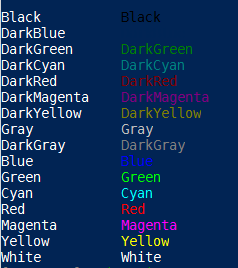
NEW:
  PowerShell Version    : 7.1.0-rc.1
  OS Name               : Microsoft Windows 8.1 (64-bit)
  PSReadLine version    : 2.1.0-beta2
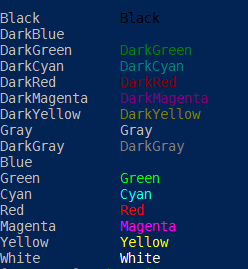
 eabase
on 18 Oct 2020
eabase
on 18 Oct 2020
@eabase Please look PSReadline issue referenced above.
iSazonov
on 19 Oct 2020
@iSazonov
I am now in the belief that powershell/pwsh version later than 6.1.1 does not handle the ANSI reset code properly. So you guys need to collaborate a little more on this issue. How can I say that? Because any PSR version works on those old shells. Clearly from my post just above and many others already reported in the PSR repo, it all points to something fishy you guys implemented back then. (Seeing how some of your code is using regex, my current suspicion is that you're missing some over-hungry regex, that removes the reset code, and subsequently forgets to put it back, or puts it back wrongly. Does pwsh use regex for processing ANSI vs Win VT API?)
eabase
on 23 Oct 2020
Related issues
 rkeithhill
·
3Comments
rkeithhill
·
3Comments
 andschwa
·
3Comments
andschwa
·
3Comments
 alx9r
·
3Comments
alx9r
·
3Comments
 abock
·
3Comments
abock
·
3Comments
 garegin16
·
3Comments
garegin16
·
3Comments