Powershell: Propagate preference variables to Windows PowerShell session
Hi, I want to see verbose messages using Test-DscConfiguration with -Verbose switch.
Thanks.
Steps to reproduce
Test-DscConfiguration -ComputerName $env:COMPUTERNAME -Verbose
Expected behavior
PS > Test-DscConfiguration -ComputerName $env:COMPUTERNAME -Verbose
VERBOSE: Perform opetation 'Invoke CimMethod' with following parameters, ''methodName' = TestConfiguration, 'className' = MSFT_DSCLocalConfigurationManager,'namespaceName' = root/Microsoft/Windows/DesiredStateConfiguration'
VERBOSE: An LCM method call arrived from coputer 'MyComputer' with user sid S-1-5-21-**********-*********...
VERBOSE: [MyComputer]: LCM:  [ Start  Test            ]
VERBOSE: [MyComputer]: LCM:  [ Start  Resource   ] [[File]]FileCopyInstance1]
....
VERBOSE: Operation 'Invoke CimMethod' Complete.
True
VERBOSE: Time taken for configuration job to complete is 0.299 seconds
Actual behavior
PS > Test-DscConfiguration -ComputerName $env:COMPUTERNAME -Verbose
True
Environment data
Name                           Value
----                           -----
PSVersion                      7.0.0-rc.2
PSEdition                      Core
GitCommitId                    7.0.0-rc.2
OS                             Microsoft Windows 10.0.18363
Platform                       Win32NT
PSCompatibleVersions           {1.0, 2.0, 3.0, 4.0…}
PSRemotingProtocolVersion      2.3
SerializationVersion           1.1.0.1
WSManStackVersion              3.0
 0x6797
All 6 comments
The only verbose messaging PowerShell can display is the messaging a cmdlet itself provides. If the cmdlet was not built with verbose messaging in mind, there will be none.
I'm not sure if the original DSC module is still under development; I certainly can't find an open source repo for it at the moment. I'm not super clear on the direction DSC is going at the moment, but from what I remember it's slated to be rather different to the original DSC module when we see a full release of it.
 vexx32
on 18 Jan 2020
vexx32
on 18 Jan 2020
@vexx32 Thank you for your information. It seems a new implement of DSC.
PowerShell 7 provides Test-DscConfiguration as a function not a cmdlet.
On PowerShell 5.1
PS C:\Users\0x6797> Get-Command Test-DscConfiguration
CommandType Name Version Source
----------- ---- ------- ------
Cmdlet Test-DscConfiguration 1.1 PSDesiredStateConfiguration
On PowerShell 7.0.0 RC2
CommandType Name Version Source
----------- ---- ------- ------
Function Test-DscConfiguration 1.0 PSDesiredStateConfiguration
I’ve recently run into this issue myself, and launched small investigation, as one of my personal project requires parsing LCM output from DSC cmdlets, and I wanted it to be compatible with PowerShell Core.
Turns out that the way that PowerShell Core 7 is achieving backwards compatibility with Windows PowerShell, for some cmdlets is creating background PSSession to localhost that uses Windows PowerShell 5.1 engine. Then it calls Import-PSSession to import cmdlets.
This feature is apparently called Windows PowerShell Compatibility.
This can be observed by calling following commands:
Get-PSSession
Get-Command Test-DscConfiguration
Get-PSSession
````
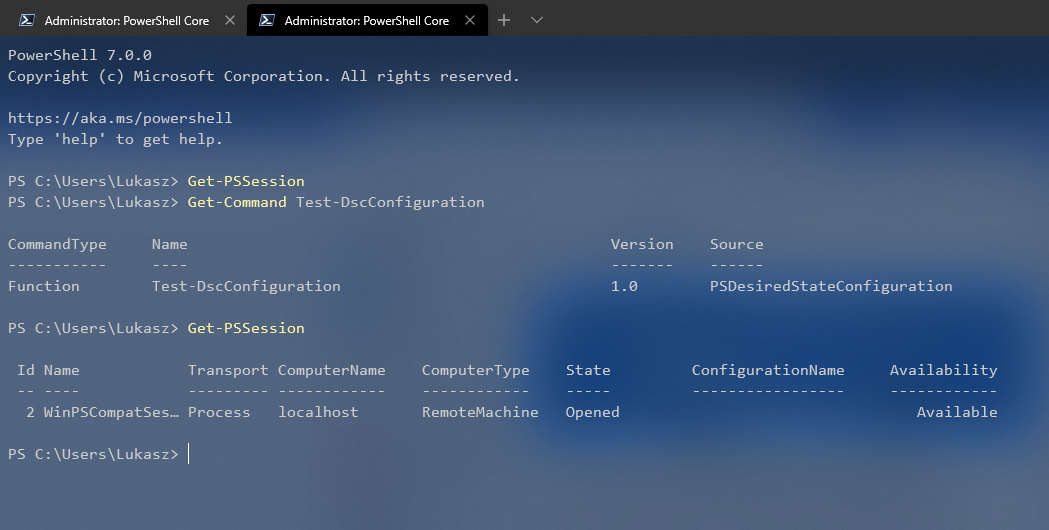
As @0x6797 correctly noted, on PowerShell Core 7, if you run `Get-Command Test-DscConfiguration`, it will show that cmdlet is a function instead of cmdlet. But his conclusion was incorrect. It shows as a function, not because how PSDesiredStateConfiguration module was reimplemented in PowerShell Core (Function vs Cmdlet) but because that is how `Import-PSSession` imports cmdlets into current session. It’s using some sort of machine code to create temporal Module and Function definitions inside that module to allow implicit remoting.
This can be observed by running:
```powershell
Get-Command Test-DscConfiguration | Select -ExpandProperty Module | Format-List Name, Path, Description

And comparing it to manually created PSSession to localhost and imported PSDesiredStateConfiguration module into PowerShell Core session:
$Session = New-PSSession $env:COMPUTERNAME
Import-PSSession -Session $Session -Module PSDesiredStateConfiguration
Get-Command Test-DscConfiguration | Select -ExpandProperty Module | Format-List Name, Path, Description

Apparently imported functions/cmdlets using Import-PSSession ignore -Verbose parameter. I did not go as far to figure out why but here’s quick test confirming it:
$Session = New-PSSession $env:COMPUTERNAME

$FunctionDefinition = {

    function Test-Function
    {
        [Cmdletbinding()]

        param()

        Write-Verbose "Test verbose output"
    }

}

Invoke-Command -Session $Session -ScriptBlock $FunctionDefinition

Import-PSSession -Session $Session -CommandName Test-Function

Test-Function -Verbose

While fiddling with it, I’ve discovered that there is a way to get Verbose output from imported function/cmdlet by setting $VerbosePreference variable to Continue in PSSession that cmdlets were imported from:
Invoke-Command -Session $Session -ScriptBlock {$VerbosePreference = 'Continue'}

Now getting back to the original question and issue:
You can get Verbose output form Test-DscConfiguration and other cmdlets working in Windows PowerShell Compatibility, in PowerShell Core by setting $VerbosePreference to Continue in the WinPSCompatSession PSSession running in background:
$Session = Get-PSSession -Name WinPSCompatSession
Invoke-Command -Session $Session -ScriptBlock {$VerbosePreference = 'Continue'}

Test-DscConfiguration -Verbose -Detailed
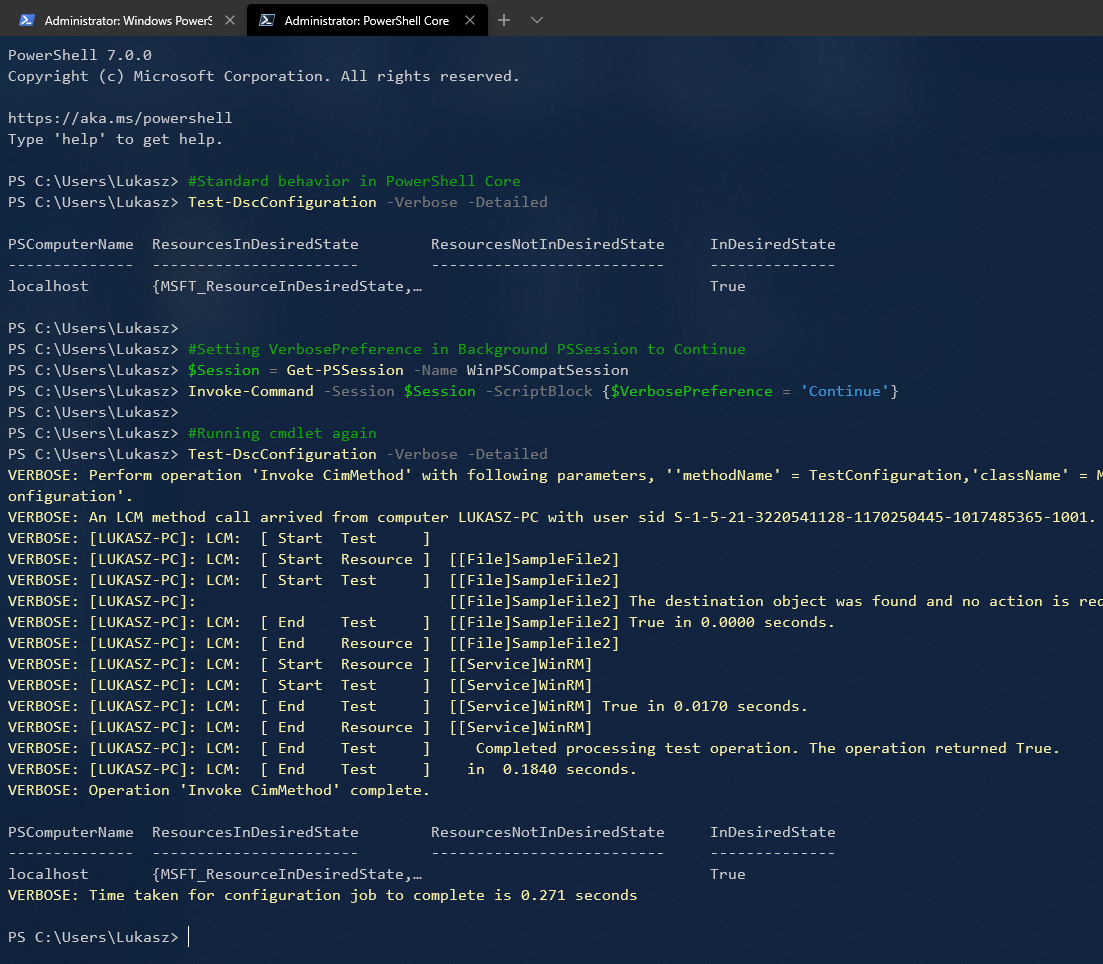
As a bonus, I will add that, the same trick will work for $ProgressPreference, as setting it just in PowerShell Core will be ignored for imported cmdlets.
Suggestion
In the future releases to improve behavior of cmdlets run in Windows PowerShell Compatibility either of Import-PSSession has to be modified, to not ignore -Verbose parameters.
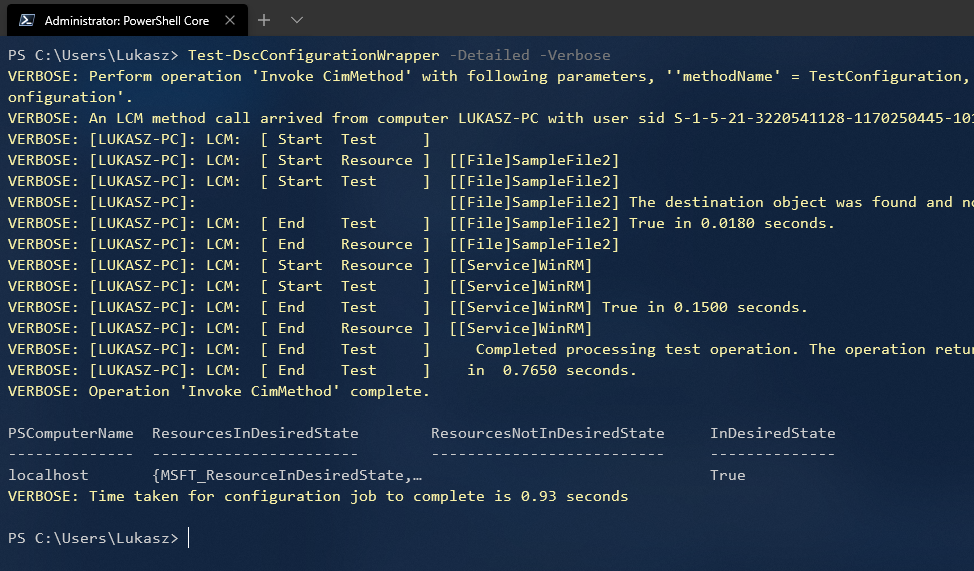
Other way to achive this goal is to write wrappers over cmdlets that are intended to run in this mode, so they can manipulate $VerbosePreference of WinPSCompatSession PSSession:
function Test-DscConfigurationWrapper
{
    [Cmdletbinding()]

    param(
        [Parameter(Mandatory=$false)]
        [switch]$Detailed
    )

    process
    {
        $Params = @{Detailed = $Detailed}

        Get-Command Test-DscConfiguration | Out-Null

        try
        {
            if($PSBoundParameters.Keys.Contains("Verbose"))
            {
                $Session = Get-PSSession -Name WinPSCompatSession

                $SessionOrgPreference = (Invoke-Command -Session $Session -ScriptBlock {$VerbosePreference}).Value

                Invoke-Command -Session $Session -ScriptBlock {$VerbosePreference = $using:VerbosePreference}
            }

            Test-DscConfiguration @Params
        }
        catch
        {
            $PSCmdlet.WriteError($_)
        }
        finally
        {
            if($PSBoundParameters.Keys.Contains("Verbose"))
            {
                Invoke-Command -Session $Session -ScriptBlock {$VerbosePreference = $using:SessionOrgPreference}
            }
        }

    }
}
Cheers!
 goorallab
on 11 Apr 2020
goorallab
on 11 Apr 2020
@goorallab thanks for the in-depth analysis! It looks like this is something we need to improve for the Windows Compatibility Remoting feature.
/cc @anmenaga
vexx32
on 12 Apr 2020
cc @anmenaga
 SteveL-MSFT
on 15 Jun 2020
SteveL-MSFT
on 15 Jun 2020
This would require changes in the LCM to accept the variables.
 TravisEz13
on 20 Aug 2020
TravisEz13
on 20 Aug 2020
Related issues
 pcgeek86
·
3Comments
pcgeek86
·
3Comments
 andschwa
·
3Comments
andschwa
·
3Comments
 lzybkr
·
3Comments
lzybkr
·
3Comments
 JohnLBevan
·
3Comments
JohnLBevan
·
3Comments
 mklement0
·
3Comments
mklement0
·
3Comments
Most helpful comment
I’ve recently run into this issue myself, and launched small investigation, as one of my personal project requires parsing LCM output from DSC cmdlets, and I wanted it to be compatible with PowerShell Core.
Turns out that the way that PowerShell Core 7 is achieving backwards compatibility with Windows PowerShell, for some cmdlets is creating background PSSession to localhost that uses Windows PowerShell 5.1 engine. Then it calls Import-PSSession to import cmdlets.
This feature is apparently called Windows PowerShell Compatibility.
This can be observed by calling following commands:
And comparing it to manually created PSSession to localhost and imported PSDesiredStateConfiguration module into PowerShell Core session:
Apparently imported functions/cmdlets using
Import-PSSessionignore-Verboseparameter. I did not go as far to figure out why but here’s quick test confirming it:While fiddling with it, I’ve discovered that there is a way to get Verbose output from imported function/cmdlet by setting
$VerbosePreferencevariable toContinuein PSSession that cmdlets were imported from:Now getting back to the original question and issue:
You can get Verbose output form
Test-DscConfigurationand other cmdlets working in Windows PowerShell Compatibility, in PowerShell Core by setting$VerbosePreferencetoContinuein theWinPSCompatSessionPSSession running in background:As a bonus, I will add that, the same trick will work for
$ProgressPreference, as setting it just in PowerShell Core will be ignored for imported cmdlets.Suggestion
In the future releases to improve behavior of cmdlets run in Windows PowerShell Compatibility either of
Import-PSSessionhas to be modified, to not ignore-Verboseparameters.Other way to achive this goal is to write wrappers over cmdlets that are intended to run in this mode, so they can manipulate
$VerbosePreferenceofWinPSCompatSessionPSSession:Cheers!