Powershell: PS 7 Preview 5 Windows MSIX x64 Install does not work
Steps to reproduce
- Download PowerShell 7 Preview 5 MSIX Package for Windows x64
- Execute it from Downloads Folder
- Press "Install"
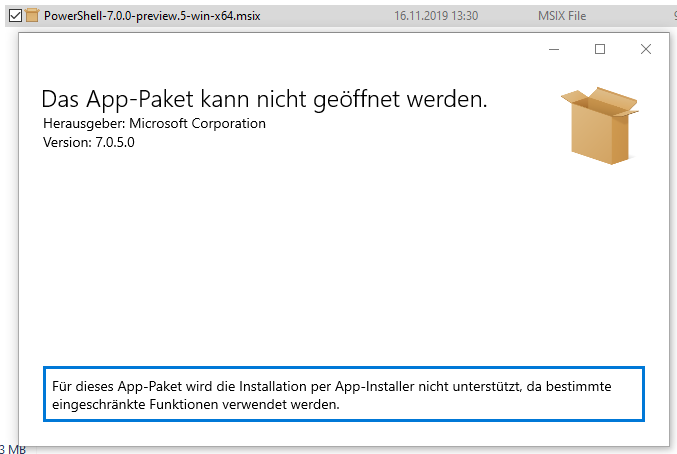
- Get an error message 😐
Expected behavior
PowerShell 7 Preview 5 installs.
Actual behavior
Get Error Message from MSIX installer before Installation starts.
Environment data
Output of
Get-ComputerInfo
 vwent
vwent
All 3 comments
Currently the MSIX can only be installed via Add-AppXPackage -Path $msixPath - note that you must also have Developer Mode enabled in the Windows settings for it to allow the install. I don't recall that the exact issue with the MSIX was, but I think @SteveL-MSFT and team managed to sort it out for the next release, if I'm not mistaken? 🤔
 vexx32
on 16 Nov 2019
vexx32
on 16 Nov 2019
@vexx32 talking to the AppX team, it seems that because our pkg requires unvirtualized resources (because it's a shell!), it won't allow installing by simply double clicking on the pkg. Using Add-AppXPackage is required to install the msix pkg. The msix is planned to be available in the MS App Store by Preview.6. However, for anyone doing offline installs of the msix, they will still need to use Add-AppXPackage.
I'll submit a PR to update https://docs.microsoft.com/en-us/powershell/scripting/install/installing-powershell-core-on-windows?view=powershell-6 with instructions for installing the MSIX.
Information about installing PowerShell Core on Windows

 SteveL-MSFT
on 17 Nov 2019
SteveL-MSFT
on 17 Nov 2019
@vexx32 @SteveL-MSFT Thanks guys for clarifying, awesome!
vwent
on 17 Nov 2019
Related issues
 HumanEquivalentUnit
·
3Comments
HumanEquivalentUnit
·
3Comments
 garegin16
·
3Comments
garegin16
·
3Comments
 concentrateddon
·
3Comments
concentrateddon
·
3Comments
 ajensenwaud
·
3Comments
ajensenwaud
·
3Comments
 alx9r
·
3Comments
alx9r
·
3Comments
Most helpful comment
@vexx32 talking to the AppX team, it seems that because our pkg requires unvirtualized resources (because it's a shell!), it won't allow installing by simply double clicking on the pkg. Using
Add-AppXPackageis required to install the msix pkg. The msix is planned to be available in the MS App Store by Preview.6. However, for anyone doing offline installs of the msix, they will still need to useAdd-AppXPackage.I'll submit a PR to update https://docs.microsoft.com/en-us/powershell/scripting/install/installing-powershell-core-on-windows?view=powershell-6 with instructions for installing the MSIX.