Powershell: Out-GridView not working as expected on PowerShell 7
There is a script which retrieves some information from a database and returns values on console. When I run this script to fetch information and pipe it to Out-GridView it works just fine on PowerShell 5.1.18362.145.
I installed PowerShell 7 (7.0.0-preview.4) and installed Graphical tools (Microsoft.PowerShell.GraphicalTools)from Powershell Gallery, It is now able to return the value fine on console but when it is piped to Out-GridView, It throws exception.
Steps to reproduce
./Script-Name -ComputerName Server1.domail.com | Out-GridView
Expected behavior
```It should redirect the output to Grid view but it fails with an exception.
Output on console with PowerShell 5.1, Works for Out-GridView too,
system.hostname : Server1.domain.com
owner Name : PRAKASH KUMAR
owner Email : [email protected]
os_family : windows
os_version : 2012R2
platform : vmware
Status : Running
Added at : Mar 20, 2017 11:10:23
landscape : Dev
purpose : testing
stability_zone : 2
Console Output on PowerShell 7, Not Working on Out-GridView
system.hostname : Server1.domain.com
owner Name : PRAKASH KUMAR
owner Email : [email protected]
os_family : windows
os_version : 2012R2
Platform : vmware
Status : Running
Added at : Mar 20, 2017 11:10:23
landscape : Dev
purpose : testing
stability_zone : 2
# Actual behavior
Exception while executing with Out-GridView
- $_.owner Name
- ~~~~
Unexpected token 'Name' in expression or statement.
At line:1 char:64 - .\ITC-Query.ps1 -ComputerName or1010050152190.corp.adobe.com |ogv
- ~~~
- CategoryInfo : ParserError: (:) [Out-GridView], ParseException
- FullyQualifiedErrorId : UnexpectedToken,OutGridView.Cmdlet.OutGridViewCmdletCommand
PS C:\Work\Working>
# Environment data

<!-- provide the output of $PSVersionTable -->
Not Working for Out-GridView
Name Value
---- -----
PSVersion 7.0.0-preview.4
PSEdition Core
GitCommitId 7.0.0-preview.4
OS Microsoft Windows 10.0.18362
Platform Win32NT
PSCompatibleVersions {1.0, 2.0, 3.0, 4.0…}
PSRemotingProtocolVersion 2.3
SerializationVersion 1.1.0.1
WSManStackVersion 3.0
Working for Out-GridView
Name Value
---- -----
PSVersion 5.1.18362.145
PSEdition Desktop
PSCompatibleVersions {1.0, 2.0, 3.0, 4.0...}
BuildVersion 10.0.18362.145
CLRVersion 4.0.30319.42000
WSManStackVersion 3.0
PSRemotingProtocolVersion 2.3
SerializationVersion 1.1.0.1
```
 Prakash82x
All 9 comments
@Prakash82x are you sure this is running the Out-Gridview cmdlet from Microsoft.PowerShell.GraphicalTools module and not the one that is shipped in windows itself
to Confirm that it's an issue with the Microsoft.PowerShell.GraphicalTools version can you try this
./Script-Name -ComputerName Server1.domail.com | Microsoft.PowerShell.GraphicalTools\Out-GridView
If that still gives the error then you will need to raise an issue in the Microsoft.PowerShell.GraphicalTools repository which is https://github.com/PowerShell/GraphicalTools
 kilasuit
on 23 Sep 2019
kilasuit
on 23 Sep 2019
@Prakash82x
Because this is not part of PowerShell 7 Preview.4, you need to go to the PowerShell Gallery and contact the Owner of the module.
:)
It work in both Windows and Ubuntu! Not in WSL yet! @TylerLeonhardt


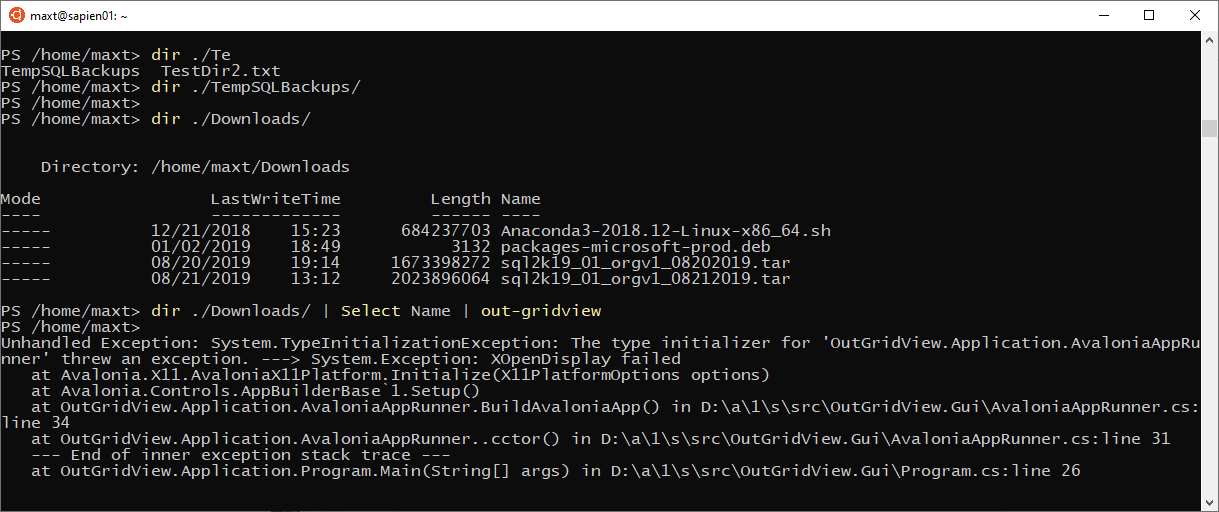
 MaximoTrinidad
on 23 Sep 2019
MaximoTrinidad
on 23 Sep 2019
@MaximoTrinidad thanks for the cc - yeah if this is truly an issue with GraphicalTools, open an issue here: https://github.com/PowerShell/GraphicalTools (thanks @kilasuit!)
@MaximoTrinidad as for WSL support... not quite sure what that'd look like. I guess if we can detect we're in WSL, we can launch the Windows version of GraphicalTools which is suppose to work from within WSL, but I'm really note sure. Open a feature request. I don't have time to add such a feature... but hacktoberfest is around the corner if you're interested :)
GitHub
A module that mixes PowerShell and GUIs! - built on Avalonia - PowerShell/GraphicalTools

 TylerLeonhardt
on 23 Sep 2019
TylerLeonhardt
on 23 Sep 2019
Thanks @TylerLeonhardt !
No worries! I'm glad the tool works cross-platform.
I'll check about Hacktoberfest.
:)
MaximoTrinidad
on 23 Sep 2019
@Prakash82x
Please repost this issue as @kilasuit suggested at https://github.com/PowerShell/GraphicalTools
This is the correct repository to post it.
Thanks
A module that mixes PowerShell and GUIs! - built on Avalonia - PowerShell/GraphicalTools
MaximoTrinidad
on 23 Sep 2019
Thanks @kilasuit
@Prakash82x are you sure this is running the Out-Gridview cmdlet from Microsoft.PowerShell.GraphicalTools module and not the one that is shipped in windows itself
to Confirm that it's an issue with the Microsoft.PowerShell.GraphicalTools version can you try this
./Script-Name -ComputerName Server1.domail.com | Microsoft.PowerShell.GraphicalTools\Out-GridViewIf that still gives the error then you will need to raise an issue in the Microsoft.PowerShell.GraphicalTools repository which is https://github.com/PowerShell/GraphicalTools
I verified using after piping the output to "| Microsoft.PowerShell.GraphicalTools\Out-GridView" and it is working there.
A module that mixes PowerShell and GUIs! - built on Avalonia - PowerShell/GraphicalTools
Prakash82x
on 23 Sep 2019
@Prakash82x that would suggest to me that the module that Out-Gridview is in, which is Microsoft.PowerShell.Utility is getting loaded first. This means that the PSModulePath for modules in the Sys32 folder are getting loaded.
do you happen to have either WindowsCompatibility or WindowsPSModulePath modules installed and loaded at all?
kilasuit
on 23 Sep 2019
@kilasuit, Here are all the modules that I have which contains "windows" in their name.

Prakash82x
on 24 Sep 2019
:tada:This issue was addressed in #10899, which has now been successfully released as v7.0.0-preview.6.:tada:
Handy links:
![msftbot[bot] picture](https://avatars2.githubusercontent.com/in/26612?v=4&s=40) msftbot[bot]
on 21 Nov 2019
msftbot[bot]
on 21 Nov 2019
Related issues
 andschwa
·
3Comments
andschwa
·
3Comments
 JohnLBevan
·
3Comments
JohnLBevan
·
3Comments
 rkeithhill
·
3Comments
rkeithhill
·
3Comments
 aragula12
·
3Comments
MaximoTrinidad
·
3Comments
aragula12
·
3Comments
MaximoTrinidad
·
3Comments