Powershell: Get-Command: Using global function scope not working and starts throwing in PowerShell7-preview1
Steps to reproduce
Running the PSScriptAnalyzer test suite with PowerShell 7-preview1 has exposed a feature that does not seem to be implemented in current and old versions of PowerShell but starting with PowerShell7-preview1, the cmdlet throws an error
function global:Get-SimpleFunction { }
Get-Command global:Get-SimpleFunc*
Expected behavior
In PowerShell 6.2.1 (and 5.1), Get-Command does not return anything (which I think is a bug or unfinished feature) but at least no error should be thrown. Ideally the cmdlet should also be returned.
Actual behavior
Starting with PowerShell7-preview1, the cmdlet throws an error, which definitely is a regression and will affect users of PSScriptAnalyzers (because PSSA issues Get-Command calls under the hood for some of its analysis of the loaded user's code)
Get-Command : Cannot find drive. A drive with the name 'global' does not exist.
At line:1 char:42
+ ... ion global:Get-SimpleFunction { }; Get-Command global:Get-SimpleFunc*
+                                        ~~~~~~~~~~~~~~~~~~~~~~~~~~~~~~~~~~
+ CategoryInfo          : ObjectNotFound: (global:String) [Get-Command], DriveNotFoundException
+ FullyQualifiedErrorId : DriveNotFound,Microsoft.PowerShell.Commands.GetCommandCommand
The problem is not so much that no object is being returned but rather that now an error is thrown. We need to review if this is by design or not.
Environment data
Name                           Value
----                           -----
PSVersion                      7.0.0-preview.1
PSEdition                      Core
GitCommitId                    7.0.0-preview.1
OS                             Microsoft Windows 10.0.17763
Platform                       Win32NT
PSCompatibleVersions           {1.0, 2.0, 3.0, 4.0…}
PSRemotingProtocolVersion      2.3
SerializationVersion           1.1.0.1
WSManStackVersion              3.0
 bergmeister
All 12 comments
Looks like this is a dupe of (or related to) #9396.
 rkeithhill
on 4 Jun 2019
rkeithhill
on 4 Jun 2019
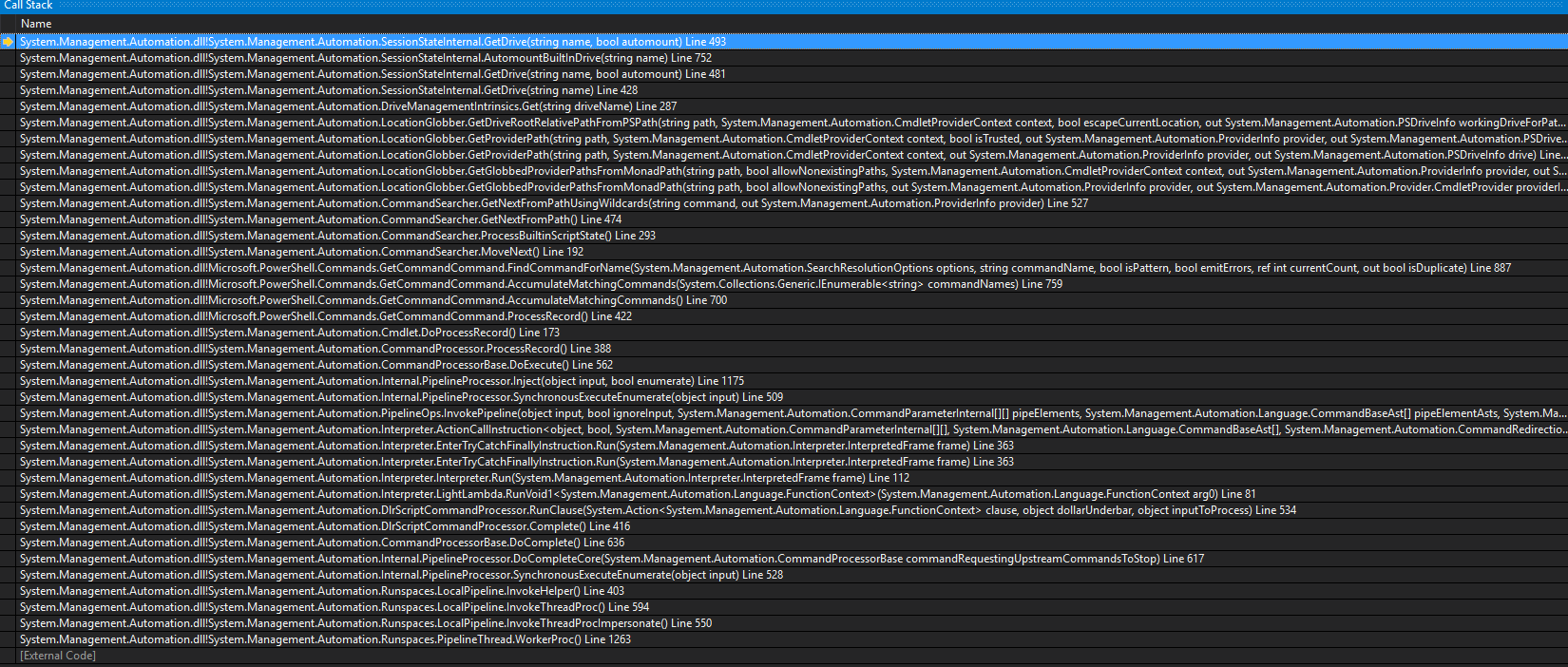
Here is the full stack trace btw (when built from source on latest master commit f222a686c5710ce31cbfd77c699e1c1d635a1091), it throws from here
https://github.com/PowerShell/PowerShell/blob/bd6fdae73520931f0d27a29d6290e18761772141/src/System.Management.Automation/engine/SessionStateDriveAPIs.cs#L485-L494
The private PSDriveInfo GetDrive(string name, bool automount) is being called with name="global" and automount=false.
bergmeister
on 4 Jun 2019
@bergmeister Please test with https://github.com/PowerShell/PowerShell/pull/9793 - is it resolve the issue too?
 iSazonov
on 4 Jun 2019
iSazonov
on 4 Jun 2019
@iSazonov Yes, PR #9793 indeed seems to fix it (I downloaded the zip of the build to test it)
bergmeister
on 4 Jun 2019
@bergmeister What do you mean by fix
With #9793 this is what I get
PS > function global:foo {}
PS > gcm global:foo
gcm : The term 'global:foo' is not recognized as the name of a cmdlet, function, script file, or operable program.
Check the spelling of the name, or if a path was included, verify that the path is correct and try again.
At line:1 char:1
+ gcm global:foo
+ ~~~~~~~~~~~~~~
+ CategoryInfo          : ObjectNotFound: (global:foo:String) [Get-Command], CommandNotFoundException
+ FullyQualifiedErrorId : CommandNotFoundException,Microsoft.PowerShell.Commands.GetCommandCommand
And the same error in 7.0.0-preview.1 before his fix.
 TravisEz13
on 4 Jun 2019
TravisEz13
on 4 Jun 2019
Perhaps https://github.com/PowerShell/PowerShell/pull/9623 fixed this?
TravisEz13
on 4 Jun 2019
@TravisEz13 By 'fixed', I meant that the example given in this issue does not throw any more:
function global:Get-SimpleFunction { }
Get-Command global:Get-SimpleFunc*
But you are right that your example still throws, removing the * at the end of my example (i.e. Get-Command global:Get-SimpleFunc makes it throw again
bergmeister
on 5 Jun 2019
@bergmeister I'm going to close this issue. I think the issue is fixed. Feel free to update the test I added.
TravisEz13
on 5 Jun 2019
@TravisEz13 I just pulled the latest changes from master (f5e3de036e84f37820eb1dac635c337f8fc17718) and your use case is not fixed (but the one that I raised in this issue)
PS C:\Users\cberg\git\PowerShell> function global:foo {}
PS C:\Users\cberg\git\PowerShell> gcm global:foo
gcm : The term 'global:foo' is not recognized as the name of a cmdlet, function, script file, or operable program.
Check the spelling of the name, or if a path was included, verify that the path is correct and try again.
At line:1 char:1
+ gcm global:foo
+ ~~~~~~~~~~~~~~
+ CategoryInfo          : ObjectNotFound: (global:foo:String) [Get-Command], CommandNotFoundException
+ FullyQualifiedErrorId : CommandNotFoundException,Microsoft.PowerShell.Commands.GetCommandCommand

PS C:\Users\cberg\git\PowerShell> $PSVersionTable

Name                           Value
----                           -----
PSVersion                      7.0.0-preview.1
PSEdition                      Core
GitCommitId                    7.0.0-preview.1-18-gf5e3de036e84f37820eb1dac635c337f8fc17718
OS                             Microsoft Windows 10.0.17763
Platform                       Win32NT
PSCompatibleVersions           {1.0, 2.0, 3.0, 4.0…}
PSRemotingProtocolVersion      2.3
SerializationVersion           1.1.0.1
WSManStackVersion              3.0
Reopen until we fix the second issue.
iSazonov
on 6 Jun 2019
I verified this is the same functionality as in 5.1
TravisEz13
on 6 Jun 2019
Please open a feature request if you would like new functionality.
TravisEz13
on 6 Jun 2019
Related issues
 manofspirit
·
3Comments
manofspirit
·
3Comments
 rudolfvesely
·
3Comments
rudolfvesely
·
3Comments
 ajensenwaud
·
3Comments
ajensenwaud
·
3Comments
 lzybkr
·
3Comments
lzybkr
·
3Comments
 concentrateddon
·
3Comments
concentrateddon
·
3Comments