Powershell: Remoting infrastructure / minishells don't consistently support capturing / redirection / suppression of streams other than success and error
Updated for technical accuracy based on @PetSerAl's feedback.
The problem at hand surfaces in the following scenarios:
- Remoting:
- true remoting:
Invoke-Command- implicit remoting with
Import-PSSession - background jobs:
Start-Job- postpositional
&
- Minishells:
- Calling the CLI from within PowerShell with
-Commandand a _script block_
- Calling the CLI from within PowerShell with
In these scenarios, redirecting and capturing the various output streams is inconsistently supported, with partial inability to redirect and/or capture streams, and partial inability to effectively suppress output streams.
Remoting:
- (unless silenced at the source) streams 3, 4, 5, 6 cannot be suppressed (quieted) with
>, because they are locally replicated as host output, which is invariably printed. - of these, only stream 6 can be redirected to a file, and both 3 and 6 can be captured with a
-*Variableparameter; 4, 5 can neither be redirected nor captured (they have no-*Variableparameter).
Minishells:
- (unless silenced at the source) streams 3, 4, 5 cannot be suppressed (quieted) with
> - streams 3, 4, 5 cannot be redirected to a file and therefore cannot be captured altogether.
Steps to reproduce
# Remoting: Write to all output streams from a background job
# and try to suppress them all when receiving the job's output.
$null = & { 1; write-error 2; write-warning 3; write-verbose -vb 4; write-debug -debug 5; write-information -InformationAction Continue 6 } &
($job = Get-Job) |  Receive-Job -wait  *>$null
'---'
# Minishell: ditto
pwsh -noprofile -c { 1; write-error 2; write-warning 3; write-verbose -vb 4; write-debug -debug 5; write-information -InformationAction Continue 6 } *>$null
In the background-job scenario, as @Niali points out in https://github.com/PowerShell/PowerShell/issues/5848#issuecomment-427210446, the streams' contents are accessible _via the job object_, curiously via the .Output, .Error, ... properties of $job.ChildJob[0](!).
Expected behavior
---
````

That is, no output other than the separator line.

# Actual behavior

The following output:

```none
WARNING: 3
VERBOSE: 4
DEBUG: 5
6
---
WARNING: 3
VERBOSE: 4
DEBUG: 5
Environment data
PowerShell Core 6.2.1
 mklement0
All 21 comments
Information stream also can be redirected. If you put $InformationPreference = 'Continue' outside and remove redirection, then you will see that information record get printed twice. Also note that warning stream still will be putted to -WarningVariable of Receive-Job.
 PetSerAl
on 19 May 2019
PetSerAl
on 19 May 2019
Thanks, @PetSerAl, I've updated the OP accordingly. So this means that while you can capture the information stream with a redirection and with-InformationVariable, and the warning stream with -WarningVariable only, the streams (effectively) still _also_ print to the console, which cannot be suppressed.
mklement0
on 21 May 2019
What you are seeing on console is actually a host stream. Warning/verbose/debug/information records processed remotely and resulting writes to host transferred and replicated locally.
PetSerAl
on 21 May 2019
Thanks, @PetSerAl; so, to summarize:
When remoting:
- streams 3, 4, 5, 6 cannot be suppressed, because they are locally replicated as host output, which is invariably printed.
- of these, only stream 6 can be redirected to a file, and both 3 and 6 can be captured with a
-*Variableparameter; 4, 5 can neither be redirected nor captured (they have no-*Variableparameter).
Is this a fair summary, and do you agree that there's a problem?
mklement0
on 21 May 2019
It is depend on how you define "problem". There are many things I wish was implemented differently in PowerShell, but them are not and would not. Given the amount of hoops PowerShell jump thru to implement this particular behavior, I presume it intentionally done this way for compatibility reasons, thus unlikely be changed given possibility of cross-version remoting.
PetSerAl
on 25 May 2019
@PetSerAl
There are many things I wish was implemented differently in PowerShell, but them are not and would not.
That's the subject of #6745, and even if changing something isn't an option for the sake of preserving backward compatibility, it is always worth getting clarity on how things _should_ work.
That said, the behavior at hand strikes me as benefitting no one, so I don't even see a reason to hang on to it for the sake of backward compatibility.
As for defining "problem": In this context, it is Inconsistent, obscure behavior that prevents expected functionality.
mklement0
on 25 May 2019
@mklement0 So, can you propose less inconsistent, less obscure and more expected behavior?
PetSerAl
on 25 May 2019
I can describe the desired behavior, but I can't speak to the technical challenges or feasibility:
Map all remote streams to the local ones fully transparently, so that the following features work the same, whether remoting is involved or not:
- redirection to a file
- host-output suppression (redirection to
$null; redirected-to-a-file output not _also_ printing to the host) - use of the common
-*Variableparameters
Isn't that the obvious expectation?
mklement0
on 25 May 2019
Invoke-Command -ComputerName SomeName {
    Write-Verbose Remote -Verbose
}
Should this command display verbose message?
Invoke-Command {
    Write-Verbose Local -Verbose
}
How about this one?
PetSerAl
on 25 May 2019
Both of them should. However, if you redirect that stream, it should not show.
Invoke-Command -ComputerName SomeName {
    Write-Verbose Remote -Verbose
} 4> $null # should suppress verbose
 vexx32
on 25 May 2019
vexx32
on 25 May 2019
@vexx32
Both of them should.
But when Invoke-Command produce verbose message locally, it should be governed by local $VerbosePreference, which is SilentlyContinue by default, thus verbose message should be suppressed.
PetSerAl
on 25 May 2019
@PetSerAl
That applies to the verbose messages the Invoke-Command _itself_ emits, not to whatever the script block it happens to be passed does.
In fact, your local example behaves exactly as expected already. Now we just need to make sure the remote behavior matches. (that is debatable - see below).
Also note that there are remoting scenarios where the user may not even be aware that remoting is involved: implicit remoting, calling the CLI from within PowerShell with a script block. Having such commands behave differently with respect to output streams is, as stated, inconsistent and obscure.
mklement0
on 25 May 2019
That applies to the verbose messages the
Invoke-Commanditself emits, not to whatever the script block it happens to be passed does.
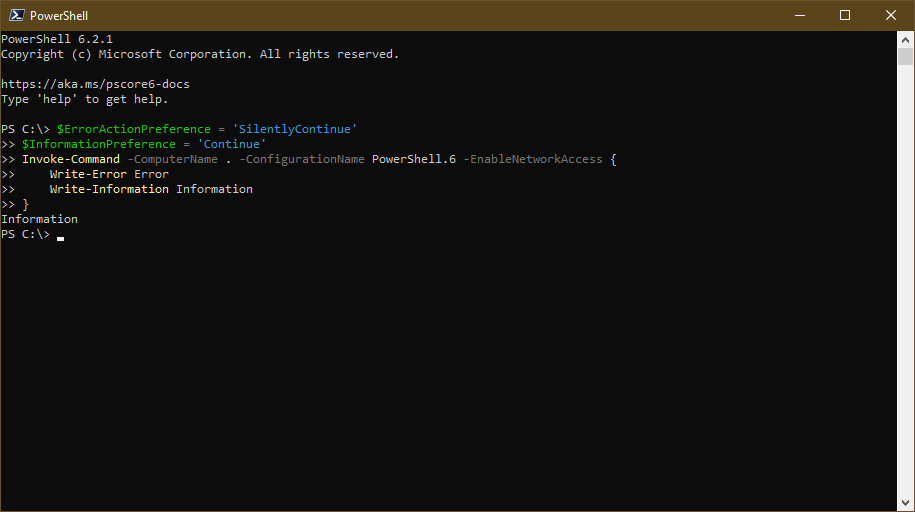
Sorry, but that is not how it behave for error and information records. Everything is emitted by Invoke-Command itself, because there is nothing else in local session and PowerShell does not have mechanic to emit for some other guy. And when records emitted locally, them follow local preference:
$ErrorActionPreference = 'SilentlyContinue'
$InformationPreference = 'Continue'
Invoke-Command -ComputerName SomeName {
    Write-Error Error
    Write-Information Information
}
So, what are you proposing?
- Current behavior for error record (which we have here since v2, IIRC) and information record should be changed. And hope that the change will not break anything.
- Warning/verbose/debug records should behave differently and ignore local preference, when replicated. So we will get yet another inconsistency.
- Warning/verbose/debug records should behave the same way as error and information records behave now and thus
Invoke-Command -ComputerName SomeName {
   Write-Verbose Remote -Verbose
}
should not display verbose record by default, because it will be suppressed bySilentlyContinuedefault local$VerbosePreference.
PetSerAl
on 27 May 2019
You're confusing the issue by bringing _preference variables_ into the picture, which do _not_ behave the same as their common-parameter counterparts (regrettably, but that's for another debate).
The following command shows that local invocation of Invoke-Command does _not_ apply common parameters to whatever the script block emits:
PS> icm { 1; write-error 2; write-warning 3; write-verbose 4; write-debug 5; write-information 6 } -InformationAction Continue -Verbose -Debug -ErrorAction SilentlyContinue -WarningAction SilentlyContinue
1
 icm { 1; write-error 2; write-warning 3; write-verbose 4; write-debug 5; write-information 6 } -InformationAction Continue -Verbose -Debug -ErrorAction Stop : 2
+ CategoryInfo          : NotSpecified: (:) [Write-Error], WriteErrorException
+ FullyQualifiedErrorId : Microsoft.PowerShell.Commands.WriteErrorException

WARNING: 3
That is, none of the common parameters were honored.
While this behavior is debatable in itself, it is not the focus of this issue; rather, the focus is the inconsistency between how streams are treated depending on whether they pass through the remoting infrastructure or not.
Let's take Invoke-Command out of the picture:
# No remoting involved:
PS> pwsh -noprofile  -c "Write-Warning 'why?'" *>$null
 # no output, as expected

# Remoting infrastructure involved, due to use of a script block.
PS> pwsh -noprofile -c { Write-Warning 'why?' } *>$null
why?  # !! warning stream still prints
What justifies the latter behavior to begin with, and what justifies hanging on to it?
mklement0
on 27 May 2019
Let me take a step back: We're really discussing two different things here, which only partially overlap.
(a) Your concern: selective _silencing / un-silencing_ of output streams, and how that should be controlled - preference variables vs. common parameters.
(b) My concern: consistent ability to _redirect, suppress, and collect_ stream output - _irrespective of silencing_, and irrespective of whether the streams were routed through the remoting infrastructure.
While there is some overlap - suppression of output streams with {n}>$null is an alternative to silencing with -*Action SilentlyContinue - my suggestion is to discuss the many inconsistencies around (a) in separate issues (only _some_ preference variables and common parameters are effective in controlling whether the remote output streams are silent / turned on; as an aside, _local_ use of Invoke-Command is currently virtually pointless, as it offers no benefits over &, given that the common stream-related parameters do not apply to the script block's output.)
mklement0
on 27 May 2019
You're confusing the issue by bringing preference variables into the picture, which do not behave the same as their common-parameter counterparts
You are wrong. In remoting scenario preference variables do behave the same as their common-parameter counterparts.
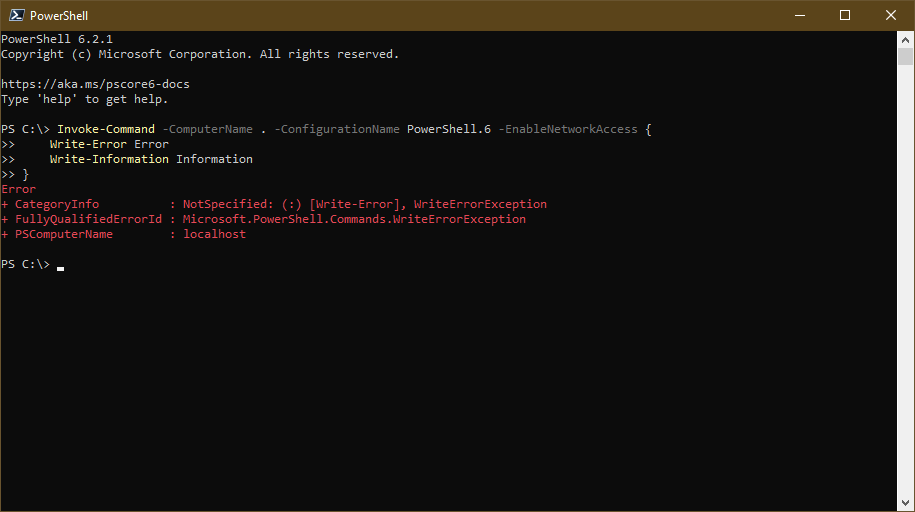
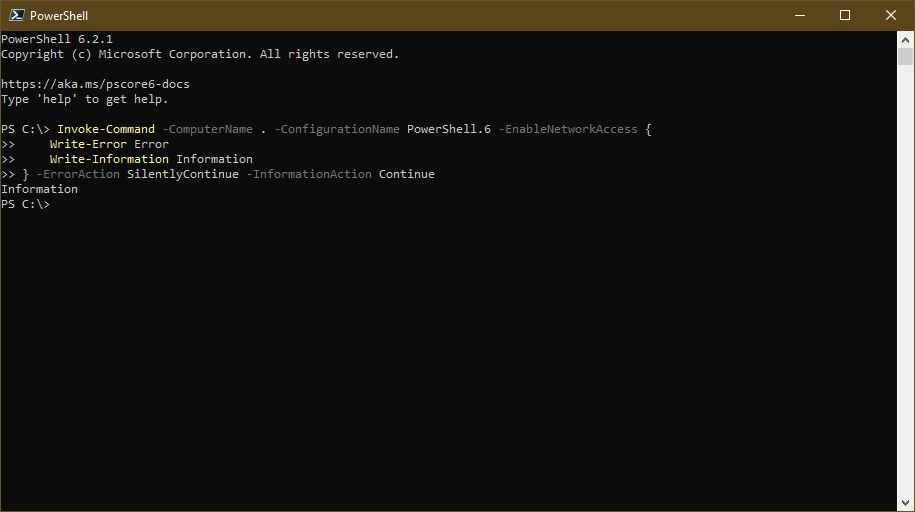
The following command shows that local invocation of
Invoke-Commanddoes not apply common parameters to whatever the script block emits:
But in remoting scenario everything in local session is emitted by Invoke-Command and not by script block. Thus common parameters apply to it.
Let's take Invoke-Command out of the picture:
That is not remoting at all. Minishell scenario covered by different piece of code with different rules and many its own quirks.
(a) Your concern: selective silencing / un-silencing of output streams, and how that should be controlled - preference variables vs. common parameters.
No. My concern is what exact behavior you propose instead of current one. Maybe current behavior is bad, but if other option is as bad as current one, then why bother?
PetSerAl
on 28 May 2019
You are wrong. In remoting scenario preference variables do behave the same as their common-parameter counterparts.
Yes, that's what I had already struck out my original claim (perhaps you missed that, because I obviously did it after the fact).
I let the _general_ observation stand (without spelling out that $ErrorAction = 'Stop' isn't the same as -ErrorAction Stop) and showed _specifically_ that _local_ Invoke-Command doesn't apply the common parameters to the script block's output (though it inherits the preference variables; in hindsight, that behavior is arguably the wrong one).
But as I've later observed, Invoke-Command's local use is virtually pointless, but, more importantly, I suggested not discussing issue (a) here anymore.
That is not remoting at all.
Please see the OP, which enumerates the scenarios that appear to be affected with respect to (b).
Of course pwsh -c isn't _remoting_ (neither are background jobs), but I _inferred_ from the behavior that the same _serialization infrastructure_ used in remoting underlies all these scenarios.
Since you're clearly more familiar with the code - is that not true?
Should I change the title and the OP to talk about _serialization_ instead?
What is a minishell? (I've heard the term on occasion, but as far as I know it isn't documented.)
No. My concern is what exact behavior you propose instead of current one.
Re (b) - please see my comment above.
Let me know if you think something is inexact about it, or if something is missing.
Re (a) I may eventually open new issues, but I feel that is a less pressing concern. Of course, if _you_ have ideas for improvement, please share them.
mklement0
on 28 May 2019
Let me know if you think something is inexact about it, or if something is missing.
Given this six scenarios, how each one of them should behave?
powershell
$ErrorActionPreference = 'SilentlyContinue'
Invoke-Command -ComputerName SomeName {
   Write-Error Error
}
powershell $ErrorActionPreference = 'Continue' Invoke-Command -ComputerName SomeName { Write-Error Error }powershell $ErrorActionPreference = 'Stop' Invoke-Command -ComputerName SomeName { Write-Error Error } 'Text'powershell $VerbosePreference = 'SilentlyContinue' Invoke-Command -ComputerName SomeName { Write-Verbose Verbose -Verbose }powershell $VerbosePreference = 'Continue' Invoke-Command -ComputerName SomeName { Write-Verbose Verbose -Verbose }powershell $VerbosePreference = 'Stop' Invoke-Command -ComputerName SomeName { Write-Verbose Verbose -Verbose } 'Text'
neither are background jobs
With respect to $Host.Name them are.
I inferred from the behavior that the same serialization infrastructure used in remoting underlies all these scenarios.
Well, it is not about serialization. It is about how PowerShell decide to handle received messages. And there are two pieces of code which responsible for that decisions: one for remoting and one for minishell, which make similar but different decisions.
What is a minishell?
Just search source for minishell. For example: https://github.com/PowerShell/PowerShell/blob/61c7b7f1204b282028816d958e904585ab9b2cfd/src/System.Management.Automation/engine/NativeCommandProcessor.cs#L1412-L1435
PetSerAl
on 28 May 2019
@PetSerAl
Thanks for the technical clarifications - I've amended the title and the OP accordingly, including addition of a reproducible case for the minishell scenario and a description of the similar, yet distinct problems associated with it; please review the changes for accuracy.
Given this six scenarios, how each one of them should behave?
Your scenarios - which pertain to (a) - and any associated inconsistencies are well worth exploring, but, as discussed, not as part of _this_ issue, which I suggest be restricted to (b) - and I feel the desired behavior with respect to (b) as previously specified needs no further clarification.
mklement0
on 29 May 2019
You can't not discuss this, because this is integral part of the issue. Making streams redirectable do have consequences. And you have to specify which consequences you are ready to accept.
PetSerAl
on 29 May 2019
I just leave a link to #3354 here...
 MVKozlov
on 18 Jun 2019
MVKozlov
on 18 Jun 2019
Related issues
 rkeithhill
·
3Comments
rkeithhill
·
3Comments
 MaximoTrinidad
·
3Comments
MaximoTrinidad
·
3Comments
 alx9r
·
3Comments
alx9r
·
3Comments
 HumanEquivalentUnit
·
3Comments
HumanEquivalentUnit
·
3Comments
 JohnLBevan
·
3Comments
JohnLBevan
·
3Comments