Powershell: Automatic proxy settings not seen by PowerShell 6.2.0 on Windows 10
Steps to reproduce
PowerShell 6.2.0 does not appear to see or recognize any system proxy settings on Windows 10 that are not hard coded. My employer uses a non-authenticated proxy server and delivers the configuration to client machines via DHCP (in Internet Options, this is the "Automatically Detect Settings" check box). When using this Proxy Option, the proxy is not recognized and no http-based request will go through, such as install-module, update-help, etc. The same experience occurs when choosing the "Use Automatic configuration script" option and properly configuring the endpoint.
Proxied connections only appear to work when hard-coding the proxy via the "Use a proxy server for your LAN" option.
Expected behavior
PowerShell 6.x should recognize automatic proxy settings in the same manner that Windows PowerShell 5.1 does.
Actual behavior
Proxied connections in PowerShell 6.2.0 only work when the proxy is hard coded. Also, PowerShell 6.2.0 does not appear to recognize proxy settings made via netsh winhttp settings either. Only way to get proxy to work is to hard code it via Internet Options.
Environment data
Name Value
---- -----
PSVersion 6.2.0
PSEdition Core
GitCommitId 6.2.0
OS Microsoft Windows 10.0.17763
Platform Win32NT
PSCompatibleVersions {1.0, 2.0, 3.0, 4.0…}
PSRemotingProtocolVersion 2.3
SerializationVersion 1.1.0.1
WSManStackVersion 3.0
 towerbe
All 34 comments
Please add repo steps.
 iSazonov
on 30 Apr 2019
iSazonov
on 30 Apr 2019
Steps to reproduce:
Windows 10 client
Have a network that uses a non-authenticated proxy.
Have a network that provides Proxy settings either via DHCP or a configuration script.
Configure "Internet Options" to use either the "Automatically detect settings" or "Use automatic configuration script".
Open a PowerShell Prompt.
Run any cmdlet that should pick up the proxy this way and watch it fail (example: update-help, Install-Module, find-module, etc.)
towerbe
on 30 Apr 2019
I can confirm for Invoke-WebRequest that it works only with explicit proxy settings in command line.
@markekraus Could you please look the issue?
iSazonov
on 30 Apr 2019
Thank you @iSazonov. FYI, this is a change in behavior from Windows PowerShell.
towerbe
on 30 Apr 2019
@iSazonov this issue appears to not be about the webcmdlets which uses a proxy by default unless -NoProxy is specified. PowerShellGet not respecting a proxy should be opened in that repo, found a similar issue there: https://github.com/PowerShell/PowerShellGet/issues/336
For Update-Help, it seems it needs to be extended to support proxies
 SteveL-MSFT
on 4 May 2019
SteveL-MSFT
on 4 May 2019
this issue appears to not be about the webcmdlets which uses a proxy by default unless -NoProxy is specified.
It seems webcmdlets do not use a proxy by default as expected :-( Should we create new tracking issue?
iSazonov
on 4 May 2019
@iSazonov yes, we should have a separate issue for that, however, it might just be an issue with HttpClient
SteveL-MSFT
on 4 May 2019
@SteveL-MSFT The technology behind is WPAD.
I found the same issue on Asp.Net Core #32135
On coreFx, i found this one relative : #26494
 fMichaleczek
on 4 May 2019
fMichaleczek
on 4 May 2019
Any updates on the fix for this issue or an ETA?
towerbe
on 21 Jun 2019
@anmenaga can you take a look at this?
SteveL-MSFT
on 22 Jun 2019
@SteveL-MSFT Do you plan to provide support back for proxy.pac ?
 .
.
I have a lot of customers with cloud proxy.
fMichaleczek
on 22 Jun 2019
"Use Automatic configuration script" seems to be working when I try it on Win10 Server and PS Core 6.2.1 and 7.0.0-preview.1:

Proxy log:
Wed 03 Jul 2019 14:57:23 : ACCESS : Instance:'Internet' Protocol:'HTTP-Proxy' Access:'Default ' Client IP:'x.x.x.x' Resource Type:'HTTP Proxy Service' Resource:'Service'
Wed 03 Jul 2019 14:57:23 : ACCESS : Instance:'Internet' Protocol:'HTTP-Proxy' Access:'Default ' Client IP:'x.x.x.x' Resource Type:'Full URI/Path' Resource:'www.verizon.com/'
Wed 03 Jul 2019 14:57:46 : ACCESS : Instance:'Internet' Protocol:'HTTP-Proxy' Access:'Default ' Client IP:'x.x.x.x' Resource Type:'HTTP Proxy Service' Resource:'Service'
Wed 03 Jul 2019 14:57:46 : ACCESS : Instance:'Internet' Protocol:'HTTP-Proxy' Access:'Default ' Client IP:'x.x.x.x' Resource Type:'Full URI/Path' Resource:'www.youtube.com/'
I also confirmed with debugger that WebCmdlet's code on PS Core code internally creates SocketsHttpHandler which by default is supposed to handle WPAD/PAC correctly, according to .NET code owner.
@fMichaleczek , @iSazonov : on what $psversiontable and OS (might be useful: Get-ItemPropertyValue "HKLM:\\SOFTWARE\Microsoft\Windows NT\CurrentVersion" -name BuildLabEx) do you see the repro?
 anmenaga
on 4 Jul 2019
anmenaga
on 4 Jul 2019
~I can not repo the issue with latest build (after 7.0-Preview1).~
iSazonov
on 4 Jul 2019
This is a duplicate of #9533 and from what I can tell it may be related to DHCP configured proxy settings in Windows 10, but I do not have the infra to reproduce.
 markekraus
on 4 Jul 2019
markekraus
on 4 Jul 2019
I forget disable TMG client. After I disabled it I see the issue - Automatic proxy settings and Manual proxy settings do not work.
 Get-ItemPropertyValue "HKLM:\\SOFTWARE\Microsoft\Windows NT\CurrentVersion" -name BuildLabEx
17763.1.amd64fre.rs5_release.180914-1434

$PSVersionTable

Name                           Value
----                           -----
PSVersion                      7.0.0-preview.1
PSEdition                      Core
GitCommitId                    7.0.0-preview.1-85-gc27314be0628ef940df5389ad40030e355dded06
OS                             Microsoft Windows 10.0.17763
Platform                       Win32NT
PSCompatibleVersions           {1.0, 2.0, 3.0, 4.0…}
PSRemotingProtocolVersion      2.3
SerializationVersion           1.1.0.1
WSManStackVersion              3.0
I did a test with 2 VMs on a Private virtual switch ('Proxy' VM also was connected to an external network) and configured WPAD on the private network through DHCP Option 252.
Both PS Core 6.2.1 and 7.0.0-preview.1 were able to successfully access the web using the Proxy VM.
VM with Proxy app, DHCP Server and IIS that hosts wpad.dat:
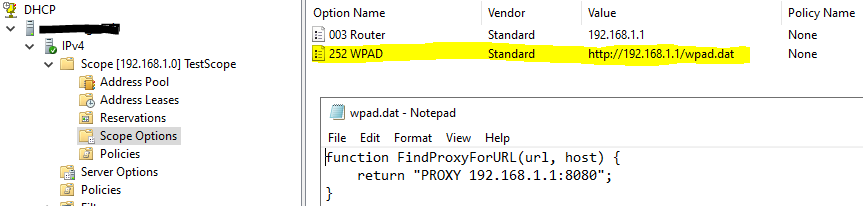
VM that uses proxy and has No direct access to the web:

Log from the Proxy software:
Tue 09 Jul 2019 13:58:22 : ACCESS    : Instance:'Internet' Protocol:'HTTP-Proxy' Access:'Default  ' Client IP:'192.168.1.5' User:'DefaultUser/FPDOMAIN' Resource Type:'Full URI/Path' Resource:'www.github.com/'
Tue 09 Jul 2019 13:59:58 : ACCESS    : Instance:'Internet' Protocol:'HTTP-Proxy' Access:'Default  ' Client IP:'192.168.1.5' User:'DefaultUser/FPDOMAIN' Resource Type:'Full URI/Path' Resource:'www.microsoft.com/'
I see a lot of chatter here about things working, but I can tell you definitively that even after installing the latest production release automatic proxy settings as delivered via DHCP in our enterprise environment are not being picked up by PowerShell Core.
To add a bit of evidence....
Here's a shot of my Internet Options

Here is a screen shot of me trying to hit a very local webpage from PSCore 6.2.1

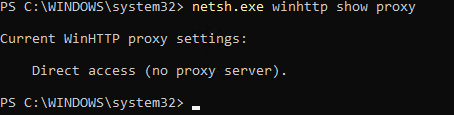
Here is the proxy configuration in Core 6.2.1 session
Screen shot of me hitting the same web page (successfully) with a browser on the same PC
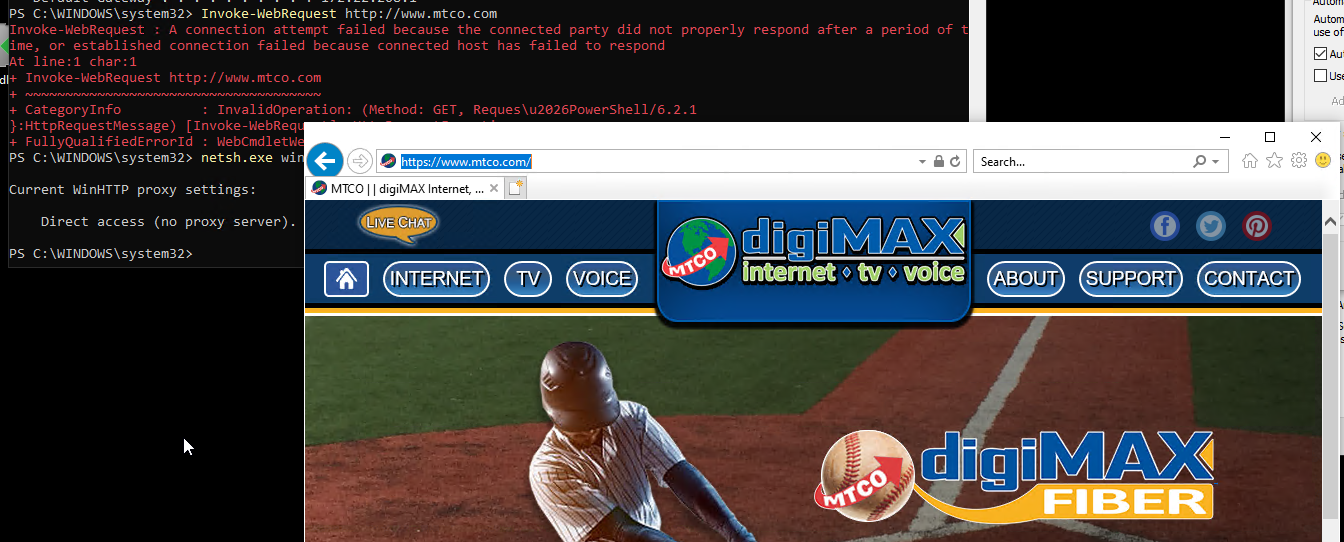
I have checked with our proxy and firewall people. When I run the invoke-webrequest from PSCore, they see nothing on the proxy server, but do indeed see my session on the firewall and being dropped because we're not allowed to go to the Internet directly. That is, it's working as it should.
So, with all of that, I feel very confident in saying a problem still exists in PSCore 6.2.1. I cannot go to 7 as it is still beta and this is a production environment. Would really appreciate a fix to this issue.
towerbe
on 12 Jul 2019
What happens if the PAC URL is added explicitly under Internet Options? Lets try to isolate if this is a WPAD issue or something else.
 scalablecory
on 22 Jul 2019
scalablecory
on 22 Jul 2019
Hi @scalablecory. I tried what you suggested, and no change. Long story short, nothing short of hard coding the proxy server and "bypass for local" work in PowerShell Core 6.x.
I tried setting the configuration script option to point directly at the URL for our PAC file. I also tried pointing it directly at our WPAD.DAT file. In both scenarios, PowerShell Core commands that require traffic over ports 80 or 443 failed (and fail to ever go to the proxy, via trace), but in both cases Windows PowerShell 5.x continued to function normally. This issue appears to be isolated to PowerShell Core (and therefore .NET Core) only.
FYI, I have a ticket open with Microsoft .NET Core Support via my enterprise account.
towerbe
on 23 Jul 2019
FYI, I have a ticket open with Microsoft .NET Core Support via my enterprise account.
Could you please share the ticket number? Perhaps PowerShell team could look the ticket.
iSazonov
on 24 Jul 2019
The PowerShell team directed me, through my TAM, to open the ticket with the NET team. They have been in contact with both my TAM and CSA, so I am sure they are aware of the ticket already.
towerbe
on 24 Jul 2019
Well, this is interesting. Working with my CSA from Microsoft, we found that the "solution" proffered at the end of https://github.com/PowerShell/PowerShell/issues/7827 appears to be a work around for my exact issue. I'm not willing to say this is a solution, but a work around or a band-aid.
Hopefully this information will help point to an actual solution.
towerbe
on 26 Jul 2019
.NET Team is looking to see why .NET Core is not respecting proxy in some cases. The workaround is to set:
or
Create $env:DOTNET_SYSTEM_NET_HTTP_USESOCKETSHTTPHANDLER = 0
SteveL-MSFT
on 26 Jul 2019
Is there a tracking issue in CoreFX repo?
iSazonov
on 29 Jul 2019
@towerbe
I'm from the CoreFx team. We're investigating this proxy issue with .NET Core 2.x regarding WPAD and/or PAC file processing.
Can you clarify something about the PAC files being used in your company? Do they return multiple proxies in the FindProxyForUrl() function in the PAC file?
For example, this snippet from a PAC script returns a single proxy:
// Proxy
return "PROXY proxy.domain.local:8080";
But this one returns multiple proxies separated by semicolons:
// Failover
return "PROXY proxy1.domain.local:8080; PROXY proxy2.domain.local:8080";
We had a bug in .NET Core 2.x where we could not handle getting multiple proxies returned from a PAC file. The end result was we ignored all of them. We fixed that bug in .NET Core 3.0 so that we would at least use the first one returned. See: https://github.com/dotnet/corefx/issues/39104
Given that @anmenaga reported in https://github.com/powershell/powershell/issues/9495#issuecomment-509818975 that "Automatically detect settings" was working fine in his tests, perhaps your problem is that the PAC file is returning multiple proxies and hitting bug https://github.com/dotnet/corefx/issues/39104.
 davidsh
on 2 Aug 2019
davidsh
on 2 Aug 2019
Yes, our PAC returns multiple proxies.
towerbe
on 2 Aug 2019
Yes, our PAC returns multiple proxies.
Thanks for confirming that.
davidsh
on 2 Aug 2019
Can you clarify something about the PAC files being used in your company? Do they return multiple proxies in the FindProxyForUrl() function in the PAC file?
We use MS TMG two servers in "cluster" - wpad returns both.
iSazonov
on 2 Aug 2019
This has been verified to be working in PS7 Preview.3 where the issue appears to have been fixed by .NET Core 3.0 Preview.8. Closing this issue. Continue to reply if you still have an issue with PS7 Preview.3 or newer.
SteveL-MSFT
on 26 Aug 2019
I write a comment after the case has been closed as I still experience this issue. And as @SteveL-MSFT writes. We can continue to reply if the issue is experienced.
SYS INFO
- Windows 10 v1809 (x64)
- PowerShell v7.1.0 preview2
- Proxy is configured via PAC script (WPAD). Company enforced. No direct access to the Internet.
- The part of the pac script that derives a proxy address to use, looks like this:
```
....
var clientIP = myIpAddress();
// #NSCLIENTIP#
host = host.toLowerCase();    // Make our shExpMatch checks case insensitive.
// Redundant proxy combinations are defined here.
var _proxyList = [
  "PROXY 10.90.100.23:8080;PROXY 10.90.100.24:8080;DIRECT",
  "PROXY 10.90.100.24:8080;PROXY 10.90.100.23:8080;DIRECT"
];
var noProxy = "DIRECT";
// Select a primary candidate proxy, based on the clients IP address.
var _octets = clientIP.split(".");
var _lastOctet = parseInt(_octets[3]);    // Get the last octet og the clients IP address.
var _proxyIndex = _lastOctet % _proxyList.length;  // Determine the proxy sequence.
var proxyString = _proxyList[_proxyIndex];      // Assign the return value.
....
```
- Internet Explorer 11 has been removed (maybe it is relevant, not sure). Edge is installed
Resolution steps tried
To get Install-Module -name invokebuild -Verbose -Scope CurrentUser -Repository PSGallery -Force to work, I've tried the following.
- Exexcuted
[System.AppContext]::SetSwitch("System.Net.Http.UseSocketsHttpHandler", $false)
- Did not work
- Same PS session. Executed:
[Net.ServicePointManager]::SecurityProtocol = [Net.SecurityProtocolType]::Tls12
- Did not work
Same PS session. Executed:
[system.net.webrequest]::defaultwebproxy = new-object system.net.webproxy('http://10.90.100.24:8080') [system.net.webrequest]::defaultwebproxy.credentials = [System.Net.CredentialCache]::DefaultNetworkCredentials [system.net.webrequest]::defaultwebproxy.BypassProxyOnLocal = $true- Did not work
- Tried using the
-Proxy&-ProxyCredentialparameters to theInstall-Modulecmdlet.
- No change
I can get the Invoke-WebRequest cmdlet to work with the -Proxy and -UseDefaultCredentials parameters.
Reproduction steps
- Run Win10 1809 or higher
- Run PS7.1 preview 2 or higher
- thereby I should have the .NET core that should work
- Execute:
Install-Module -name invokebuild -Verbose -Scope CurrentUser -Repository PSGallery -Force - Run through a proxy, configured via a PAC script
Acceptance criteria
When I can execute Install-Module -name invokebuild -Verbose -Scope CurrentUser -Repository PSGallery -Force in a PS7.1 preview 2 or higher session and the module installs.
Thank you.
 larssb
on 12 May 2020
larssb
on 12 May 2020
@larssb If you could create a simple C# app you could open issue in .Net Runtime.
The app could be as simple as:
c#
var a = system.net.webrequest.Create("https://ya.ru");
var b = a.GetResponse();
iSazonov
on 12 May 2020
Created the app and now the issue. As the .NET throws an error.
Thank you @iSazonov ... I hope they will be able to find something. Really a bummer that Install-Module does not work for me on Win10 PS 7.1
larssb
on 12 May 2020
The following:
# For PowerShell to use the Proxy system settings. The bewlow is PS 6 core + compatible
# $true to the System.Net.WebProxy constructor is to indicate that the proxy should be bypassed for local addresses
[System.Net.Http.HttpClient]::DefaultProxy = New-Object System.Net.WebProxy('http://PROXY_IP:PROXY_PORT', $true)
[System.Net.Http.HttpClient]::DefaultProxy.Credentials = [System.Net.CredentialCache]::DefaultCredentials
is the solution for the HTTP407 status code thrown, which in a PowerShell session where Install-Module .... -Verbose is executed could show itself as: WARNING: Unable to resolve package source 'https://www.powershellgallery.com/api/v2'.
larssb
on 13 May 2020
If proxy detection works follow works too:
c#
iSazonov
on 13 May 2020
Related issues
 mklement0
·
3Comments
mklement0
·
3Comments
 JohnLBevan
·
3Comments
JohnLBevan
·
3Comments
 Michal-Ziemba
·
3Comments
Michal-Ziemba
·
3Comments
 lzybkr
·
3Comments
lzybkr
·
3Comments
 HumanEquivalentUnit
·
3Comments
HumanEquivalentUnit
·
3Comments