Powershell: smtpServer requires secure connection or client was not authenticated. the server response was: 5.7.0 must issue STARTTLS command first
when i try the send mail using powershell mail server. thus send-mailmessage with commands like this
send-mailmessage -From "XXXXX" -Subject "hello world" -To "xxxx" -Body "hello world and welcome" -SmtpServer "smtp.gmail.com" -Port "587" and when i run this command. I get this issue
smtpServer requires secure connection or client was not authenticated. the server response was: 5.7.0 must issue STARTTLS command first.
any help will be much appreciated. thanks
 eben562012
All 8 comments
@eben562012 Please add the -UseSsl parameter and try this again.
 TravisEz13
on 26 Feb 2019
TravisEz13
on 26 Feb 2019
i have added the -UseSsl and also enable less secure app access on gmail.
yet i get the same error message.
On Tue, Feb 26, 2019 at 7:26 PM Travis Plunk notifications@github.com
wrote:
@eben562012 https://github.com/eben562012 Please add the -UseSsl
parameter and try this again.—
You are receiving this because you were mentioned.
Reply to this email directly, view it on GitHub
https://github.com/PowerShell/PowerShell/issues/8987#issuecomment-467577214,
or mute the thread
https://github.com/notifications/unsubscribe-auth/APxvvHOD27XOKTmzHGJ7gNCGBNPBS0joks5vRYpUgaJpZM4bSPMb
.
eben562012
on 28 Feb 2019
Looking at what the error means
STARTTLS is a way to take an existing insecure connection and upgrade it to a secure connection using SSL/TLS. Note that despite having TLS in the name, STARTTLS doesn't mean you have to use TLS, you can use SSL.
Meaning the port is meant for insecure connections.
Looking at the google docs it looks like 465 is the actual secure port.
TravisEz13
on 1 Mar 2019
Send-MailMessage cmdlet uses .NET Core System.Net.SmtpClient class, which only supports STARTTLS connections (Port 587) and not SMTPS connections (Port 465). So @eben562012 should be right using Port 587.
Here is the description of System.Net.SmtpClient class with the EnableSsl property:
The SmtpClient class only supports the SMTP Service Extension for Secure SMTP over Transport Layer Security as defined in RFC 3207. In this mode, the SMTP session begins on an unencrypted channel, then a STARTTLS command is issued by the client to the server to switch to secure communication using SSL. See RFC 3207 published by the Internet Engineering Task Force (IETF) for more information.
An alternate connection method is where an SSL session is established up front before any protocol commands are sent. This connection method is sometimes called SMTP/SSL, SMTP over SSL, or SMTPS and by default uses port 465. This alternate connection method using SSL is not currently supported.
The last sentence is the important one. Implicit SSL over 465 is not supported for System.Net.SmtpClient and therefore also not supported for the Send-MailMessage cmdlet.
Still STARTTLS switch from an unsecure connection to secure connection on Port 587 should be supported. Also the documentation of Google shows that STARTTLS is supported on Port 587.
Outgoing Mail (SMTP) Server | smtp.gmail.com
Requires SSL: Yes
Requires TLS: Yes (if available)
Requires Authentication: Yes
Port for SSL: 465
Port for TLS/STARTTLS: 587
-- | --
@TravisEz13 and @eben562012 If you agree and give me a couple of days, I would be willing to investigate further.
 ThreeFive-O
on 2 Mar 2019
ThreeFive-O
on 2 Mar 2019
Well, didn't take days only a couple of minutes 😀
Google, as well as other mail providers these days are not allowing unsecure connections per default. Since the STARTTLS connection initiation allows starts with an unsecure connection and later switching to a secure connection, those client connections are blocked by mail providers with best practice security guidelines.
Once I tried the example of @eben562012 I immediately got a notification from Google that someone tried to authenticate with an unsecure device.
Actually the problem is easy to solve, though NOT recommended at all. One could modify in the Google account settings to allow "less secure app access":

And voila, the mail was sent without any error or any alert mail from Google. BUT, from a security perspective this is NOT recommended at all! Google will warn you in the user account settings about it multiple times. Most prominently with this one:
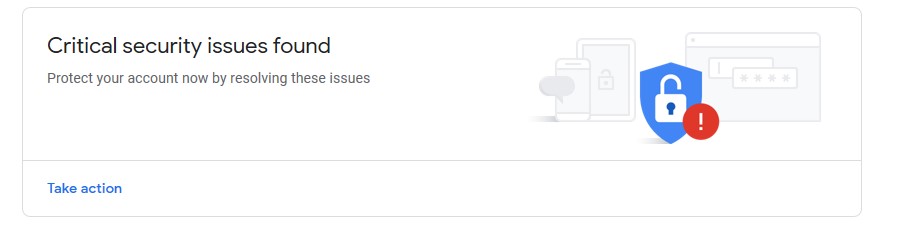
So the resolution for this issue is EXTERNAL. Either by modifying your Google account settings as shown above or by enhancing System.Net.SmtpClient class in the .NET CoreFX repo.
Later one will be highly unlikely since the class is flagged as deprecated or not recommended for new projects, since a lot of modern mail functionality is missing.
DE0005: SmtpClient shouldn't be used
Motivation
SmtpClient doesn't support many modern protocols. It is compat-only. It's great for one off emails from tools, but doesn't scale to modern requirements of the protocol.
Recommendation
Use MailKit or other libraries.
Just for the sake of completeness: The example of @eben562012 was TESTED on PowerShell 6.2.0-preview.4 and Windows PowerShell 5.1.18346.1 and works fine when the Google account settings are modified accordingly.
@eben562012 Is it ok for you, if @TravisEz13 would close the issue, since not much can be done here at the PowerShell source level?
ThreeFive-O
on 2 Mar 2019
Sorry I missed that you already have the Google account option enabled
i have added the -UseSsl and also enable less secure app access on gmail.
One possibility that it doesn't even work with "Less secure app access" enabled is, that the unsecure device is still blocked by Google. You might want to review "Your devices" in the account settings:

Here is the code I used:
```powershell
$mycredentials = Get-Credential
Send-MailMessage -SmtpServer smtp.gmail.com -Port 587 -UseSsl -From [email protected] -To [email protected] -Subject Test -Credential $mycredentials
ThreeFive-O
on 2 Mar 2019
@ThreeFive-O Thanks, for your investigation. I filed #9031 based on the results of his issue. I agree that this issue is answered and should be closed.
TravisEz13
on 2 Mar 2019
I have used the following command and successfully sent the email;
Send-MailMessage -To "
 jaril-valsalakrishnan
on 16 Oct 2019
jaril-valsalakrishnan
on 16 Oct 2019
Related issues
 ajensenwaud
·
3Comments
ajensenwaud
·
3Comments
 abock
·
3Comments
abock
·
3Comments
 MaximoTrinidad
·
3Comments
MaximoTrinidad
·
3Comments
 pcgeek86
·
3Comments
pcgeek86
·
3Comments
 lzybkr
·
3Comments
lzybkr
·
3Comments
Most helpful comment
Well, didn't take days only a couple of minutes 😀
Google, as well as other mail providers these days are not allowing unsecure connections per default. Since the STARTTLS connection initiation allows starts with an unsecure connection and later switching to a secure connection, those client connections are blocked by mail providers with best practice security guidelines.
Once I tried the example of @eben562012 I immediately got a notification from Google that someone tried to authenticate with an unsecure device.
Actually the problem is easy to solve, though NOT recommended at all. One could modify in the Google account settings to allow "less secure app access":

And voila, the mail was sent without any error or any alert mail from Google. BUT, from a security perspective this is NOT recommended at all! Google will warn you in the user account settings about it multiple times. Most prominently with this one:

So the resolution for this issue is EXTERNAL. Either by modifying your Google account settings as shown above or by enhancing
System.Net.SmtpClientclass in the .NET CoreFX repo.Later one will be highly unlikely since the class is flagged as deprecated or not recommended for new projects, since a lot of modern mail functionality is missing.
Just for the sake of completeness: The example of @eben562012 was TESTED on
PowerShell 6.2.0-preview.4andWindows PowerShell 5.1.18346.1and works fine when the Google account settings are modified accordingly.@eben562012 Is it ok for you, if @TravisEz13 would close the issue, since not much can be done here at the PowerShell source level?