Powershell: Throw 'Could not load file or assembly' exception when using package System.Management.Automation in C# project (target net framework)
Steps to reproduce
(Please re-open issue#7675)
- Create new console project with VS 2017 or
dotnet new console - Edit csproj file to change to change the
TargetFrameworktonet461evennet471. netcoreapp is working. - Add
RuntimeIdentifier(2 different types of exception will be thrown)
<RuntimeIdentifier>win-x64</RuntimeIdentifier>
- Debug the code in main like below
namespace test
{
    using System.Management.Automation;

    internal class Program
    {
        private static void Main(string[] args)
        {
            PowerShell ps = PowerShell.Create();
            Console.ReadKey();
        }

    }
}
Expected behavior
The code could pass.
Actual behavior
- If not add RuntimeIdentifier tag. csproj like this:
<Project Sdk="Microsoft.NET.Sdk">

  <PropertyGroup>
    <OutputType>Exe</OutputType>
    <TargetFramework>net471</TargetFramework>
  </PropertyGroup>

  <ItemGroup>
    <PackageReference Include="System.Management.Automation" Version="6.1.2" />
  </ItemGroup>

</Project>
Throw exception:
System.IO.FileNotFoundException: 'Could not load file or assembly 'System.Management.Automation, Version=6.1.2.0, Culture=neutral, PublicKeyToken=31bf3856ad364e35' or one of its dependencies. The system cannot find the file specified.'

- if add the RuntimeIdentifier tag. csproj like this:
<Project Sdk="Microsoft.NET.Sdk">

  <PropertyGroup>
    <OutputType>Exe</OutputType>
    <TargetFramework>net471</TargetFramework>
    <RuntimeIdentifier>win-x64</RuntimeIdentifier>
  </PropertyGroup>

  <ItemGroup>
    <PackageReference Include="System.Management.Automation" Version="6.1.2" />
  </ItemGroup>

</Project>
Throw exception:
System.IO.FileNotFoundException: 'Could not load file or assembly 'System.Runtime, Version=4.2.1.0, Culture=neutral, PublicKeyToken=b03f5f7f11d50a3a' or one of its dependencies. The system cannot find the file specified.'

Environment data
OS: Windows 10
Visual studio: Visual studio 2017 5.9.5
My analyze & questions for your reference
I check the nuget package System.Management.Automation with NuGet package Explore

Here are the problems:
- All the libs files are in ref/runtimes folder instead of lib folder. Maybe it is fine. But how to deal with the Any CPU case? Repro step3 is added after I checked the nuget package. That is a real Any CPU case.
- Even if the
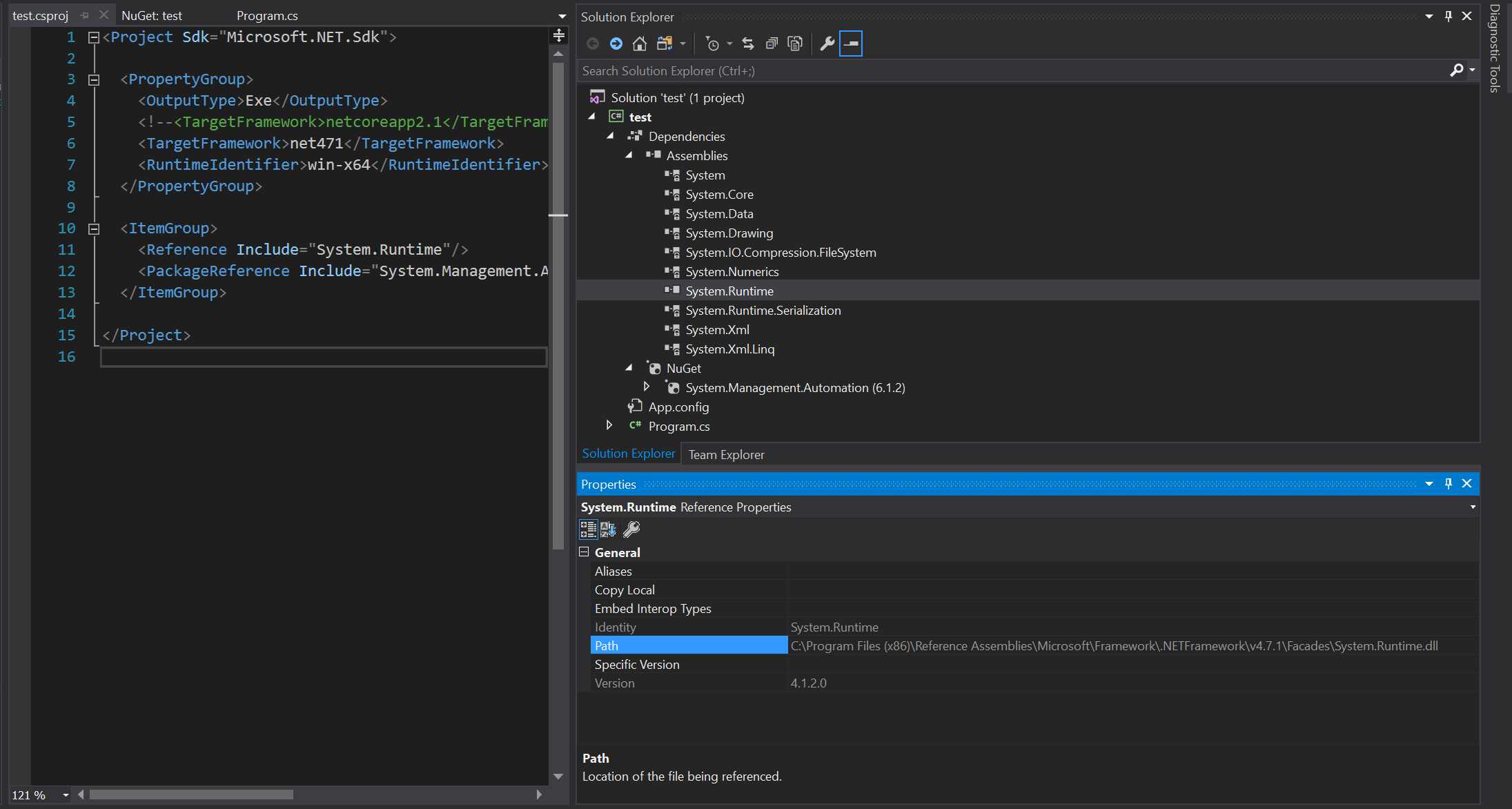
RuntimeIdentifieris assigned. We can see from the screen shot that: the System.Runtime 4.2.1.0 is in referenced assemblies of the System.Management.Automation.dll(double click the file in Nuget Package Explorer). Maybe most of the referenced assemblies(dependencies) are in the Netframework binaries. But when we add the System.Runtime reference manualy we could see: The version of it is 4.1.2.0.
- System.Runtime is not the only dependency with the issue. We could add binding redirect to force redirect version of this dependency. (I don't think it is a good solution). You will still see the exception, but with another dll name.
 xycui
xycui
All 9 comments
Please see comment in #4669.
 iSazonov
on 21 Jan 2019
iSazonov
on 21 Jan 2019
Please see comment in #4669.
Hi @iSazonov. I have tried to use the package Microsoft.Powershell.SDK, Microsoft.PowerShell.Commands.Diagnostics, Microsoft.WSMan.Management. Still not work. Here is the csproj.
<Project Sdk="Microsoft.NET.Sdk">

  <PropertyGroup>
    <OutputType>Exe</OutputType>
    <TargetFramework>net461</TargetFramework>
  </PropertyGroup>

  <ItemGroup>
    <PackageReference Include="Microsoft.PowerShell.Commands.Diagnostics" Version="6.1.2" />
    <PackageReference Include="Microsoft.PowerShell.SDK" Version="6.1.2" />
    <PackageReference Include="Microsoft.WSMan.Management" Version="6.1.2" />
  </ItemGroup>

</Project>
I think I have the different case. Because I am using NET FRAMEWORK as target. It is working if I change the target framework to netcore. BUT that is not what I want.
Could you please have a try on the repro steps I have provided?
Thanks in advance...
xycui
on 21 Jan 2019
Please see comment in #4669.
I also check the package of Microsoft.PowerShell.SDK. I think the package has the similar issue which I have mentioned in the origin post. Please take a look at section:
My analyze & questions for your reference
 xycui
on 21 Jan 2019
xycui
on 21 Jan 2019
@xycui The problem is that you are building against full .net, you'd have to use .net core or .net standard instead
What are you trying to achieve on a high level? the SMA package is just for referencing the API's, it does not do anything by itself. Do you want to host PowerShell instead (then you should use the SDK package) and are you clear on the difference between PowerShell v5 (also known as Windows PowerShell) vs v6 (PowerShell Core, which this repo is about)? From a .Net app, I would only expect that referencing the Windows PowerShell assemblies to work.
 bergmeister
on 21 Jan 2019
bergmeister
on 21 Jan 2019
For hosting PowerShell, if you're specifically targeting the .Net Framework runtime, you should be using https://www.nuget.org/packages/Microsoft.PowerShell.5.ReferenceAssemblies/ which targets Windows PowerShell (built on .Net Framework). Otherwise, Microsoft.PowerShell.SDK is specifically for PSCore6 which is targeting the .Net Core runtime.
 SteveL-MSFT
on 22 Jan 2019
SteveL-MSFT
on 22 Jan 2019
@SteveL-MSFT Thanks for the reply. This is what I need.
xycui
on 23 Jan 2019
@bergmeister Thanks for your note.
I know the SMA is just for reference. But the net standard version of SMA package cannot work on .NET Framework target. Which really confused me. I know there is another System.Management.Automation.dll package. But that is 3 years ago version. I thought that might be replaced by the NET standard one. And now I know that this package is just for .NET Core environment.
xycui
on 23 Jan 2019
@SteveL-MSFT Maybe the package (PowerShell.SDK and System.Management.Automation) could be package to netcore? Just because net standard could also be used by net framework target? Or any doc for the case of net framework to use Microsoft.PowerShell.5.ReferenceAssemblies instead.
xycui
on 23 Jan 2019
https://github.com/PowerShell/PowerShell/issues/8721 is opened for changing the target framework for SDK nuget package to netcoreapp2.1
 adityapatwardhan
on 23 Jan 2019
adityapatwardhan
on 23 Jan 2019
Related issues
 Michal-Ziemba
·
3Comments
Michal-Ziemba
·
3Comments
 andschwa
·
3Comments
andschwa
·
3Comments
 pcgeek86
·
3Comments
pcgeek86
·
3Comments
 rkeithhill
·
3Comments
rkeithhill
·
3Comments
 aragula12
·
3Comments
aragula12
·
3Comments
Most helpful comment
For hosting PowerShell, if you're specifically targeting the .Net Framework runtime, you should be using https://www.nuget.org/packages/Microsoft.PowerShell.5.ReferenceAssemblies/ which targets Windows PowerShell (built on .Net Framework). Otherwise, Microsoft.PowerShell.SDK is specifically for PSCore6 which is targeting the .Net Core runtime.