Powershell: Running powershell -command 'Get-FileHash' fails
Steps to reproduce
powershell -noprofile -command "(get-filehash $PSHOME\powershell.exe).hash"
Expected behavior
DE96A6E69944335375DC1AC238336066889D9FFC7D73628EF4FE1B1B160AB32C
Actual behavior
get-filehash : The term 'get-filehash' is not recognized as the name of a cmdlet, function, script file, or operable
program. Check the spelling of the name, or if a path was included, verify that the path is correct and try again.
At line:1 char:2
+ (get-filehash C:\Windows\System32\WindowsPowerShell\v1.0\powershell.e ...
+  ~~~~~~~~~~~~
    + CategoryInfo          : ObjectNotFound: (get-filehash:String) [], CommandNotFoundException
    + FullyQualifiedErrorId : CommandNotFoundException
Actual behavior on a different computer
get-filehash : The 'get-filehash' command was found in the module 'Microsoft.PowerShell.Utility', but the module could
not be loaded. For more information, run 'Import-Module Microsoft.PowerShell.Utility'.
At line:1 char:2
+ (get-filehash $pshome\powershell.exe).hash
+  ~~~~~~~~~~~~
    + CategoryInfo          : ObjectNotFound: (get-filehash:String) [], CommandNotFoundException
    + FullyQualifiedErrorId : CouldNotAutoloadMatchingModule
Environment data
Name                           Value
----                           -----
PSVersion                      6.1.1
PSEdition                      Core
GitCommitId                    6.1.1
OS                             Microsoft Windows 10.0.17763
Platform                       Win32NT
PSCompatibleVersions           {1.0, 2.0, 3.0, 4.0...}
PSRemotingProtocolVersion      2.3
SerializationVersion           1.1.0.1
WSManStackVersion              3.0
 1480c1
All 20 comments
Additional notes:
- Running the command from command prompt gives the expected results.
- Running $PSVersionTable from both the default powershell and through
powershell -noprofile -command '$PSVersionTable'in powershell core outputs:
Name                           Value
----                           -----
PSVersion                      5.1.17763.134
PSEdition                      Desktop
PSCompatibleVersions           {1.0, 2.0, 3.0, 4.0...}
BuildVersion                   10.0.17763.134
CLRVersion                     4.0.30319.42000
WSManStackVersion              3.0
PSRemotingProtocolVersion      2.3
SerializationVersion           1.1.0.1
- The hash from the first computer's powershell is different than the second computer's.
- Running the command from the preview version, I get:
get-filehash : The term 'get-filehash' is not recognized as the name of a cmdlet, function, script file, or operable
program. Check the spelling of the name, or if a path was included, verify that the path is correct and try again.
At line:1 char:2
+ (get-filehash C:\Program Files\PowerShell\Preview\6-preview\powershel ...
+  ~~~~~~~~~~~~
    + CategoryInfo          : ObjectNotFound: (get-filehash:String) [], CommandNotFoundException
    + FullyQualifiedErrorId : CommandNotFoundException
This fails when the call is from PS Core. Below are some observations.
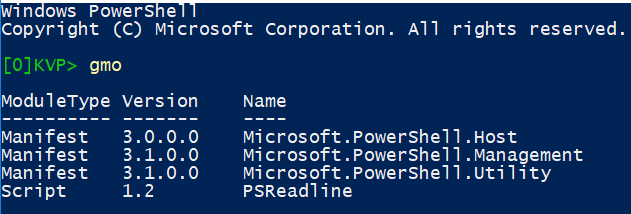
powershell -noprofile -command "gcm get-file*"


 kvprasoon
on 14 Jan 2019
kvprasoon
on 14 Jan 2019
If you invoke powershell.exe from PowerShell _Core_, the problem is the presence of the _Core_ standard module path in $env:PSModulePath _before_ the Windows PowerShell standard module path, which causes Windows Powershell not to find Get-FileHash.
You can verify this as follows:
# OK: Use standard WinPS module directory  only.
# Note the use of SINGLE quotes around the command string, to prevent up-front expansion.
PS Core> powershell -noprofile -command '$env:PSModulePath = \"$PSHOME/Modules\"; (get-filehash $PSHOME\powershell.exe).hash'
D3F8FADE829D2B7BD596C4504A6DAE5C034E789B6A3DEFBE013BDA7D14466677
Conversely, prepending the Core module path provokes the symptom:
# !! FAILS, because the Core standard module path comes first.
PS Core> powershell -noprofile -command "`$env:PSModulePath = '$PSHOME\Modules;'; `$env:PSModulePath += \`"`$PSHOME\Modules\`"; (get-filehash `$PSHOME\powershell.exe).hash"
Your second error message is more accurate and helpful, as it indicates that the command was found, but that its enclosing module failed to load (presumably because the module is a _Core_ module).
I only see the obscure not-found error message in preview.3.
What was different on the other computer that caused the couldn't-import message? Different PS version?
Generally, since Windows PowerShell knows nothing about PowerShell _Core_, the presence of Core module directories in $env:PSModulePath is likely to cause problems.
I don't know what the proper solution is, short of _undefining_ $env:PSModulePath for the child process behind the scenes when powershell.exe is being invoked, so that Windows PowerShell's regular $env:PSModulePath value takes effect.
 mklement0
on 14 Jan 2019
mklement0
on 14 Jan 2019
I only see the obscure not-found error message in preview.3.
What was different on the other computer that caused the couldn't-import message? Different PS version?
There is no difference between the two computers that I am aware of as the $PSVersionTable matched under a cursory exam and I used the same Windows (x64) stable installer for both. The only difference that I can hypothesize, other than the obvious different hardware and probably unrelated software and username, is that the first computer had been updated to the october update during the first window and the second is still on the previous update.
1480c1
on 14 Jan 2019
We discussed to have another env path for PowerShell Core .
 iSazonov
on 15 Jan 2019
iSazonov
on 15 Jan 2019
@iSazonov:
PowerShell Core already _does_ set its own $env:PSModulePath value, which is appropriate in principle (but needs tweaking - see #6850).
By contrast, the issue at hand is that when the _Windows_ PowerShell's CLI (powershell.exe) is called while PowerShell _Core_'s $env:PSModulePath value is in effect, problems arise, because child processes automatically _inherit_ the calling process' environment variables.
mklement0
on 15 Jan 2019
I believe the issue should be addressed in RFC requested in #6850.
I think the problem in important and it would be nice if MSGT team forced the RFC.
iSazonov
on 15 Jan 2019
@iSazonov:
6850 discusses how PowerShell Core itself should determine _its_
$env:PSModulePathvalue.However, resolving #6850 will _not_ resolve _this_ issue, which requires hiding Core-specific
$env:PSModulePathentries from child processes running the _Windows PowerShell_ CLI,powershell.exe.
mklement0
on 15 Jan 2019
@mklement0 There is a suggestion to introduce new $ENV:PSModulePathCore. Seems it'll resolve the issue too.
iSazonov
on 15 Jan 2019
@iSazonov: Good point: If, ultimately, a new, edition-specific environment variable such as $env:PSModulePathCore is chosen for PS Core, the problem discussed here would indeed go away as well.
mklement0
on 15 Jan 2019
Hum!! Original issue was about the Hash.
As of now... No issues!

PowerShell Core Preview
PowerShell 6.2.0-preview.4
Copyright (c) Microsoft Corporation. All rights reserved.

https://aka.ms/pscore6-docs
Type 'help' to get help.

PowerShell Core User Profile
PS [7] > $PSVersionTable

Name                           Value
----                           -----
PSVersion                      6.2.0-preview.4
PSEdition                      Core
GitCommitId                    6.2.0-preview.4
OS                             Microsoft Windows 10.0.17763
Platform                       Win32NT
PSCompatibleVersions           {1.0, 2.0, 3.0, 4.0…}
PSRemotingProtocolVersion      2.3
SerializationVersion           1.1.0.1
WSManStackVersion              3.0

PS [21] >
PowerShell Core GA
PowerShell 6.1.2
Copyright (c) Microsoft Corporation. All rights reserved.

https://aka.ms/pscore6-docs
Type 'help' to get help.

PowerShell Core User Profile
PS [7] > $PSVersionTable

Name                           Value
----                           -----
PSVersion                      6.1.2
PSEdition                      Core
GitCommitId                    6.1.2
OS                             Microsoft Windows 10.0.17763
Platform                       Win32NT
PSCompatibleVersions           {1.0, 2.0, 3.0, 4.0...}
PSRemotingProtocolVersion      2.3
SerializationVersion           1.1.0.1
WSManStackVersion              3.0


PS [22] >
 MaximoTrinidad
on 13 Feb 2019
MaximoTrinidad
on 13 Feb 2019
On the issue of calling Windows PowerShell from within PowerShell Core.
It works too!


Sorry I haven't try this before! Hehe
Executing the command line: powershell -noprofile -command "gcm get-file*"
I had no issues neither!

Is it possible the latest releases have fix the issues!!
:)
MaximoTrinidad
on 13 Feb 2019

PowerShell 6.1.2
Copyright (c) Microsoft Corporation. All rights reserved.

https://aka.ms/pscore6-docs
Type 'help' to get help.

PS C:\Users\cddeg> $PSVersionTable

Name                           Value
----                           -----
PSVersion                      6.1.2
PSEdition                      Core
GitCommitId                    6.1.2
OS                             Microsoft Windows 10.0.17763
Platform                       Win32NT
PSCompatibleVersions           {1.0, 2.0, 3.0, 4.0...}
PSRemotingProtocolVersion      2.3
SerializationVersion           1.1.0.1
WSManStackVersion              3.0


PS C:\Users\cddeg> powershell -noprofile -command "(get-filehash $PSHOME\powershell.exe).hash"
get-filehash : The term 'get-filehash' is not recognized as the name of a cmdlet, function, script file, or operable program. Check the spelling of the name, or if a path was included,
verify that the path is correct and try again.
At line:1 char:2
+ (get-filehash C:\Program Files\PowerShell\6\powershell.exe).hash
+  ~~~~~~~~~~~~
    + CategoryInfo          : ObjectNotFound: (get-filehash:String) [], CommandNotFoundException
    + FullyQualifiedErrorId : CommandNotFoundException

PS C:\Users\cddeg> powershell -noprofile -command "Get-command get-file*"

CommandType     Name                                               Version    Source
-----------     ----                                               -------    ------
Function        Get-FileHash                                       3.1.0.0    Microsoft.PowerShell.Utility
Function        Get-FileIntegrity                                  2.0.0.0    Storage
Function        Get-FileShare                                      2.0.0.0    Storage
Function        Get-FileShareAccessControlEntry                    2.0.0.0    Storage
Function        Get-FileStorageTier                                2.0.0.0    Storage
Cmdlet          Get-FileHash                                       6.1.0.0    Microsoft.PowerShell.Utility

PowerShell 6.2.0-preview.4
Copyright (c) Microsoft Corporation. All rights reserved.

https://aka.ms/pscore6-docs
Type 'help' to get help.

PS C:\Program Files\PowerShell\6-preview> $PSVersionTable

Name                           Value
----                           -----
PSVersion                      6.2.0-preview.4
PSEdition                      Core
GitCommitId                    6.2.0-preview.4
OS                             Microsoft Windows 10.0.17763
Platform                       Win32NT
PSCompatibleVersions           {1.0, 2.0, 3.0, 4.0…}
PSRemotingProtocolVersion      2.3
SerializationVersion           1.1.0.1
WSManStackVersion              3.0

PS C:\Program Files\PowerShell\6-preview> powershell -noprofile -command "(get-filehash $PSHOME\powershell.exe).hash"
get-filehash : The term 'get-filehash' is not recognized as the name of a cmdlet, function, script file, or operable program. Check the spelling of the name, or if a path was included,
verify that the path is correct and try again.
At line:1 char:2
+ (get-filehash C:\Program Files\PowerShell\6-preview\powershell.exe).h ...
+  ~~~~~~~~~~~~
    + CategoryInfo          : ObjectNotFound: (get-filehash:String) [], CommandNotFoundException
    + FullyQualifiedErrorId : CommandNotFoundException

PS C:\Program Files\PowerShell\6-preview> powershell -noprofile -command "Get-command get-file*"

CommandType     Name                                               Version    Source
-----------     ----                                               -------    ------
Function        Get-FileHash                                       3.1.0.0    Microsoft.PowerShell.Utility
Function        Get-FileIntegrity                                  2.0.0.0    Storage
Function        Get-FileShare                                      2.0.0.0    Storage
Function        Get-FileShareAccessControlEntry                    2.0.0.0    Storage
Function        Get-FileStorageTier                                2.0.0.0    Storage
Cmdlet          Get-FileHash                                       6.1.0.0    Microsoft.PowerShell.Utility
This should give a better idea of what my original problem was.
test.bat
echo.1
powershell -noprofile -command "$PSVersionTable"
powershell -noprofile -command "(get-filehash $PSHOME\powershell.exe).hash"
powershell -noprofile -command "Get-command get-file*"
Running test.bat under 6.2.0-preview.4
PS C:\Users\cddeg> .\test.bat

C:\Users\cddeg>echo.1
1

C:\Users\cddeg>powershell -noprofile -command "$PSVersionTable"

Name                           Value
----                           -----
PSVersion                      5.1.17763.134
PSEdition                      Desktop
PSCompatibleVersions           {1.0, 2.0, 3.0, 4.0...}
BuildVersion                   10.0.17763.134
CLRVersion                     4.0.30319.42000
WSManStackVersion              3.0
PSRemotingProtocolVersion      2.3
SerializationVersion           1.1.0.1


C:\Users\cddeg>powershell -noprofile -command "(get-filehash $PSHOME\powershell.exe).hash"
get-filehash : The term 'get-filehash' is not recognized as the name of a cmdlet, function, script file, or operable program. Check the spelling of the name, or if a path was included,
verify that the path is correct and try again.
At line:1 char:2
+ (get-filehash $PSHOME\powershell.exe).hash
+  ~~~~~~~~~~~~
    + CategoryInfo          : ObjectNotFound: (get-filehash:String) [], CommandNotFoundException
    + FullyQualifiedErrorId : CommandNotFoundException


C:\Users\cddeg>powershell -noprofile -command "Get-command get-file*"

CommandType     Name                                               Version    Source
-----------     ----                                               -------    ------
Function        Get-FileHash                                       3.1.0.0    Microsoft.PowerShell.Utility
Function        Get-FileIntegrity                                  2.0.0.0    Storage
Function        Get-FileShare                                      2.0.0.0    Storage
Function        Get-FileShareAccessControlEntry                    2.0.0.0    Storage
Function        Get-FileStorageTier                                2.0.0.0    Storage
Cmdlet          Get-FileHash                                       6.1.0.0    Microsoft.PowerShell.Utility
Running under 6.1.2
PS C:\Users\cddeg> .\test.bat

C:\Users\cddeg>echo.1
1

C:\Users\cddeg>powershell -noprofile -command "$PSVersionTable"

Name                           Value
----                           -----
PSVersion                      5.1.17763.134
PSEdition                      Desktop
PSCompatibleVersions           {1.0, 2.0, 3.0, 4.0...}
BuildVersion                   10.0.17763.134
CLRVersion                     4.0.30319.42000
WSManStackVersion              3.0
PSRemotingProtocolVersion      2.3
SerializationVersion           1.1.0.1


C:\Users\cddeg>powershell -noprofile -command "(get-filehash $PSHOME\powershell.exe).hash"
get-filehash : The term 'get-filehash' is not recognized as the name of a cmdlet, function, script file, or operable program. Check the spelling of the name, or if a path was included,
verify that the path is correct and try again.
At line:1 char:2
+ (get-filehash $PSHOME\powershell.exe).hash
+  ~~~~~~~~~~~~
    + CategoryInfo          : ObjectNotFound: (get-filehash:String) [], CommandNotFoundException
    + FullyQualifiedErrorId : CommandNotFoundException


C:\Users\cddeg>powershell -noprofile -command "Get-command get-file*"

CommandType     Name                                               Version    Source
-----------     ----                                               -------    ------
Function        Get-FileHash                                       3.1.0.0    Microsoft.PowerShell.Utility
Function        Get-FileIntegrity                                  2.0.0.0    Storage
Function        Get-FileShare                                      2.0.0.0    Storage
Function        Get-FileShareAccessControlEntry                    2.0.0.0    Storage
Function        Get-FileStorageTier                                2.0.0.0    Storage
Cmdlet          Get-FileHash                                       6.1.0.0    Microsoft.PowerShell.Utility
Ah!! I was running it from the DOS shell. and it works!
I understand now. My Bad! Hehe
In PowerShell Core 6.1.2 getting a different message:
PS [17] >  pwsh -noprofile -command "(get-filehash $PSHOME\pwsh.exe).hash"
Get-FileHash : Cannot validate argument on parameter 'Algorithm'. The argument "Files\PowerShell\6\pwsh.exe" does not belong to the set "SHA1,SHA256,SHA384,SHA512,MD5" specified by the ValidateSet attribute. Supply an argument that is in the set and then try the command again.
At line:1 char:26
+ (get-filehash C:\Program Files\PowerShell\6\pwsh.exe).hash
+                          ~~~~~~~~~~~~~~~~~~~~~~~~~~~
+ CategoryInfo          : InvalidData: (:) [Get-FileHash], ParameterBindingValidationException
+ FullyQualifiedErrorId : ParameterArgumentValidationError,Microsoft.PowerShell.Commands.GetFileHashCommand

MaximoTrinidad
on 13 Feb 2019
pwsh -noprofile -command {(get-filehash "$PSHOME\pwsh.exe").hash}
Your thing will evaluate to "C:\Program" and "Files\Powershell\6\pwsh.exe" as two separate arguments.
1480c1
on 13 Feb 2019
Also note, I'm calling powershell from pwsh, not pwsh from pwsh.
1480c1
on 13 Feb 2019
@1480c1
Even executing Get-filehash in Windows PowerShell in PowerShell Core. Definitely a cmdlet confusion issue.

Thanks for the Test.bat!
:)
MaximoTrinidad
on 13 Feb 2019
This is a dupe of https://github.com/PowerShell/PowerShell/issues/6850. Current proposal is to have a separate env var for PSCore6 so WinPS and PSCore6 can work from within each other.
 SteveL-MSFT
on 20 Feb 2019
SteveL-MSFT
on 20 Feb 2019
Related issues
 HumanEquivalentUnit
·
3Comments
HumanEquivalentUnit
·
3Comments
 rkeithhill
·
3Comments
MaximoTrinidad
·
3Comments
mklement0
·
3Comments
rkeithhill
·
3Comments
MaximoTrinidad
·
3Comments
mklement0
·
3Comments
 alx9r
·
3Comments
alx9r
·
3Comments