Powershell: When using remoting/jobs, `Object[]` type is being coerced to `Object`
_From @YuriySamorodov on October 26, 2018 10:46_
Issue Details
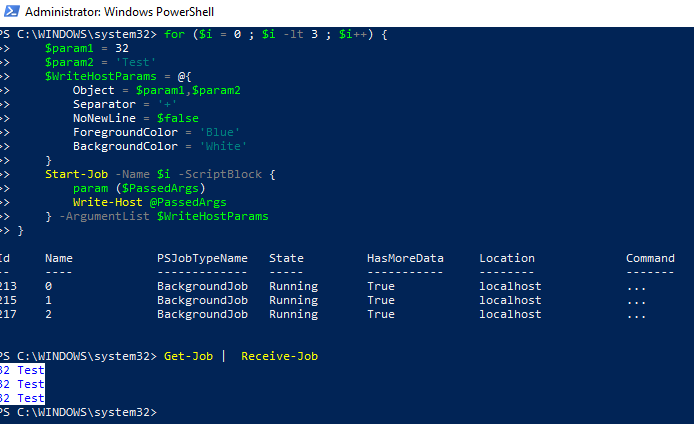
-Separator parameter in Write-Host is ignored when running the following script:
for ($i = 0 ; $i -lt 3 ; $i++) {
    $param1 = 32
    $param2 = 'Test'
    $WriteHostParams = @{
        Object = $param1,$param2
        Separator = '+'
        NoNewLine = $false
        ForegroundColor = 'Blue'
        BackgroundColor = 'White'
    }
    Start-Job -Name $i -ScriptBlock {
        param ($PassedArgs)
        Write-Host @PassedArgs
    } -ArgumentList $WriteHostParams
}
Other parameters get passed no problem.
Version(s) of document impacted
- [ x] Impacts 6.next document
- [x ] Impacts 6 document
- [x ] Impacts 5.1 document
- [ x] Impacts 5.0 document
- [x ] Impacts 4.0 document
- [x ] Impacts 3.0 document
Reason(s) for not selecting all version of documents
- [ ] The documented feature was introduced in selected version of PowerShell
- [ ] This issue only shows up in selected version of the document
_Copied from original issue: PowerShell/PowerShell-Docs#3187_
 sdwheeler
All 10 comments
Good find; the issue is not related to splatting, so a simpler reproduction is:
PS> Start-Job { Write-Host -Separator '+' what, gives } | Receive-Job -Wait -AutoRemove
what gives  # -Separator was not honored.
 mklement0
on 26 Oct 2018
mklement0
on 26 Oct 2018
I can confirm.
And no problem is with Invoke-ScriptBlock.
 iSazonov
on 26 Oct 2018
iSazonov
on 26 Oct 2018
This is very odd. I'm going to look into this in case other parameters are being dropped in jobs. Works fine with ThreadJob
 SteveL-MSFT
on 27 Oct 2018
SteveL-MSFT
on 27 Oct 2018
The problem appears to be the deserialized object parameter what,gives which should be an array, but ends up as a singleton what gives which is why you don't see the separator. This repros with: invoke-command -session $s { write-host -separator "+" what,gives }
Start-Job goes through the remoting stack hence the same behavior. Not sure where it's being deserialized wrong yet as I can see the base object is still an array.
Write-Information has the same problem as it accepts an object which can be an array.
SteveL-MSFT
on 27 Oct 2018
It works when I try to trace the binding,
Start-Job {Trace-Command ParameterBinding {Write-Host (1..5) -Separator ','}} | Receive-Job -Wait
Even
Start-Job {&{Write-Host (1..5) -Separator ','}} | Receive-Job -Wait
 kvprasoon
on 27 Oct 2018
kvprasoon
on 27 Oct 2018
@kvprasoon I noticed that, too. It doesn't repro in that case because the embedded scriptblock is now running "locally" whereas the outer scriptblock is running "remotely". Something related to deserialized psobject not binding Object[] to Object parameter. I'll work with @BrucePay next week to understand what's happening.
SteveL-MSFT
on 27 Oct 2018
I think this is the same thing? You can't pass arrays to jobs. It only uses the first element.
$a = 1,2,3
start-job { param ($b) $b } -args $a | wait-job | receive-job
1
Even this doesn't resolve it:
start-job { param ($b) $b } -args @($a) | wait-job | receive-job
1
But here's an arcane workaround:
start-job { param ($b) $b } -args (,$a) | wait-job | receive-job
1
2
3
Another workaround is adding a second argument:
start-job { param ($b,$c) $b,$c } -args $a,4 | wait-job | receive-job
1
2
3
4
Invoke-command does the same thing:
$a = 1,2,3
icm comp001 { param ($b) $b } -args $a
1
The call operator works ok.
$a = 1,2,3
& { param ($b) $b } $a
1
2
3
Btw the docs could be improved in this area.
 jszabo98
on 16 Oct 2019
jszabo98
on 16 Oct 2019
@jszabo98: No, the issue is unrelated to argument passing, it is specific to the remoting infrastructure . What you're describing is a general pitfall that applies whenever a cmdlet accepts an array of arguments, whether remoting is involved or not.
You can verify that by applying your workaround, which does _not_ help with the problem at hand:
PS> Start-Job { param($a) Write-Host -Separator '+' $a } -args (, (1,2)) | Receive-Job -Wait -AutoRemove
1 2  # Problem still exists, even though array argument was passed correctly.
It seemed related, from the title of the post. Btw, since -object is a ValueFromRemainingArguments, here's a workaround:
Start-Job { Write-Host -Separator + what gives } | Receive-Job -Wait -AutoRemove
what+gives
@jszabo98: I can see how it _seems_ related, but now we know that it isn't.
To close this tangent: The unrelated pitfall you describe - explained in detail in this Stack Overflow answer (see the footnote there for why @($a) doesn't help) - is indeed worth documenting - see https://github.com/MicrosoftDocs/PowerShell-Docs/issues/4945
mklement0
on 16 Oct 2019
Related issues
 MaximoTrinidad
·
3Comments
MaximoTrinidad
·
3Comments
 pcgeek86
·
3Comments
mklement0
·
3Comments
pcgeek86
·
3Comments
mklement0
·
3Comments
 Michal-Ziemba
·
3Comments
pcgeek86
·
3Comments
Michal-Ziemba
·
3Comments
pcgeek86
·
3Comments
Most helpful comment
The problem appears to be the deserialized object parameter
what,giveswhich should be an array, but ends up as a singletonwhat giveswhich is why you don't see the separator. This repros with: invoke-command -session $s { write-host -separator "+" what,gives }Start-Job goes through the remoting stack hence the same behavior. Not sure where it's being deserialized wrong yet as I can see the base object is still an array.
Write-Informationhas the same problem as it accepts anobjectwhich can be an array.