Powershell: Import Microsoft.PowerShell.Management version 3.1 does not allow use of Write-EventLog
Steps to reproduce

Expected behavior
Write-EventLog function (provided by the Microsoft.PowerShell.Management module version 3.1.0) should be available. As a side note, should i do a get-module on Microsoft.PowerShell.Management version 3.1, and view the exported commands on the module, I can clearly see that Write-EventLog is available. Once I import the 3.1 version Microsoft.PowerShell.Management module, the exported command is not listed as an exported command.
Thanks!
Actual behavior
Write-EventLog is not available.
Environment data
PS C:\Users\test> $psversiontable
Name Value
---- -----
PSVersion 6.1.0
PSEdition Core
GitCommitId 6.1.0
OS Microsoft Windows 10.0.17763
Platform Win32NT
PSCompatibleVersions {1.0, 2.0, 3.0, 4.0...}
PSRemotingProtocolVersion 2.3
SerializationVersion 1.1.0.1
WSManStackVersion 3.0
 cmichaelingram
All 12 comments
Seems you need to use https://github.com/PowerShell/WindowsCompatibility
 iSazonov
on 15 Oct 2018
iSazonov
on 15 Oct 2018
Thanks for the quick response iSazonov. That's the way we were doing it - at least until PowerShell Core 6.1 was released. With PS Core 6.1, they rolled the Windows Compatibility pack into the 6.1 release so you shouldn't have to add it in - at least that is my understanding and based on what I'm seeing in practice (https://docs.microsoft.com/en-us/powershell/scripting/whats-new/what-s-new-in-powershell-core-61?view=powershell-6).
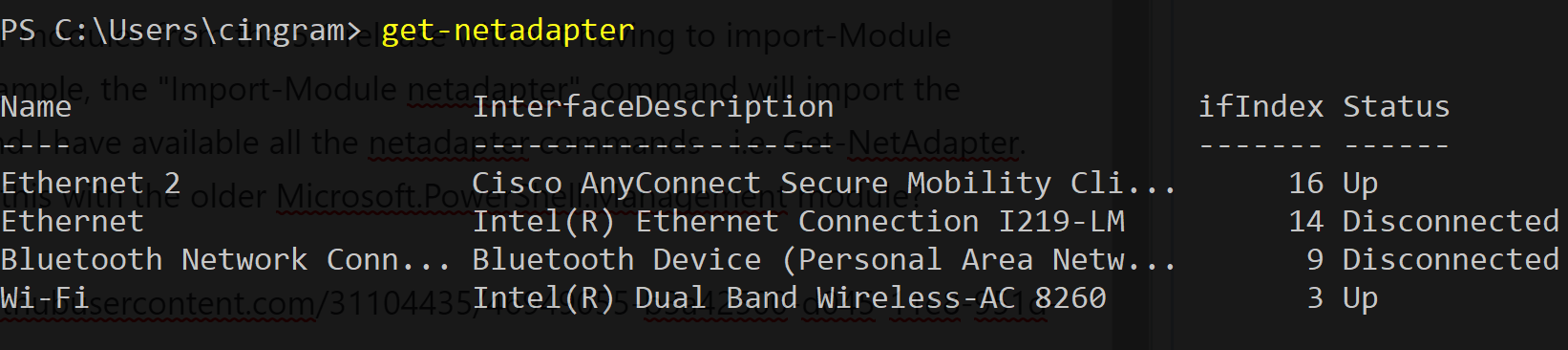
I've successfully imported other modules from the 5.1 release without having to import-Module WindowsCompatibility. For example, the "Import-Module netadapter" command will import the netadapter module from 5.1 and I have available all the netadapter commands - i.e. Get-NetAdapter. Why can I not do this with the older Microsoft.PowerShell.Management module?

cmichaelingram
on 15 Oct 2018
Windows 10 1809 is released with some Windows PowerShell modules compatible with PowerShell Core 6.1. Such modules have a special flag. Rest of modules should be used by means of proxing.
Modules packaged with distributive like Microsoft.PowerShell.Management is core modules and can not be loaded in other PowerShell versions.
iSazonov
on 16 Oct 2018
Thank you iSazonov, if that is the case, the import-module command should throw an error/message to the user stating that the conflicting module can not be imported. As of now, it imports the module without exposing the exported commands (with no message/indication that anything is wrong).
cmichaelingram
on 16 Oct 2018
@SteveL-MSFT Please look the feedback.
iSazonov
on 16 Oct 2018
I think there is a bug in that PSCore6 shouldn't look into the Windows PowerShell core modules as it gives confusing output where a command appears to be available, but won't actually work as module analysis finds the cmdlet in the Windows PowerShell module, but module loading looks in the PSCore6 version and doesn't find it. cc @rjmholt
However, the expected way to get this to work IS with the WindowsCompatibility module (which isn't shipped by default with PSCore6.1). You need to do:
import-winmodule microsoft.powershell.management
Then the Write-EventLog cmdlet will work.
 SteveL-MSFT
on 18 Oct 2018
SteveL-MSFT
on 18 Oct 2018
I think there is a bug in that PSCore6 shouldn't look into the Windows PowerShell core modules
Related PR #7727. Perhaps we need more general fix.
iSazonov
on 18 Oct 2018
@cmichaelingram can you execute the following on your machine and paste the results here:
Get-Module Microsoft.PowerShell.Management | Format-List *
On my machine I'm seeing a few strange things:
- The Windows PowerShell
Microsoft.PowerShell.Managementmodule has been marked asCorecompatible (the manifest of the module confirms this) gmo Microsoft.PowerShell.Management | fl *reports the correctPathproperty (in the Windows PowerShell home dir), but(gmo -FullyQualifiedName @{ ModuleName = Microsoft.PowerShell.Management; MaximumVersion = '4.0' })[0].ModuleBasegives me the PSCore$PSHOME.
I think we need to:
- Look into why the Windows PowerShell module is marked as Core-compatible
- Fix whatever the bug is with the
ModuleBaseproperty there (probably caused by the same thing as the erroneous load) - Fix autoloading so that if the command could resolve to one that works, it will pick the right one. This is already on my todo list, but it appears there's no explicit issue for it.
 rjmholt
on 18 Oct 2018
rjmholt
on 18 Oct 2018
@rjmholt Sure thing!
I ran a "Import-Module Microsoft.PowerShell.Management -maximumversion 4.0" prior to running the Get-Module command you specified - that way you could view the get-module results for both versions of the Microsoft.PowerShell.Management module.
PS C:\Users\cingram> get-module Microsoft.PowerShell.Management | Format-List *


LogPipelineExecutionDetails : False
Name                        : microsoft.powershell.management
Path                        : C:\WINDOWS\system32\WindowsPowerShell\v1.0\Modules\microsoft.powershell.management\microsoft.powershell.managemen
                              t.psd1
ImplementingAssembly        :
Definition                  :
Description                 :
Guid                        : eefcb906-b326-4e99-9f54-8b4bb6ef3c6d
HelpInfoUri                 : https://go.microsoft.com/fwlink/?linkid=390785
ModuleBase                  : C:\Program Files\PowerShell\6
PrivateData                 :
ExperimentalFeatures        : {}
Tags                        : {}
ProjectUri                  :
IconUri                     :
LicenseUri                  :
ReleaseNotes                :
RepositorySourceLocation    :
Version                     : 3.1.0.0
ModuleType                  : Manifest
Author                      : Microsoft Corporation
AccessMode                  : ReadWrite
ClrVersion                  : 4.0
CompanyName                 : Microsoft Corporation
Copyright                   : © Microsoft Corporation. All rights reserved.
DotNetFrameworkVersion      :
ExportedFunctions           : {}
Prefix                      :
ExportedCmdlets             : {[Add-Content, Add-Content], [Clear-Content, Clear-Content], [Clear-Item, Clear-Item], [Clear-ItemProperty,
                              Clear-ItemProperty]...}
ExportedCommands            : {[Add-Content, Add-Content], [Clear-Content, Clear-Content], [Clear-Item, Clear-Item], [Clear-ItemProperty,
                              Clear-ItemProperty]...}
FileList                    : {}
CompatiblePSEditions        : {Desktop, Core}
ModuleList                  : {}
NestedModules               : {Microsoft.PowerShell.Commands.Management}
PowerShellHostName          :
PowerShellHostVersion       :
PowerShellVersion           : 5.1
ProcessorArchitecture       : None
Scripts                     : {}
RequiredAssemblies          : {}
RequiredModules             : {}
RootModule                  :
ExportedVariables           : {}
ExportedAliases             : {[gin, gin], [gtz, gtz], [stz, stz]}
ExportedWorkflows           : {}
ExportedDscResources        : {}
SessionState                : System.Management.Automation.SessionState
OnRemove                    :
ExportedFormatFiles         : {}
ExportedTypeFiles           : {}

LogPipelineExecutionDetails : False
Name                        : Microsoft.PowerShell.Management
Path                        : C:\program files\powershell\6\Modules\Microsoft.PowerShell.Management\Microsoft.PowerShell.Management.psd1
ImplementingAssembly        :
Definition                  :
Description                 :
Guid                        : eefcb906-b326-4e99-9f54-8b4bb6ef3c6d
HelpInfoUri                 : https://go.microsoft.com/fwlink/?linkid=855958
ModuleBase                  : C:\Program Files\PowerShell\6
PrivateData                 :
ExperimentalFeatures        : {}
Tags                        : {}
ProjectUri                  :
IconUri                     :
LicenseUri                  :
ReleaseNotes                :
RepositorySourceLocation    :
Version                     : 6.1.0.0
ModuleType                  : Manifest
Author                      : PowerShell
AccessMode                  : ReadWrite
ClrVersion                  :
CompanyName                 : Microsoft Corporation
Copyright                   : Copyright (c) Microsoft Corporation. All rights reserved.
DotNetFrameworkVersion      :
ExportedFunctions           : {}
Prefix                      :
ExportedCmdlets             : {[Add-Content, Add-Content], [Clear-Content, Clear-Content], [Clear-Item, Clear-Item], [Clear-ItemProperty,
                              Clear-ItemProperty]...}
ExportedCommands            : {[Add-Content, Add-Content], [Clear-Content, Clear-Content], [Clear-Item, Clear-Item], [Clear-ItemProperty,
                              Clear-ItemProperty]...}
FileList                    : {}
CompatiblePSEditions        : {Core}
ModuleList                  : {}
NestedModules               : {Microsoft.PowerShell.Commands.Management}
PowerShellHostName          :
PowerShellHostVersion       :
PowerShellVersion           : 3.0
ProcessorArchitecture       : None
Scripts                     : {}
RequiredAssemblies          : {}
RequiredModules             : {}
RootModule                  :
ExportedVariables           : {}
ExportedAliases             : {[gin, gin], [gtz, gtz], [stz, stz]}
ExportedWorkflows           : {}
ExportedDscResources        : {}
SessionState                : System.Management.Automation.SessionState
OnRemove                    :
ExportedFormatFiles         : {}
ExportedTypeFiles           : {}
Yes, it appears that we should not have marked that module as Core in Windows PowerShell and rely on WindowsCompatibility module to use those cmdlets. @rjmholt I'll leave it to you to make the fix in Windows.
SteveL-MSFT
on 19 Oct 2018
I see no reason to load core modules from other PowerShell version at all. I think we should block this in PowerShell Core.
iSazonov
on 19 Oct 2018
This issue has been marked as answered and has not had any activity for 1 day. It has been closed for housekeeping purposes.
![msftbot[bot] picture](https://avatars2.githubusercontent.com/in/26612?v=4&s=40) msftbot[bot]
on 1 Jun 2019
msftbot[bot]
on 1 Jun 2019
Related issues
 alx9r
·
3Comments
alx9r
·
3Comments
 abock
·
3Comments
SteveL-MSFT
·
3Comments
abock
·
3Comments
SteveL-MSFT
·
3Comments
 pcgeek86
·
3Comments
pcgeek86
·
3Comments
 manofspirit
·
3Comments
manofspirit
·
3Comments