PowerShell 6.0.4 and 6.1.0 MSIs are not side by side
According to the Lifecycle of PowerShell Core, one has 6 months to update to the new version. However, during that period I still expect to be able to use 6.0 and 6.1 side by side, which is not the case for the Windows MSIs.
Installing 6.1.0 will remove 6.0.4 as part of it.
In the same way, 6.0.4 cannot be installed when 6.1.0 is already installed:
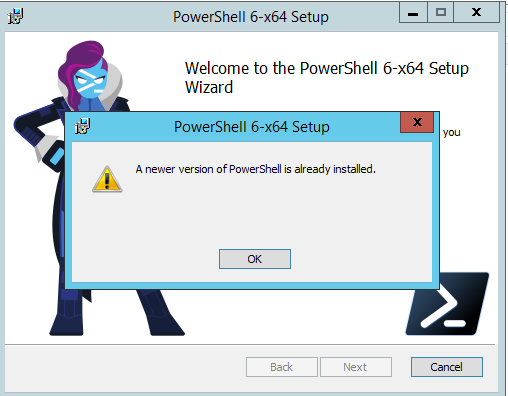
Again, I suspect this is due to the refactoring that happened for the 6.1 preview MSI builds to not have them side-by-side
cc @SteveL-MSFT @joeyaiello @TravisEz13
 bergmeister
All 7 comments
PowerShell Core is side-by-side but not MSI.
 iSazonov
on 14 Sep 2018
iSazonov
on 14 Sep 2018
IIRC, the preview builds are side by side with release builds, but different versions of the release builds installed via msi will overwrite prior releases and new preview builds will overwrite previous preview builds if installed with msi.
 vexx32
on 14 Sep 2018
vexx32
on 14 Sep 2018
It seems, I missed this detail in this RFC here that came from this PR. However, the current state of the RFC does not state what the final decision was. I'd rather prefer the mentioned alternative of having minor versions side-by-side @joeyaiello
bergmeister
on 14 Sep 2018
Plan was to allow upgrade from 6.0.x to 6.1.x.
Perhaps we'll have new upgrade code for 7.0 (because of breaking changes).
iSazonov
on 14 Sep 2018
And it's not as though you can't install side by side -- just not with the MSI. Side by side of adjacent minor versions needs to be handled manually, at present.
Can you imagine how annoying it would get having to uninstall/reinstall every minor version for those who don't want to maintain 15 separate PS Core versions side by side? 😄
vexx32
on 14 Sep 2018
Correct, the current intended design is that the MSI will upgrade stable builds over stable builds and preview builds over preview builds. If side-by-side for minor versions is needed, one must use the zip and not the MSI installer.
 SteveL-MSFT
on 14 Sep 2018
SteveL-MSFT
on 14 Sep 2018
Ok, thanks. Will close then
bergmeister
on 14 Sep 2018
Related issues
 mklement0
·
74Comments
mklement0
·
74Comments
 be5invis
·
170Comments
be5invis
·
170Comments
 NJ-Dude
·
64Comments
SteveL-MSFT
·
189Comments
NJ-Dude
·
64Comments
SteveL-MSFT
·
189Comments
 andschwa
·
64Comments
andschwa
·
64Comments