Powershell: Crash in Microsoft.PowerShell.TaskbarJumpList.CreateElevatedEntry(System.String)
I have an intermittent crash in
Microsoft.PowerShell.TaskbarJumpList.CreateElevatedEntry(System.String)
on process startup.
0:009> !pe
Exception object: 000002a22d6b11f8
Exception type:   System.ExecutionEngineException
Message:          <none>
InnerException:   <none>
StackTrace (generated):
<none>
StackTraceString: <none>
HResult: 80131506
With symbols available, it had been a lot easier to provide better debug info.
0:009> !clrstack
OS Thread Id: 0x5f3c (9)
        Child SP               IP Call Site
000000b2b7d7ebb0 00007ffbc04100f4 [GCFrame: 000000b2b7d7ebb0]
000000b2b7d7ed20 00007ffbc04100f4 [GCFrame: 000000b2b7d7ed20]
000000b2b7d7ee48 00007ffbc04100f4 [HelperMethodFrame_1OBJ: 000000b2b7d7ee48]
000000b2b7d7ef80 00007ffb305bf033 Microsoft.PowerShell.TaskbarJumpList.CreateElevatedEntry(System.String)
000000b2b7d7f0f0 00007ffb305c18a4 Microsoft.PowerShell.ConsoleHost+<>c.<Start>b__4_0()
000000b2b7d7f120 00007ffb2a84cb49 System.Threading.ExecutionContext.RunInternal(System.Threading.ExecutionContext, System.Threading.ContextCallback, System.Object) [E:\A\_work\31\s\src\mscorlib\shared\System\Threading\ExecutionContext.cs @ 167]
000000b2b7d7f1a0 00007ffb2a8ff517 System.Threading.Tasks.Task.ExecuteWithThreadLocal(System.Threading.Tasks.Task ByRef) [E:\A\_work\31\s\src\mscorlib\src\System\Threading\Tasks\Task.cs @ 2440]
000000b2b7d7f240 00007ffb2a9366bc System.Threading.ThreadPoolWorkQueue.Dispatch() [E:\A\_work\31\s\src\mscorlib\src\System\Threading\ThreadPool.cs @ 588]
000000b2b7d7f690 00007ffb2d071573 [DebuggerU2MCatchHandlerFrame: 000000b2b7d7f690]
> $PSVersionTable
Name                           Value
----                           -----
PSVersion                      6.1.0-preview.4
PSEdition                      Core
GitCommitId                    6.1.0-preview.4
OS Microsoft Windows 10.0.17134
OS                             Microsoft Windows 10.0.16299
Platform                       Win32NT
PSCompatibleVersions           {1.0, 2.0, 3.0, 4.0...}
PSRemotingProtocolVersion      2.3
SerializationVersion           1.1.0.1
WSManStackVersion              3.0
@bergmeister Is this something you recognize?
 powercode
All 15 comments
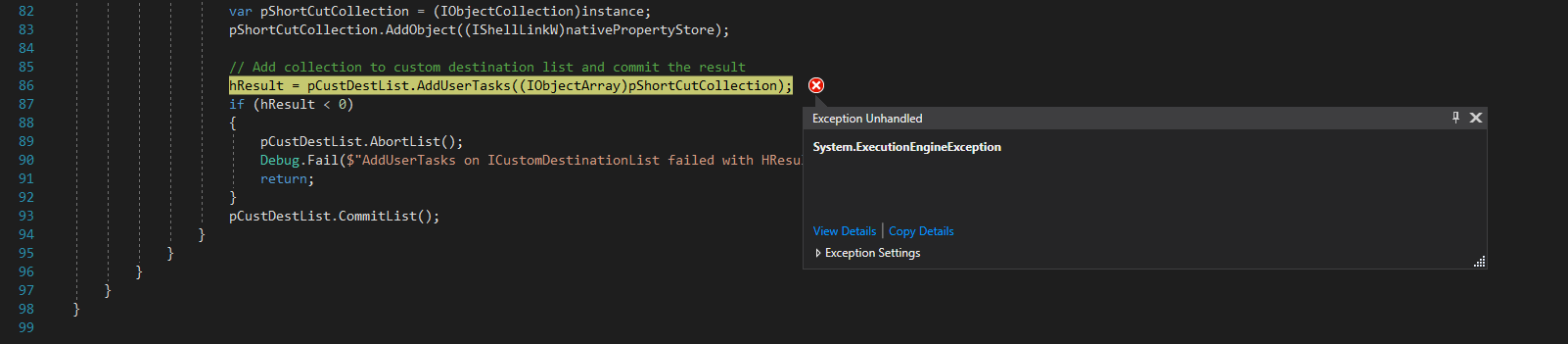
ExecutionEngineException usually mean that we have messed up unmanaged memory somehow.
powercode
on 20 Aug 2018
In TaskbarJumpList.cs
powercode
on 20 Aug 2018
@powercode Yes, but I have never seen a problem despite using/testing it on multiple OSs, which version of Windows are you using exactly? This code creates the Jumplist entry in the taskbar and was added in PR #6985 by converting unmanaged C++ code from the unmanaged Windows PowerShell ConsoleHost to partially managed C# code in the managed PowerShell Core ConsoleHoist
Can you retry to build and repro locally:
Import-Module .\build.psm1
Start-PSBootStrap
Start-PSBuild
Invoke-Item "$pwd/src\powershell-win-core\bin\Debug\netcoreapp2.1\win7-x64\publish\pwsh.exe"
 bergmeister
on 20 Aug 2018
bergmeister
on 20 Aug 2018
@powercode Sorry, I saw your screenshot only now after writing the response. To convert the C++ code, I took some code of the WindowsApiPack that wrap calls to the Windows API and it turned out now special treatment was needed for the conversion (the WindowsApiPack was written for full .Net and is only maintained by the community at the moment as it got integrated into the GUI frameworks of .Net like WPF and WinForms, therefore I expect that some code can be simplified/removed once .Net Core 3 is out).
The only thing that I could suggest is to wrap the code into a try/catch block but as the exception does not contain details about what went wrong I can only speculate it is a problem with the Windows API. cc @SteveL-MSFT
bergmeister
on 20 Aug 2018
@bergmeister After some investigations, it seems I actually only have machines with 1709 that manifest the problem. I updated the version info in the original description.
powercode
on 20 Aug 2018
I cannot reproduce the problem when I run without the Task, and neither with a debug build.
powercode
on 20 Aug 2018
In ComInterfaces.cs, we have
[DllImport("kernel32.dll", SetLastError = true, EntryPoint = "GetStartupInfoA")]
        internal static extern void GetStartupInfo(out StartUpInfo lpStartupInfo);
but
[StructLayout(LayoutKind.Sequential, CharSet = CharSet.Unicode)]
        internal struct StartUpInfo
So we pass the Unicode struct to the ansi function.
powercode
on 20 Aug 2018
Could lead to strange marshalling behavior for our strings.
powercode
on 20 Aug 2018
@powercode Does it repro when you compile using -Configuration Release and/or -CrossGen (the released version uses both)? The COM code that you referenced is from the WindowsCompatibiltyPack. We could check what the COM code in the WPF workspace looks like by decompiling it, maybe we can improve it that way. We could also look for the documentation of the Windows API in question to figure out an improved COM interface
Also, keep in mind that the code path that you reached gets only executed if the elevated start entry has never been created (i.e. it runs only the first time pwsh is being executed the very first time), this means that you should also copy the publish folder to a new path before launching pwsh.exe in order to be able to reproduce
bergmeister
on 20 Aug 2018
@powercode the discrepancy between GetStartupInfo calling the Ansi version of the API and the StartUpInfo struct being Unicode seems suspect and wrong. By chance are you using a language on your machine other than English?
 SteveL-MSFT
on 20 Aug 2018
SteveL-MSFT
on 20 Aug 2018
It not my machine - I see it out in the wild. Have to check tomorrow if it was a Swedish locale, but I don't think it was.
powercode
on 20 Aug 2018
I suggest using IntPtr instead of the strings. We don't need them anyway.
Edit:
In the StartupInfo struct, that is.
powercode
on 20 Aug 2018
@bergmeister Yes, I reprod on crossgen:ed. Could not repro on debug. Maybe the marshaller works different in debug?
@SteveL-MSFT We could you IntPtr for the strings. That would make the struct blittable, with a much simpler marshaller. And we don't use them anyway.
powercode
on 21 Aug 2018
I haven't been able to reproduce the crash with the marshalling changes in #7580. I think the incorrect marshalling resulted in a heap corruption that later lead to a somewhat unrelated crash.
powercode
on 21 Aug 2018
@powercode My final fix (spinning up the thread in STA instead of MTA mode) for this issue has been back-ported to the recent release of 6.2.2, please update and provide feedback if it fixed it. If you use the preview you will have to wait for 7.0.0-preview.2 or use the daily build instead (or build from master)
https://github.com/PowerShell/PowerShell/releases/tag/v6.2.2
bergmeister
on 16 Jul 2019
Related issues
 manofspirit
·
3Comments
manofspirit
·
3Comments
 JohnLBevan
·
3Comments
JohnLBevan
·
3Comments
 pcgeek86
·
3Comments
pcgeek86
·
3Comments
 ajensenwaud
·
3Comments
ajensenwaud
·
3Comments
 HumanEquivalentUnit
·
3Comments
HumanEquivalentUnit
·
3Comments
Most helpful comment
In ComInterfaces.cs, we have
but
So we pass the Unicode struct to the ansi function.